Combine Alibaba Cloud Vector Search with Milvus (Milvus) and the Qwen-VL large language model (LLM) to extract image features and perform multimodal search, including text-to-image, text-to-text, search by image, and image-to-text retrieval.
Background information
In multimodal search, unstructured data such as images and text is converted into vector representations, and vector search technology is used to find similar content. This topic uses the following tools:
-
Milvus: An efficient vector database for storing and retrieving vectors.
-
Qwen-VL: Extracts image descriptions and keywords. For more information, see Qwen-VL.
-
DashScope Embedding API: Converts images and text into vectors. For more information, see Multimodal-Embedding API details.
The supported search modes are:
-
Text-to-image search: Enter a text query to find the most similar images.
-
Text-to-text search: Enter a text query to find the most similar image descriptions.
-
Search by image: Enter an image query to find the most similar images.
-
Image-to-text search: Enter an image query to find the most similar image descriptions.
System architecture
The following figure shows the overall architecture of the multimodal search system.
Prerequisites
-
You have created a Milvus instance. For more information, see Create a Milvus instance.
-
You have activated Alibaba Cloud Model Studio and obtained an API key. For more information, see Obtain an API key.
-
You have installed the required dependency packages.
pip3 install dashscope pymilvus==2.5.0The example in this topic runs in a
Python 3.9environment. -
You have downloaded and decompressed the sample dataset.
wget https://github.com/milvus-io/pymilvus-assets/releases/download/imagedata/reverse_image_search.zip
unzip -q -o reverse_image_search.zip
The sample dataset contains a CSV file named
reverse_image_search.csvand several image files.NoteThe sample dataset and its images used in this topic are from the open source Milvus project.
Core code introduction
In this example, the Qwen-VL model extracts image descriptions and stores them in the image_description field. The multimodal embedding model then converts images and their descriptions into vector representations, such as image_embedding and text_embedding, to prepare the data for cross-modal search.
To simplify the demo, only the first 200 images are used.
import base64
import csv
import dashscope
import os
import pandas as pd
import sys
import time
from tqdm import tqdm
from pymilvus import (
    connections,
    FieldSchema,
    CollectionSchema,
    DataType,
    Collection,
    MilvusException,
    utility,
)

from http import HTTPStatus
import logging

logging.basicConfig(level=logging.INFO)
logger = logging.getLogger(__name__)


class FeatureExtractor:
    def __init__(self, DASHSCOPE_API_KEY):
        self._api_key = DASHSCOPE_API_KEY  # Use an environment variable to store the API key

    def __call__(self, input_data, input_type):
        if input_type not in ("image", "text"):
            raise ValueError("Invalid input type. Must be 'image' or 'text'.")

        try:
            if input_type == "image":
                _, ext = os.path.splitext(input_data)
                image_format = ext.lstrip(".").lower()
                with open(input_data, "rb") as image_file:
                    base64_image = base64.b64encode(image_file.read()).decode("utf-8")
                input_data = f"data:image/{image_format};base64,{base64_image}"
                payload = [{"image": input_data}]
            else:
                payload = [{"text": input_data}]

            resp = dashscope.MultiModalEmbedding.call(
                model="multimodal-embedding-v1",
                input=payload,
                api_key=self._api_key,
            )

            if resp.status_code == HTTPStatus.OK:
                return resp.output["embeddings"][0]["embedding"]
            else:
                raise RuntimeError(
                    f"API call failed. Status code: {resp.status_code}, Error message: {resp.message}"
                )
        except Exception as e:
            logger.error(f"Processing failed: {str(e)}")
            raise


class FeatureExtractorVL:
    def __init__(self, DASHSCOPE_API_KEY):
        self._api_key = DASHSCOPE_API_KEY  # Use an environment variable to store the API key

    def __call__(self, input_data, input_type):
        if input_type not in ("image"):
            raise ValueError("Invalid input type. Must be 'image'.")

        try:
            if input_type == "image":
                payload=[
                            {
                                "role": "system",
                                "content": [{"type":"text","text": "You are a helpful assistant."}]
                            },
                            {
                                "role": "user",
                                "content": [
                                            # {"image": "https://dashscope.oss-cn-beijing.aliyuncs.com/images/dog_and_girl.jpeg"},
                                            {"image": input_data},
                                            {"text": "First, describe this image in under 50 words, and then provide 5 keywords"}
                                            ],
                            }
                        ]

            resp = dashscope.MultiModalConversation.call(
                model="qwen-vl-plus",
                messages=payload,
                api_key=self._api_key,
            )

            if resp.status_code == HTTPStatus.OK:
                return resp.output["choices"][0]["message"].content[0]["text"]
            else:
                raise RuntimeError(
                    f"API call failed. Status code: {resp.status_code}, Error message: {resp.message}"
                )
        except Exception as e:
            logger.error(f"Processing failed: {str(e)}")
            raise


class MilvusClient:
    def __init__(self, MILVUS_TOKEN, MILVUS_HOST, MILVUS_PORT, INDEX, COLLECTION_NAME):
        self._token = MILVUS_TOKEN
        self._host = MILVUS_HOST
        self._port = MILVUS_PORT
        self._index = INDEX
        self._collection_name = COLLECTION_NAME

        self._connect()
        self._create_collection_if_not_exists()

    def _connect(self):
        try:
            connections.connect(alias="default", host=self._host, port=self._port, token=self._token)
            logger.info("Connected to Milvus successfully.")
        except Exception as e:
            logger.error(f"Failed to connect to Milvus: {str(e)}")
            sys.exit(1)

    def _collection_exists(self):
        return self._collection_name in utility.list_collections()

    def _create_collection_if_not_exists(self):
        try:
            if not self._collection_exists():
                fields = [
                    FieldSchema(name="id", dtype=DataType.INT64, is_primary=True, auto_id=True),
                    FieldSchema(name="origin", dtype=DataType.VARCHAR, max_length=512),
                    FieldSchema(name="image_description", dtype=DataType.VARCHAR, max_length=1024),
                    FieldSchema(name="image_embedding", dtype=DataType.FLOAT_VECTOR, dim=1024),
                    FieldSchema(name="text_embedding", dtype=DataType.FLOAT_VECTOR, dim=1024)
                ]

                schema = CollectionSchema(fields)

                self._collection = Collection(self._collection_name, schema)

                if self._index == 'IVF_FLAT':
                    self._create_ivf_index()
                else:
                    self._create_hnsw_index()
                logger.info("Collection created successfully.")
            else:
                self._collection = Collection(self._collection_name)
                logger.info("Collection already exists.")
        except Exception as e:
            logger.error(f"Failed to create or load the collection: {str(e)}")
            sys.exit(1)


    def _create_ivf_index(self):
        index_params = {
            "index_type": "IVF_FLAT",
            "params": {
                        "nlist": 1024, # Number of clusters for the index
                    },
            "metric_type": "L2",
        }
        self._collection.create_index("image_embedding", index_params)
        self._collection.create_index("text_embedding", index_params)
        logger.info("Index created successfully.")

    def _create_hnsw_index(self):
        index_params = {
            "index_type": "HNSW",
            "params": {
                        "M": 64, # Maximum number of neighbors each node can connect to in the graph
                        "efConstruction": 100, # Number of candidate neighbors considered for connection during index construction
                    },
            "metric_type": "L2",
        }
        self._collection.create_index("image_embedding", index_params)
        self._collection.create_index("text_embedding", index_params)
        logger.info("Index created successfully.")

    def insert(self, data):
        try:
            self._collection.insert(data)
            self._collection.load()
            logger.info("Data inserted and loaded successfully.")
        except MilvusException as e:
            logger.error(f"Failed to insert data: {str(e)}")
            raise

    def search(self, query_embedding, field, limit=3):
        try:
            if self._index == 'IVF_FLAT':
                param={"metric_type": "L2", "params": {"nprobe": 10}}
            else:
                param={"metric_type": "L2", "params": {"ef": 10}}

            result = self._collection.search(
                data=[query_embedding],
                anns_field=field,
                param=param,
                limit=limit,
                output_fields=["origin", "image_description"],
            )
            return [{"id": hit.id, "distance": hit.distance, "origin": hit.origin, "image_description": hit.image_description} for hit in result[0]]
        except Exception as e:
            logger.error(f"Search failed: {str(e)}")
            return None


# Load data and generate embeddings
def load_image_embeddings(extractor, extractorVL, csv_path):
    df = pd.read_csv(csv_path)
    image_embeddings = {}

    for image_path in tqdm(df["path"].tolist()[:200], desc="Generating image embeddings"): # Use only the first 200 images for the demo
        try:
            desc = extractorVL(image_path, "image")
            image_embeddings[image_path] = [desc, extractor(image_path, "image"), extractor(desc, "text")]
            time.sleep(1)  # Control the API call frequency
        except Exception as e:
            logger.warning(f"Failed to process {image_path}, skipping: {str(e)}")

    return [{"origin": k, 'image_description':v[0], "image_embedding": v[1], 'text_embedding': v[2]} for k, v in image_embeddings.items()]
Where:
-
FeatureExtractor: Calls theDashScope Embedding APIto convert images or text into vector representations. -
FeatureExtractorVL: Calls the Qwen-VL model to extract text descriptions and keywords from images. -
MilvusClient: Encapsulates Milvus operations, including connection, collection creation, index building, data insertion, and search.
Procedure
Step 1: Load the dataset
if __name__ == "__main__":
    # Configure Milvus and DashScope APIs
    MILVUS_TOKEN = "root:****"
    MILVUS_HOST = "c-0aa16b1****.milvus.aliyuncs.com"
    MILVUS_PORT = "19530"
    COLLECTION_NAME = "multimodal_search"
    INDEX = "IVF_FLAT"  # IVF_FLAT OR HNSW
    script_dir = os.path.dirname(os.path.abspath(__file__))
    csv_path = os.path.join(script_dir, "reverse_image_search.csv")


    # Step 1: Initialize the Milvus client
    milvus_client = MilvusClient(MILVUS_TOKEN, MILVUS_HOST, MILVUS_PORT, INDEX, COLLECTION_NAME)

    # Step 2: Initialize the Qwen-VL LLM and the multimodal embedding model
    extractor = FeatureExtractor(DASHSCOPE_API_KEY)
    extractorVL = FeatureExtractorVL(DASHSCOPE_API_KEY)

    # Step 3: Generate embeddings for the image dataset and insert them into Milvus
    embeddings = load_image_embeddings(extractor, extractorVL, csv_path)
    milvus_client.insert(embeddings)
This step involves the following parameters. Replace them with your actual values.
|
Parameter Name |
Description |
|
|
The API key for DashScope, used to call the Qwen-VL and multimodal embedding models. |
|
|
The access credential for the Milvus instance, in the format |
|
|
The internal or public endpoint of the Milvus instance, such as |
|
|
The port number of the Milvus instance. The default value is |
|
|
The name of the Milvus collection used to store the vector data of images and text. |
Run the Python file. If the output contains the following information, the data is loaded successfully.
Generating image embeddings:  100%
INFO:__main__:Data inserted and loaded successfully.
You can also visit the Attu page and go to the Data tab to verify the loaded dataset information.
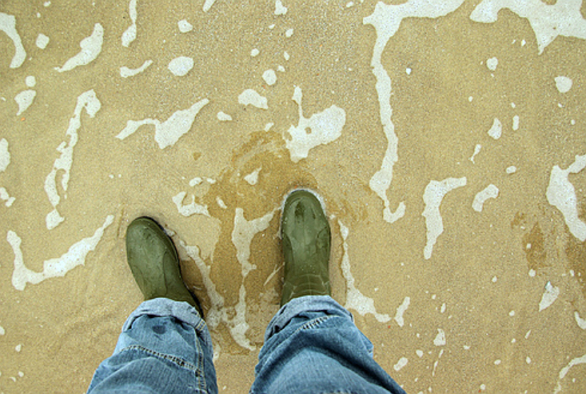
For example, after an image is analyzed by the Qwen-VL LLM, the extracted text summary describes the scene: "A person in jeans and green boots stands on a beach. The sand is covered with water marks. Keywords: beach, footprints, sand, shoes, pants".
The description uses concise language to capture the main features of the image, providing a clear mental picture of the scene.
Step 2: Perform multimodal vector search
Example 1: Text-to-image and text-to-text search
In this example, the query text is "a brown dog". The multimodal embedding model converts the query into a vector representation (embedding). Based on the generated vector, a text-to-image search is performed on image_embedding, and a text-to-text search is performed on text_embedding.
In the Python file, replace the main section with the following code and run the file.
if __name__ == "__main__":
    MILVUS_HOST = "c-xxxxxxxxxxxx.milvus.aliyuncs.com"
    MILVUS_PORT = "19530"
    MILVUS_TOKEN = "root:****"
    COLLECTION_NAME = "multimodal_search"
    INDEX = "IVF_FLAT" # IVF_FLAT OR HNSW
    DASHSCOPE_API_KEY = "<YOUR_DASHSCOPE_API_KEY >"

    # Step 1: Initialize the Milvus client
    milvus_client = MilvusClient(MILVUS_TOKEN, MILVUS_HOST, MILVUS_PORT, INDEX, COLLECTION_NAME)

    # Step 2: Initialize the multimodal embedding model
    extractor = FeatureExtractor(DASHSCOPE_API_KEY)

    # Step 4: Multimodal search example for text-to-image and text-to-text search
    text_query = "a brown dog"
    text_embedding = extractor(text_query, "text")
    text_results_1 = milvus_client.search(text_embedding, field = 'image_embedding')
    logger.info(f"Text-to-image search results: {text_results_1}")
    text_results_2 = milvus_client.search(text_embedding, field = 'text_embedding')
    logger.info(f"Text-to-text search results: {text_results_2}")
The following information is returned.
Because LLM output has a degree of randomness, the results of this example may not be fully reproducible.
INFO:__main__:Text-to-image search results: [
{'id': 456882250782308942, 'distance': 1.338853359222412, 'origin': './train/Rhodesian_ridgeback/n02087394_9675.JPEG', 'image_description': 'A photo of a small dog standing on a carpet. It has brown fur and blue eyes.\nKeywords: puppy, carpet, eyes, fur color, standing'},
{'id': 456882250782308933, 'distance': 1.3568601608276367, 'origin': './train/Rhodesian_ridgeback/n02087394_6382.JPEG', 'image_description': 'This is a brown hound with drooping ears and a collar around its neck. It is looking straight ahead.\n\nKeywords: dog, brown, hound, ears, collar'},
{'id': 456882250782308940, 'distance': 1.3838427066802979, 'origin': './train/Rhodesian_ridgeback/n02087394_5846.JPEG', 'image_description': 'Two puppies are playing on a blanket. One dog is lying on top of the other, with a teddy bear in the background.\n\nKeywords: puppies, playing, blanket, teddy bear, interaction'}]
INFO:__main__:Text-to-text search results: [
{'id': 456882250782309025, 'distance': 0.6969608068466187, 'origin': './train/mongoose/n02137549_7552.JPEG', 'image_description': 'This is a close-up photo of a small brown animal. It has a round face and large eyes.\n\nKeywords: small animal, brown fur, round face, large eyes, natural background'},
{'id': 456882250782308933, 'distance': 0.7110348343849182, 'origin': './train/Rhodesian_ridgeback/n02087394_6382.JPEG', 'image_description': 'This is a brown hound with drooping ears and a collar around its neck. It is looking straight ahead.\n\nKeywords: dog, brown, hound, ears, collar'},
{'id': 456882250782308992, 'distance': 0.7725887298583984, 'origin': './train/lion/n02129165_19310.JPEG', 'image_description': 'This is a close-up photo of a lion. It has a thick mane and sharp eyes.\n\nKeywords: lion, eyes, mane, natural environment, wild animal'}]
Example 2: Search by image and image-to-text search
In this example, a similarity search is performed using a lion image from the test directory (path: test/lion/n02129165_13728.JPEG).
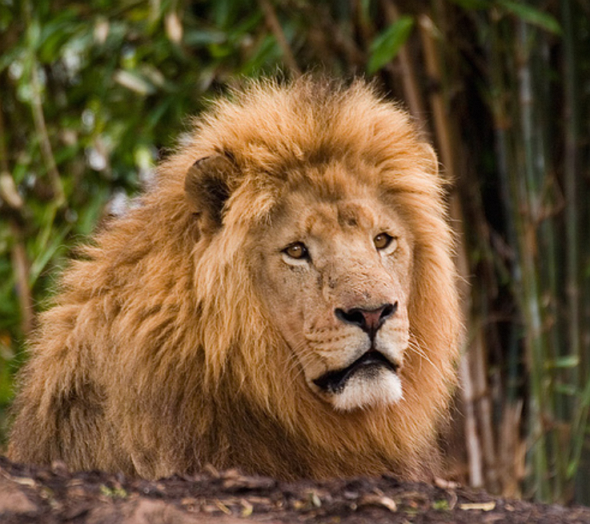
With both search by image and image-to-text search, you can find content related to the target image from both image and text modalities, achieving multi-dimensional similarity matching.
if __name__ == "__main__":
    # Configure Milvus and DashScope APIs
    MILVUS_TOKEN = "root:****"
    MILVUS_HOST = "c-0aa16b1****.milvus.aliyuncs.com"
    MILVUS_PORT = "19530"
    COLLECTION_NAME = "multimodal_search"
    INDEX = "IVF_FLAT"  # IVF_FLAT OR HNSW
    DASHSCOPE_API_KEY = "<YOUR_DASHSCOPE_API_KEY >"

    # Step 1: Initialize the Milvus client
    milvus_client = MilvusClient(MILVUS_TOKEN, MILVUS_HOST, MILVUS_PORT, INDEX, COLLECTION_NAME)

    # Step 2: Initialize the multimodal embedding model
    extractor = FeatureExtractor(DASHSCOPE_API_KEY)

    # Step 5: Multimodal search example for search by image and image-to-text search
    image_query_path = "./test/lion/n02129165_13728.JPEG"
    image_embedding = extractor(image_query_path, "image")
    image_results_1 = milvus_client.search(image_embedding, field = 'image_embedding')
    logger.info(f"Search by image results: {image_results_1}")
    image_results_2 = milvus_client.search(image_embedding, field = 'text_embedding')
    logger.info(f"Image-to-text search results: {image_results_2}")
The following information is returned.
Because LLM output has a degree of randomness, the results of this example may not be fully reproducible.
INFO:__main__:Search by image results: [
{'id': 456882250782308987, 'distance': 0.23892249166965485, 'origin': './train/lion/n02129165_19953.JPEG', 'image_description': 'A majestic lion stands by a rock, with trees and bushes in the background. Sunlight shines on its body.\n\nKeywords: lion, rock, forest, sunlight, wildness'},
{'id': 456882250782308989, 'distance': 0.4113130569458008, 'origin': './train/lion/n02129165_1142.JPEG', 'image_description': 'A lion rests among dense green plants. The background consists of bamboo and trees.\n\nKeywords: lion, grass, green plants, tree trunk, natural environment'},
{'id': 456882250782308984, 'distance': 0.5206397175788879, 'origin': './train/lion/n02129165_16.JPEG', 'image_description': 'The image shows a pair of lions standing on the grass. The male lion has a thick mane, while the female lion appears leaner.\n\nKeywords: lion, grass, male, female, natural environment'}]
INFO:__main__:Image-to-text search results:
[{'id': 456882250782308989, 'distance': 1.0935896635055542, 'origin': './train/lion/n02129165_1142.JPEG', 'image_description': 'A lion rests among dense green plants. The background consists of bamboo and trees.\n\nKeywords: lion, grass, green plants, tree trunk, natural environment'},
{'id': 456882250782308987, 'distance': 1.2102885246276855, 'origin': './train/lion/n02129165_19953.JPEG', 'image_description': 'A majestic lion stands by a rock, with trees and bushes in the background. Sunlight shines on its body.\n\nKeywords: lion, rock, forest, sunlight, wildness'},
{'id': 456882250782308992, 'distance': 1.2725986242294312, 'origin': './train/lion/n02129165_19310.JPEG', 'image_description': 'This is a close-up photo of a lion. It has a thick mane and sharp eyes.\n\nKeywords: lion, eyes, mane, natural environment, wild animal'}]