This topic walks you through running the Single Source Shortest Path (SSSP) algorithm as a MaxCompute Graph job, covering data preparation, job submission, and result verification.
How it works
MaxCompute Graph uses a vertex-centric compute model based on iterative supersteps. In each superstep, every vertex reads incoming messages, updates its value, and sends messages to its neighbors. The job runs until no more messages are sent, then writes the final vertex values to the output table.
For SSSP, each vertex tracks the shortest distance from a designated source vertex. Starting from source vertex 1 (distance = 0), the algorithm propagates distance updates across edges until all shortest paths converge.
Prerequisites
Before you begin, ensure that you have:
The MaxCompute client (odpscmd) installed, configured, and connected to your MaxCompute instance. For details, see MaxCompute client (odpscmd)
IntelliJ IDEA 2024 with MaxCompute Studio installed and configured (version update time within 2024). See Install MaxCompute Studio and Configure MaxCompute Studio
Maven
apache-maven-3.5.0configuredJava Development Kit (JDK) 1.8 or later installed
The
sssp.txtdata file ready. The file represents a weighted directed graph in adjacency-list format — each line lists a source vertex ID followed by its neighbors and edge weights (neighbor:weight):1 2:2,3:1,4:4 2 1:2,3:2,4:1 3 1:1,2:2,5:1 4 1:4,2:1,5:1 5 3:1,4:1For example,
1 2:2,3:1,4:4means vertex 1 has edges to vertex 2 (weight 2), vertex 3 (weight 1), and vertex 4 (weight 4).In this example,
sssp.txtis stored in thebindirectory of the MaxCompute client. Adjust the path in the Tunnel command to match your actual file location.
Run the SSSP Graph job
Step 1: Create the input and output tables
In the MaxCompute client, run the following statements to create the input table sssp_in and the output table sssp_out:
CREATE TABLE sssp_in (v bigint, es string);
CREATE TABLE sssp_out (vertex bigint, value bigint);| Table | Column | Description |
|---|---|---|
sssp_in | v | Vertex ID |
sssp_in | es | Adjacency list as a string |
sssp_out | vertex | Vertex ID |
sssp_out | value | Shortest distance from source vertex 1 |
Step 2: Upload the data
Run the following Tunnel command to upload sssp.txt into sssp_in, using a space as the field delimiter:
tunnel u -fd " " sssp.txt sssp_in;Step 3: Write the SSSP code
In IntelliJ IDEA, create a MaxCompute Java module named
odps-graph-example-sssp. For details, see Create a MaxCompute Java module.In the
odps-graph-example-ssspmodule, create theBaseLoadingVertexResolverclass and theSSSPclass. For the full algorithm implementation, see the directed graph sample code in SSSP. Add the following dependencies to yourpom.xml:<dependency> <groupId>com.aliyun.odps</groupId> <artifactId>odps-sdk-core</artifactId> <version>0.48.0-public</version> </dependency> <dependency> <groupId>com.aliyun.odps</groupId> <artifactId>odps-sdk-graph</artifactId> <version>0.48.0-public</version> </dependency> <!-- used for local test --> <dependency> <groupId>com.aliyun.odps</groupId> <artifactId>odps-graph-local</artifactId> <version>0.48.0-public</version> </dependency>Package the Java program into a JAR file using MaxCompute Studio. For packaging instructions, see Package a Java program, upload the package, and create a MaxCompute UDF.
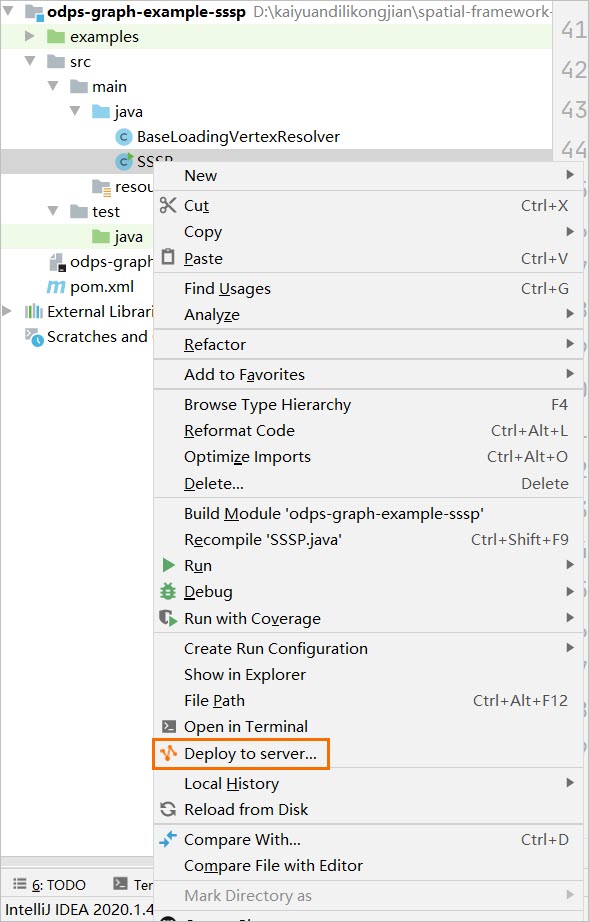
In this example, the deployed JAR package is named
odps-graph-example-sssp.jar.
Step 4: Submit the Graph job
In the MaxCompute client, run the following command:
jar -libjars odps-graph-example-sssp.jar -classpath <LOCAL_JAR_PATH>/odps-graph-example-sssp.jar SSSP 1 sssp_in sssp_out;Replace <LOCAL_JAR_PATH> with the local path of the odps-graph-example-sssp.jar package.
Step 5: Verify the result
Query the output table to check the SSSP result:
select * from sssp_out;Expected output:
vertex    value
1        0
2        2
3        1
4        3
5 2vertex: the vertex ID.value: the shortest distance from source vertex 1 to that vertex.
What's next
To submit a Graph job directly without the client, see Graph job.