The MaxCompute compiler is built on the new-generation SQL engine of MaxCompute V2.0. It significantly simplifies SQL compilation and improves SQL expressions. It runs static compilation checks on your scripts before submission, surfacing errors and alerts that would otherwise cause runtime failures or lower your project's health score.
The compiler signals issues at two severity levels:
Errors (red digit): block correct execution and must be fixed before running.
Alerts (yellow-background letter): indicate risky constructs that may cause data loss; clear them before running.
Prerequisites
Before you begin, ensure that you have:
MaxCompute Studio installed in IntelliJ IDEA. For installation steps, see Install MaxCompute Studio.
Syntax highlighting enabled. In the MaxCompute SQL configuration items, select Enable syntax coloring. For configuration details, see MaxCompute SQL configuration items.
Fix errors
Errors appear as a red digit in the editor. Hover over the red digit to read the error message.
Example error:
expect 1 columns, actually have 2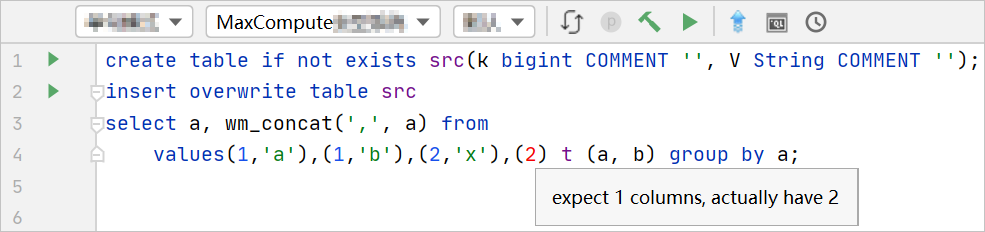
What it means: The target table (src) has two columns, but the VALUES clause in the INSERT statement supplies a value for only one column. Add the missing column value to fix the mismatch.

Submitting a script that contains errors deducts your MaxCompute project's health score, which lowers the priority of all subsequent jobs you submit.
Fix alerts
Alerts appear as a letter with a yellow background in the editor. Hover over the highlighted letter to read the alert message.
Example alert:
implicit conversion from STRING to DOUBLE, potential data loss, use CAST function to suppress
What it means: MaxCompute can implicitly convert STRING to DOUBLE in some contexts, but the conversion may cause data loss. Use an explicit CAST to control the conversion and clear the alert:
CAST(your_column AS DOUBLE)For type conversion rules, see Type conversions.
Clear all alerts before running scripts to save time and resources. In later versions of MaxCompute, submitting scripts with uncleared alerts also deducts your project's health score.