Data tunneling is the primary channel for data import and export in MaxCompute. It includes standard Tunnel for batch operations and Stream Tunnel for streaming writes. Both are available with free limited-use shared resource groups and subscription-based dedicated resource groups across all regions.
Usage
Tunnel commands
Tunnel commands are executed through the MaxCompute client (odpscmd) for data upload and download, suitable for manual operations or scripted workflows. Currently, only odpscmd is supported; other client tools are not yet available.
Batch operations (standard Tunnel):
Performs offline batch upload and download of data, suitable for scenarios that require transferring large volumes of data at once, including single-table data upload and download, and query instance result download.
Streaming operations (Stream Tunnel)
Continuously writes data in micro-batches, suitable for scenarios that require sustained data ingestion, such as log collection and real-time data ingestion.
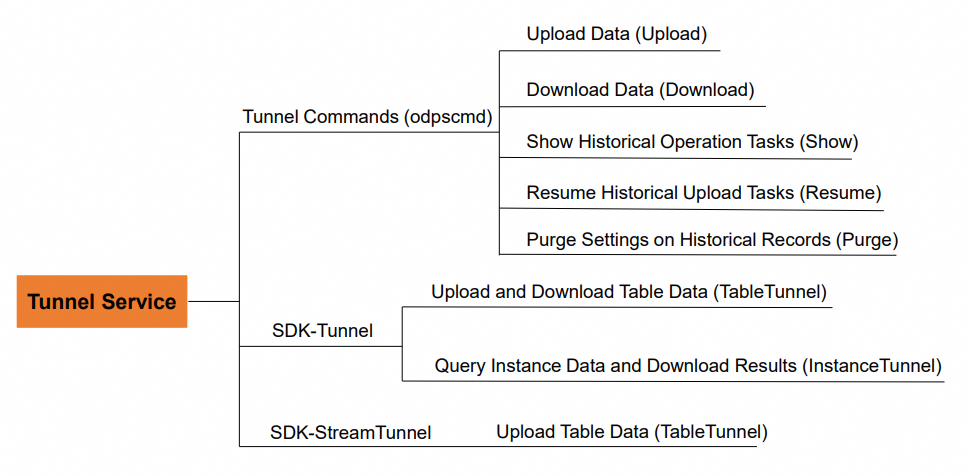
Data Transmission Service Limits
Limits on batch data channels
Batch data upload
Limits
Limitations
UploadSession lifecycle
24 hours
Number of blocks written per UploadSession
20,000
Write speed per block
10 MB/s
Data volume per block
100 GB
Number of UploadSessions created per table
500 every 5 minutes
Number of blocks written per table
500 every 5 minutes
Number of concurrent UploadSession commits per table
32
Number of commits per table
75 every 15 seconds
Number of concurrent block writes
Limited by the number of concurrent slots. A single block write occupies one slot.
Concurrent writes
MaxCompute ensures concurrent writes based on atomicity, consistency, isolation, and durability (ACID). For more information about ACID semantics, see ACID semantics.
Batch data download
Limits
Limitations
DownloadSession lifecycle
24 hours
InstanceDownloadSession lifecycle
24 hours, limited by the instance lifetime.
Number of InstanceDownloadSessions created per project
200 every 5 minutes
Number of DownloadSessions created per table
200 every 5 minutes
Speed per download request
10 MB/s
Number of concurrent DownloadSession creations
Limited by the number of concurrent slots. A single DownloadSession creation occupies one slot.
Number of concurrent InstanceDownloadSession creations
Limited by the number of concurrent slots. A single InstanceDownloadSession creation occupies one slot.
Number of concurrent download requests
Limited by the number of concurrent slots. A single data download request occupies one slot.
Batch data supports the upsert feature for Delta tables
Limits
Limitations
UpsertSession lifecycle
24 hours
Maximum write speed for an UpsertSession
Number of buckets in the table or partition × 10 MB/s.
Maximum slot quota usage for an UpsertSession
Number of buckets in the table or partition.
UpsertSession commit frequency
You can commit data to each partition of a Delta table only once per minute (min). If the commit interval for a partition is less than 1 minute, the system returns the following error message:
ErrorCode=FlowExceeded, ErrorMessage=CommitUpsert QPS Quota exceeded.
Limits on streaming data channels
Limits | Limitations |
Write speed per slot | 10 MB/s |
Number of concurrent partitions written to per table | 64 |
Maximum number of available slots per partition | 32 |
Number of concurrent flushes | Limited by the number of concurrent slots. A single flush occupies one slot. |
Limits on Data upload
The size of each field cannot exceed its limit. For more information, see Data type versions.
The size of a STRING field cannot exceed 8 MB.
During an upload, multiple data records are packaged for transmission.
Network limits for Data Transmission Service (dedicated resource groups)
Only VPC access is supported. Public network access is not supported.
Only data transmission within the same region is supported. Cross-region data transmission is not supported.
Network conditions significantly affect the upload and download speeds of Data Transmission Service. Speeds typically range from 1 MB/s to 20 MB/s. If the upload speed is too slow, consider using a multi-threaded upload method.
Information on shared Data Transmission Service resource groups
The following table lists the maximum number of available slots per project for free shared resources in different regions. The values are measured in slots.
Site | Region | Slots (Number) |
China | China (Hangzhou) | 300 |
China | China East 1 Finance (Hangzhou) | 50 |
China | China (Shanghai) | 600 |
China | China East 2 Finance (Shanghai) | 50 |
China | China (Beijing) | 300 |
China | China (Beijing) Gov Cloud | 100 |
China | China (Zhangjiakou) | 300 |
China | China (Ulanqab) | 300 |
China | China (Shenzhen) | 150 |
China | China South 1 Finance (Shenzhen) | 50 |
China | China (Chengdu) | 150 |
China | China (Hong Kong) | 50 |
Asia-Pacific | Singapore (Singapore) | 100 |
Asia-Pacific | Malaysia (Kuala Lumpur) | 50 |
Asia-Pacific | Indonesia (Jakarta) | 50 |
Asia-Pacific | Japan (Tokyo) | 50 |
Europe and Americas | Germany (Frankfurt) | 50 |
Europe and Americas | US (Silicon Valley) | 100 |
Europe and Americas | US (Virginia) | 50 |
Europe and Americas | UK (London) | 50 |
Middle East and India | UAE (Dubai) | 50 |
Each operation in the data tunneling service (such as writing a block, creating a download session, or flushing) occupies a slot. When a connection remains idle without data transfer for an extended period, the server automatically disconnects it and releases the occupied slot. Therefore, even if the number of concurrent slots reaches the limit, idle connections are automatically reclaimed after a certain period without manual intervention.
Valid status codes for Data Transmission Service
Status code | Status code name |
200 | HTTP_OK |
201 | HTTP_CREATED |
400 | HTTP_BAD_REQUEST |
401 | HTTP_UNAUTHORIZED |
403 | HTTP_FORBIDDEN |
404 | HTTP_NOT_FOUND |
405 | HTTP_METHOD_NOT_ALLOWED |
409 | HTTP_CONFLICT |
422 | HTTP_UNPROCESSABLE_ENTITY |
429 | HTTP_TOO_MANY_REQUESTS |
499 | HTTP_CLIENT_CLOSED_REQUEST |
500 | HTTP_INTERNAL_SERVER_ERROR |
502 | HTTP_BAD_GATEWAY |
503 | HTTP_SERVICE_UNAVAILABLE |
504 | HTTP_GATEWAY_TIME_OUT |
Retry policy for failed requests
After a request fails, the client must wait for a period of time before retrying.
The wait time for consecutive failed requests must increase exponentially, starting from a minimum of 1 second. For example: 1 s, 2 s, 4 s, 8 s, 16 s, 32 s, and so on.
Duplicate requests
The URL is the same (URI and URI parameters).
Consecutive requests are sent from the same client IP address.
Valid requests
A request that returns a valid status code and follows the retry policy.
Invalid requests
A request that returns a valid status code but does not follow the retry policy.
NoteThe Service-level agreement (SLA) does not cover invalid requests.
Attack requests
Requests that do not follow the retry policy for throttle status codes 429 and 503.
For attack requests, the service isolates the client IP address, UID, and project that initiated the attack. The isolated object can no longer access the service.
NoteThe SLA does not cover attack requests.
FAQ
What are the common causes for Data Transmission Service to slow down?
Due to limitations in the service architecture, the MaxCompute Tunnel service may experience occasional request latency in the following scenarios. For example, the time required to upload or download 10 MB of data can increase from seconds to minutes.
Shared Tunnel service resources are exhausted (CPU or network bandwidth)
Duration: Several minutes to several hours.
This is unavoidable due to limitations in the service architecture. If you require high stability, purchase a dedicated Tunnel resource.
The network link from the client to the Tunnel service is unstable (public network upload or download)
Duration: Cannot be estimated.
The stability of the public network cannot be guaranteed. If you require high stability, use the Alibaba Cloud internal network.
Client resources are exhausted (CPU or network bandwidth)
Duration: Cannot be estimated.
Evaluate the physical resources on the client.
Inefficient client code logic (for example, long-running data processing during an upload or download over a persistent connection)
Duration: Cannot be estimated.
Consider data transmission performance during code design.