MaxCompute introduces user-defined types (UDTs) based on the new-generation SQL engine. UDTs allow you to reference classes or objects of third-party programming languages in SQL statements to call methods or obtain data.
When to use UDTs vs. UDFs
Both UDTs and user-defined functions (UDFs) extend MaxCompute SQL with custom logic. Choose based on your workflow:
| Situation | Recommended approach |
|---|---|
Call a built-in Java class method directly (e.g., Integer.MAX_VALUE) |
UDT — no function definition required |
| Reuse a third-party library directly in a SQL expression | UDT — reference the class inline without wrapping |
| Include compiled source-language objects across multi-stage jobs | UDT — encapsulates cross-stage JVM state automatically |
| Implement reusable business logic across multiple projects | UDF — explicit function registration makes it shareable |
Use cases
-
Call Java standard library methods without defining a function. When a task needs a built-in Java class method that MaxCompute SQL does not expose natively, a UDT lets you call it directly in an expression.
-
Reference third-party libraries inline. Instead of wrapping a third-party library function inside a UDF, reference the class directly in a SQL statement.
-
Embed compiled source code in SQL. For languages like Java that require compilation, UDTs let you reference objects and classes in SQL expressions without a separate registration step. See SELECT TRANSFORM for script-based alternatives.
Prerequisites
Before using UDTs, make sure that:
-
JDK 1.8 is available in your environment. Versions later than JDK 1.8 may not be supported.
-
New data types are enabled if you use types such as INT:
set odps.sql.type.system.odps2=true;
How it works
Unlike UDTs in other SQL engines (which typically define type aliases similar to the STRUCT type), MaxCompute UDTs work like a CREATE TYPE statement — they contain both fields and methods, and you reference them directly in SQL without writing DDL.
The following example illustrates the difference. To access Integer.MAX_VALUE from Java's java.lang package:
Using a UDT (direct reference):
-- Enable new data types (required for types such as INTEGER).
set odps.sql.type.system.odps2=true;
SELECT java.lang.Integer.MAX_VALUE;
Because java.lang is auto-imported (as in Java), this is equivalent to:
set odps.sql.type.system.odps2=true;
SELECT Integer.MAX_VALUE;
Result:
+-----------+
| max_value |
+-----------+
| 2147483647 |
+-----------+
Using a UDF (for comparison):
-
Write the UDF class:
package com.aliyun.odps.test; public class IntegerMaxValue extends com.aliyun.odps.udf.UDF { public Integer evaluate() { return Integer.MAX_VALUE; } } -
Compile, upload, and register:
add jar odps-test.jar; create function integer_max_value as 'com.aliyun.odps.test.IntegerMaxValue' using 'odps-test.jar'; -
Call:
select integer_max_value();
UDTs reduce this to a single SQL statement.
Multi-stage execution
UDT objects flow naturally across MapReduce stages. The following example joins two BigInteger columns computed from different data sources:
-- Sample data.
@table1 := select * from values ('100000000000000000000') as t(x);
@table2 := select * from values (100L) as t(y);

-- Create an object with the new method.
@a := select new java.math.BigInteger(x) x from @table1;
-- Call a static method.
@b := select java.math.BigInteger.valueOf(y) y from @table2;
-- Call an instance method across the join.
select /*+mapjoin(b)*/ x.add(y).toString() from @a a join @b b;

-- Output:
100000000000000000100
This job runs across three stages (M1, R2, J3). new java.math.BigInteger(x) runs at M1; java.math.BigInteger.valueOf(y) and x.add(y).toString() run at J3 on different processes and physical machines. The UDT encapsulates this so that all stages behave as if they run on the same Java Virtual Machine (JVM).
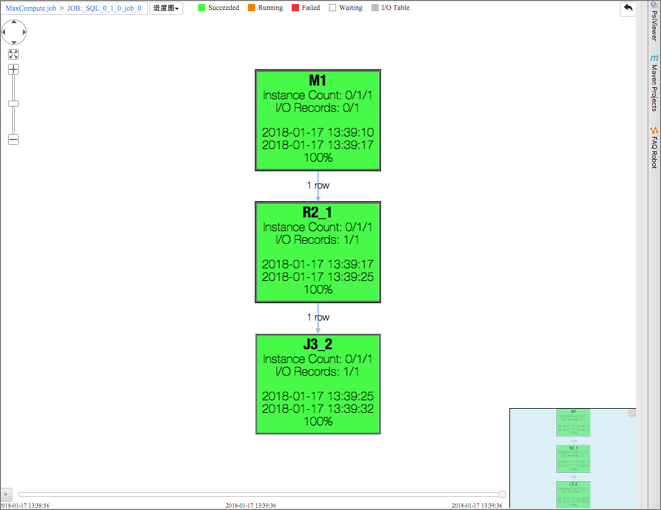
The x column from variable a is of the java.math.BigInteger type rather than a built-in type. This UDT value can be passed to other operators and used in data reshuffling.
Reference JAR packages and set Java imports
All SDK for Java classes are available to UDTs by default. To reference additional JAR packages or set default import paths, use the following session flags.
Reference a JAR package:
set odps.sql.type.system.odps2=true;
set odps.sql.session.resources=odps-test.jar;
-- The JAR must be uploaded to the project beforehand.
select new com.aliyun.odps.test.IntegerMaxValue().evaluate();
You can specify multiple resources separated by commas: set odps.sql.session.resources=foo.sh,bar.txt;
odps.sql.session.resources controls both UDTs and SELECT TRANSFORM. A JAR set here is available to both features.Set a default Java import path:
set odps.sql.type.system.odps2=true;
set odps.sql.session.resources=odps-test.jar;
set odps.sql.session.java.imports=com.aliyun.odps.test.*;
-- With the import set, you can omit the full package prefix.
select new IntegerMaxValue().evaluate();
odps.sql.session.java.imports accepts a classpath (e.g., java.math.BigInteger) or a wildcard (*). Static imports are not supported.
Supported operations
UDTs support the following operations in SQL expressions:
-
Create objects using
new— example:new java.math.BigInteger('123') -
Create arrays using
newwith initializer lists — example:new Integer[] { 1, 2, 3 } -
Call instance and static methods
-
Access public instance and static fields
Only public methods and public fields are accessible. All identifiers (package names, class names, method names, field names) are case-sensitive. Anonymous classes and lambda expressions are not supported. Functions that do not return values cannot be called in expressions.
Data types
Type mapping
Java data types map to MaxCompute built-in types. The same mapping used in Java UDFs applies to UDTs.
-
Call built-in type methods directly:
'123'.length(),1L.hashCode() -
Use UDTs in built-in functions:
chr(Long.valueOf('100'))—Long.valueOfreturnsjava.lang.Long, which maps to the built-in BIGINT type -
Java primitive types are automatically converted to their boxing types
For new built-in data types, add set odps.sql.type.system.odps2=true; before running the query.
Type conversions
-
SQL type conversions are supported:
cast(1 as java.lang.Object) -
Java-style casts are not supported:
(Object)1 -
UDT objects can be implicitly converted to base class objects
-
UDT objects can be explicitly converted (cast) to base class or subclass objects
-
Converting between two unrelated types follows the same rules as built-in type conversion. For example, converting
java.lang.Longtojava.lang.Integerapplies the same rules as converting BIGINT to INT, which may result in data loss.
UDT objects cannot be saved to disk and cannot be inserted into tables directly (DDL does not support UDTs as a column type). If the UDT value can be implicitly converted to a built-in type, it can be written to a table. BINARY supports automatic serialization —byte[]arrays can be saved and deserialized. To persist a UDT, convert it to BINARY using serialization and deserialization methods. UDT values cannot appear in the final output directly. CalltoString()to convert any UDT tojava.lang.Stringfor display. To convert all UDT output to strings automatically during debugging, use: This flag applies only to PRINT statements, not INSERT statements.
set odps.sql.udt.display.tostring=true;Generics
UDTs support Java generics. The compiler infers the type parameter from the argument:
-- Returns java.util.List<java.math.BigInteger>
java.util.Arrays.asList(new java.math.BigInteger('1'))
Specify type parameters explicitly in constructor calls or use java.lang.Object:
-- ArrayList<Object>
new java.util.ArrayList(java.util.Arrays.asList('1', '2'))

-- ArrayList<String>
new java.util.ArrayList<String>(java.util.Arrays.asList('1', '2'))
Operator semantics
All operators follow MaxCompute SQL semantics, not Java semantics:
-
String concatenation:
String.valueOf(1) + String.valueOf(2)returns3(both strings are implicitly cast to DOUBLE and summed). To concatenate as strings, use a string concatenation function instead. -
Equality: The
=operator is a SQL comparison operator, not Java reference equality. Use theequalsmethod to check whether two objects are equivalent.
Object equality and data reshuffling
UDTs do not have a clear definition of object equality. During data reshuffling, objects may be transmitted across processes and physical machines, causing a single object to appear as two distinct references. Always use the equals method — not = — to compare UDT objects.
Objects within the same row or column are correlated, but correlation across rows or columns is not guaranteed.
Limitations
UDTs cannot be used as shuffle keys in JOIN, GROUP BY, DISTRIBUTE BY, SORT BY, ORDER BY, or CLUSTER BY clauses. UDTs are valid in expressions at these stages, but cannot be the output. For example:
-
group by new java.math.BigInteger('123')— not supported -
group by new java.math.BigInteger('123').hashCode()— supported, becausehashCode()returnsint.class, which maps to the built-in INT type
UDFs, user-defined aggregate functions (UDAFs), and UDTs cannot read data from the following table types:
-
Tables on which schema evolution is performed
-
Tables that contain complex data types
-
Tables that contain JSON data types
-
Transactional tables
Access resources
In MaxCompute SQL, call the static method com.aliyun.odps.udf.impl.UDTExecutionContext.get() to get the ExecutionContext object. Use this object to access the current execution context, including files and tables registered as resources.
Performance considerations
UDT performance is similar to UDF performance. The optimized computing engine provides additional improvements in specific scenarios:
-
No serialization overhead for local operations. When a UDT object is used within the same process (no data reshuffling required, such as in JOIN or AGGREGATE stages), serialization and deserialization are skipped.
-
Codegen-based runtime. UDTs run via Codegen rather than reflection, so there is no reflection overhead. Multiple UDT calls are batched into a single function call — for example,
values[x].add(values[y]).divide(java.math.BigInteger.valueOf(2))is called once, avoiding per-call interface overhead.
Security
UDTs are subject to the same Java sandbox model as UDFs. To perform operations restricted by the sandbox, cancel sandbox isolation for those operations or apply to join the sandbox whitelist.
Features to be improved
The following features are planned for future versions:
-
Call functions that do not return values, and functions that directly use transferred data (where the return value is ignored, such as the
addmethod of the List interface). -
Use anonymous classes and lambda expressions.
-
Use UDTs as shuffle keys.
-
Support more programming languages, such as Python.
What's next
-
Java UDFs — data type mapping table and UDF implementation reference
-
New built-in data types — types that require
set odps.sql.type.system.odps2=true; -
SELECT TRANSFORM — embed scripts in SQL statements
-
COLLECT_SET and other aggregate functions — use with UDTs to implement aggregate and table-valued function behavior
-
Java sandbox — sandbox model and whitelist application