OSS-HDFS external tables
Use OSS-HDFS external tables to query and write data stored in OSS-HDFS directly from MaxCompute — no ETL ingestion needed. This is useful when sharing data across EMR clusters or when other teams store data in OSS-HDFS and you need access from your MaxCompute data warehouse. MaxCompute supports RAM policies and Security Token Service (STS) for authentication, and is compatible with common formats including Parquet, ORC, Paimon, CSV, TSV, TEXTFILE, and JSON.
How it works
Creating and using an OSS-HDFS external table involves four steps:
Create an OSS bucket and enable the OSS-HDFS service.
Get the OSS-HDFS endpoint for your bucket.
Create the external table in MaxCompute, specifying
TBLPROPERTIES ('odps.oss-hdfs.state'='on').Read and write data using standard SQL.
Prerequisites
Before you begin, make sure you have:
An OSS bucket with OSS-HDFS enabled. If you don't have a bucket yet, create one first.
(Optional) If a Resource Access Management (RAM) user needs to create OSS-HDFS external tables, grant that RAM user permissions to access the OSS-HDFS service.
Get the OSS-HDFS endpoint
The LOCATION clause requires an OSS-HDFS endpoint, which differs from a standard OSS endpoint. To find it:
Log in to the OSS console.
On the Buckets page, click the bucket name to open the Objects page.
In the left navigation pane, click Overview.
In the Port section, copy the Endpoint value listed for OSS-HDFS.
The endpoint follows the format <region-id>.oss-dls.aliyuncs.com, for example cn-beijing.oss-dls.aliyuncs.com for the China (Beijing) region.
Syntax
CREATE EXTERNAL TABLE [IF NOT EXISTS] <mc_oss_extable_name>
(
  <col_name> <data_type>,
  ...
)
[PARTITIONED BY (<col_name> <data_type>, ...)]
[ROW FORMAT SERDE 'serde_class'
  [WITH SERDEPROPERTIES (
    ['<property_name>'='<property_value>',...])
  ]
]
STORED AS file_format
LOCATION 'oss://<oss_hdfs_endpoint>/<bucket>/<path_data>'
[TBLPROPERTIES (
  'odps.oss-hdfs.state'='on',
  '<tbproperty_name>'='<tbproperty_value>',...)
];
Parameters
For common parameters such as ROW FORMAT SERDE, STORED AS, and PARTITIONED BY, see Basic syntax parameters.
The following parameter is specific to OSS-HDFS external tables:
| Property name | Required | Description |
|---|---|---|
odps.oss-hdfs.state | Yes | Set to on. Required when the LOCATION endpoint is an OSS-HDFS endpoint (ending in .oss-dls.aliyuncs.com). Without this property, MaxCompute creates a standard OSS external table instead — data written to the table goes to OSS, not OSS-HDFS. |
For format-specific parameters (Parquet, ORC, and others), see the relevant format sections in OSS external tables.
To create OSS-HDFS external tables in formats other than the default, such as Parquet, ORC, Paimon, CSV, TSV, TEXTFILE, and JSON, see OSS external tables.
Limitations
The
MAX_PTfunction is not supported.Writing data to dynamic partitions is not supported.
When reading data, if the OSS-HDFS file has fewer columns than the external table definition, the missing columns are filled with NULL. If the file has more columns, the extra columns are discarded.
Example: create a Parquet OSS-HDFS external table
This example creates an OSS-HDFS external table in Parquet format, writes two rows, and queries the result.
Step 1: Set up the OSS bucket
Log in to the OSS console, create an OSS bucket named oss-mc-test in the China (Hangzhou) region, and enable the OSS-HDFS service. Create a folder named oss_hdfs_tbl_parquet_pt inside the bucket.
Step 2: Create the external table
Replace <uid> with your Alibaba Cloud account ID or the UID of your RAM user.
CREATE EXTERNAL TABLE oss_hdfs_tbl_parquet_pt (
  id INT, dt STRING
)
PARTITIONED BY (ds STRING)
ROW FORMAT SERDE 'org.apache.hadoop.hive.ql.io.parquet.serde.ParquetHiveSerDe'
WITH SERDEPROPERTIES(
  'odps.properties.rolearn' = 'acs:ram::<uid>:role/aliyunodpsdefaultrole'
)
STORED AS PARQUET
LOCATION 'oss://cn-hangzhou.oss-dls.aliyuncs.com/oss-mc-test/oss_hdfs_tbl_parquet_pt/'
TBLPROPERTIES('odps.oss-hdfs.state'='on');
Step 3: Write and read data
INSERT OVERWRITE oss_hdfs_tbl_parquet_pt PARTITION (ds='2025-0609') VALUES(1, '0106'), (2, '0107');

SELECT * FROM oss_hdfs_tbl_parquet_pt WHERE ds = '2025-0609';
Expected output:
+------------+------------+------------+
| id         | dt         | ds         |
+------------+------------+------------+
| 1          | 0106       | 2025-0609  |
| 2          | 0107       | 2025-0609  |
+------------+------------+------------+
Step 4: Verify in the OSS console
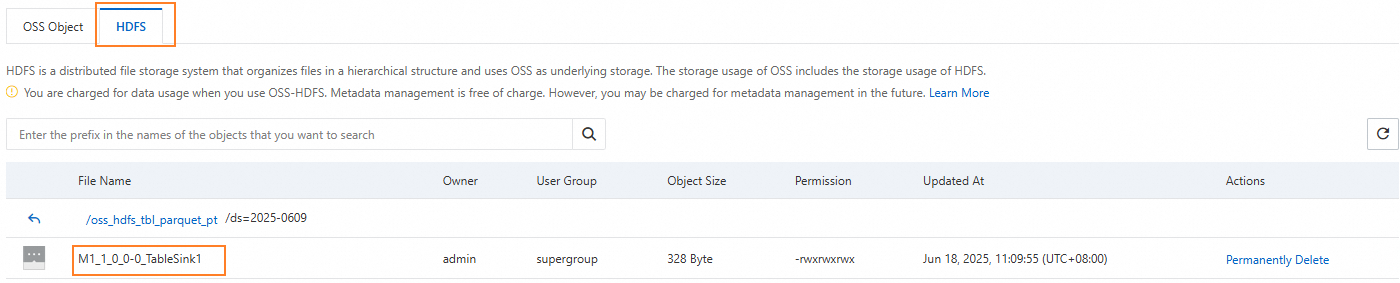
In the destination bucket, navigate to the oss_hdfs_tbl_parquet_pt/ds=2025-0609/ folder and click the HDFS tab to confirm the data file was written to OSS-HDFS.
FAQ
Why do I get "Data lake storage is disabled" when creating the external table?
The OSS-HDFS service is not enabled for the bucket referenced in your LOCATION clause. Enable the OSS-HDFS service for that bucket and retry.
FAILED: ODPS-0130071:[0,0] Semantic analysis exception - physical plan generation failed:
common/io/jindo/jindo_file_system.cpp(348): RuntimeError: JindoFS failed to GetFileStatus:
/xxx/xxx/test_csv/.odps/.meta. Error Message: get status failed:
Caused by error 6403: 403 Forbidden <?xml version="1.0" encoding="UTF-8"?><Error>
<Code>AccessDenied</Code>  <Message>Data lake storage is disabled.</Message>
Why do I get "The bucket you access does not belong to you" when creating the external table?
The RAM role specified in odps.properties.rolearn doesn't have read/write access to the OSS-HDFS bucket. Grant the RAM user permissions to access OSS-HDFS, or attach the AliyunEMRDlsFullAccess policy directly to the RAM role.
FAILED: ODPS-0130071:[0,0] Semantic analysis exception - physical plan generation failed:
common/io/jindo/jindo_file_system.cpp(348): RuntimeError: JindoFS failed to GetFileStatus:
/xxx/xxx/test_invalid_rolearn/.odps/.meta. Error Message: get status failed:
Caused by error 6403: 403 Forbidden <?xml version="1.0" encoding="UTF-8"?><Error>
<Code>AccessDenied</Code>  <Message>The bucket you access does not belong to you.</Message>
What's next
OSS external tables — create external tables in Parquet, ORC, Paimon, CSV, TSV, TEXTFILE, and JSON formats, including format-specific parameters