AI functions are a set of predefined functions in MaxCompute for AI-related use cases. They encapsulate complex model inference operations into concise SQL or Python operators. You can use these functions to invoke large models or machine learning models directly from standard SQL or MaxFrame (a distributed Python engine) without writing low-level model invocation code. This significantly lowers the barrier to entry for using AI in data processing and big data analytics.
Use cases
Large models have a significantly enhanced ability to understand data, allowing them to extract precise semantic information from multimodal data, such as structured, text, and unstructured data. Based on their instruction-following capabilities, these models can transform the semantic information into normalized data, enabling relational algebra operations. This enables unified queries and processing for both structured and unstructured data within a big data platform.
As use cases expand, the demand for unified computing within big data platforms grows. MaxCompute meets this demand by providing multiple computing engines, such as MaxFrame (Python) and SQL. Combined with AI functions, MaxCompute offers a more accessible way for users to leverage AI. This enhances the capability and quality of data analysis and computing in various use cases, including multimodal data processing, content generation, information extraction, and image and text analysis. Typical use cases include:
Data preprocessing for large model pre-training: Web data processing for large model pre-training requires fine-tuned, small-parameter large language models (LLMs) to perform tasks like calculating text quality scores, filtering text, and classifying text.
Multimodal content understanding: Video and image processing in traditional e-commerce and emerging autonomous driving fields require multimodal models for tasks such as object detection, image tagging, and classification.
Intelligent risk control: In intelligent risk control use cases, you can use fine-tuned, small-parameter LLMs for tasks such as user behavior classification and risk alerts.

Benefits
Low-code development: Get started quickly. Perform model inference with a single function call, without deploying model services or writing complex inference logic. This significantly shortens the development cycle and lowers the barrier to building AI applications.
Seamless integration: AI functions integrate seamlessly with MaxCompute model objects, computing resources, and the permission system, simplifying adoption.
Unified multi-engine support: MaxCompute provides unified AI function capabilities across both its SQL and MaxFrame engines. This allows data analysts to use familiar SQL to call powerful AI models, while data scientists can leverage the distributed Python computing power of MaxFrame to enhance the capability and quality of their data preprocessing.
AI functions
SQL AI functions
MaxCompute provides SQL AI functions that allow you to run model inference by specifying MaxCompute model objects. Supported models include built-in public large language models, user-imported models, and remote models from PAI-EAS. For more information, see Model types.
The following table describes the SQL AI functions that MaxCompute supports.
Function
Description
Supported model types
Extracts the best-matching label string for the input content from a given set of labels.
Supports the models in the public model list, excluding
text-embedding-v4andQwen3-VL-8B-Instruct.Converts text/image data into vectors.
Supports public model list models
Qwen3-Embedding-0.6B-Q8_0,text-embedding-v4, andqwen3-vl-embedding.Extracts specified information from the given text data.
Supports the models in the public model list, excluding
text-embedding-v4andQwen3-VL-8B-Instruct.Generates natural language text. It supports complex logical reasoning, multimodal tasks, and processing of unstructured data.
Supports public models and remote models, excluding
Qwen3-VL-8B-Instruct.Performs sentiment analysis on the input text.
Supports the models in the public model list, excluding
text-embedding-v4andQwen3-VL-8B-Instruct.Determines the textual and semantic similarity between two texts. It returns a floating-point number between 0 and 1; a larger value indicates higher semantic similarity.
Supports the models in the public model list, excluding
text-embedding-v4andQwen3-VL-8B-Instruct.Generates a summary for a given text.
Supports the models in the public model list, excluding
text-embedding-v4andQwen3-VL-8B-Instruct.Translates the input text into a specified language.
Supports the models in the public model list, excluding
text-embedding-v4andQwen3-VL-8B-Instruct.Makes predictions on structured data. This is common in traditional machine learning tasks such as classification and regression.
BOOSTED_TREE_REGRESSOR
BOOSTED_TREE_CLASSIFIER
SQL AI function billing
When you use a SQL AI function to call a model:
If you use subscription standard computing resources (also called a subscription CU quota), the job consumes your CU quota.
If you use pay-as-you-go standard computing resources (also called a pay-as-you-go CU quota), you are billed based on the amount of data scanned by the SQL job, and no separate CU computing fees are incurred.
MaxFrame AI functions
The MaxFrame AI Function provides a flexible, general-purposegenerate interface and streamlined, scenario-specifictask interfaces (such as for text translation, structured extraction, and data embedding). You can select a model and pass a MaxCompute table and prompts as inputs.
When an interface is called, MaxFrame first splits the table data. You can set an appropriate level of concurrency based on the data volume and start a worker group to perform the computing tasks. Each worker uses the prompts you provide as a template, renders them based on input data rows to construct the model request, and writes the inference results and success status to MaxCompute.
The following figure shows the overall architecture and workflow.
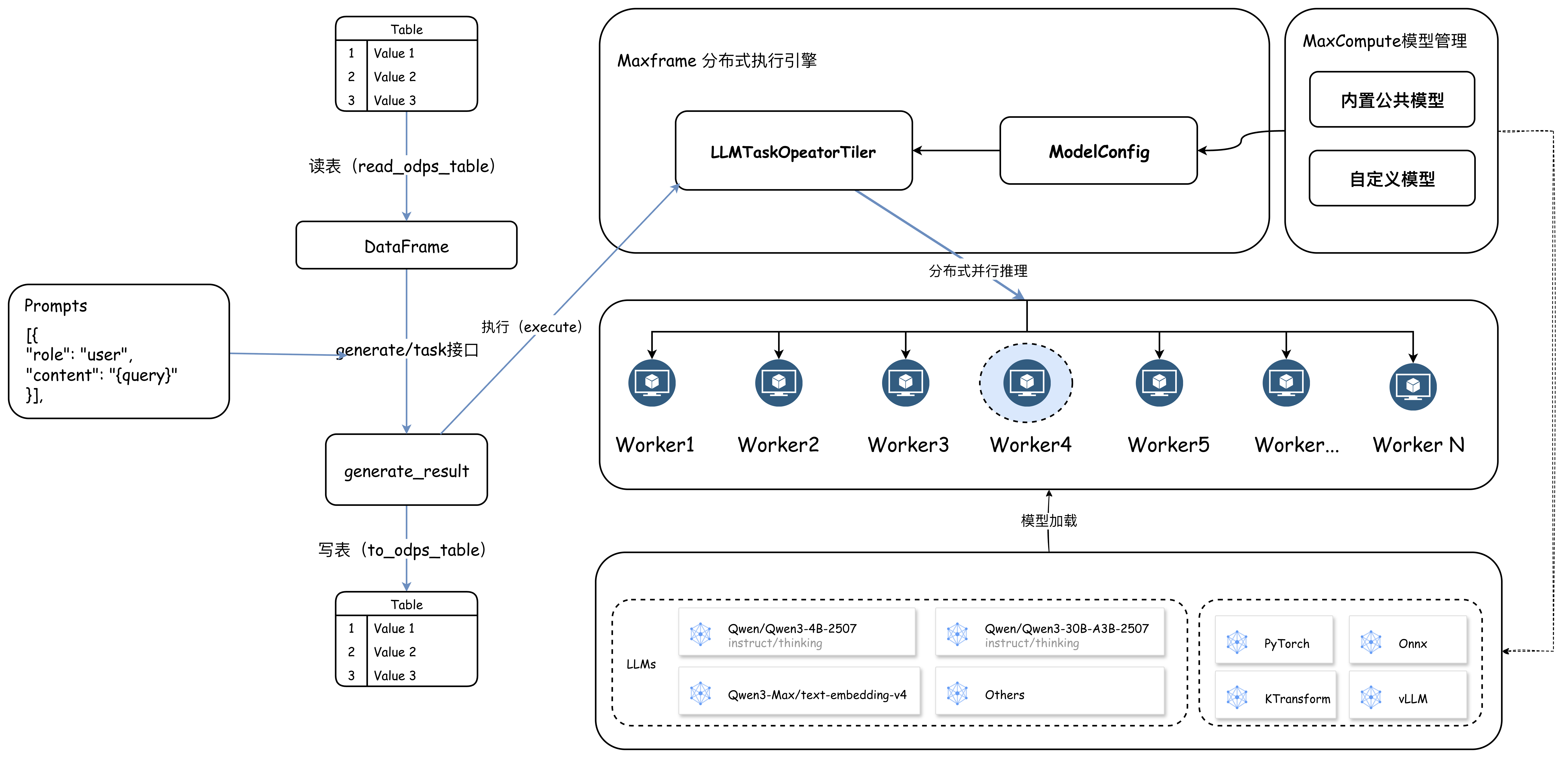
MaxCompute also provides Python-based AI functions through MaxFrame.
The call consumes CPU or GPU resources based on its required resource type. For more information, see MaxFrame AI functions.
Tutorials
For more tutorials on using MaxCompute models and AI functions, see the following topics: