Frequently asked questions about Proxima CE.
Result quality
Why does the query return fewer results than the number I specified?
Proxima CE uses the HNSW (Hierarchical Navigable Small World) algorithm to build indexes by default. HNSW is an approximate nearest neighbor algorithm — it trades perfect recall for speed. When objects in the graph are not fully connected, the number of retrieved results can fall short of the requested top K.
The following options are available, in order of invasiveness:
-
Tune the recall rate. Reducing the recall rate threshold does not fully resolve the issue. If the graph has connectivity gaps, no recall setting guarantees the exact top K count. Lowering the threshold may also affect other queries, so evaluate the impact before applying this change.
-
Switch the index algorithm. Use Hierarchical Clustering (HC) instead of HNSW by setting the
-algo_modelparameter to specify HC as the index creation algorithm. -
Enable result padding (Proxima 2.4 and later). Add
{"proxima.hnsw.searcher.force_padding_result_enable" : True}to the configuration. This pads results to the top K count based on available search results. The similarity scores of padded results may be lower in edge cases, so validate against your business requirements before use.
Can I configure cosine distance for Proxima CE?
Yes. Proxima CE supports cosine distance and optimizes the inner-product search. For details, see Inner product and cosine distance.
Performance
What resources does Proxima CE use?
Proxima CE uses the resources of the MaxCompute project that your account belongs to.
How do I configure the -column_num and -row_num parameters?
Proxima CE is a distributed engine that works with MaxCompute MapReduce to process large volumes of vector data in offline mode.
-
Build process: The doc table is divided into columns. Each column gets its own index. More columns mean smaller per-column index sizes and faster per-column searches — but higher cluster resource consumption.
-
Seek process: The query table is divided into rows. Each row handles fewer queries. More rows accelerate the seek process — but also increase cluster resource consumption.
Constraints to keep in mind:
-
Cluster resource limits. Contact the owner of your MaxCompute project to check the default limits on cluster resource usage.
-
MapReduce instance limit. MaxCompute MapReduce supports a maximum of 99,999 instances for reduce tasks. During the build process, the instance count equals
column_num. During the seek process, the instance count equalscolumn_num × row_num. Keep this product below 99,999.
Start with the row and column values that Proxima CE calculates automatically from your input parameters — these ensure normal operation. See Multi-category search for details on automatic calculation.
From that baseline, adjust as needed:
-
If query speed is too slow, add rows or columns.
-
If cluster resources are insufficient, reduce rows or columns.
See How do I speed up a task? for the general tuning principles.
How do I speed up a task?
Multi-category scenarios involve two category sizes:
-
Small categories (fewer than 1 million documents by default; configurable): use linear search. Tune with
-category_row_numand-category_col_num. -
Large categories (more than 1 million documents): tune with
-row_numand-column_num.
In both cases, the principle is the same — adding columns reduces per-column index size and speeds up single-column searches; adding rows reduces per-row query volume and speeds up each batch. Both consume more cluster resources, so balance tuning against your available capacity. For parameter details, see Multi-category search.
Non-multi-category scenarios: set -row_num and -column_num to increase overall task concurrency.
Why is my Proxima CE task running slowly?
Proxima CE tasks run as MaxCompute MapReduce jobs. If the task compiles and runs without errors, the slowness is likely a MaxCompute scheduling or resource issue. Join the MaxCompute developer community DingTalk group (group ID: 11782920) to reach the technical support team.
Why does the ERROR: KILLED error appear in the logs?
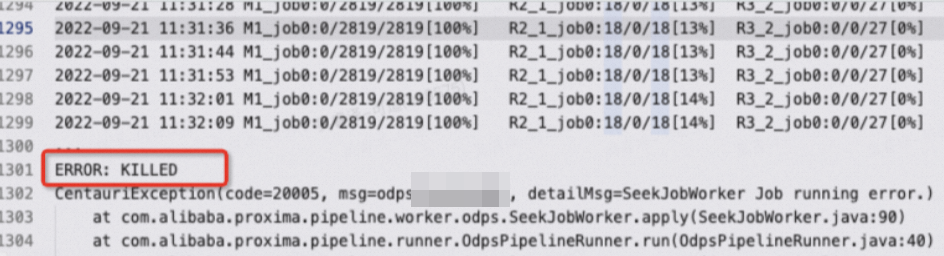
A task is killed for one of three reasons:
-
Runtime exceeded 24 hours. MaxCompute automatically kills SQL tasks that run longer than 24 hours. Extend the limit to up to 72 hours:
set odps.sql.job.max.time.hours=72; -
Cluster overloaded. Resources were preempted for too long and the task was terminated. Rerun the task when cluster load decreases, or increase the task priority using
-odps_task_priority. See Optional parameters for details.ImportantRaising task priority may preempt resources from other high-priority jobs. Confirm with the project owner that no critical online or offline tasks are running in the cluster before applying this setting.
-
Manually killed. Check with the project owner or administrators to determine whether someone terminated the task intentionally.
In most cases, if a task is killed, you can rerun it. If the cluster is overloaded, wait until high-priority task resource usage decreases before rerunning the Proxima CE task.
Why doesn't the -odps_task_priority parameter take effect?
If your project has a configured baseline priority, -odps_task_priority has no effect when the specified priority exceeds the baseline. For baseline management, see Manage baselines.
Why do offline tasks affect online tasks?
The most common cause: offline and online tasks share the same cluster. Offline tasks can consume large amounts of cluster resources, leaving online tasks with insufficient resources — causing them to run slowly or fail.
To resolve this:
-
Limit offline task concurrency. Reduce the number of rows and columns in Proxima CE offline tasks, or set resource limits for your MaxCompute project in the MaxCompute console.
-
Separate execution windows. Schedule offline and online tasks to run at different times. Alternatively, apply for new resources.
Data types and vectors
Can input table vectors be of the BINARY type?
No. By default, vector columns in the doc table support only the STRING type. BINARY is not supported directly.
Proxima CE provides the -binary_to_int parameter to convert BINARY data to INT before indexing. When comma-delimited input data is used:
-
-binary_to_int=false: input stays as-is, for example1,1,1,1,1,1,... -
-binary_to_int=true: input is converted, for example12345,13423,13325,...
The conversion packs N binary values (each 0 or 1) into N 32-bit integers, which reduces the size of the resulting indexes.
Errors and naming
Why does temporary table creation fail with invalid table name: xxx.yyy?
The table name contains a period (.). In MaxCompute, periods are reserved as namespace separators in the project.table format — any name containing a period is invalid and causes downstream processes to fail. This typically happens when an output table is named in the xxx.output_table_name format.
Rename the input and output tables to remove all periods.
Can I run multiple tasks on the same doc table at the same time?
No. Concurrent tasks on the same doc table cause index overwrites — for example, Task B's index gets overwritten by Task A's output mid-execution. This leads to the following errors:
-
OSS volume file system errors
-
JNI (Java Native Interface)-based index write failures during the build process
-
JNI-based index loading failures during the seek process
Run tasks on the same doc table sequentially to avoid these conflicts.
Logging
What is the difference between run logs and Logview?
Run logs contain output generated after a DataWorks node runs. Copy the run log content and send it to technical support for troubleshooting. If you use the MaxCompute client odpscmd, run logs are also available in the client. Copy all client output or redirect it to a log file before sharing.