A script template defines an SQL code process with input and output parameters that you can reuse across nodes. When your workflows share common logic—filtering source tables, joining datasets, or aggregating data into an output table—referencing a script template from an SQL Snippet node keeps that logic in one place and avoids duplicating code across multiple nodes.
Prerequisites
Before you begin, ensure that you have:
A script template. For more information, see Create and manage a script template
An SQL Snippet node. For more information, see Create and manage MaxCompute nodes
Limitations
SQL Snippet nodes require DataWorks Standard Edition or higher. For more information, see Differences among DataWorks editions.
The Workspace-Specific tab lists templates created by member accounts in the current workspace. Use these for SQL logic shared within your team.
The Public tab lists templates created at the tenant level. Use these for SQL logic shared across the entire organization.
Reference a script template
On the configuration tab of the SQL Snippet node, follow the instructions in the figure below to reference a script template.
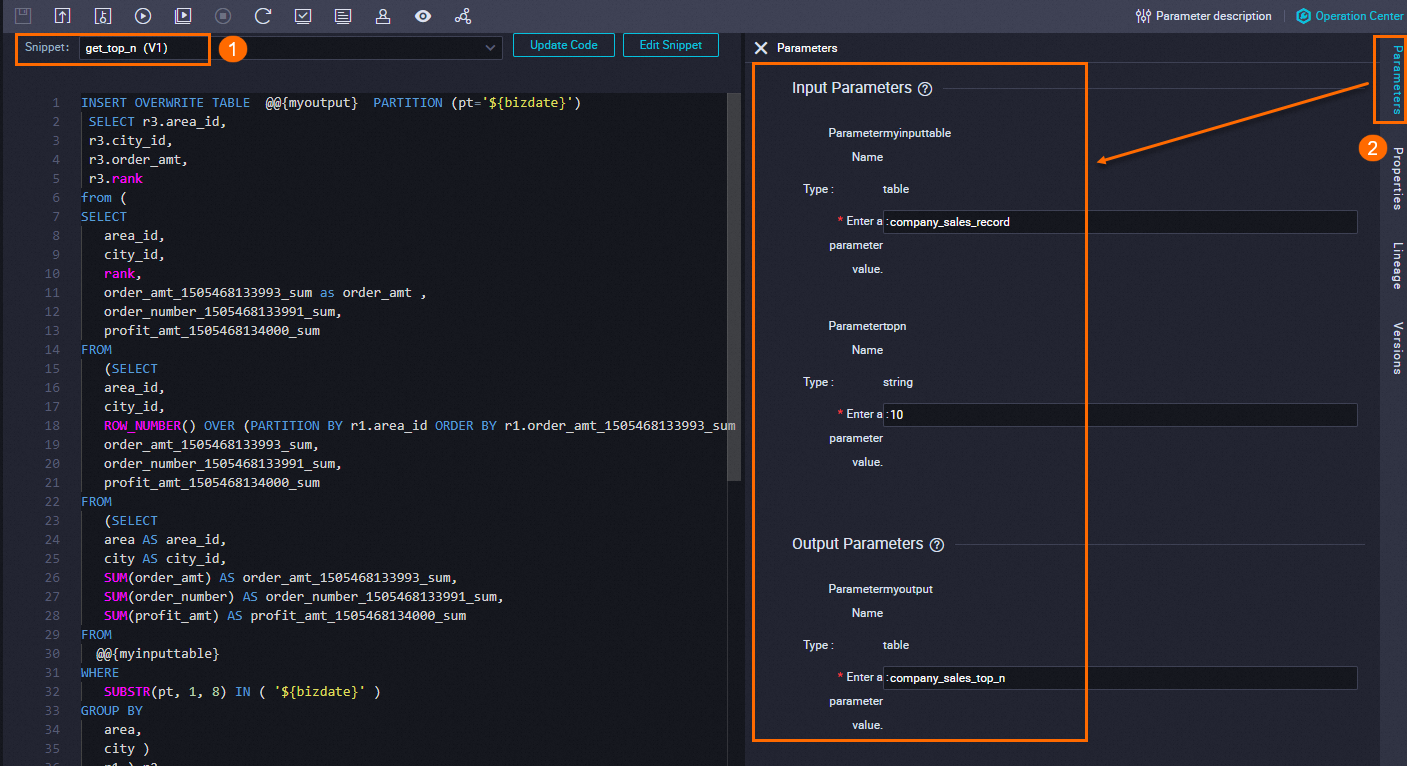
Select the script template to reference. If no templates are available, create one first. For more information, see Create and manage a script template.
If the script template that you selected has the latest version, determine whether to reference the latest version based on your requirements. To reference the latest version, click Update Code.
To inspect the template definition before referencing it, click Edit Snippet.
Configure the input and output parameters in the template to match your business requirements.
What's next
After completing node development, you can:
Configure scheduling: Set up periodic scheduling, rerun settings, and dependencies so the system runs the task on a schedule. For more information, see Overview.
Debug the node: Test the code to verify the logic behaves as expected. For more information, see Debugging procedure.
Deploy the node: Deploy the node to activate scheduling. After deployment, the system runs the node according to its scheduling properties. For more information, see Deploy nodes.