Modifies the structure, properties, or partitions of an existing table.
Usage notes
Schema evolution involves operations like adding columns with complex data types, deleting columns, reordering columns, and changing column data types. When you reorder columns, add and then reorder columns, or delete columns, the table's read and write behavior is affected, and the following limitations apply:
If the job type is MapReduce 1.0, Graph tasks cannot read data from or write data to the modified table.
For CUPID jobs, only the following Spark versions can read data from the table. You cannot write data to the table.
Spark-2.3.0-odps0.34.0
Spark-3.1.1-odps0.34.0
PAI jobs can read data from the table, but cannot write data to it.
For Hologres jobs, if you use a Hologres version earlier than 1.3, you cannot read from or write to the modified table when referencing it as a foreign table.
After schema evolution, CLONE TABLE is not supported.
Streaming Tunnel reports an error if schema evolution has occurred.
Change the table owner
ALTER TABLE <table_name> changeowner TO <new_owner>;Parameters:
Parameter | Required | Description |
| Yes | The name of the table whose owner you want to change. |
| Yes | The account name of the new owner. |
Example:
-- Transfer ownership of the test1 table to ALIYUN$xxx@aliyun.com.
ALTER TABLE test1 changeowner TO 'ALIYUN$xxx@aliyun.com';
Change the table comment
ALTER TABLE <table_name> SET COMMENT '<new_comment>';Parameters:
Parameter | Required | Description |
| Yes | The name of the table whose comment you want to change. |
| Yes | The new comment text. |
Example:
ALTER TABLE sale_detail SET COMMENT 'new comments for table sale_detail';Run DESC <table_name> to verify the updated comment.
Update the LastModifiedTime of a table
The touch operation sets LastModifiedTime to the current time, which restarts the lifecycle calculation for the table.
ALTER TABLE <table_name> touch;Example:
ALTER TABLE sale_detail touch;Change the cluster properties of a table
Adds or removes cluster properties for a partitioned table.
Cluster properties can only be changed for partitioned tables. Non-partitioned tables cannot change cluster properties after creation. The change affects only new partitions (including those created by INSERT OVERWRITE). Old partitions retain their original cluster properties. Because this statement affects only new partitions, you cannot specify a partition in this statement.
Syntax:
-- Add hash cluster properties.
ALTER TABLE <table_name> [clustered BY (<col_name> [, <col_name>, ...]) [sorted BY (<col_name> [ASC | DESC]
  [, <col_name> [ASC | DESC] ...])] INTO <number_of_buckets> buckets];

-- Remove hash or range cluster properties from a table.
ALTER TABLE <table_name> NOT clustered;

-- Add range cluster properties (bucket count is optional; the system auto-determines the optimal count).
ALTER TABLE <table_name> [RANGE clustered BY (<col_name> [, <col_name>, ...]) [sorted BY (<col_name> [ASC | DESC]
  [, <col_name> [ASC | DESC] ...])] INTO <number_of_buckets> buckets];

-- Remove range cluster properties from a partition or a table.
ALTER TABLE <table_name> NOT clustered;
ALTER TABLE <table_name> PARTITION [<pt_spec>] NOT clustered;
Parameters are the same as those in CREATE TABLE.
Example:
-- Create a partitioned table.
CREATE TABLE IF NOT EXISTS sale_detail(
  shop_name     STRING,
  customer_id   STRING,
  total_price   DOUBLE)
PARTITIONED BY (sale_date STRING, region STRING);

-- Add hash cluster properties. New partitions are stored with these settings.
ALTER TABLE sale_detail clustered BY (customer_id) sorted BY (customer_id) INTO 10 buckets;
For details on clustering types, see Hash Clusteringand Range clustering.
Change the properties of a PK Delta Table
-- Update the bucket count for a partitioned PK Delta Table.
ALTER TABLE <table_name> SET tblproperties("write.bucket.num"="64");

-- Update the bucket count for a non-partitioned PK Delta Table.-- Existing data is redistributed based on the new bucket count.
ALTER TABLE <table_name> REWRITE tblproperties("write.bucket.num"="128");

-- Update the retain property: the time range (in hours) for Time Travel queries.
ALTER TABLE <table_name> SET tblproperties("acid.data.retain.hours"="60");
Rename a table
Renames a table without modifying its data.
ALTER TABLE <table_name> RENAME TO <new_table_name>;Parameters:
Parameter | Required | Description |
| Yes | The table to rename. |
| Yes | The new name. An error is returned if a table with this name already exists. |
Example:
ALTER TABLE sale_detail RENAME TO sale_detail_rename;Modify the lifecycle period
Changes the lifecycle period of an existing partitioned or non-partitioned table.
ALTER TABLE <table_name> SET LIFECYCLE <days>;Parameters:
Parameter | Required | Description |
| Yes | The name of the table whose lifecycle period you want to change. |
| Yes | The new lifecycle period, in days. Must be a positive integer. |
Example:
-- Modify the lifecycle of sale_detail_rename to 50 days.
ALTER TABLE sale_detail_rename SET LIFECYCLE 50;
Enable or disable the lifecycle
Enables or disables the lifecycle for a table or a specific partition.
ALTER TABLE <table_name> PARTITION [<pt_spec>] {enable|disable} LIFECYCLE;Parameters:
Parameter | Required | Description |
| Yes | The name of the table. |
| No | The target partition. Format: |
| — | Reapplies lifecycle reclamation to the table and its partitions using their current lifecycle configurations. Update lifecycle configurations before enabling if needed to prevent unintended data reclamation. |
| — | Prevents the table and all its partitions from being reclaimed. This takes priority over any partition-level |
Examples:
-- Example 1: Disable the lifecycle for the sale_detail_rename table.
ALTER TABLE sale_detail_rename disable LIFECYCLE;

-- Example 2: Add test partitions.
ALTER TABLE sale_detail_rename ADD IF NOT EXISTSPARTITION (sale_date='201910', region='shanghai') PARTITION (sale_date='201911', region='shanghai')
  PARTITION (sale_date='201912', region='shanghai') PARTITION (sale_date='202001', region='shanghai')
  PARTITION (sale_date='202002', region='shanghai') PARTITION (sale_date='201910', region='beijing')
  PARTITION (sale_date='201911', region='beijing') PARTITION (sale_date='201912', region='beijing')
  PARTITION (sale_date='202001', region='beijing') PARTITION (sale_date='202002', region='beijing');

-- Disable the lifecycle for a single partition.
ALTER TABLE sale_detail_rename PARTITION (sale_date='201912', region='shanghai') disable LIFECYCLE;
Add a partition
Add one or more partitions to an existing partitioned table.
Usage notes
For a multi-level partitioned table, specify values for all partition key columns when adding a partition.
This operation adds partition values only. It does not add partition key columns.
Syntax
ALTER TABLE <table_name> ADD [IF NOT EXISTS] PARTITION <pt_spec> [PARTITION <pt_spec> PARTITION <pt_spec>...];Parameters
Parameter | Required | Description |
table_name | Yes | The name of the partitioned table. |
IF NOT EXISTS | No | Suppresses the error if the partition already exists. |
pt_spec | Yes | The partition to add, in the format |
Examples
The following examples use a partitioned table named sale_detail. To create this table, see Create and delete tables.
CREATE TABLE IF NOT EXISTS sale_detail(
  shop_name     STRING,
  customer_id   STRING,
  total_price   DOUBLE)
PARTITIONED BY (sale_date STRING, region STRING);
Add a single partition
Add a partition for the Hangzhou region in December 2025.
ALTER TABLE sale_detail ADD IF NOT EXISTS PARTITION (sale_date='202512', region='hangzhou');Add multiple partitions at once
Add two partitions for the Beijing and Shanghai regions in December 2025.
ALTER TABLE sale_detail ADD IF NOT EXISTS PARTITION (sale_date='202512', region='beijing') PARTITION (sale_date='202512', region='shanghai');Incomplete partition specification (error)
Specifying only part of a multi-level partition key returns an error. Both
sale_dateandregionare required.ALTER TABLE sale_detail ADD IF NOT EXISTS PARTITION (sale_date='20260111'); -- Error returned: -- FAILED: ODPS-0130071:[1,58] Semantic analysis exception - provided partition spec does not match table partition specAdd a partition to a Delta Table
-- Create a Delta Table.
CREATE TABLE delta_table_test_par (
  pk BIGINT NOT NULL PRIMARY KEY,
  val BIGINT NOT NULL)
  PARTITIONED BY (dd STRING, hh STRING)
  TBLPROPERTIES ("transactional"="true");

-- Add a partition.
ALTER TABLE delta_table_test_par ADD PARTITION (dd='01', hh='01');

CREATE TABLE delta_table_test_nonpar (
  pk BIGINT NOT NULL PRIMARY KEY,
  val BIGINT NOT NULL)
  TBLPROPERTIES ("transactional"="true");
Modify properties of a PK Delta Table
-- Update the number of buckets for a partitioned PK Delta Table.
ALTER TABLE delta_table_test_par SET TBLPROPERTIES("write.bucket.num"="64");

-- Update the number of buckets for a non-partitioned PK Delta Table.
-- After the update, historical data is redistributed based on the new bucket count.
ALTER TABLE delta_table_test_nonpar REWRITE TBLPROPERTIES("write.bucket.num"="128");

-- Update the retain property. This property specifies the number of hours
-- for querying historical data states via Time Travel.
ALTER TABLE delta_table_test_par SET TBLPROPERTIES("acid.data.retain.hours"="60");
After adding partitions, verify them with SHOW PARTITIONS. See List all partitions.
Modify partition update time
The touch operation resets a partition's LastModifiedTime to the current time, triggering lifecycle recalculation.
Usage notes
For a multi-level partitioned table, specify values for all partition key columns.
Syntax
ALTER TABLE <table_name> TOUCH PARTITION (<pt_spec>);Parameters
Parameter | Required | Description |
table_name | Yes | The name of the partitioned table. Returns an error if the table does not exist. |
pt_spec | Yes | The partition to update, in the format |
Examples
-- Update the LastModifiedTime of a specific partition in the sale_detail table.
ALTER TABLE sale_detail TOUCH PARTITION (sale_date='202512', region='shanghai');
Modify a partition value
RENAME changes the values of an existing partition.
Usage notes
This operation changes partition values only. It does not rename partition key columns.
For a multi-level partitioned table, specify values for all partition key columns.
Syntax
ALTER TABLE <table_name> PARTITION (<pt_spec>) RENAME TO PARTITION (<new_pt_spec>);Parameters
Parameter | Required | Description |
table_name | Yes | The name of the partitioned table. |
pt_spec | Yes | The current partition specification, in the format |
new_pt_spec | Yes | The new partition specification, in the format |
Examples
-- Rename a partition in the sale_detail table.
ALTER TABLE sale_detail PARTITION (sale_date = '201312', region = 'hangzhou') RENAME TO PARTITION (sale_date = '201310', region = 'beijing');
Merge partitions
MERGE PARTITION combines multiple partitions into one destination partition. Data moves to the destination and the source partitions are deleted.
Usage notes
Foreign tables are not supported.
Merging partitions of a clustered table removes the clustering from the resulting partition.
Maximum of 4,000 partitions can be merged at a time.
Syntax
ALTER TABLE <table_name> MERGE [IF EXISTS] PARTITION (<predicate>) [, PARTITION(<predicate2>) ...] OVERWRITE PARTITION (<fullpartitionSpec>) [PURGE];Parameters
Parameter | Required | Description |
table_name | Yes | The name of the partitioned table. |
IF EXISTS | No | Suppresses the error if no partition matches the condition. If no partition qualifies, no new partition is created. Concurrent |
predicate | Yes | The condition that source partitions must meet. |
fullpartitionSpec | Yes | The destination partition specification. |
PURGE | No | Clears the session directory. By default, logs within the last three days are cleared. For more information, see Purge. |
Examples
Merge partitions by condition
-- View current partitions.
SHOW PARTITIONS sale_detail;

-- Sample result:
-- sale_date=202512/region=beijing
-- sale_date=202512/region=shanghai
-- sale_date=202602/region=beijing

-- Merge all partitions where sale_date='202512' into a single destination partition.
ALTER TABLE sale_detail MERGE PARTITION(sale_date='202512') OVERWRITE PARTITION(sale_date='202601', region='hangzhou');

-- View partitions after the merge.
SHOW PARTITIONS sale_detail;

-- Sample result:
-- sale_date=202601/region=hangzhou
-- sale_date=202602/region=beijing
Merge specific partitions with PURGE
-- Merge two named partitions into a new destination partition.
ALTER TABLE sale_detail MERGE IF EXISTS
  PARTITION(sale_date='202601', region='hangzhou'),
  PARTITION(sale_date='202602', region='beijing')
  OVERWRITE PARTITION(sale_date='202603', region='shanghai') PURGE;

-- View partitions after the merge.
SHOW PARTITIONS sale_detail;

-- Sample result:
-- sale_date=202603/region=shanghai
Delete a partition
Remove one or more partitions from a table. Specific partitions can be deleted by name, or filter conditions can be used for bulk deletion.
Deleting partitions reduces storage usage. To automate deletion of old partitions, use the Lifecycle feature.
Usage notes
Each partition filter clause can reference only one partition key column.
Functions used in filter expressions must be built-in scalar functions.
Syntax
Delete specific partitions
-- Delete one partition.
ALTER TABLE <table_name> DROP [IF EXISTS] PARTITION <pt_spec>;

-- Delete multiple partitions.
ALTER TABLE <table_name> DROP [IF EXISTS] PARTITION <pt_spec>,PARTITION <pt_spec>[,PARTITION <pt_spec>....];
Delete partitions by filter condition
ALTER TABLE <table_name> DROP [IF EXISTS] PARTITION <partition_filtercondition>;Parameters
Parameter | Required | Description |
table_name | Yes | The name of the partitioned table. |
IF EXISTS | No | Suppresses the error if the partition does not exist. |
pt_spec | Yes | The partition to delete, in the format |
partition_filtercondition | No | Required when using filter-based deletion. See Partition filter condition syntax. |
Partition filter condition syntax
Both the delete and truncate operations support the same partition filter syntax:
partition_filtercondition
    : PARTITION (<partition_col> <relational_operators> <partition_col_value>)
    | PARTITION (scalar(<partition_col>) <relational_operators> <partition_col_value>)
    | PARTITION (<partition_filtercondition1> AND|OR <partition_filtercondition2>)
    | PARTITION (NOT <partition_filtercondition>)
    | PARTITION (<partition_filtercondition1>)[,PARTITION (<partition_filtercondition2>), ...]
Element | Description |
partition_col | The partition key column name. |
relational_operators | A relational operator. For details, see Operators. |
partition_col_value | A value or regular expression to compare against the partition key column value. The data type must match the partition key column type. |
scalar() | A built-in scalar function. Processes the partition key column value before comparison. |
NOT, AND, OR | Logical operators supported within a single filter clause. |
Comma-separated clauses | Multiple filter clauses separated by commas are combined with the OR operator. |
Examples
Delete specific partitions
-- Delete one partition.
ALTER TABLE sale_detail DROP IF EXISTS PARTITION(sale_date='202603',region='shanghai');

-- Delete two partitions at once.
ALTER TABLE sale_detail DROP IF EXISTS PARTITION(sale_date='202412',region='hangzhou'),PARTITION(sale_date='202412',region='shanghai');
Delete partitions by filter condition (single-level table)
-- Create a single-level partitioned table with sample partitions.
CREATE TABLE IF NOT EXISTS sale_detail_del(
shop_name     STRING,
customer_id   STRING,
total_price   DOUBLE)
PARTITIONED BY (sale_date STRING);

-- Add partitions.
ALTER TABLE sale_detail_del ADD IF NOT EXISTS
PARTITION (sale_date= '201910') PARTITION (sale_date= '201911') PARTITION (sale_date= '201912')
PARTITION (sale_date= '202001') PARTITION (sale_date= '202002') PARTITION (sale_date= '202003')
PARTITION (sale_date= '202004') PARTITION (sale_date= '202005') PARTITION (sale_date= '202006')
PARTITION (sale_date= '202007');

-- Delete by comparison.
ALTER TABLE sale_detail_del DROP IF EXISTS PARTITION(sale_date < '201911');
ALTER TABLE sale_detail_del DROP IF EXISTS PARTITION(sale_date >= '202007');

-- Delete by pattern matching.
ALTER TABLE sale_detail_del DROP IF EXISTS PARTITION(sale_date LIKE '20191%');

-- Delete by value list.
ALTER TABLE sale_detail_del DROP IF EXISTS PARTITION(sale_date IN ('202002','202004','202006'));

-- Delete by range.
ALTER TABLE sale_detail_del DROP IF EXISTS PARTITION(sale_date BETWEEN '202001' AND '202007');

-- Delete using a scalar function.
ALTER TABLE sale_detail_del DROP IF EXISTS PARTITION(substr(sale_date, 1, 4) = '2020');

-- Delete with OR condition.
ALTER TABLE sale_detail_del DROP IF EXISTS PARTITION(sale_date < '201912' OR sale_date >= '202006');

-- Delete with AND condition.
ALTER TABLE sale_detail_del DROP IF EXISTS PARTITION(sale_date > '201912' AND sale_date <= '202004');

-- Delete with NOT condition.
ALTER TABLE sale_detail_del DROP IF EXISTS PARTITION(NOT sale_date > '202004');

-- Multiple filter clauses separated by commas are combined with OR.
ALTER TABLE sale_detail_del DROP IF EXISTS PARTITION(sale_date < '201911'), PARTITION(sale_date >= '202007');

-- Delete by regular expression.
ALTER TABLE sale_detail_del ADD IF NOT EXISTS
PARTITION (sale_date= '2019-10-05')
PARTITION (sale_date= '2019-10-06')
PARTITION (sale_date= '2019-10-07');

ALTER TABLE sale_detail_del DROP IF EXISTS PARTITION(sale_date RLIKE '2019-\\d+-\\d+');
Delete partitions from a multi-level partitioned table
-- Create a multi-level partitioned table with sample partitions.
CREATE TABLE IF NOT EXISTS region_sale_detail(
shop_name     STRING,
customer_id   STRING,
total_price   DOUBLE)
PARTITIONED BY (sale_date STRING , region STRING );

-- Add partitions.
ALTER TABLE region_sale_detail ADD IF NOT EXISTS
PARTITION (sale_date= '201910',region = 'shanghai') PARTITION (sale_date= '201911',region = 'shanghai')
PARTITION (sale_date= '201912',region = 'shanghai') PARTITION (sale_date= '202001',region = 'shanghai')
PARTITION (sale_date= '202002',region = 'shanghai') PARTITION (sale_date= '201910',region = 'beijing')
PARTITION (sale_date= '201911',region = 'beijing') PARTITION (sale_date= '201912',region = 'beijing')
PARTITION (sale_date= '202001',region = 'beijing') PARTITION (sale_date= '202002',region = 'beijing');

-- Comma-separated filter clauses are combined with OR.
-- This deletes all partitions where sale_date < '201911' OR region = 'beijing'.
ALTER TABLE region_sale_detail DROP IF EXISTS PARTITION(sale_date < '201911'),PARTITION(region = 'beijing');

-- To combine conditions with AND, place both conditions in a single clause.
-- This deletes only partitions where sale_date < '201911' AND region = 'beijing'.
ALTER TABLE region_sale_detail DROP IF EXISTS PARTITION(sale_date < '201911', region = 'beijing');
Each filter clause can reference only one partition key column. Using AND to combine multiple partition key columns in a single filter clause returns an error.
-- The following statement fails because it references two partition key columns
-- (sale_date and region) with AND in a single filter clause.
ALTER TABLE region_sale_detail DROP IF EXISTS PARTITION(sale_date < '201911' AND region = 'beijing');

-- Error returned:
-- FAILED: ODPS-0130071:[1,82] Semantic analysis exception - invalid column reference region,
-- partition expression must have one and only one column reference
Add columns or comments
You can add columns or comments to an existing non-partitioned or partitioned table. For more information about the constraints, see Usage notes. MaxCompute supports adding columns of the STRUCT type, such as STRUCT<x: STRING, y: BIGINT> and MAP<STRING, STRUCT<x: DOUBLE, y: DOUBLE>>.
Prerequisites
Run the
setproject odps.schema.evolution.enable=true;command to enable schema evolution.Permissions: This is a project-level property. To run this command, you must be the project owner or have the project-level Super_Administrator or Admin role. For more information, see Assign a built-in management role to a user.
Effective time: The change takes effect in approximately 10 minutes.
Syntax
ALTER TABLE <table_name>
  ADD COLUMNS [IF NOT EXISTS]
  (<col_name1> <type1> COMMENT ['<col_comment>']
  [, <col_name2> <type2> COMMENT '<col_comment>'...]
  );
Parameters
Parameter
Required
Description
table_name
Yes
The name of the table to modify. New columns are added to the end of the table.
col_name
Yes
The name of the new column.
type
Yes
The data type of the new column.
col_comment
No
The comment for the new column.
Examples
Example 1: Add two columns to the sale_detail table.
ALTER TABLE sale_detail ADD COLUMNS IF NOT EXISTS(customer_name STRING, education BIGINT);Example 2: Add two columns with comments to the sale_detail table.
ALTER TABLE sale_detail ADD COLUMNS (customer_name STRING COMMENT 'Customer', education BIGINT COMMENT 'Education' );Example 3: Add a column of a complex data type to the sale_detail table.
ALTER TABLE sale_detail ADD COLUMNS (region_info struct<province:string, area:string>);Example 4: If you use IF NOT EXISTS to add a column that already exists, the command returns a success message without adding the column again.
-- The statement is successful, but the ID column is not repeatedly added.
ALTER TABLE sale_detail ADD COLUMNS IF NOT EXISTS(id bigint);
Example 5: Add a column to a Delta table.
CREATE TABLE delta_table_test (pk BIGINT NOT NULL PRIMARY KEY, val BIGINT)
  TBLPROPERTIES ("transactional"="true");

ALTER TABLE delta_table_test ADD COLUMNS (val2 bigint);
Delete columns
You can delete one or more columns from an existing non-partitioned or partitioned table. For more information about the constraints, see Usage notes.
Prerequisites
Run the
setproject odps.schema.evolution.enable=true;command to enable schema evolution.Permissions: This is a project-level property. To run this command, you must be the project owner or have the project-level Super_Administrator or Admin role. For more information, see Assign a built-in management role to a user.
Effective time: The change takes effect in approximately 10 minutes.
Syntax
-- Delete a single column.
ALTER TABLE <table_name> DROP COLUMN <col_name>;

-- Delete multiple columns.
ALTER TABLE <table_name> DROP COLUMNS <col_name1>[, <col_name2>...];
Parameters
table_name: Required. The name of the table to modify.
col_name: Required. The name of the column to delete.
Examples
-- Example 1: Delete the customer_id column from the sale_detail table.
ALTER TABLE sale_detail DROP COLUMNS customer_id;

-- Example 2: Delete the shop_name and total_price columns from the sale_detail table.
ALTER TABLE sale_detail DROP COLUMNS shop_name, total_price;
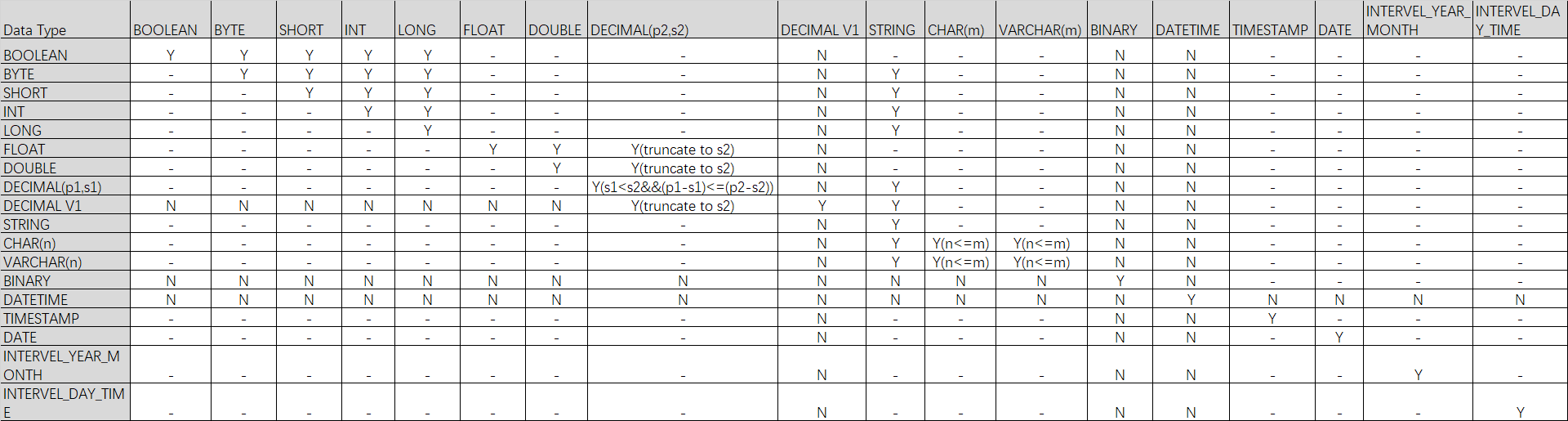
Change column data types
You can change the data type of an existing column. For more information about the constraints, see Usage notes.
Prerequisites
Run the
setproject odps.schema.evolution.enable=true;command to enable schema evolution.Permissions: This is a project-level property. To run this command, you must be the project owner or have the project-level Super_Administrator or Admin role. For more information, see Assign a built-in management role to a user.
Effective time: The change takes effect in approximately 10 minutes.
Syntax
ALTER TABLE <table_name> CHANGE [COLUMN] <old_column_name> <new_column_name> <new_data_type>;Parameters
Parameter
Required
Description
table_name
Yes
The name of the table that contains the column.
old_column_name
Yes
The name of the column to modify.
new_column_name
Yes
The new name of the column.
old_column_name can be the same as new_column_name, which indicates that the column name is not modified. However, new_column_name cannot be the same as the name of any column other than old_column_name.
new_data_type
Yes
The new data type for the column.
Example
-- Change the data type of the id field in the sale_detail table from BIGINT to STRING.
ALTER TABLE sale_detail CHANGE COLUMN id id STRING;
Supported data type conversions
NoteY indicates that the conversion is supported. N indicates that the conversion is not supported. - indicates that the conversion is not applicable. Y() indicates that the conversion is supported if the condition in the parentheses is met.
Change the column order
You can change the column order in an existing non-partitioned or partitioned table. For more information about the constraints, see Usage notes.
Prerequisites
Run the
setproject odps.schema.evolution.enable=true;command to enable schema evolution.Permissions: This is a project-level property. To run this command, you must be the project owner or have the project-level Super_Administrator or Admin role. For more information, see Assign a built-in management role to a user.
Effective time: The change takes effect in approximately 10 minutes.
Syntax
ALTER TABLE <table_name> CHANGE <old_column_name> <new_column_name> <column_type> AFTER <column_name>;Parameters
Parameter
Required
Description
table_name
Yes
The name of the table to modify.
old_column_name
Yes
The name of the column to move.
new_col_name
Yes
The new name of the column.
new_col_name can be the same as old_column_name, which indicates that the column name is not modified. However, new_col_name cannot be the same as any column name other than old_column_name.
column_type
Yes
The original data type of the column. This cannot be changed.
column_name
Yes
Moves the column to be reordered after column_name.
Examples
-- Change the name of the customer column in the sale_detail table to customer_id and move it after the total_price column.
ALTER TABLE sale_detail CHANGE customer customer_id STRING AFTER total_price;

-- Move the customer_id column in the sale_detail table after the total_price column without changing the column name.
ALTER TABLE sale_detail CHANGE customer_id customer_id STRING AFTER total_price;
Change a column name
You can change the name of a column in an existing non-partitioned or partitioned table.
Syntax
ALTER TABLE <table_name> CHANGE COLUMN <old_col_name> RENAME TO <new_col_name>;Parameters
Parameter
Required
Description
table_name
Yes
The name of the table to modify.
old_col_name
Yes
The current name of the column. The column must exist.
new_col_name
Yes
The new name for the column. The column name must be unique within the table.
Example
-- Rename the customer_name column in the sale_detail table to customer.
ALTER TABLE sale_detail CHANGE COLUMN customer_name RENAME TO customer;
Change a column comment
You can change the comment of a column in an existing non-partitioned or partitioned table.
Syntax
ALTER TABLE <table_name> CHANGE COLUMN <col_name> COMMENT '<col_comment>';Parameters
Parameter
Required
Description
table_name
Yes
The name of the table to modify.
col_name
Yes
The name of the column whose comment you want to change. The column must exist.
col_comment
Yes
The new comment, which must be a valid string. The maximum length is 1,024 bytes.
Example
-- Change the comment of the customer column in the sale_detail0113 table.
ALTER TABLE sale_detail0113 CHANGE COLUMN customer COMMENT 'customer';
Change a column name and comment
You can change the name and comment of a column in a non-partitioned or partitioned table.
Syntax
ALTER TABLE <table_name> CHANGE COLUMN <old_col_name> <new_col_name> <column_type> COMMENT '<col_comment>';Parameters
Parameter
Required
Description
table_name
Yes
The name of the table to modify.
old_col_name
Yes
The current name of the column to modify. The column must exist.
new_col_name
Yes
The new name for the column. The column name must be unique within the table.
column_type
Yes
The data type of the column.
col_comment
Optional
The new comment. The maximum length is 1,024 bytes.
Example
-- Change the name of the customer column in the sale_detail table to customer_newname and change its comment to 'customer'.
ALTER TABLE sale_detail CHANGE COLUMN customer customer_newname STRING COMMENT 'customer';
Change the NOT NULL property of a column
You can change the NOT NULL property of a non-partition key column. For example, if a non-partition key column is defined to not allow NULL values, you can use this command to change it to allow NULL values.
This operation is irreversible: you cannot change a column back to disallowing NULL values after allowing them.
Run the
DESC EXTENDED table_name;command to view theNullableproperty and determine whether the column allows NULL values:If
Nullableistrue, NULL values are allowed.If
Nullableisfalse, NULL values are not allowed.
Syntax
ALTER TABLE <table_name> CHANGE COLUMN <old_col_name> NULL;Parameters
Parameter
Required
Description
table_name
Yes
The name of the table to modify.
old_col_name
Yes
The name of the non-partition key column to modify. The column must exist.
Example
-- Create a partitioned table in which the id column cannot be NULL.
CREATE TABLE null_test(id INT NOT NULL, name STRING) PARTITIONED BY (ds string);

-- View table properties.
DESC EXTENDED null_test;
-- The following result is returned:
+------------------------------------------------------------------------------------+
| Native Columns:                                                                    |
+------------------------------------------------------------------------------------+
| Field    | Type   | Label | ExtendedLabel | Nullable | DefaultValue | Comment      |
+------------------------------------------------------------------------------------+
| id       | int    |       |               | false    | NULL         |              |
| name     | string |       |               | true     | NULL         |              |
+------------------------------------------------------------------------------------+
| Partition Columns:                                                                 |
+------------------------------------------------------------------------------------+
| ds              | string     |                                                     |
+------------------------------------------------------------------------------------+

-- Allow the id column to be NULL.
ALTER TABLE null_test CHANGE COLUMN id NULL;
-- View table properties.
DESC EXTENDED null_test;
-- The following result is returned:
+------------------------------------------------------------------------------------+
| Native Columns:                                                                    |
+------------------------------------------------------------------------------------+
| Field    | Type   | Label | ExtendedLabel | Nullable | DefaultValue | Comment      |
+------------------------------------------------------------------------------------+
| id       | int    |       |               | true     | NULL         |              |
| name     | string |       |               | true     | NULL         |              |
+------------------------------------------------------------------------------------+
| Partition Columns:                                                                 |
+------------------------------------------------------------------------------------+
| ds              | string     |                                                     |
+------------------------------------------------------------------------------------+
Compact transactional table files
The underlying physical storage of a transactional table consists of base files and delta files that cannot be read directly. When update or delete operations are performed on a transactional table, only delta files are appended. The base files are not modified. As a result, more updates or deletions lead to greater storage consumption and higher query costs.
Performing multiple update or delete operations on the same table or partition generates a large number of delta files. When reading data, the system loads these delta files to determine which rows are updated or deleted. A large number of delta files degrades data read performance. In this case, compact the base files and delta files to reduce storage and improve data read performance.
Syntax
ALTER TABLE <table_name> [PARTITION (<partition_key> = '<partition_value>' [, ...])] compact {minor|major};Parameters
table_name: Required. The name of the transactional table whose files are to be compacted.
partition_key: Optional. The partition column name if the transactional table is a partitioned table.
partition_value: Optional. The partition column value if the transactional table is a partitioned table.
major|minor: Specify at least one. The differences are as follows:
minor: Merges the base files and all associated delta files to eliminate delta files.major: Not only merges the base files and all associated delta files to eliminate delta files, but also merges small files among the base files of the table. When base files are small (less than 32 MB) or delta files exist, this is equivalent to performing aninsert overwriteoperation on the table. However, when base files are sufficiently large (32 MB or more) and no delta files exist, no rewrite occurs.
Examples
Example 1: Compact files of the transactional table acid_delete.
ALTER TABLE acid_delete compact minor;Sample output:
Summary:
Nothing found to merge, set odps.merge.cross.paths=true IF cross path merge is permitted.
OK
Example 2: Compact files of the transactional table acid_update_pt.
ALTER TABLE acid_update_pt PARTITION (ds = '2019') compact major;Sample output:
Summary:
table name: acid_update_pt /ds=2019  instance count: 2  run time: 6
  before merge, file count:        8  file size: 2613  file physical size: 7839
   after merge, file count:        2  file size: 679  file physical size: 2037

OK
Merge small files
A distributed file system stores data in blocks. Files smaller than the block size (64 MB) are called small files. Distributed systems inevitably produce small files, such as SQL or other distributed engine computation results and Tunnel data ingestion output. Merging small files can improve computing performance.
Syntax
ALTER TABLE <tablename> [PARTITION(<partition_key>=<partition_value>)] MERGE SMALLFILES;Parameters
table_name: Required. The name of the table whose files are to be merged.
partition_key: Optional. The partition column name if the table is a partitioned table.
partition_value: Optional. The partition column value if the table is a partitioned table.
Examples
SET odps.merge.cross.paths=true;
SET odps.merge.smallfile.filesize.threshold=128;
SET odps.merge.max.filenumber.per.instance = 2000;
ALTER TABLE tbcdm.dwd_tb_log_pv_di PARTITION (ds='20151116') MERGE smallfiles;
The merge small files feature requires computing resources. For pay-as-you-go instances, this operation incurs fees. The billing rules are the same as SQL pay-as-you-go billing. For more information, see Compute pricing (pay-as-you-go).
For more information, see Merge small files.
Related statements
CREATE TABLE: Creates a non-partitioned table, partitioned table, external table, or clustered table.
TRUNCATE TABLE: Truncates data in a specified table.
DROP TABLE: Drops a partitioned or non-partitioned table.
DESC TABLE/VIEW: Views information about MaxCompute internal tables, views, materialized views, external tables, clustered tables, or transactional tables.
SHOW: Views the SQL DDL statement of a table, lists all tables and views in a project, or lists all partitions of a table.\