MaxCompute lets you modify columns in existing tables. You can add or delete columns and change column data types to meet your business requirements.
Commands
The following table describes the MaxCompute SQL commands for column operations.
Actions | Description | Role | Platform |
Adds columns or comments to an existing non-partitioned or partitioned table. | Users with the Alter permission on the table | You can run these commands on the following platforms: | |
Deletes columns from an existing non-partitioned or partitioned table. | |||
Changes the data type of an existing column. | |||
Adjusts the order of a specified column in a table. | |||
Changes the name of a column in an existing non-partitioned or partitioned table. | |||
Changes the comment of a column in an existing non-partitioned or partitioned table. | |||
Changes the name and comment of a column in an existing non-partitioned or partitioned table simultaneously. | |||
Changes the NOT NULL property of a non-partition key column. |
Usage notes
Schema evolution involves operations like adding columns with complex data types, deleting columns, reordering columns, and changing column data types. When you reorder columns, add and then reorder columns, or delete columns, the table's read and write behavior is affected, and the following limitations apply:
If the job type is MapReduce 1.0, Graph tasks cannot read data from or write data to the modified table.
For CUPID jobs, only the following Spark versions can read data from the table. You cannot write data to the table.
Spark-2.3.0-odps0.34.0
Spark-3.1.1-odps0.34.0
PAI jobs can read data from the table, but cannot write data to it.
For Hologres jobs, if you use a Hologres version earlier than 1.3, you cannot read from or write to the modified table when referencing it as a foreign table.
After schema evolution, CLONE TABLE is not supported.
Streaming Tunnel reports an error if schema evolution has occurred.
Add columns or comments
You can add columns or comments to an existing non-partitioned or partitioned table. For more information about the constraints, see Usage notes. MaxCompute supports adding columns of the STRUCT type, such as STRUCT<x: STRING, y: BIGINT> and MAP<STRING, STRUCT<x: DOUBLE, y: DOUBLE>>.
Prerequisites
Run the
setproject odps.schema.evolution.enable=true;command to enable schema evolution.Permissions: This is a project-level property. To run this command, you must be the project owner or have the project-level Super_Administrator or Admin role. For more information, see Assign a built-in management role to a user.
Effective time: The change takes effect in approximately 10 minutes.
Syntax
ALTER TABLE <table_name>
  ADD COLUMNS [IF NOT EXISTS]
  (<col_name1> <type1> COMMENT ['<col_comment>']
  [, <col_name2> <type2> COMMENT '<col_comment>'...]
  );
Parameters
Parameter
Required
Description
table_name
Yes
The name of the table to modify. New columns are added to the end of the table.
col_name
Yes
The name of the new column.
type
Yes
The data type of the new column.
col_comment
No
The comment for the new column.
Examples
Example 1: Add two columns to the sale_detail table.
ALTER TABLE sale_detail ADD COLUMNS IF NOT EXISTS(customer_name STRING, education BIGINT);Example 2: Add two columns with comments to the sale_detail table.
ALTER TABLE sale_detail ADD COLUMNS (customer_name STRING COMMENT 'Customer', education BIGINT COMMENT 'Education' );Example 3: Add a column of a complex data type to the sale_detail table.
ALTER TABLE sale_detail ADD COLUMNS (region_info struct<province:string, area:string>);Example 4: If you use IF NOT EXISTS to add a column that already exists, the command returns a success message without adding the column again.
-- The statement is successful, but the ID column is not repeatedly added.
ALTER TABLE sale_detail ADD COLUMNS IF NOT EXISTS(id bigint);
Example 5: Add a column to a Delta table.
CREATE TABLE delta_table_test (pk BIGINT NOT NULL PRIMARY KEY, val BIGINT)
  TBLPROPERTIES ("transactional"="true");

ALTER TABLE delta_table_test ADD COLUMNS (val2 bigint);
Delete columns
You can delete one or more columns from an existing non-partitioned or partitioned table. For more information about the constraints, see Usage notes.
Prerequisites
Run the
setproject odps.schema.evolution.enable=true;command to enable schema evolution.Permissions: This is a project-level property. To run this command, you must be the project owner or have the project-level Super_Administrator or Admin role. For more information, see Assign a built-in management role to a user.
Effective time: The change takes effect in approximately 10 minutes.
Syntax
-- Delete a single column.
ALTER TABLE <table_name> DROP COLUMN <col_name>;

-- Delete multiple columns.
ALTER TABLE <table_name> DROP COLUMNS <col_name1>[, <col_name2>...];
Parameters
table_name: Required. The name of the table to modify.
col_name: Required. The name of the column to delete.
Examples
-- Example 1: Delete the customer_id column from the sale_detail table.
ALTER TABLE sale_detail DROP COLUMNS customer_id;

-- Example 2: Delete the shop_name and total_price columns from the sale_detail table.
ALTER TABLE sale_detail DROP COLUMNS shop_name, total_price;
Change column data types
You can change the data type of an existing column. For more information about the constraints, see Usage notes.
Prerequisites
Run the
setproject odps.schema.evolution.enable=true;command to enable schema evolution.Permissions: This is a project-level property. To run this command, you must be the project owner or have the project-level Super_Administrator or Admin role. For more information, see Assign a built-in management role to a user.
Effective time: The change takes effect in approximately 10 minutes.
Syntax
ALTER TABLE <table_name> CHANGE [COLUMN] <old_column_name> <new_column_name> <new_data_type>;Parameters
Parameter
Required
Description
table_name
Yes
The name of the table that contains the column.
old_column_name
Yes
The name of the column to modify.
new_column_name
Yes
The new name of the column.
old_column_name can be the same as new_column_name, which indicates that the column name is not modified. However, new_column_name cannot be the same as the name of any column other than old_column_name.
new_data_type
Yes
The new data type for the column.
Example
-- Change the data type of the id field in the sale_detail table from BIGINT to STRING.
ALTER TABLE sale_detail CHANGE COLUMN id id STRING;
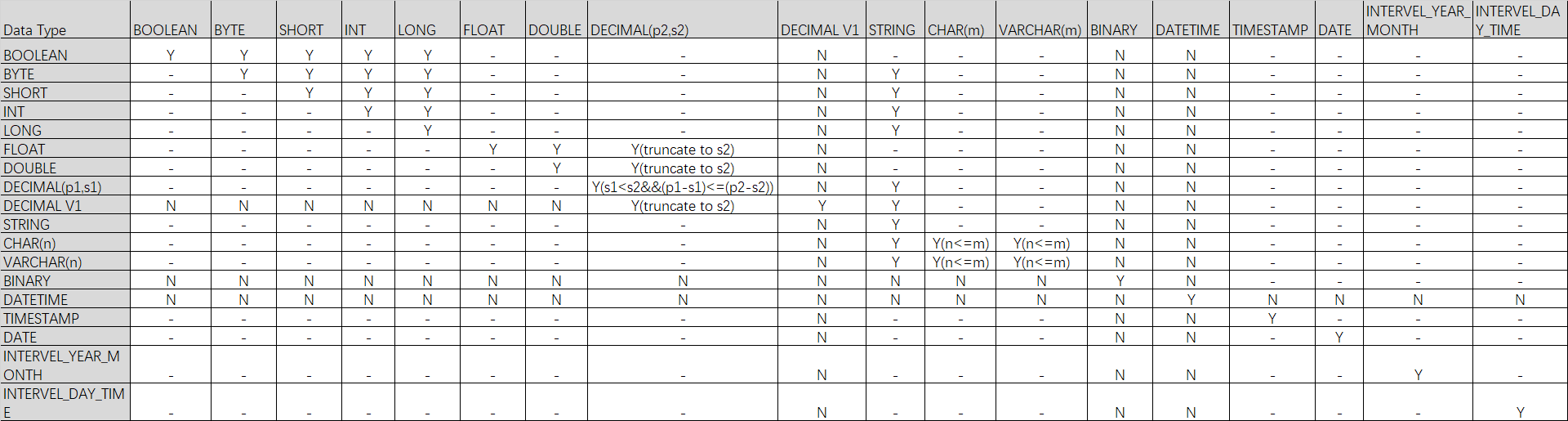
Supported data type conversions
NoteY indicates that the conversion is supported. N indicates that the conversion is not supported. - indicates that the conversion is not applicable. Y() indicates that the conversion is supported if the condition in the parentheses is met.
Change the column order
You can change the column order in an existing non-partitioned or partitioned table. For more information about the constraints, see Usage notes.
Prerequisites
Run the
setproject odps.schema.evolution.enable=true;command to enable schema evolution.Permissions: This is a project-level property. To run this command, you must be the project owner or have the project-level Super_Administrator or Admin role. For more information, see Assign a built-in management role to a user.
Effective time: The change takes effect in approximately 10 minutes.
Syntax
ALTER TABLE <table_name> CHANGE <old_column_name> <new_column_name> <column_type> AFTER <column_name>;Parameters
Parameter
Required
Description
table_name
Yes
The name of the table to modify.
old_column_name
Yes
The name of the column to move.
new_col_name
Yes
The new name of the column.
new_col_name can be the same as old_column_name, which indicates that the column name is not modified. However, new_col_name cannot be the same as any column name other than old_column_name.
column_type
Yes
The original data type of the column. This cannot be changed.
column_name
Yes
Moves the column to be reordered after column_name.
Examples
-- Change the name of the customer column in the sale_detail table to customer_id and move it after the total_price column.
ALTER TABLE sale_detail CHANGE customer customer_id STRING AFTER total_price;

-- Move the customer_id column in the sale_detail table after the total_price column without changing the column name.
ALTER TABLE sale_detail CHANGE customer_id customer_id STRING AFTER total_price;
Change a column name
You can change the name of a column in an existing non-partitioned or partitioned table.
Syntax
ALTER TABLE <table_name> CHANGE COLUMN <old_col_name> RENAME TO <new_col_name>;Parameters
Parameter
Required
Description
table_name
Yes
The name of the table to modify.
old_col_name
Yes
The current name of the column. The column must exist.
new_col_name
Yes
The new name for the column. The column name must be unique within the table.
Example
-- Rename the customer_name column in the sale_detail table to customer.
ALTER TABLE sale_detail CHANGE COLUMN customer_name RENAME TO customer;
Change a column comment
You can change the comment of a column in an existing non-partitioned or partitioned table.
Syntax
ALTER TABLE <table_name> CHANGE COLUMN <col_name> COMMENT '<col_comment>';Parameters
Parameter
Required
Description
table_name
Yes
The name of the table to modify.
col_name
Yes
The name of the column whose comment you want to change. The column must exist.
col_comment
Yes
The new comment, which must be a valid string. The maximum length is 1,024 bytes.
Example
-- Change the comment of the customer column in the sale_detail0113 table.
ALTER TABLE sale_detail0113 CHANGE COLUMN customer COMMENT 'customer';
Change a column name and comment
You can change the name and comment of a column in a non-partitioned or partitioned table.
Syntax
ALTER TABLE <table_name> CHANGE COLUMN <old_col_name> <new_col_name> <column_type> COMMENT '<col_comment>';Parameters
Parameter
Required
Description
table_name
Yes
The name of the table to modify.
old_col_name
Yes
The current name of the column to modify. The column must exist.
new_col_name
Yes
The new name for the column. The column name must be unique within the table.
column_type
Yes
The data type of the column.
col_comment
Optional
The new comment. The maximum length is 1,024 bytes.
Example
-- Change the name of the customer column in the sale_detail table to customer_newname and change its comment to 'customer'.
ALTER TABLE sale_detail CHANGE COLUMN customer customer_newname STRING COMMENT 'customer';
Change the NOT NULL property of a column
You can change the NOT NULL property of a non-partition key column. For example, if a non-partition key column is defined to not allow NULL values, you can use this command to change it to allow NULL values.
This operation is irreversible: you cannot change a column back to disallowing NULL values after allowing them.
Run the
DESC EXTENDED table_name;command to view theNullableproperty and determine whether the column allows NULL values:If
Nullableistrue, NULL values are allowed.If
Nullableisfalse, NULL values are not allowed.
Syntax
ALTER TABLE <table_name> CHANGE COLUMN <old_col_name> NULL;Parameters
Parameter
Required
Description
table_name
Yes
The name of the table to modify.
old_col_name
Yes
The name of the non-partition key column to modify. The column must exist.
Example
-- Create a partitioned table in which the id column cannot be NULL.
CREATE TABLE null_test(id INT NOT NULL, name STRING) PARTITIONED BY (ds string);

-- View table properties.
DESC EXTENDED null_test;
-- The following result is returned:
+------------------------------------------------------------------------------------+
| Native Columns:                                                                    |
+------------------------------------------------------------------------------------+
| Field    | Type   | Label | ExtendedLabel | Nullable | DefaultValue | Comment      |
+------------------------------------------------------------------------------------+
| id       | int    |       |               | false    | NULL         |              |
| name     | string |       |               | true     | NULL         |              |
+------------------------------------------------------------------------------------+
| Partition Columns:                                                                 |
+------------------------------------------------------------------------------------+
| ds              | string     |                                                     |
+------------------------------------------------------------------------------------+

-- Allow the id column to be NULL.
ALTER TABLE null_test CHANGE COLUMN id NULL;
-- View table properties.
DESC EXTENDED null_test;
-- The following result is returned:
+------------------------------------------------------------------------------------+
| Native Columns:                                                                    |
+------------------------------------------------------------------------------------+
| Field    | Type   | Label | ExtendedLabel | Nullable | DefaultValue | Comment      |
+------------------------------------------------------------------------------------+
| id       | int    |       |               | true     | NULL         |              |
| name     | string |       |               | true     | NULL         |              |
+------------------------------------------------------------------------------------+
| Partition Columns:                                                                 |
+------------------------------------------------------------------------------------+
| ds              | string     |                                                     |
+------------------------------------------------------------------------------------+
References
For more information about table operations, see the following topics: