Configure sales information when you publish service products on Alibaba Cloud Marketplace.
1.Sales Mode
Sales mode determines how customers purchase the product. ISVs can select a proper sales mode for their product.
1.1 Package
In this mode, customers buy your product once and use it within the validity period. During the valid period, customers do not need to renew. After the valid period expires, customers must purchase it again to get a new valid period.
1.2 Subscription
In this mode, customers subscribe to your product. You can set prices for both new purchases and renewals. The first subscription period follows the new purchase price, and subsequent subscription periods are based on the renewal price.
2.SKU Configuration
2.1 SKU Number
Up to 200 SKUs are supported (including hidden SKUs).
2.2 SKU Name
-
The SKU name can contain up to 50 characters, numbers, or letters.
-
An SKU can be deleted before you proceed to the next step or before the product is published.
2.3 SKU Availablity
-
An SKU can be hidden but cannot be deleted after it is published.
-
Customers can neither see the hidden SKU nor purchase it. However, if a customer has already purchased it, the SKU can be renewed.
-
At least one SKU must not be hidden.
2.4 SKU Code
The SKU code identifies the product SKU that a customer purchased in SPI production notifications. After the product is published, Alibaba Cloud generates the code automatically. You can check it by managing the product.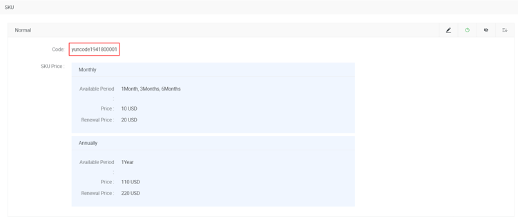
2.5 SKU Sequence
You can change the SKU display order by clicking the button.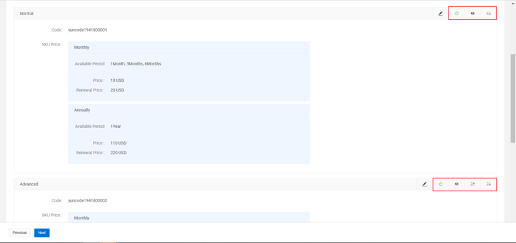 You can also hide and close (stop selling) an SKU.
2.6 Extra Billing Term
Extra Billing Term provides additional billing capabilities to ISVs so that they can publish products with complex pricing policies.
Each SKU can contain several different extra billing terms.
Each extra billing term consists of a name, type, parameter, and unit.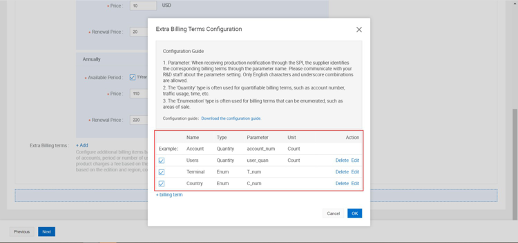
2.6.1 Attributes
2.6.1.1 Type
There are two types of extra billing terms: quantity and enumeration.
-
If you want your product to be priced by a quantity-based attribute, add a billing term of quantity. For example, the product price varies with the number of authorized accounts or licenses.
-
If you want your product to be priced by an enumeration-based attribute, add a billing term of enumeration. For example, the product price varies with the delivery region.
2.6.1.2 Name
You can customize the name of your extra billing term. The name should consist of numbers and underscores.
2.6.1.3 Paramater
You can customize the parameter name of your extra billing term. The name should consist of numbers and underscores.
Because Alibaba Cloud notifies production to you through SPI, your R&D team should recognize the parameters. Make sure they know the actual meaning of the
parameters.
2.6.1.4 Unit
Only available in quantity type.
2.6.2 Price of QuantityTerm
There are two pricing models for quantity terms.
2.6.2.1 Fixed Unit Price
In this model, you can set a fixed unit price.
For example, if you set 120 USD/Person, when a customer selects 2 people, the price on this billing term will be 240 USD.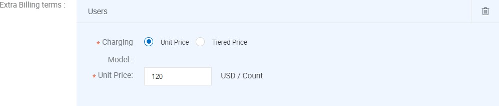
2.6.2.2 Tiered Price
In this model, you can set different prices for different tiers.
For example, you can set 120 USD/User for fewer than 5 people and 100 USD/Person
for more than 5 people. When a customer selects 7 people, the price on this billing term will be 100*7 = 700 USD.
Note: If more than 5 users, ALL users will be priced at 100 USD/User.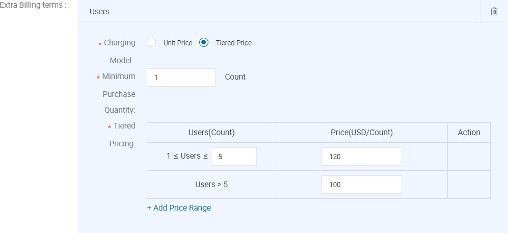
2.6.3 Price of Enumeration Term
You can set several items with different prices.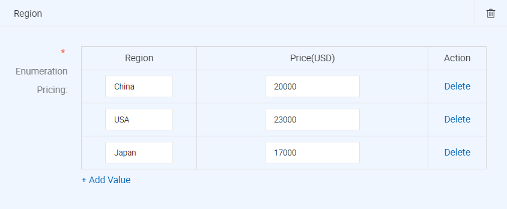
3.Examples
3.1 Simple example without extra billing terms
Demo link (please do not buy it):
https://marketplace.alibabacloud.com/products/56714002/sgcmfw00025418.html
Product Name: Data Analyze Service (Simple)
Version: 'Normal', 'Advanced', 'Ultimate'
Sale Mode: Subscription:
-
'Normal' version supports 1/3/6 months and 1 year
-
'Advanced' version supports 6 months and 1 year
-
'Ultimate' version supports 1 and 2 years.
Price: Take one version for example:
-
Normal-New:10 USD/month, 110 USD/year
-
Normal-Renew: 20 USD/month, 220 USD/year
Step1: Select pricing plan as Subscription.
Step2: Create SKU named 'Normal'.
Step3: Select both 'Monthly' and 'Annually', then select 1/3/6 months and 1 year.
Step4: Fill in the price as below and save the SKU.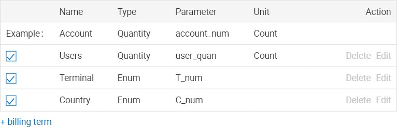
Step5: Repeat Step2~Step4 to create the 'Advanced' and 'Ultimate' version.
Finally the product detail page shows as follows: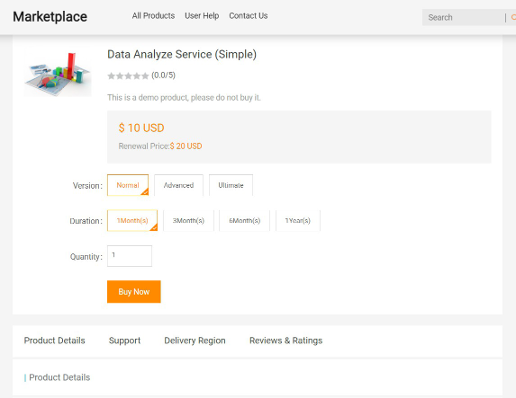
3.2 Complex example with extra billing terms
Demo link (please do not buy it): https://marketplace.alibabacloud.com/products/56714002/sgcmfw00025420.html
Product Name: Data Analyze Service (Complex)
Version: 'Normal', 'Advanced', 'Ultimate'
Sale Mode: Subscription. (In this section, we only take Normal version as example.)
-
'Normal' version supports 1/3/6 months and 1 year
Price:
-
Normal-New: 10 USD/month, 110 USD/year
-
Normal-Renew: 20 USD/month, 220 USD/year
Extra Billing Terms: Users, Terminal, Country
-
Users: Normal version supports at least 5 users.
-
1 USD/person/month, 12 USD/person/year
-
Tiered Price: more than 10 people, 1 USD/person/month, 10 USD/person/year
-
-
Terminal: Normal version supports 'PC' and 'PC+Mobile'
-
PC: 20 USD/month, 240 USD/year
-
PC+Mobile: 50 USD/month, 600 USD/year
-
-
Country: Normal version supports Japan and Singapore
-
Japan: 40 USD/month, 480 USD/year
-
Singapore: 20 USD/month, 240 USD/year
Note: The renewal prices are the same as the first purchase prices.
To achieve this pricing policy, follow these steps.
Step1: Create the 'Normal' SKU and set the monthly and yearly price as the previous example shows.
Step2: Click 'Add' and create the extra billing terms as follows:
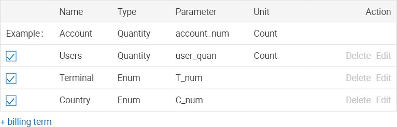
Step3: Click 'OK' to save the configuration. All extra billing terms are created and you need to set the price.
Step4: Let's select 'Tiered Price' for 'Users'.
Step5: Fill in the price as follows. Step6: Save the SKU.
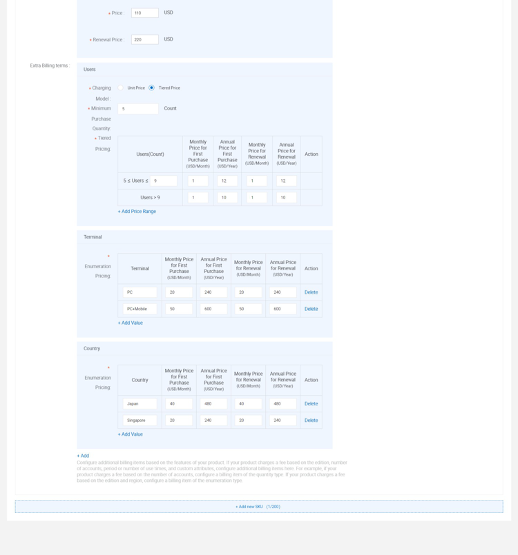
Step6: Save the SKU.
Step7: Repeat Step1~Step6 to create the 'Advanced' and 'Ultimate' version.
-
Finally the product detail page shows as follows: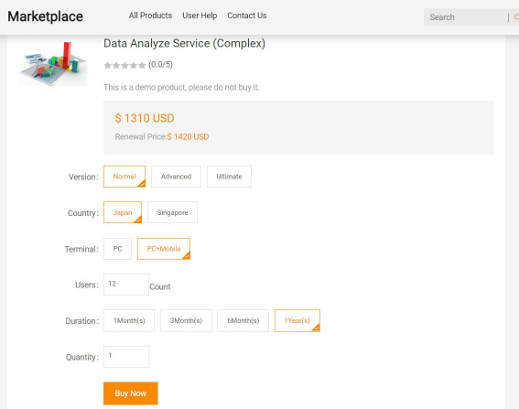
The total price shown in the screenshot above is calculated as follows:
-
Normal version, new purchase, 1 year: so it's 110 USD
-
Number of Users: 12 users, so it's 120 USD (10 USD/person/year * 12 people)
-
Terminal: PC+Mobile, so it's 600 USD
-
Country: Japan, so it's 480 USD
Total: 110 USD + 120 USD + 600 USD + 480 USD = 1310 USD