RTS (RTS) is based on Web Real-Time Communication (WebRTC) signaling interactions. RTS leverages the global coverage and advanced scheduling algorithms of Alibaba Cloud's live streaming nodes. This topic describes the signaling protocol for standard WebRTC access to GRTN and is intended for developers who have a basic understanding of WebRTC.
Background information
ApsaraVideo Live provides the RTS (RTS) value-added feature to address latency issues, which can be 3 to 6 seconds or more when using TCP. RTS uses the UDP protocol and provides an easy-to-integrate, millisecond-latency, high-concurrency, and high-definition live streaming experience. RTS is designed to build an open and standard ecosystem. In addition to the dedicated RTS SDK from Alibaba Cloud, RTS supports custom clients that use WebRTC-like signaling to ingest and pull audio and video streams from live streaming nodes. This allows customers to use the Alibaba Cloud RTS service on a large scale in a convenient and self-managed way.
GRTN now offers resilience for poor network conditions.
Prerequisites
- You have activated ApsaraVideo Live. For more information, see Get started with ApsaraVideo Live.
- You have enabled the RTS feature. For more information, see Step 5: Enable Real-Time Streaming (RTS).
- You have configured an HTTPS certificate for your domain name. For more information, see Configure HTTPS secure acceleration.
Signaling interaction flow
The following figure shows the signaling interaction flow:
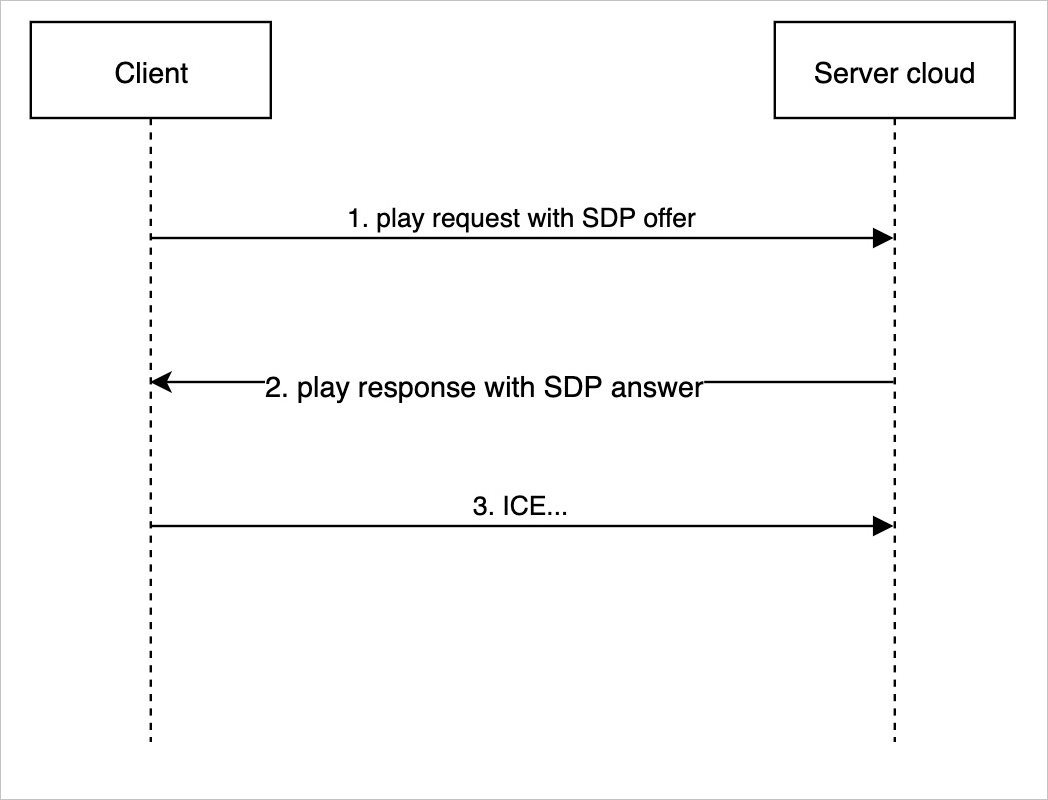
Signaling interaction flow
- The client sends an offer request.
- The client creates a local RTCPeerConnection, sets the Stream Direction property for receiving audio and video, and creates an offer SDP.
// Enable audio and video, recvonly or sendonly { offerToReceiveVideo: true, offerToReceiveAudio: true } - The client sends a stream pulling request in JSON format to the ApsaraVideo Live service over an HTTPS POST request. For more information about the protocol format, see Signaling protocol definition.
versionfield specifies the protocol version. The current version is fixed at 2.sdk_versionfield specifies the SDK version. You can customize this field.
- After the protocol content is generated, the client sends it to the signaling endpoint of the ApsaraVideo Live service in a POST request to complete the signaling interaction. The JSON body of the request contains the stream URL to pull.
POST /app/streamname?auth=xxx HTTP/1.1
Host: domain
Connection: keep-alive
Content-Length: 2205
Content-Type: application/json
Note The signaling endpoint is almost the same as the stream URL, but the protocol prefix is different:- Signaling endpoint:
https://domain/app/streamname?auth=xxx. - Stream URL:
artc://domain/app/streamname?auth=xxx.
- Signaling endpoint:
- The client creates a local RTCPeerConnection, sets the Stream Direction property for receiving audio and video, and creates an offer SDP.
- The server responds with an SDP answer.
The ApsaraVideo Live server verifies the security of the request, generates an SDP answer, and returns the node information to the client in the response body. For more information about the protocol format, see Signaling protocol definition.
- The client establishes an ICE connection.
- After the client receives the SDP answer, it sets the answer on the RTCPeerConnection.
peerConnection.setRemoteDescription(new RTCSessionDescription(answer.jsep)); - The RTCPeerConnection starts the ICE connection establishment process and the subsequent DTLS process. After the media channel is established, the client can receive the media stream from the ApsaraVideo Live service. This completes the standard WebRTC access for stream pulling and playback.
- After the client receives the SDP answer, it sets the answer on the RTCPeerConnection.
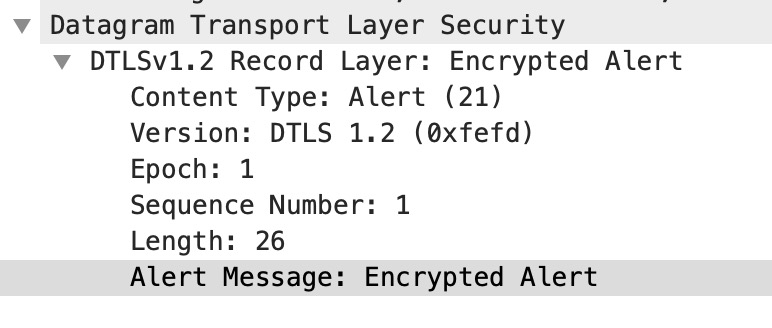
- Disconnect.
To disconnect and stop stream ingest or playback, the client sends a DTLS Alert message.
// Create peer connection and local offer sdp.
peerConnection = new RTCPeerConnection();
peerConnection.onicecandidate = iceCandidateCallback;
peerConnection.ontrack = remoteStreamCallback;
peerConnection.createOffer({ offerToReceiveVideo: true, offerToReceiveAudio: true })
      .then(signaling_pull).catch(errorHandler);


// Send a stream pulling request to ApsaraVideo Live.
function signaling_pull(offer_sdp) {
  console.log('local offer sdp', offer_sdp);

  peerConnection.setLocalDescription(offer_sdp).then(function() {
    // Get the stream pulling URL.
    var stream_url = $("#stream_url").val();
    console.log("stream url:" , stream_url);

    // Add sdk and protocol versions.
    var protocol_version = 2;
    var sdk_version = "0.0.1";

    $.ajax({url: stream_url, data: JSON.stringify({
          mode: "live",
          version: protocol_version,
          sdk_version: sdk_version,
          jsep:description,
      }),
      type: "post",
      success:function(result){
          var signal = JSON.parse(result);
          peerConnection.setRemoteDescription(new RTCSessionDescription(signal.jsep)).then(function() {
              console.log("get remote answer sdp: ", signal.jsep.sdp);
          }).catch(errorHandler);
      }});
  }).catch(errorHandler);
}
Signaling protocol definition
The RTS signaling protocol uses HTTPS (short-lived connections) and the JSON format. The following is a sample:
{
    "version":2,
    "sdk_version":"0.0.1",
    "mode":"live",
    "pull_streams":[
        {
            "url":"artc://your.domain.com/live/testname",
            "amsid":[
                "rts audio"
            ],
            "vmsid":[
                "rts video"
            ]
        }
    ],
    "jsep":{
        "type":"offer",
        "sdp":"v=0\n\ro=- 6839248142876176651 2 IN IP4 127.0.0.1\n\rs=-\n\r... Omitted ..."
    }
}
Playback
- Playback protocol description
Table 1. Request parameters Parameter Type Required Description mode string Yes The mode. Set the value to live. version int Yes The protocol version number. Set the value to 2. push_stream string No The stream ingest URL. pull_streams []object No The stream pulling object. Multiple streams can be pulled. For more information, see the following table. sdk_version string No The SDK version number. jsep.type string Yes The SDP type. Set the value to offer. jsep.sdp string Yes The SDP description. Table 2. pull_stream parameters Field Type Required Description url string Yes The stream pulling URL. Example: artc://<pull_stream_url>.amsid []string Yes The audio msid for stream pulling. In live streaming scenarios, set the value to rts audio.vmsid []string Yes The video msid for stream pulling. In live streaming scenarios, set the value to rts video.Table 3. Response parameters Field Type Required Description code int Yes The return code. A value of 200 indicates a success. For more information about error codes, see the error code description table below. trace_id string Yes A globally unique request ID generated by CDN. Save this ID to help locate and troubleshoot requests. jsep.type string Yes The SDP type. Set the value to answer. jsep.sdp string Yes The SDP generated by Alibaba Cloud CDN for origin fetch. - Playback request example
Request: { "version":2, "sdk_version":"0.0.1", "mode":"live", "pull_streams":[ { "url":"artc://your.domain.com/live/testname", "amsid":[ "rts audio" ], "vmsid":[ "rts video" ] } ], "jsep":{ "type":"offer", "sdp":"v=0\n\ro=- 6839248142876176651 2 IN IP4 127.0.0.1\n\rs=-\n\r... Omitted ..." } } Response: { "trace_id":"2_1591173296_101.227.0.169_702080732320_dec327eb6eed0e0b07b349c8a5653eca", "code":200, "jsep":{ "type":"answer", "sdp":"v=0\r\no=- 1591173291 2 IN IP4 127.0.0.1\n\r ... Omitted ..." } }sps-pps-idr-in-keyframe: To prevent video artifacts during playback on poor networks, modify the SDP.
After an offer is generated for an H5 subscription stream (recvonly) and before you call setLocalDescription, modify the SDP. Find the line in the H.264 video properties that is similar to the following:a=fmtp:127 level-asymmetry-allowed=1;packetization-mode=1;profile-level-id=42001fAdd sps-pps-idr-in-keyframe=1 to the line:a=fmtp:127 level-asymmetry-allowed=1;packetization-mode=1;profile-level-id=42001f;sps-pps-idr-in-keyframe=1GRTN responds to this change and enables the feature in the browser.
- Error handling
If the signaling request is valid, the server returns a 200 response. To obtain the specific result, parse the code property in the JSON response body. The code property follows an HTTP response code pattern. The following is a sample:
Response:
{
   "code": 200, // 200: Success. For non-200 codes, see the definitions below.
   "message": "success"  // Description for non-200 error codes.
}
Table 4. Response parameters Parameter Type Description code int The response code. For more information about the format and definitions, see the following table. message string The error description. Table 5. Error code descriptions Error code Description 403 Authentication failed. 404 The stream does not exist. 611 The client must fall back to TCP for playback. 302 The client must send a new signaling request to a new service endpoint.
Stream ingest
- Stream ingest protocol description
Table 6. Request parameters Parameter Type Required Description mode string Yes The mode. Set the value to live. version int Yes The protocol version number. Set the value to 2. push_stream string No The stream ingest URL. sdk_version string No The SDK version number. jsep.type string Yes The SDP type. Set the value to offer. jsep.sdp string Yes The SDP description. Table 7. Response parameters Field Type Required Description code int Yes The return code. A value of 200 indicates a success. For more information about error codes, see the error code description table below. trace_id string Yes A globally unique request ID generated by CDN. Save this ID to help locate and troubleshoot requests. jsep.type string Yes The SDP type. Set the value to answer. jsep.sdp string Yes The SDP generated by Alibaba Cloud CDN for origin fetch. - Stream ingest request example
Request:
{
    "version":2,
    "sdk_version":"0.0.1",
    "mode":"rtc",
    "push_stream":"artc://host/app/name",
    "jsep":{
        "type":"offer",
        "sdp":"v=0\r\no=- 1385856200224536561 2 IN IP4 127.0.0.1\r\ns=-\r\nt=0 0\r\na=group:BUNDLE 0 1 2\r\na=extmap-allow-mixed\r\na=msid-semantic: WMS rts\r\nm=audio 9 UDP/TLS/RTP/SAVPF 111 63 103 104 9 0 8 106 105 13 110 112 113 126\r\nc=IN IP4 0.0.0.0\r\na=rtcp:9 IN IP4 0.0.0.0\r\na=ice-ufrag:iQyM\r\na=ice-pwd:D3GXKCcUGvW9djaAozff5ppT\r\na=ice-options:trickle\r\na=fingerprint:sha-256 20:50:72:9B:A2:C0:D8:50:AD:D0:EF:A7:62:8F:EF:C3:AB:86:D5:B6:3E:17:22:69:79:5B:CE:E8:42:33:B5:E4\r\na=setup:actpass\r\na=mid:0\r\na=extmap:1 urn:ietf:params:rtp-hdrext:ssrc-audio-level\r\na=extmap:2 http://www.webrtc.org/experiments/rtp-hdrext/abs-send-time\r\na=extmap:3 http://www.ietf.org/id/draft-holmer-rmcat-transport-wide-cc-extensions-01\r\na=extmap:4 urn:ietf:params:rtp-hdrext:sdes:mid\r\na=sendrecv\r\na=msid:rts audio\r\na=rtcp-mux\r\na=rtpmap:111 opus/48000/2\r\na=rtcp-fb:111 transport-cc\r\na=rtcp-fb:111 nack\r\na=fmtp:111 minptime=10;useinbandfec=1\r\na=rtpmap:63 red/48000/2\r\na=fmtp:63 111/111\r\na=rtpmap:103 ISAC/16000\r\na=rtpmap:104 ISAC/32000\r\na=rtpmap:9 G722/8000\r\na=rtpmap:0 PCMU/8000\r\na=rtpmap:8 PCMA/8000\r\na=rtpmap:106 CN/32000\r\na=rtpmap:105 CN/16000\r\na=rtpmap:13 CN/8000\r\na=rtpmap:110 telephone-event/48000\r\na=rtpmap:112 telephone-event/32000\r\na=rtpmap:113 telephone-event/16000\r\na=rtpmap:126 telephone-event/8000\r\na=ssrc:3411287802 cname:s4eR7OuKnnPL0vKS\r\na=ssrc:3411287802 msid:rts audio\r\na=ssrc:3411287802 mslabel:rts\r\na=ssrc:3411287802 label:audio\r\nm=video 9 UDP/TLS/RTP/SAVPF 96 97 98 99 100 101 127 121 125 107 108 109 124 120 123 119 35 36 41 42 114 115 116 117 118\r\nc=IN IP4 0.0.0.0\r\na=rtcp:9 IN IP4 0.0.0.0\r\na=ice-ufrag:iQyM\r\na=ice-pwd:D3GXKCcUGvW9djaAozff5ppT\r\na=ice-options:trickle\r\na=fingerprint:sha-256 20:50:72:9B:A2:C0:D8:50:AD:D0:EF:A7:62:8F:EF:C3:AB:86:D5:B6:3E:17:22:69:79:5B:CE:E8:42:33:B5:E4\r\na=setup:actpass\r\na=mid:1\r\na=extmap:14 urn:ietf:params:rtp-hdrext:toffset\r\na=extmap:2 http://www.webrtc.org/experiments/rtp-hdrext/abs-send-time\r\na=extmap:13 urn:3gpp:video-orientation\r\na=extmap:3 http://www.ietf.org/id/draft-holmer-rmcat-transport-wide-cc-extensions-01\r\na=extmap:5 http://www.webrtc.org/experiments/rtp-hdrext/playout-delay\r\na=extmap:6 http://www.webrtc.org/experiments/rtp-hdrext/video-content-type\r\na=extmap:7 http://www.webrtc.org/experiments/rtp-hdrext/video-timing\r\na=extmap:8 http://www.webrtc.org/experiments/rtp-hdrext/color-space\r\na=extmap:4 urn:ietf:params:rtp-hdrext:sdes:mid\r\na=extmap:10 urn:ietf:params:rtp-hdrext:sdes:rtp-stream-id\r\na=extmap:11 urn:ietf:params:rtp-hdrext:sdes:repaired-rtp-stream-id\r\na=sendrecv\r\na=msid:rts video\r\na=rtcp-mux\r\na=rtcp-rsize\r\na=rtpmap:96 VP8/90000\r\na=rtcp-fb:96 goog-remb\r\na=rtcp-fb:96 transport-cc\r\na=rtcp-fb:96 ccm fir\r\na=rtcp-fb:96 nack\r\na=rtcp-fb:96 nack pli\r\na=rtpmap:97 rtx/90000\r\na=fmtp:97 apt=96\r\na=rtpmap:98 VP9/90000\r\na=rtcp-fb:98 goog-remb\r\na=rtcp-fb:98 transport-cc\r\na=rtcp-fb:98 ccm fir\r\na=rtcp-fb:98 nack\r\na=rtcp-fb:98 nack pli\r\na=fmtp:98 profile-id=0\r\na=rtpmap:99 rtx/90000\r\na=fmtp:99 apt=98\r\na=rtpmap:100 VP9/90000\r\na=rtcp-fb:100 goog-remb\r\na=rtcp-fb:100 transport-cc\r\na=rtcp-fb:100 ccm fir\r\na=rtcp-fb:100 nack\r\na=rtcp-fb:100 nack pli\r\na=fmtp:100 profile-id=2\r\na=rtpmap:101 rtx/90000\r\na=fmtp:101 apt=100\r\na=rtpmap:127 H264/90000\r\na=rtcp-fb:127 goog-remb\r\na=rtcp-fb:127 transport-cc\r\na=rtcp-fb:127 ccm fir\r\na=rtcp-fb:127 nack\r\na=rtcp-fb:127 nack pli\r\na=fmtp:127 level-asymmetry-allowed=1;packetization-mode=1;profile-level-id=42001f\r\na=rtpmap:121 rtx/90000\r\na=fmtp:121 apt=127\r\na=rtpmap:125 H264/90000\r\na=rtcp-fb:125 goog-remb\r\na=rtcp-fb:125 transport-cc\r\na=rtcp-fb:125 ccm fir\r\na=rtcp-fb:125 nack\r\na=rtcp-fb:125 nack pli\r\na=fmtp:125 level-asymmetry-allowed=1;packetization-mode=0;profile-level-id=42001f\r\na=rtpmap:107 rtx/90000\r\na=fmtp:107 apt=125\r\na=rtpmap:108 H264/90000\r\na=rtcp-fb:108 goog-remb\r\na=rtcp-fb:108 transport-cc\r\na=rtcp-fb:108 ccm fir\r\na=rtcp-fb:108 nack\r\na=rtcp-fb:108 nack pli\r\na=fmtp:108 level-asymmetry-allowed=1;packetization-mode=1;profile-level-id=42e01f\r\na=rtpmap:109 rtx/90000\r\na=fmtp:109 apt=108\r\na=rtpmap:124 H264/90000\r\na=rtcp-fb:124 goog-remb\r\na=rtcp-fb:124 transport-cc\r\na=rtcp-fb:124 ccm fir\r\na=rtcp-fb:124 nack\r\na=rtcp-fb:124 nack pli\r\na=fmtp:124 level-asymmetry-allowed=1;packetization-mode=0;profile-level-id=42e01f\r\na=rtpmap:120 rtx/90000\r\na=fmtp:120 apt=124\r\na=rtpmap:123 H264/90000\r\na=rtcp-fb:123 goog-remb\r\na=rtcp-fb:123 transport-cc\r\na=rtcp-fb:123 ccm fir\r\na=rtcp-fb:123 nack\r\na=rtcp-fb:123 nack pli\r\na=fmtp:123 level-asymmetry-allowed=1;packetization-mode=1;profile-level-id=4d001f\r\na=rtpmap:119 rtx/90000\r\na=fmtp:119 apt=123\r\na=rtpmap:35 H264/90000\r\na=rtcp-fb:35 goog-remb\r\na=rtcp-fb:35 transport-cc\r\na=rtcp-fb:35 ccm fir\r\na=rtcp-fb:35 nack\r\na=rtcp-fb:35 nack pli\r\na=fmtp:35 level-asymmetry-allowed=1;packetization-mode=0;profile-level-id=4d001f\r\na=rtpmap:36 rtx/90000\r\na=fmtp:36 apt=35\r\na=rtpmap:41 AV1/90000\r\na=rtcp-fb:41 goog-remb\r\na=rtcp-fb:41 transport-cc\r\na=rtcp-fb:41 ccm fir\r\na=rtcp-fb:41 nack\r\na=rtcp-fb:41 nack pli\r\na=rtpmap:42 rtx/90000\r\na=fmtp:42 apt=41\r\na=rtpmap:114 H264/90000\r\na=rtcp-fb:114 goog-remb\r\na=rtcp-fb:114 transport-cc\r\na=rtcp-fb:114 ccm fir\r\na=rtcp-fb:114 nack\r\na=rtcp-fb:114 nack pli\r\na=fmtp:114 level-asymmetry-allowed=1;packetization-mode=1;profile-level-id=64001f\r\na=rtpmap:115 rtx/90000\r\na=fmtp:115 apt=114\r\na=rtpmap:116 red/90000\r\na=rtpmap:117 rtx/90000\r\na=fmtp:117 apt=116\r\na=rtpmap:118 ulpfec/90000\r\na=ssrc-group:FID 4075787827 945566690\r\na=ssrc:4075787827 cname:s4eR7OuKnnPL0vKS\r\na=ssrc:4075787827 msid:rts video\r\na=ssrc:4075787827 mslabel:rts\r\na=ssrc:4075787827 label:video\r\na=ssrc:945566690 cname:s4eR7OuKnnPL0vKS\r\na=ssrc:945566690 msid:rts video\r\na=ssrc:945566690 mslabel:rts\r\na=ssrc:945566690 label:video\r\nm=application 9 UDP/DTLS/SCTP webrtc-datachannel\r\nc=IN IP4 0.0.0.0\r\na=ice-ufrag:iQyM\r\na=ice-pwd:D3GXKCcUGvW9djaAozff5ppT\r\na=ice-options:trickle\r\na=fingerprint:sha-256 20:50:72:9B:A2:C0:D8:50:AD:D0:EF:A7:62:8F:EF:C3:AB:86:D5:B6:3E:17:22:69:79:5B:CE:E8:42:33:B5:E4\r\na=setup:actpass\r\na=mid:2\r\na=sctp-port:5000\r\na=max-message-size:262144\r\n"
    }
}

Response:
{
    "trace_id":"...",
    "code":200,
    "jsep":{
        "type":"answer",
        "sdp":"v=0\r\no=- 1657264764 2 IN IP4 127.0.0.1 ... Omitted ..."
    }
}
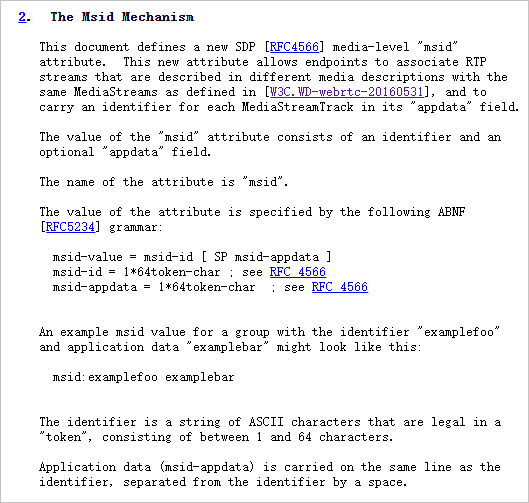
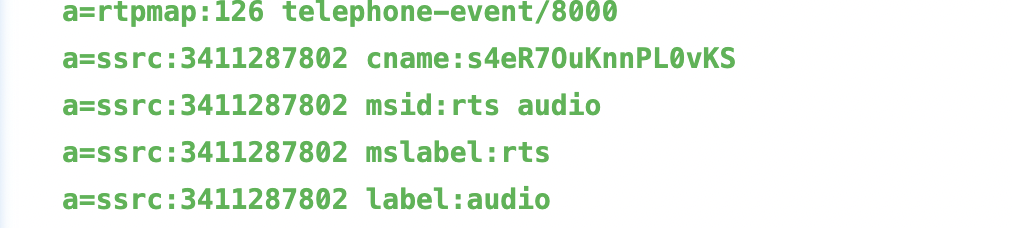
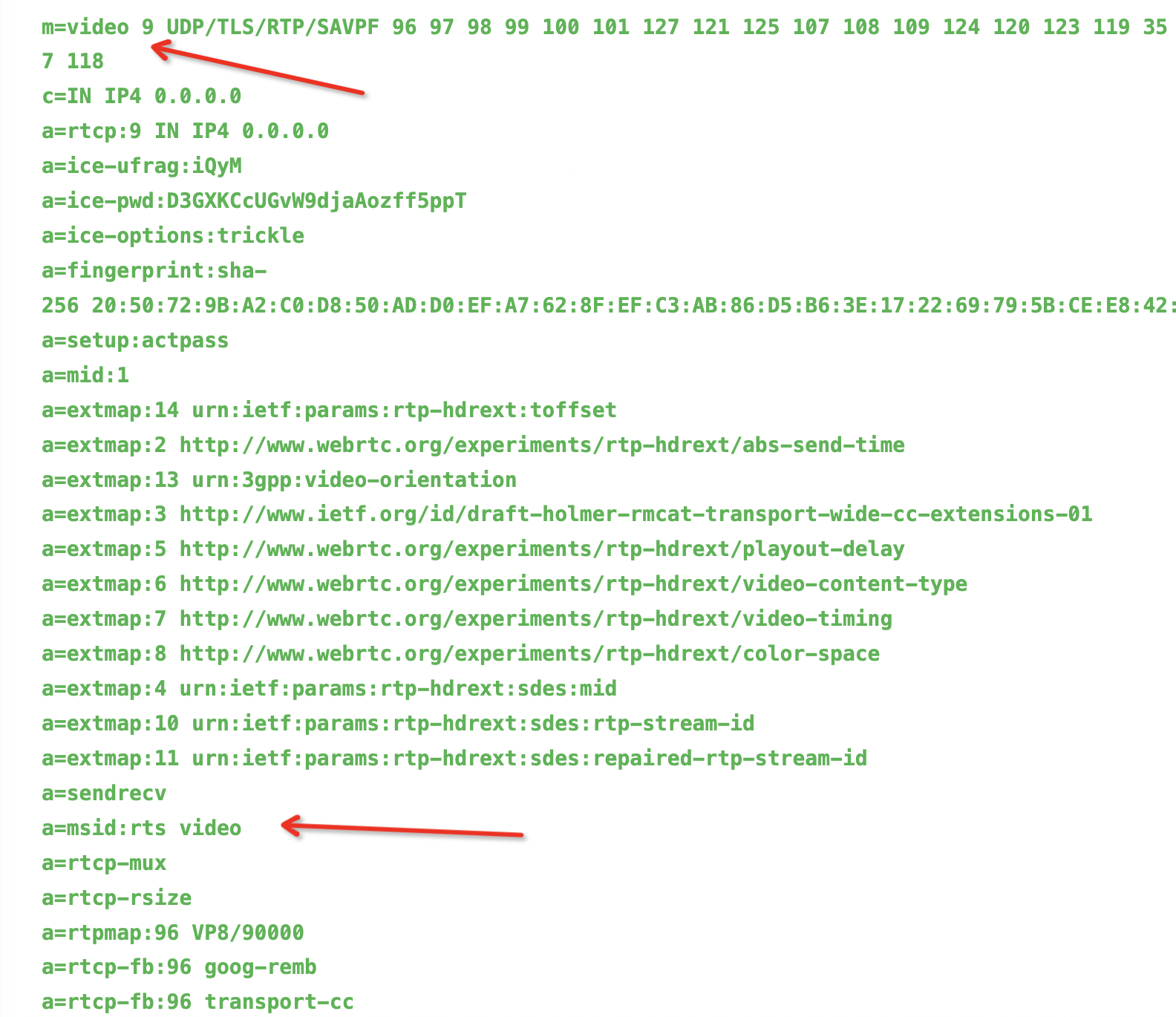
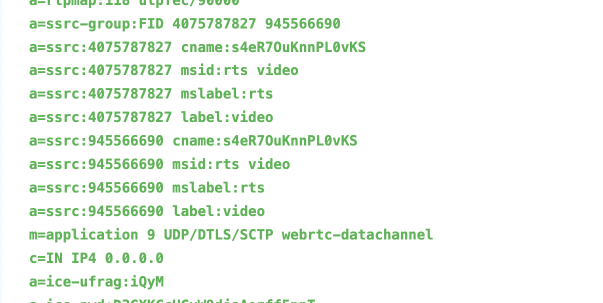
In the signaling message, push_stream specifies the stream ingest URL. This is similar to RTMP stream ingest. Note:- You must specify the msid in the SDP. GRTN uses the msid as the unique identifier for the media.
- Media negotiation is not supported for stream ingest. For a single media msid specified by the client, only one type of encoding is allowed. GRTN does not perform selection. GRTN currently supports AAC, Opus, H.264, and H.265.
- audio
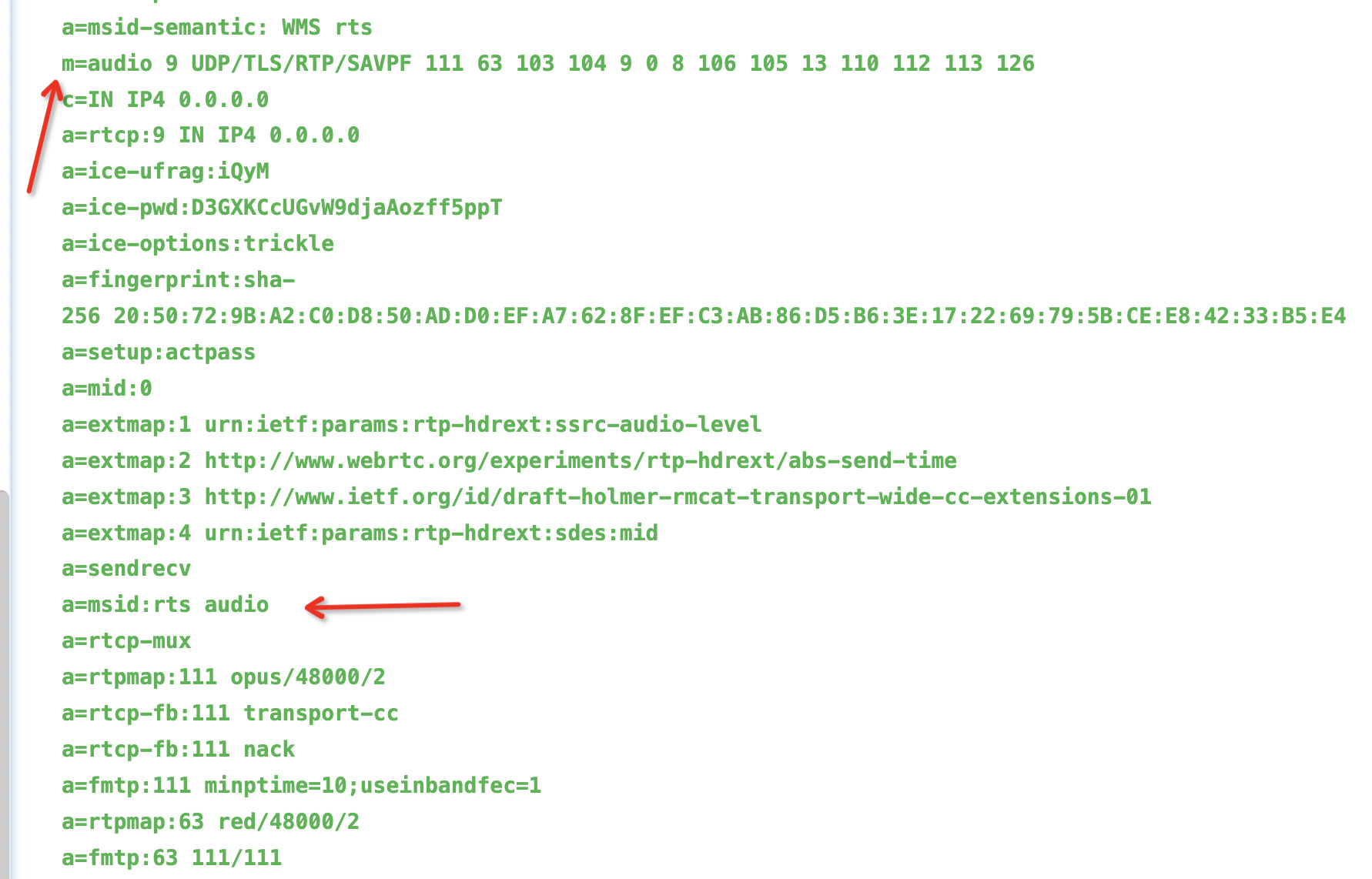
- video
- Error handling
If the signaling request is valid, the server returns a 200 response. To obtain the specific result, parse the code property in the JSON response body. The code property follows an HTTP response code pattern. The following is a sample:
Response:
{
   "code": 200, // 200: Success. For non-200 codes, see the definitions below.
   "message": "success"  // Description for non-200 error codes.
}
Table 8. Response parameters Parameter Type Description code int The response code. For more information about the format and definitions, see the following table. message string The error description. Table 9. Error code descriptions Error code Description 403 Authentication failed. 611 The client must fall back to TCP. 302 The client must send a new signaling request to a new service endpoint.
Enhanced SDP
During signaling, SDP is used to describe media information. The common SDP negotiation is based on RFC 4566. Alibaba Cloud RTS extends this with richer semantics that are compatible with the live streaming industry. RTS supports more audio and video encapsulation formats and communication protocols. This overcomes the limitations of WebRTC, such as only supporting Opus audio and not supporting B-frames in video, to meet the evolving needs of the streaming media industry.
Support for AAC audio in stream ingest and pulling
RTS supports the transport of any AAC audio format that can be transported in RTMP, including AAC-LC, HE-AACv1, and HE-AACv2.
RTS supports AAC audio transport in the LATM format. LATM can transmit audio encoding information either in-band (sent with every audio packet) or out-of-band (sent only once), depending on whether the audio stream itself contains this information. This is determined by muxconfigPresent in the Audio Mux Element. This makes LATM more flexible than ADTS. If the AudioSpecificConfig does not change, the StreamMuxConfig (AudioSpecificConfig) information can be transmitted initially in the SDP session.
- Stream ingest support for AAC audio
The offer SDP can include AAC information to inform the server about the ingested audio format. You can also add config=StreamMuxConfig to the FMTP line. This config is assembled from the AudioSpecificConfig information of the ingested stream and transmits this information to the server to generate the AAC header.
offer SDP:a=rtpmap:125 MP4A-LATM/48000/2 a=fmtp:125 config=4000232000;cpresent=0;object=2;profile-level-id=1 - Stream pulling support for AAC audio
During the signaling interaction, RTS parses the audio encoding information from the ingest source and returns the corresponding information in the negotiation response. The following table provides details.
offer SDP answer SDP AAC-LC HE-AACv1 HE-AACv2 m=audio 9 UDP/RTP/AVPF 120 96 a=rtpmap:120 MP4A-LATM/44100/2AudioSpecificConfig = 0x1210AudioSpecificConfig = 2b920800AudioSpecificConfig = eb8a0800a=rtpmap:120 MP4A-LATM/44100/2 a=fmtp:120 cpresent=0;profile-level-id=1;object=2;config=400024203fc0a=rtpmap:120 MP4A-LATM/44100/2 a=fmtp:120 cpresent=0;profile-level-id=1;object=2;config=4000572410003fc0;SBR-enabled=1a=rtpmap:120 MP4A-LATM/44100/2 a=fmtp:120 cpresent=0;object=2;profile-level-id=1;config=4001d71410003fc0;PS-enabled=1;SBR-enabled=1Here, adding
SBR-enabled=1to the fmtp line of the MP4A-LATM audio in the answer SDP indicates HE-AAC. Adding bothSBR-enabled=1andPS-enabled=1indicates HE-AACv2. The SBR and PS identifiers are added progressively to represent the different AAC formats, reflecting the technological progression from AAC-LC to HE-AACv2. In addition,config=StreamMuxConfigis added to the fmtp line. This is assembled from the AudioSpecificConfig information of the ingested stream and provides detailed information about the audio encoding parameters. The client can use this information as needed.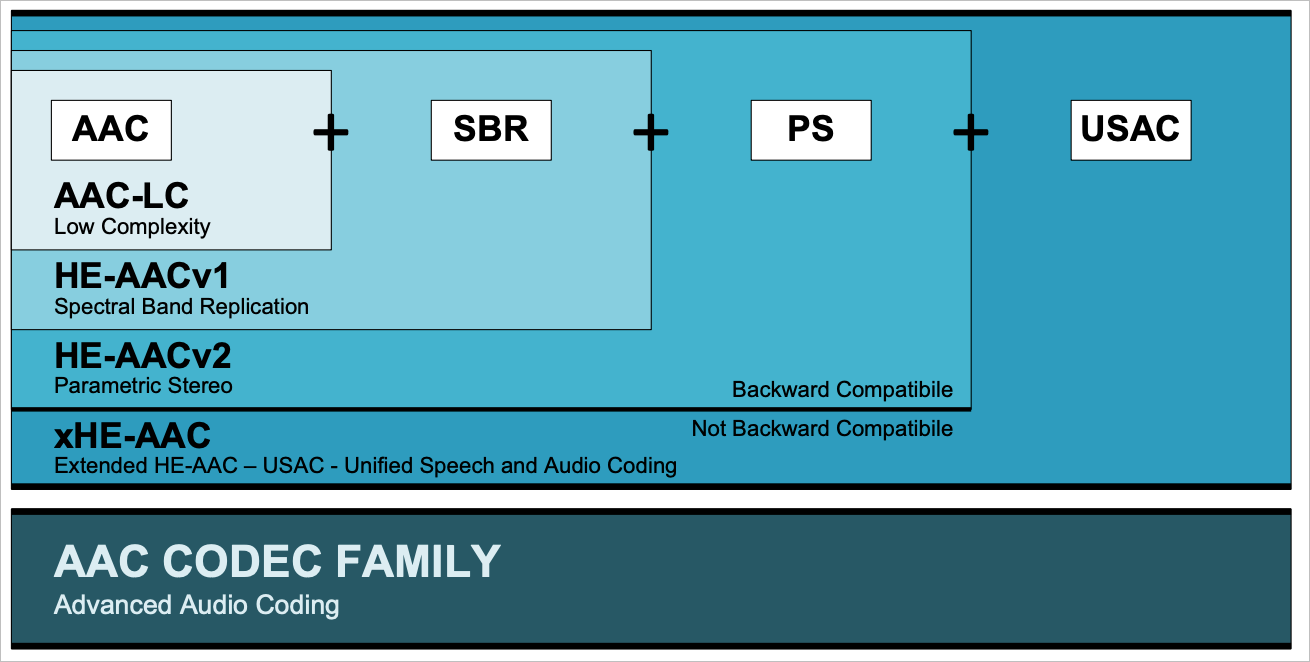
Support for H.265 video in stream ingest and pulling
- Stream ingest support for H.265 video
The offer SDP can include H.265 information to inform the server about the ingested video format.
Offer SDP:a=rtpmap:102 H265/90000 - Stream pulling support for H.265 video
During the signaling interaction for stream pulling, the server obtains the video encoding information (such as H.264 or H.265) of the source stream and negotiates based on this information.
offer SDP answer SDP a=rtpmap:102 H265/90000a=rtpmap:122 H265/90000 a=fmtp:122
Support for video with B-frames in stream ingest and pulling
- Stream ingest support for B-frames
The source stream for ingest can contain B-frames.
- Stream pulling support for B-frames
During the signaling interaction, the client can add a field to the offer SDP to indicate whether it supports parsing video with B-frames. For example, add
BFrame-enabled = 1to the video fmtp line to indicate support for B-frames. In this case,RTP timestamp = PTS, and the sequence number increments. The client can perform normal decoding based on the sequence number. If B-frames are not supported, RTS can transcode the source video stream to remove the B-frames.When B-frames are present, RTP timestamp = PTS, and the sequence number increments. The client can perform normal decoding based on the sequence number.
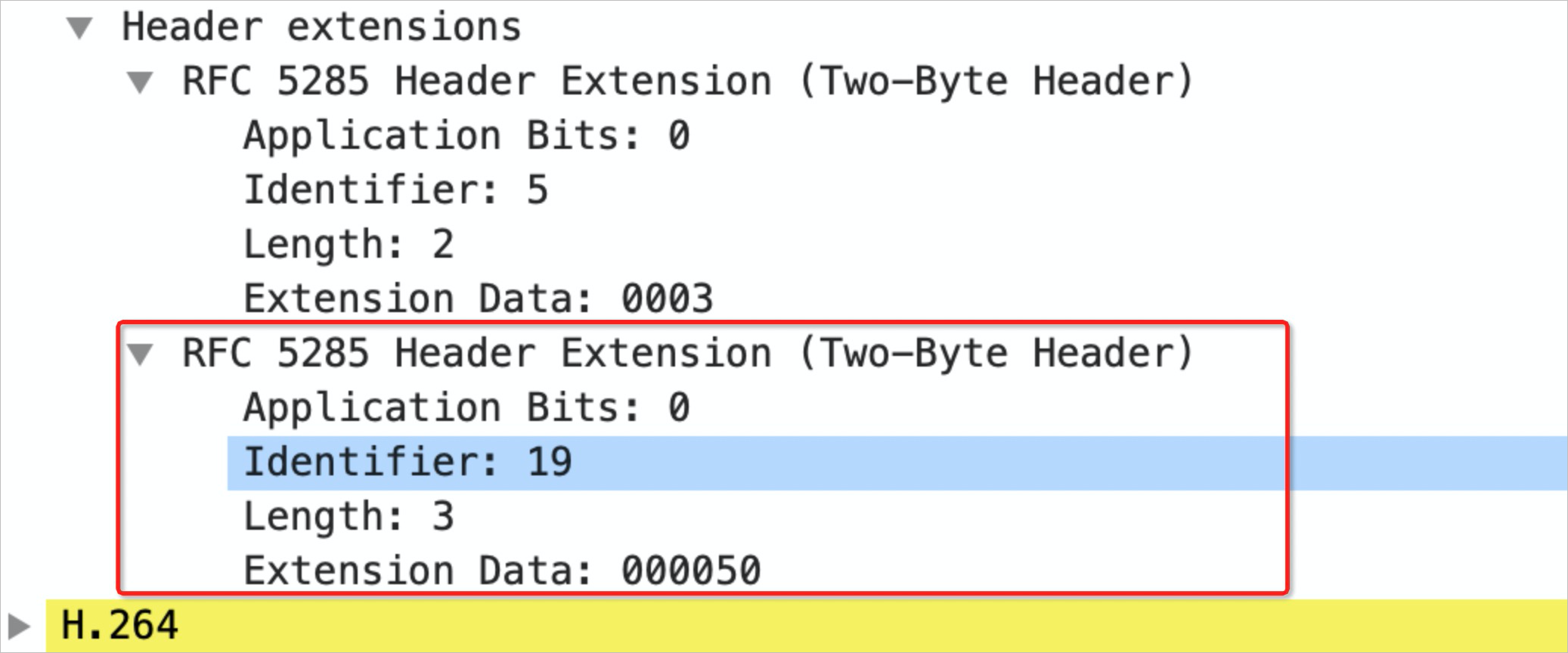
The server also supports returning an additional commit timestamp (CTS) extension header for clients that require accurate calculation of the DTS (PTS = DTS + CTS). If the offer SDP contains
a=extmap:{$id} uri:webrtc:rtc:rtp-hdrext:video:CompositionTime, RTS adds aCTS extension headerwithextension identifier = {$id}to the first RTP packet of each video frame. The id is determined by the offer SDP.RTS provides clients with the flexibility to decide whether to accept video with B-frames and whether they need additional CTS information. Building more universal communication capabilities is a core principle of RTS.
The following figures show an offer SDP snippet and an example of captured packets from stream pulling:

Support for carrying metadata in signaling for stream ingest
RTMP stream ingest uses RTMP metadata to carry metadata, which can provide information to ingest callbacks and stream pulling clients. Because WebRTC transport does not natively support metadata, RTS supports carrying additional information in the signaling message to generate metadata in the ingested stream.
Add a metadata field to the body of the stream ingest signaling message:
{
    "version":2,
    "sdk_version":"0.0.1",
    "mode":"rtc",
    "push_stream":"artc://host/app/name",
    "jsep":{
        "type":"offer",
        "sdp":"..."
    },
    "metadata":{
        "framerate":"20",
        "platform":"iOS",
        "audiodatarate":"200",
        "videodatarate":"2000"
    }
}
MSID concepts