Lingma Enterprise Dedicated Edition provides a one-stop service for Supervised Fine-Tuning (SFT) model fine-tuning based on Alibaba Cloud Model Studio. This service supports the rapid integration and precise control of private enterprise models to enable customization for business scenarios.
|
Applicable editions |
Enterprise Dedicated Edition |
Background information
Many large and medium-sized customers on public clouds have strong requirements for personalization and want to use Supervised Fine-Tuning (SFT) to create solutions that are customized for their business scenarios. To meet this demand, Alibaba Cloud Model Studio provides a one-stop solution that covers data preparation, model fine-tuning, and inference deployment, with full support for SFT capabilities. Lingma can seamlessly integrate with Alibaba Cloud Model Studio to quickly meet customer needs for model fine-tuning and personalization, helping enterprises efficiently achieve their customization goals.
Prerequisites
-
Service purchase
-
You have purchased Lingma Enterprise Dedicated Edition (Enterprise Dedicated Edition). For more information, see Quick Start for the Enterprise Dedicated Edition.
-
-
Obtain the inference service API
Log on to the Alibaba Cloud Model Studio console, generate an inference service API URL, and record key information such as the API URL, model name, and API key. For more information, see Make your first call to the Qwen API.
Currently, only reasoning models from Alibaba Cloud Model Studio.
After an enterprise administrator configures the API for a private inference service, the Lingma system ensures that when developers in the enterprise are authorized to use the related Lingma services, the system automatically invokes the model service configured for the enterprise.
Procedure
-
Log on to the Lingma console. In the navigation pane on the left, choose .
-
On the Inference Service Configuration page, configure the model service for the required scenario:
-
Enable the model service configuration.
-
Enter the model URL, model name, and API key.
-
-
Click Test Now.
-
Success: The model service is connected.
-
Failure: The model service connection failed. Verify that the configuration is correct and test again.
-
-
Click Save.
-
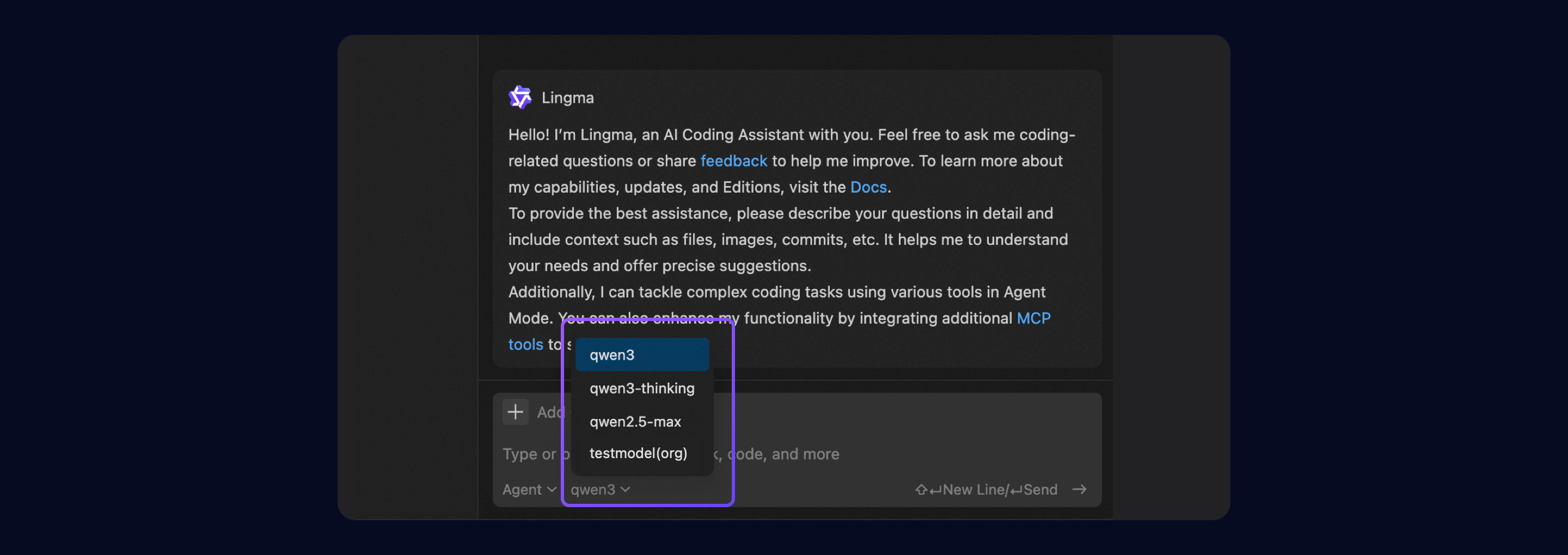
In your IDE, log on to your enterprise account. In the intelligent session window, select the model service. The configured model is now visible.
Disclaimer
This service supports connections to third-party models. Lingma assumes no responsibility for the availability, compliance, or security of these third-party models. Before you use this service, carefully evaluate and review the relevant third-party license agreements to ensure that your use is legal and compliant with regulatory requirements.