Managing time-series data at scale requires partitioning data across multiple collections while keeping your application code simple. Without aliases, you must update collection names in application code every time you rotate or rebuild a collection. LindormSearch aliases decouple your application's collection name from the physical collection that holds the data, so you can swap collections or automate time-based partitioning without changing a line of application code.
LindormSearch supports two alias types:
| Type | What it does | When to use |
|---|---|---|
| Standard alias | Points to one or more existing collections. Change the target collection at any time. | Zero-downtime index rebuilds, collection swaps |
| Time routed alias | Creates new collections on a schedule and deletes expired ones automatically. | Time-series workloads, hot data partitioning |
Use cases
Manage time-series data: Create a new collection each week so each collection holds only recent data. Queries on hot data scan a smaller index, improving performance. LindormSearch handles collection creation and deletion automatically—no manual table management is needed.
Rebuild an index: Build a replacement collection in the background. When it is ready, point the alias to the new collection. Queries continue uninterrupted and no code changes are required.
Create a standard alias
Point a new alias to an existing collection:
curl "http://solrhost:8983/solr/admin/collections?action=CREATEALIAS&name=your_alias_name&collections=your_collection_name_A"All requests to your_alias_name are forwarded to your_collection_name_A by the LindormSearch kernel. Your application accesses only the alias name and requires no knowledge of the underlying collection.
To switch the alias to a different collection, use ALIASPROP:
curl "http://solrhost:8983/solr/admin/collections?action=ALIASPROP&name=your_alias_name&collections=your_collection_name_B"Your application continues to access your_alias_name. No code changes are required.
Configure time routed aliases (automatic sharding)
A time routed alias creates a new collection at each interval and removes expired ones. The example below creates a weekly alias starting 30 days ago and retains collections for 90 days.
curl "http://solrhost:8983/solr/admin/collections?action=CREATEALIAS\
&name=test_router_alias\
&router.name=time\
&router.start=NOW-30DAYS/DAY\
&router.interval=%2B7DAY\
&router.autoDeleteAge=/DAY-90DAYS\
&router.field=your_timestamp_l\
&router.maxFutureMs=8640000000\
&create-collection.collection.configName=_indexer_default\
&create-collection.numShards=2"
Parameters:
| Parameter | Example value | Description |
|---|---|---|
router.name | time | Routing strategy. Set to time for time-based routing. |
router.start | NOW-30DAYS/DAY | Start of the time range for the first collection. NOW-30DAYS/DAY means the start time is 30 days before the current time. |
router.interval | +7DAY | How often a new collection is created. +7DAY creates one collection per week. |
router.autoDeleteAge | /DAY-90DAYS | Age at which a collection is deleted. Collections older than 90 days are removed automatically. This value must represent a longer period than router.start. |
router.field | your_timestamp_l | The field in your documents that drives routing. Must be present in every document. Accepted types: DATE or LONG (for example, System.currentTimeMillis()). |
router.maxFutureMs | 8640000000 | Maximum allowed difference, in milliseconds, between the router.field value and the current time. The value 8640000000 ms equals 100 days, so documents dated more than 100 days in the future or past are rejected. |
create-collection.collection.configName | _indexer_default | The configuration set the collection uses. For more information, see Update the configuration set. |
create-collection.numShards | 2 | Number of shards per collection. Default: 2. |
Result: Starting 30 days ago, LindormSearch creates one collection every 7 days, named test_router_alias_<date> (for example, test_router_alias_2020-03-04). Collections older than 90 days are deleted automatically.
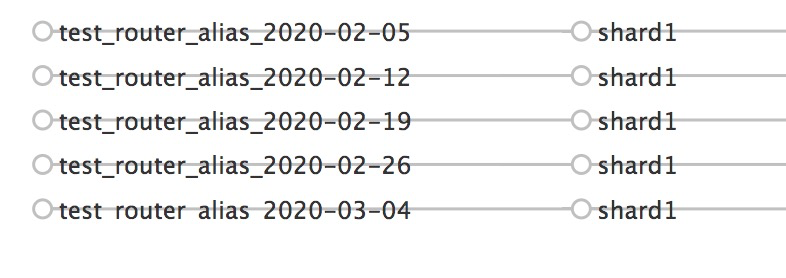
All documents must include the field specified in router.field. By default, all collections under the alias are queried. To restrict a query to a specific time range, identify the target collections first and pass their names explicitly—see the Java example below.Query a time range with a LONG-type timestamp
When router.field uses a LONG type (epoch milliseconds), restrict a query to a specific time range by resolving the alias to its constituent collections and filtering to those that overlap your range.
import org.apache.solr.client.solrj.SolrQuery;
import org.apache.solr.client.solrj.impl.CloudSolrClient;
import org.apache.solr.client.solrj.impl.ClusterStateProvider;
import org.apache.solr.client.solrj.response.QueryResponse;
import org.apache.solr.common.SolrDocument;
import org.apache.solr.common.util.StrUtils;

import java.time.Instant;
import java.time.ZoneOffset;
import java.time.format.DateTimeFormatter;
import java.time.format.DateTimeFormatterBuilder;
import java.time.temporal.ChronoField;
import java.util.AbstractMap;
import java.util.ArrayList;
import java.util.Collections;
import java.util.List;
import java.util.Locale;
import java.util.Map;
import java.util.Optional;

public class SolrDemo {
  private static final DateTimeFormatter DATE_TIME_FORMATTER = new DateTimeFormatterBuilder()
      .append(DateTimeFormatter.ISO_LOCAL_DATE).appendPattern("[_HH[_mm[_ss]]]")
      .parseDefaulting(ChronoField.HOUR_OF_DAY, 0)
      .parseDefaulting(ChronoField.MINUTE_OF_HOUR, 0)
      .parseDefaulting(ChronoField.SECOND_OF_MINUTE, 0)
      .toFormatter(Locale.ROOT).withZone(ZoneOffset.UTC);

  private static final String zkHost = "localhost:2181/solr";
  private CloudSolrClient cloudSolrClient;
  private ClusterStateProvider clusterStateProvider;

  public SolrDemo() {
    cloudSolrClient = new CloudSolrClient.Builder(
        Collections.singletonList(zkHost), Optional.empty()).build();
    cloudSolrClient.connect();
    clusterStateProvider = cloudSolrClient.getClusterStateProvider();
  }

  public void close() throws Exception {
    if (null != cloudSolrClient) {
      cloudSolrClient.close();
    }
  }

  // Returns the collections that overlap the [start, end] epoch-millisecond range.
  // Collection names follow the pattern: test_router_alias_2020-03-04
  private List<String> findCollection(String aliasName, long start, long end) {
    List<String> collections = new ArrayList<>();
    if (start > end) {
      return collections;
    }

    if (clusterStateProvider.getState(aliasName) == null) {
      // Resolve the alias to its backing collections, e.g.:
      // [test_router_alias_2020-03-04, test_router_alias_2020-02-26, ...]
      List<String> aliasedCollections = clusterStateProvider.resolveAlias(aliasName);

      // Parse the date suffix from each collection name and map it to an Instant
      List<Map.Entry<Instant, String>> collectionsInstant = new ArrayList<>(aliasedCollections.size());
      for (String collectionName : aliasedCollections) {
        String dateTimePart = collectionName.substring(aliasName.length() + 1);
        Instant instant = DATE_TIME_FORMATTER.parse(dateTimePart, Instant::from);
        collectionsInstant.add(new AbstractMap.SimpleImmutableEntry<>(instant, collectionName));
      }

      // Keep only collections whose start time falls within the query range
      Instant startI = Instant.ofEpochMilli(start);
      Instant endI = Instant.ofEpochMilli(end);
      for (Map.Entry<Instant, String> entry : collectionsInstant) {
        Instant colStartTime = entry.getKey();
        if (!endI.isBefore(colStartTime)) {
          collections.add(entry.getValue());
          System.out.println("find collection: " + entry.getValue());
          if (!startI.isBefore(colStartTime)) {
            break;
          }
        }
      }
    } else {
      collections.add(aliasName);
    }
    System.out.println("query " + collections);
    return collections;
  }

  public void run() throws Exception {
    try {
      // Query the range [2020-03-07, 2020-03-10]
      long start = 1583538686312L;
      long end   = 1583797886000L;
      String aliasName = "test_router_alias";

      // Join matched collection names and run the query
      String collections = StrUtils.join(findCollection(aliasName, start, end), ',');
      QueryResponse res = cloudSolrClient.query(collections, new SolrQuery("*:*"));
      for (SolrDocument sd : res.getResults()) {
        System.out.println(sd.get("id") + " " + sd.get("gmtCreate_l"));
      }
    } finally {
      cloudSolrClient.close();
    }
  }

  public static void main(String[] args) throws Exception {
    SolrDemo solrDemo = new SolrDemo();
    solrDemo.run();
    solrDemo.close();
  }
}
Delete an alias
Deleting an alias does not affect the underlying collections for either alias type. For time routed aliases, the auto-created collections remain and must be removed manually.
Standard alias: Run the following command to delete the alias.
curl "http://solrhost:8983/solr/admin/collections?action=DELETEALIAS&name=your_alias_name"Time routed alias: After deleting the alias, delete each associated collection manually.
List all collections to identify those associated with the alias:
curl "http://solrhost:8983/solr/admin/collections?action=LIST"Collections named
test_router_alias_<date>are associated with the alias.Delete the alias:
curl "http://solrhost:8983/solr/admin/collections?action=DELETEALIAS&name=test_router_alias"Delete each associated collection:
curl "http://solrhost:8983/solr/admin/collections?action=DELETE&name=<collection_name>"