Good table design is the foundation of query and storage performance in LindormTSDB. Before writing any SQL, analyze your query patterns and data source characteristics—the decisions you make at schema creation time are hard to reverse later.
This topic uses air quality monitoring (AQM) data as a running example to walk through each design decision.
Data model overview
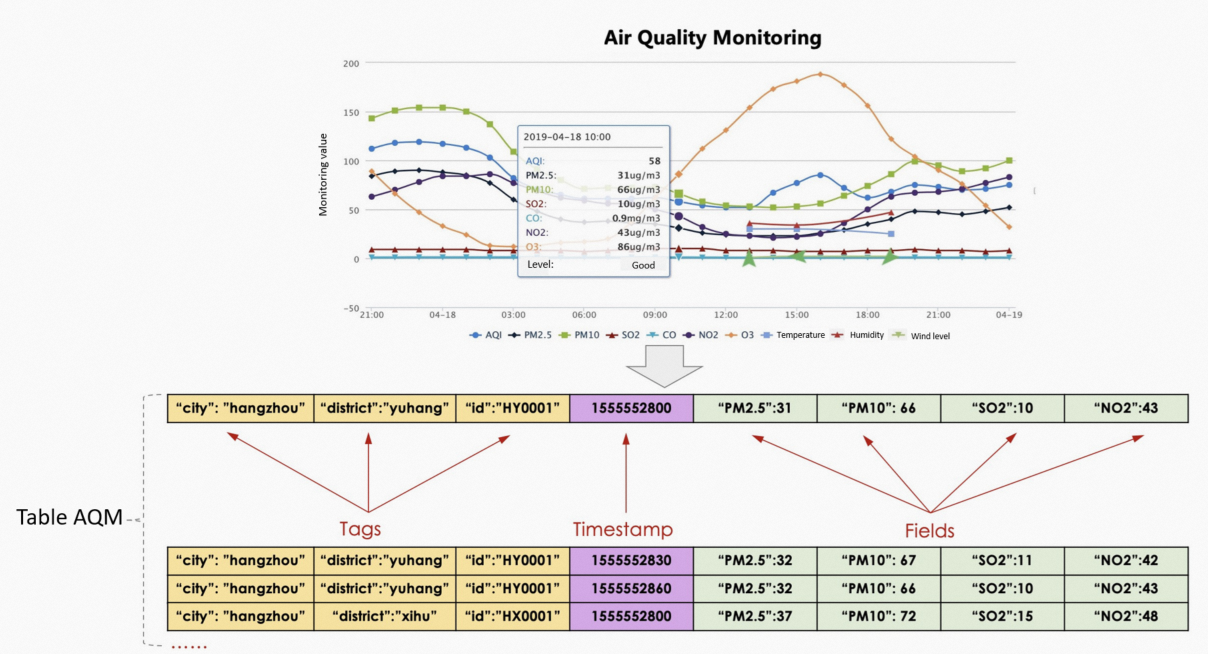
Every record in a LindormTSDB time series table consists of four components:
| Component | Description |
|---|---|
| Table | A collection of time series data of the same type. Maps to a measurement—for example, aqm for all air quality readings. |
| Tag | An attribute that identifies the monitored object, stored as a key-value pair. By default, LindormTSDB indexes every tag key-value pair, mapping tags to time series for fast filtering. Also referred to as labels or dimensions in some systems. |
| Timestamp | The time when the record was generated. |
| Field | A measured value. A record can have multiple fields. LindormTSDB does not index fields. |
The following diagram illustrates how these components relate using AQM data:
Decide which columns should be tags
This is the most consequential schema decision. Getting it wrong causes the time series index to grow unbounded, which degrades both write and query performance.
Tags are for identity; fields are for measurements.
-
Define a column as a tag when it identifies the source or context of the data—city, device ID, region, host.
-
Define a column as a field when it stores a measured value that changes over time—temperature, CPU usage, PM2.5 concentration.
Avoid high-churn tags
Do not use attributes whose values change frequently—such as process IDs or time-related attributes—as tags, even if the data type is STRING. Each unique tag key-value combination creates a new time series entry in the index. High-churn attributes generate a large number of distinct time series, causing the index to expand rapidly. This slows down queries that rely on tag-based lookups.
Define high-churn attributes as fields instead.
Create the table
Name the table after the measurement it represents. Use the CREATE TABLE statement with the TAG keyword to mark tag columns. The TAG keyword is a LindormTSDB SQL extension—only columns declared with TAG can be used as primary keys.
The following example creates an AQM table with three tag columns and four field columns:
CREATE TABLE aqm (
    city        VARCHAR TAG,
    district    VARCHAR TAG,
    id          VARCHAR TAG,
    time        TIMESTAMP,
    pm2_5       DOUBLE,
    pm10        DOUBLE,
    so2         DOUBLE,
    no2         DOUBLE,
    PRIMARY KEY (id)  -- Remove this line for single-node Lindorm instances, which do not support primary keys.
);
After creating the table, insert records with INSERT INTO:
INSERT INTO aqm (city, district, id, time, pm2_5, pm10, so2, no2)
VALUES ('hangzhou', 'yuhang', 'HY00001', '2019-04-18 10:00:00', 31.0, 66.0, 10.0, 43.0);

INSERT INTO aqm (city, district, id, time, pm2_5, pm10, so2, no2)
VALUES ('hangzhou', 'yuhang', 'HY00001', '2019-04-18 10:01:00', 31.2, 66.0, 10.5, 43.1);
To insert multiple records in a single statement:
INSERT INTO aqm (city, district, id, time, pm2_5, pm10, so2, no2)
VALUES
    ('hangzhou', 'yuhang', 'HY00001', '2019-04-18 10:02:00', 31.3, 66.0, 10.0, 42.9),
    ('hangzhou', 'yuhang', 'HY00001', '2019-04-18 10:03:00', 31.2, 66.4, 10.3, 43.0);
Choose a primary key
LindormTSDB uses the primary key to partition data and optimize queries. Queries that include the primary key in the WHERE clause run faster.
Time series tables differ from relational database tables. The primary key column does not need to contain unique values. The primary key column must be tagged (declared with the TAG keyword).
Single-node Lindorm instances do not support primary keys.
Use the unique identifier of the data source as the primary key:
| Scenario | Recommended primary key |
|---|---|
| IoT (Internet of Things) / IIoT (Industrial Internet of Things) | Device ID |
| IoV (Internet of Vehicles) | Vehicle unique identifier |
| Application monitoring | App ID or host:port |
In the AQM example, id uniquely identifies each monitoring station. If most queries filter by station ID, use id as the primary key:
PRIMARY KEY (id)Choose data types
Tag columns
Tag columns must be VARCHAR. This data type cannot be changed after the table is created.
Timestamp columns
LindormTSDB stores timestamps internally as BIGINT values in UNIX epoch format in LindormDFS, which optimizes timestamp compression. At table creation, choose the column type based on how your application handles timestamps:
| Type | Use when |
|---|---|
TIMESTAMP |
Your application works with human-readable datetime strings and you want the database to handle conversion automatically. |
BIGINT |
Your application works with UNIX epoch values directly, or you perform arithmetic on timestamps (for example, computing durations). |
Field columns
Field columns support all data types. Avoid VARCHAR for field columns—it compresses poorly and slows down queries compared to numeric types.
For the full list of supported data types, see Data types.