Spatio-temporal queries perform best when query conditions match the indexes you created — this avoids full table scans. Four optimization strategies are available: index selection for spatial-only and spatial-temporal queries, composite indexes for mixed conditions, sharding for parallel queries, and enhanced filtering for irregular query shapes.
Choose an optimization strategy
| Scenario | Strategy |
|---|---|
| Query filters only on spatial ranges | Use Z-ORDER(geometry) |
| Query filters on both spatial and time ranges | Use Z-ORDER(geometry, time) |
| Query combines spatio-temporal conditions with other columns | Create a composite index with Z-ORDER |
| Parallel queries on large point datasets | Use Z-ORDER(Point, numShards) with sharding |
| Query range is much smaller than the index bounding box | Enable enhanced index filtering |
Optimize queries with spatio-temporal conditions only
The Z-ORDER indexing function generates spatio-temporal codes for spatial or time columns. Two formats are supported:
Z-ORDER(geometry)— indexes spatial data onlyZ-ORDER(geometry, time)— indexes both spatial and time data
When the index is used
For Z-ORDER(geometry): the index is used when the query includes a spatial range.
For Z-ORDER(geometry, time): the index is used only when all of the following conditions are met:
The query includes a spatial range.
The query specifies both the upper and lower bounds of the time range.
The following table shows how each index configuration handles different query conditions. In the examples, g is a spatial column and t is a time column.
| Condition | Example statement | Z-ORDER(g) | Z-ORDER(g,t) |
|---|---|---|---|
| Spatial range only | SELECT id FROM point_table WHERE ST_Contains(ST_GeomFromText('POLYGON((0 0, 0 10, 10 10, 10 0, 0 0))'), g); | Used | Not used — time range missing |
| Spatial range + both time bounds | SELECT id FROM point_table WHERE ST_Contains(ST_GeomFromText('POLYGON((0 0, 0 10, 10 10, 10 0, 0 0))'), g) AND t > '2021-01-01 08:21:00' AND t < '2021-01-01 08:23:00'; | Used | Used |
| Spatial range + lower time bound only | SELECT id FROM point_table WHERE ST_Contains(ST_GeomFromText('POLYGON((0 0, 0 10, 10 10, 10 0, 0 0))'), g) AND t > '2021-01-01 08:21:00'; | Used | Not used — upper time bound missing |
Optimize queries with mixed conditions
If a query combines spatio-temporal conditions with filters on other columns, create a composite index. A composite index is a primary key index or secondary index that includes the Z-ORDER function alongside other columns.
Example composite primary key index:
PRIMARY KEY(Z-ORDER(g,t), id)The Z-ORDER function acts as a regular column in the composite index by returning spatio-temporal codes for the specified columns. For information about secondary indexes in LindormTable, see Optimize queries based on secondary indexes.
Optimize parallel queries with sharding
Sharding splits data across multiple storage regions to increase query parallelism. To create a spatio-temporal index for point data with sharding, use the following format:
Z-ORDER(Point, numShards)numShards controls the number of storage regions that receive data. Lindorm adds sequential prefixes from 0 to numShards - 1 to distribute spatially or temporally adjacent data across different regions.
The following example shows the performance difference on a table with approximately 150 million rows of point data, using 8 parallel query threads.
Without sharding
-- Create the table without sharding
CREATE TABLE table_noshard(id INT, g GEOMETRY(POINT), name VARCHAR, PRIMARY KEY(Z-ORDER(g)));

-- Run a parallel query
SELECT /*+_l_enable_parallel_(8)*/ id FROM table_noshard WHERE ST_Contains(ST_GeomFromText('POLYGON((...))'), g);
Result: 2,058,894 rows returned in 10,986 ms.
With sharding (numShards = 8)
-- Create the table with 8 shards
CREATE TABLE table_shard8(id INT, g GEOMETRY(POINT), name VARCHAR, PRIMARY KEY(Z-ORDER(g, 8)));

-- Run a parallel query
SELECT /*+_l_enable_parallel_(8)*/ id FROM table_shard8 WHERE ST_Contains(ST_GeomFromText('POLYGON((...))'), g);
Result: 2,058,894 rows returned in 2,501 ms.
The performance of parallel queries is significantly improved with sharding.
Optimize queries with irregular ranges
When the shape of your query polygon differs significantly from the rectangular bounding box used by the index, the index filters out fewer rows than expected, reducing its effectiveness.
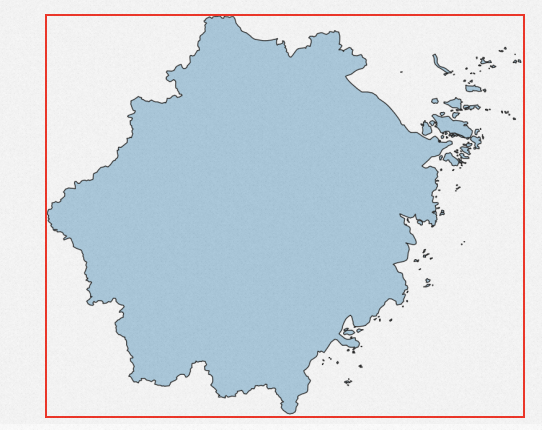
For large datasets, add the /*+_l_enable_enhanced_filter_*/ hint to enable enhanced index filtering, which applies the polygon's actual shape during index filtering rather than its bounding box.
SELECT /*+_l_enable_enhanced_filter_*/ id FROM gtest WHERE ST_Contains(ST_GeomFromText('POLYGON((...))'), g);Enhanced index filtering is disabled by default. It is only beneficial for large datasets — for small queries, the overhead is unnecessary.