Lindorm supports real-time change tracking. This feature processes real-time data changes to facilitate real-time monitoring, real-time reports, and stream data analytics. You can use the Flink Kafka Connector to consume subscribed data and parse it using the Debezium format.
Background information
Lindorm provides a real-time change tracking feature that includes a push model and a pull model. The push model supports shipping real-time data changes to downstream systems, such as Time Tunnel (TT), DD, or MetaQ. You can also combine this model with other computing platforms to process incremental data and build a complete real-time data system. However, the push model can cause issues such as stacked logs and long developer cycles. The pull model of the real-time change tracking feature uses Lindorm Streams Storage to store subscribed messages. Its read and write methods are compatible with Kafka clients. Therefore, you can use the Flink Kafka Connector to subscribe to and consume data.
Prerequisites
You have created a change tracking channel. For more information, see Create a change tracking channel using the pull model.
Table API connection type
The Table API is an API operation in Flink that supports data queries using Flink SQL.
Change messages from Lindorm change data capture (CDC) use the Debezium format.
The Table API supports the Debezium-Json format. For more information, see Parsing Description.
If you consume data using open source Flink, you must add the following Maven dependencies.
<dependency>
  <groupId>org.apache.flink</groupId>
  <artifactId>flink-java</artifactId>
  <version>1.13.2</version>
</dependency>
<dependency>
  <groupId>org.apache.flink</groupId>
  <artifactId>flink-streaming-java_2.12</artifactId>
  <version>1.13.2</version>
</dependency>
<dependency>
  <groupId>org.apache.flink</groupId>
  <artifactId>flink-connector-kafka_2.11</artifactId>
  <version>1.13.2</version>
</dependency>
<dependency>
  <groupId>org.apache.flink</groupId>
  <artifactId>flink-clients_2.12</artifactId>
  <version>1.13.2</version>
</dependency>
<dependency>
  <groupId>org.apache.flink</groupId>
  <artifactId>flink-table</artifactId>
  <version>1.13.2</version>
  <type>pom</type>
</dependency>
<dependency>
  <groupId>org.apache.flink</groupId>
  <artifactId>flink-table-common</artifactId>
  <version>1.13.2</version>
</dependency>
<dependency>
  <groupId>org.apache.flink</groupId>
  <artifactId>flink-table-api-java</artifactId>
  <version>1.13.2</version>
</dependency>
<dependency>
  <groupId>org.apache.flink</groupId>
  <artifactId>flink-table-api-java-bridge_2.12</artifactId>
  <version>1.13.2</version>
</dependency>
<dependency>
  <groupId>org.apache.flink</groupId>
  <artifactId>flink-table-planner-blink_2.12</artifactId>
  <version>1.13.2</version>
</dependency>
<dependency>
  <groupId>org.apache.flink</groupId>
  <artifactId>flink-json</artifactId>
  <version>1.13.2</version>
</dependency>
Example of consuming data
You can use the following statement to create a Lindorm source table.
CREATE TABLE `lindorm_table` (
    `c1` INT,
  `col1` VARCHAR,
  `col2` VARCHAR,
  `col3` VARCHAR,
  PRIMARY KEY ( `c1` )
)
After you create a change tracking channel, you can use the following Java code to create a table and consume data.
NoteTo create a table and consume data, you must obtain the following configuration information.
properties.bootstrap.servers: The consumption endpoint for LindormTable. To obtain the endpoint, go to the Lindorm console. On the Instances page, select the target instance. In the navigation pane on the left, choose . The endpoint is displayed in the Endpoint section.
properties.group.id: The name of the consumer group. You can specify a custom name.
topic: The topic name that you specified when you created the change tracking channel.
import org.apache.flink.streaming.api.environment.StreamExecutionEnvironment;
import org.apache.flink.table.api.Table;
import org.apache.flink.table.api.bridge.java.StreamTableEnvironment;

import static org.apache.flink.table.api.Expressions.$;

public class TestDebeziumFlink {
  public static void main(String[] args) {
    StreamExecutionEnvironment env = StreamExecutionEnvironment.getExecutionEnvironment();
    StreamTableEnvironment tableEnvironment = StreamTableEnvironment.create(env);

    // topic created by subscription
    String topicName = "test-topic";
    // replace with cdc endpoint
    String bootstrapServer = "localhost:9092";
    // consumer group id
    String groupID = "test-flink";

    // create table connected to source
    tableEnvironment.executeSql("CREATE TABLE test_table (\n" +
        "    c1 INT,\n" +
        "    `f:col1` STRING,\n" +
        "    `f:col2` STRING,\n" +
        "    `f:col3` STRING\n" +
        ") WITH (\n" +
        "    'connector' = 'kafka',\n" +
        "    'topic'     = '"+ topicName + "',\n" +
        "    'properties.bootstrap.servers' = '" + bootstrapServer + "',\n" +
        "    'properties.group.id' = '" + groupID + "',\n" +
        "    'debezium-json.schema-include' = 'true',\n" +
        "    'format'    = 'debezium-json'\n" +
        ")");

    // create print table
    tableEnvironment.executeSql("CREATE TABLE test_table_copy (\n" +
        "    c1 INT,\n" +
        "    `f:col1` STRING,\n" +
        "    `f:col2` STRING,\n" +
        "    `f:col3` STRING\n" +
        ") WITH (\n" +
        "    'connector' = 'print'" +
        ")");

    Table testTable = tableEnvironment.from("test_table");
    testTable.select($("c1"), $("f:col1"), $("f:col2"), $("f:col3")).executeInsert("test_table_copy");

    tableEnvironment.executeSql("SELECT * FROM test_table").print();
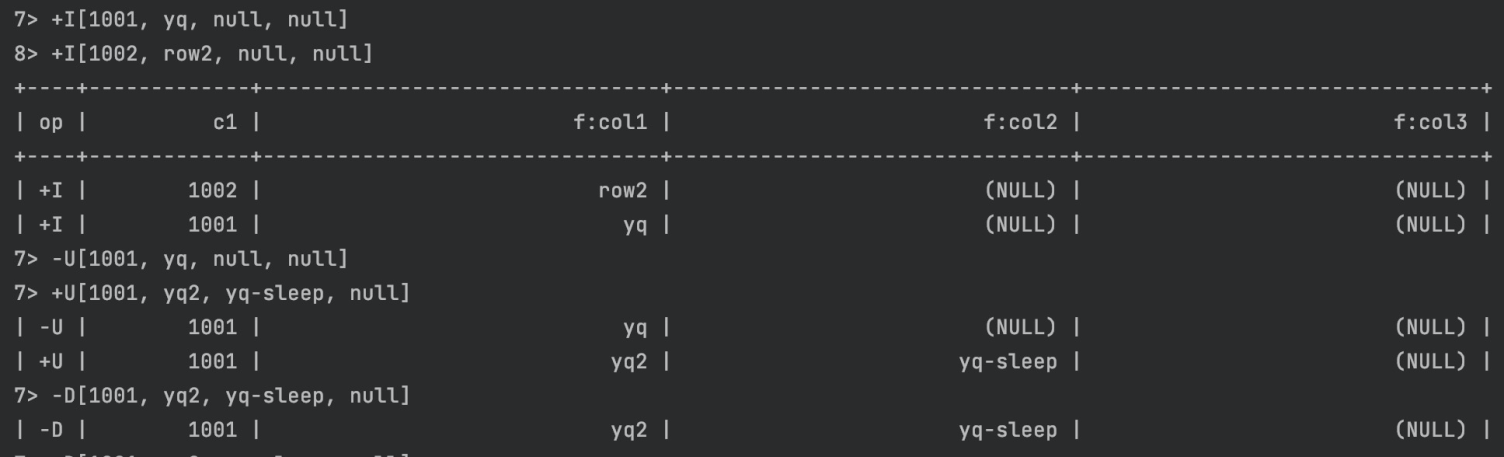
  }
}
Sample result: