Key Management Service (KMS) lets you store sensitive data—database passwords, AccessKey pairs, SSH credentials—as secrets and retrieve them programmatically. This guide covers how to create a secret in the KMS console and retrieve its value using the Alibaba Cloud SDK for Java.
Prerequisites
Before you begin, ensure that you have:
A KMS instance that is created and enabled. See Purchase and enable a KMS instance
A symmetric key created in that KMS instance. See Create a key
The symmetric key and the secret must belong to the same KMS instance.
Step 1: Create a secret
Log on to the KMS console. In the top navigation bar, select a region. In the left navigation pane, choose Resource > Secrets.
On the Secrets page, click the tab for the type of secret you want to create, select an instance from the Instance ID drop-down list, and then click Create a secret.
In the panel that appears, fill in the parameters for your secret type, and then click OK.
The parameters vary by secret type. Refer to the section below that matches your use case.
Generic secret
A generic secret stores any sensitive value—an API key, an OAuth token, a certificate, or a custom key-value pair.
Generic secrets do not support rotation at creation time. To rotate a generic secret after creation, see Manage and use generic secrets.
| Parameter | Description |
|---|---|
| Secret name | A name that is unique within the region. |
| Secret value | The sensitive data to store. Choose a format: Secret Key/Value for structured data or Plain Text for unstructured data. Maximum size: 30,720 bytes (30 KB). |
| Initial version | The version label for this secret value. Defaults to v1. |
| CMK | The symmetric key used to encrypt this secret. Must belong to the same KMS instance. RAM users and roles must have permission to call GenerateDataKey on this key. |
| Tag | (Optional) Key-value pairs to classify and filter secrets. Each key or value can be up to 128 characters and can contain letters, digits, forward slashes (/), backslashes (\\), underscores (_), hyphens (-), periods (.), plus signs (+), equal signs (=), colons (:), at signs (@), and spaces. Tag keys cannot start with aliyun or acs:. Up to 20 tags per secret. |
| Description | (Optional) A description of the secret. |
| Advanced settings > Policy settings | (Optional) A resource-based policy to control access to this secret. The default policy applies if you skip this setting. |
RAM secret
A RAM secret manages the AccessKey pair of a RAM user and supports automatic rotation.
| Parameter | Description |
|---|---|
| Select RAM user | The RAM user whose AccessKey pair to manage. The user must have at least one AccessKey pair. The secret name is automatically generated based on the RAM user's name. |
| Secret value | The AccessKey secret of the selected RAM user. Maximum size: 30,720 bytes (30 KB). |
| CMK | The symmetric key used to encrypt this secret. Must belong to the same KMS instance. RAM users and roles must have permission to call GenerateDataKey on this key. |
| Tag | (Optional) Key-value pairs to classify secrets. Each key or value can be up to 128 characters and can contain letters, digits, forward slashes (/), backslashes (\\), underscores (_), hyphens (-), periods (.), plus signs (+), equal signs (=), colons (:), at signs (@), and spaces. Tag keys cannot start with aliyun or acs:. Up to 20 tags per secret. |
| Automatic rotation | Whether to rotate the AccessKey pair automatically. |
| Days (7 days to 365 days) | The rotation interval. Required only when automatic rotation is enabled. |
| Description | (Optional) A description of the secret. |
| Advanced settings > Policy settings | (Optional) A resource-based policy for this secret. |
Database secret (ApsaraDB RDS)
Only Create single secret is supported for ApsaraDB RDS.
| Parameter | Description |
|---|---|
| Database type | Select ApsaraDB RDS Secrets. |
| Secret name | A name that is unique within the region. |
| ApsaraDB RDS instance | The ApsaraDB RDS instance to manage. |
| Account management | How KMS manages database accounts during rotation: Manage dual accounts (recommended) — KMS maintains two accounts with identical permissions. Connections are not interrupted during rotation. Use this for application workloads. Manage single account — KMS manages one account. The current secret version may be temporarily unavailable during rotation. Use this for privileged or manual O&M (operations and maintenance) accounts. |
| CMK | The symmetric key used to encrypt this secret. Must belong to the same KMS instance. RAM users and roles must have permission to call GenerateDataKey on this key. |
| Tag | (Optional) Key-value pairs to classify secrets. Each key or value can be up to 128 characters and can contain letters, digits, forward slashes (/), backslashes (\\), underscores (_), hyphens (-), periods (.), plus signs (+), equal signs (=), colons (:), at signs (@), and spaces. Tag keys cannot start with aliyun or acs:. Up to 20 tags per secret. |
| Automatic rotation | Whether to rotate the database credentials automatically. |
| Rotation period | The rotation interval (6 hours to 365 days). Required only when automatic rotation is enabled. |
| Description | (Optional) A description of the secret. |
| Advanced settings > Policy settings | (Optional) A resource-based policy for this secret. |
Dual account options:
Create account tab: Specify a username prefix, select a database, and set permissions. KMS creates the accounts after you confirm the secret configuration.
Import existing accounts tab: Select usernames and specify their current passwords.
Use the same passwords that were set when the accounts were created. If a username and password do not match, KMS retrieves the correct credentials on the first rotation.
Single account options:
Create account tab: Specify a username prefix and select an account type (Standard account or Privileged account). For standard accounts, also select a database and set permissions.
Import existing accounts tab: Select a username and specify its password.
Database secret (PolarDB)
Only Create single secret is supported. Only new accounts in dual mode are supported, and only for PolarDB for MySQL and PolarDB for PostgreSQL.
| Parameter | Description |
|---|---|
| Database type | Select PolarDB Secret. |
| Secret name | A name that is unique within the region. |
| PolarDB cluster | The PolarDB cluster to manage. |
| Account management | Only Manage dual accounts is supported. KMS maintains two standard accounts with identical permissions. Connections are not interrupted during rotation. |
| Secret value | Only Create account is supported. Specify a username prefix, permissions, and a database. KMS creates the accounts after you confirm the secret configuration. Account names must be unique. |
| CMK | The symmetric key used to encrypt this secret. Must belong to the same KMS instance. RAM users and roles must have permission to call GenerateDataKey on this key. |
| Tag | (Optional) Key-value pairs to classify secrets. Each key or value can be up to 128 characters and can contain letters, digits, forward slashes (/), backslashes (\\), underscores (_), hyphens (-), periods (.), plus signs (+), equal signs (=), colons (:), at signs (@), and spaces. Tag keys cannot start with aliyun or acs:. Up to 20 tags per secret. |
| Automatic rotation | Whether to rotate credentials automatically. |
| Rotation period | The rotation interval (6 hours to 365 days). Required only when automatic rotation is enabled. |
| Description | (Optional) A description of the secret. |
| Advanced settings > Policy settings | (Optional) A resource-based policy for this secret. |
Database secret (ApsaraDB for Redis)
Both Create single secret and Create bulk secrets are supported. The following example uses Create single secret.
Only new accounts can be managed. Existing ApsaraDB for Redis accounts cannot be imported.
| Parameter | Description |
|---|---|
| Database type | Select ApsaraDB for Redis Secrets. |
| Secret name | A name that is unique within the region. |
| ApsaraDB for Redis/Tair instance | The ApsaraDB for Redis instance to manage. |
| Account management | Only Manage dual accounts is supported. |
| Secret value | Enter a username prefix. KMS calls an ApsaraDB for Redis operation to create two accounts with the same permissions. For example, if you enter user, KMS creates user and user_clone. Permissions: Read/Write or Read-Only (both accounts share the same permission level). |
| CMK | The symmetric key used to encrypt this secret. Must belong to the same KMS instance. RAM users and roles must have permission to call GenerateDataKey on this key. |
| Tag | (Optional) Key-value pairs to classify secrets. Each key or value can be up to 128 characters and can contain letters, digits, forward slashes (/), backslashes (\\), underscores (_), hyphens (-), periods (.), plus signs (+), equal signs (=), colons (:), at signs (@), and spaces. Tag keys cannot start with aliyun or acs:. Up to 20 tags per secret. |
| Automatic rotation | Whether to rotate credentials automatically. |
| Rotation period | The rotation interval (6 hours to 365 days). Required only when automatic rotation is enabled. |
| Description | (Optional) A description of the secret. |
| Advanced settings > Policy settings | (Optional) A resource-based policy for this secret. |
ECS secret
An ECS secret manages login credentials—a password or SSH key pair—for a user on an ECS instance.
| Parameter | Description |
|---|---|
| Secret name | A name that is unique within the region. |
| Managed instance | The ECS instance to manage. |
| Managed user | An existing user on the ECS instance—for example, root (Linux) or Administrator (Windows). |
| Initial secret value | The credential to store. Choose Password (the user's login password) or Key pair (an SSH key pair). See Obtaining an SSH key pair below. Maximum size: 30,720 bytes (30 KB). |
| CMK | The symmetric key used to encrypt this secret. Must belong to the same KMS instance. RAM users and roles must have permission to call GenerateDataKey on this key. |
| Tag | (Optional) Key-value pairs to classify secrets. Each key or value can be up to 128 characters and can contain letters, digits, forward slashes (/), backslashes (\\), underscores (_), hyphens (-), periods (.), plus signs (+), equal signs (=), colons (:), at signs (@), and spaces. Tag keys cannot start with aliyun or acs:. Up to 20 tags per secret. |
| Automatic rotation | Whether to rotate credentials automatically. |
| Rotation period | The rotation interval (1 hour to 365 days). Required only when automatic rotation is enabled. |
| Description | (Optional) A description of the secret. |
| Advanced settings > Policy settings | (Optional) A resource-based policy for this secret. |
Enter a valid secret value. If the value is invalid, the password or key pair retrieved from KMS cannot be used to log on to the ECS instance until the secret is first rotated.
Obtaining an SSH key pair
Option 1: Use a key pair created in ECS
Private key: After creating an SSH key pair in ECS, the browser downloads the private key automatically as
<key-pair-name>.pem. See Create an SSH key pair.Public key: See View public key information.
Option 2: Generate a key pair locally
Run ssh-keygen to generate a 3072-bit RSA key pair:
ssh-keygen -t RSA -b 3072 -m PEM -f ~/.ssh/sshKey_demo -N ""This produces two files:
~/.ssh/sshKey_demo— private key~/.ssh/sshKey_demo.pub— public key
Step 2: Retrieve the secret
This example uses the Alibaba Cloud SDK for Java V2.0 to call GetSecretValue.
Required permissions: AliyunKMSSecretUserAccess and AliyunKMSCryptoUserAccess
Set up your environment
1. Install the Java Development Kit (JDK)
Download and install JDK 8 or later. Verify the installation:
java -version2. Add the SDK dependency
Add the following Maven dependency to your project. Make sure to use Alibaba Cloud SDK V2.0.
<dependency>
  <groupId>com.aliyun</groupId>
  <artifactId>kms20160120</artifactId>
  <version>1.2.3</version>
</dependency>
3. Create access credentials
This example uses AccessKey pairs for authentication. For other authentication methods, see Manage access credentials.
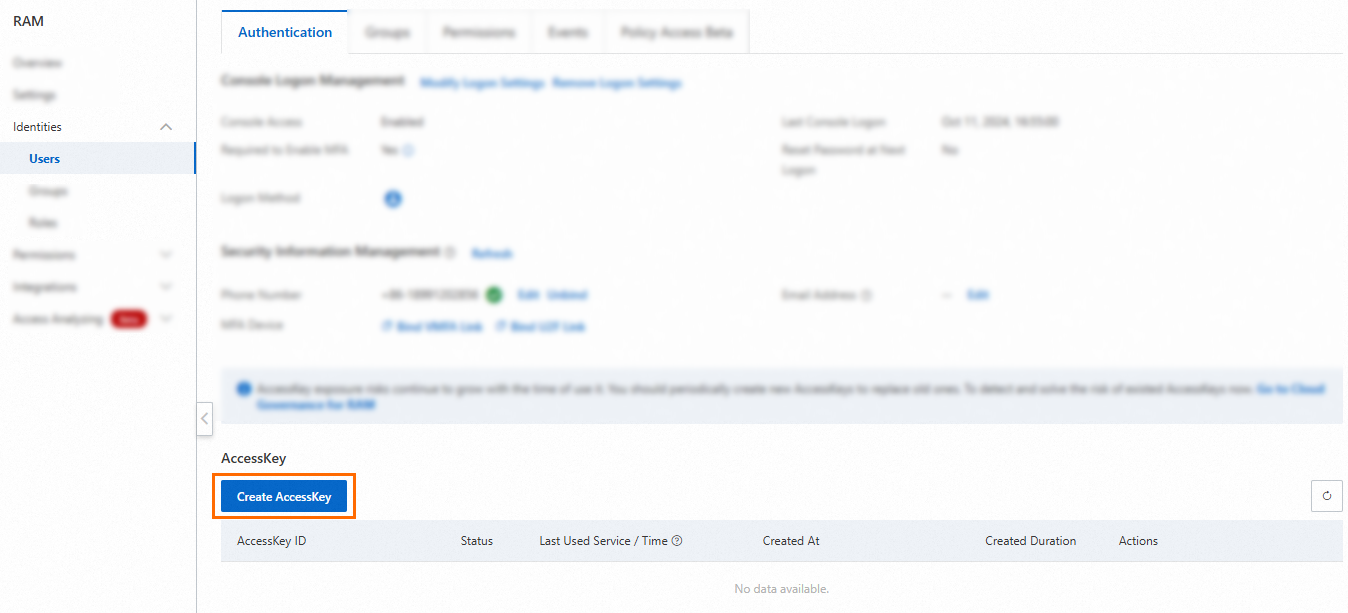
Create an AccessKey pair for a RAM user in the RAM console. See Create an AccessKey pair.
Grant the RAM user the required permissions by attaching the AliyunKMSSecretUserAccess and AliyunKMSCryptoUserAccess system policies. See Grant permissions to a RAM user.

KMS supports two types of access control:
Identity-based policies: Attach policies to RAM identities to define what they can do. See Use RAM to implement access control.
Resource-based policies: Attach policies directly to KMS resources (keys and secrets) to define who can access them. See Key policies and Secret policies.
4. Download the instance CA certificate
On the Instances page, click the Software key management or Hardware key management tab and select your instance.
Click the instance ID or Details in the Actions column.
On the instance details page, click Download next to Instance CA certificate.
Save the certificate file. It is named PrivateKmsCA_kst-******.pem by default.
5. Record the VPC endpoint
On the instance details page, copy the Virtual Private Cloud (VPC) endpoint of your instance.

Retrieve the secret value
The following example initializes the SDK client and calls GetSecretValue. The example uses the VPC endpoint and CA certificate to connect to your KMS instance.
Set the ALIBABA_CLOUD_ACCESS_KEY_ID and ALIBABA_CLOUD_ACCESS_KEY_SECRET environment variables before running the code.
Do not hardcode AccessKey credentials in your source code. Use environment variables or Security Token Service (STS) tokens instead. See Manage access credentials.
package com.aliyun.sample;

import com.aliyun.tea.*;

public class Sample {

    /**
     * Initialize the KMS client.
     *
     * endpoint: The VPC endpoint of your KMS instance.
     *           Example: kst-hzz65f176a0ogplgq****.cryptoservice.kms.aliyuncs.com
     * ca:       The content of the CA certificate downloaded from the instance details page.
     */
    public static com.aliyun.kms20160120.Client createClient() throws Exception {
        com.aliyun.teaopenapi.models.Config config = new com.aliyun.teaopenapi.models.Config()
                // Read credentials from environment variables
                .setAccessKeyId(System.getenv("ALIBABA_CLOUD_ACCESS_KEY_ID"))
                .setAccessKeySecret(System.getenv("ALIBABA_CLOUD_ACCESS_KEY_SECRET"));
        config.endpoint = "<VPC endpoint of the instance>";
        config.ca = "<CA certificate of the instance>";
        return new com.aliyun.kms20160120.Client(config);
    }

    public static void main(String[] args_) throws Exception {
        com.aliyun.kms20160120.Client client = Sample.createClient();

        com.aliyun.kms20160120.models.GetSecretValueRequest request =
                new com.aliyun.kms20160120.models.GetSecretValueRequest()
                        .setSecretName("<SecretName>");

        com.aliyun.teautil.models.RuntimeOptions runtime =
                new com.aliyun.teautil.models.RuntimeOptions();

        try {
            client.getSecretValueWithOptions(request, runtime);
        } catch (TeaException error) {
            System.out.println(error.getMessage());
            System.out.println(error.getData().get("Recommend"));
            com.aliyun.teautil.Common.assertAsString(error.message);
        } catch (Exception _error) {
            TeaException error = new TeaException(_error.getMessage(), _error);
            System.out.println(error.getMessage());
            System.out.println(error.getData().get("Recommend"));
            com.aliyun.teautil.Common.assertAsString(error.message);
        }
    }
}
Replace the following placeholders before running:
| Placeholder | Description | Example |
|---|---|---|
<VPC endpoint of the instance> | VPC endpoint from the instance details page | kst-hzz65f176a0ogplgq****.cryptoservice.kms.aliyuncs.com |
<CA certificate of the instance> | Content of the PrivateKmsCA_kst-******.pem file | (paste the full certificate string) |
<SecretName> | The name of the secret to retrieve | my-db-password |
What's next
Overview of secrets — Learn about secret types and lifecycle management.
Manage and use generic secrets — Configure rotation for generic secrets after creation.
Key policies and Secret policies — Set fine-grained access control for your keys and secrets.
Understanding KMS keys — Learn about the symmetric key types supported by KMS.