Encrypting large amounts of data directly through KMS adds network latency and sends sensitive data off your machine. Envelope encryption solves this by keeping data encryption local: KMS generates and protects a data key, and your application uses that key to encrypt data on the local machine without sending the data to KMS.
This topic covers envelope encryption in your own applications. For server-side encryption in Alibaba Cloud services, see Integration with KMS.
Applicable key types
You can use software-protected keys and hardware-protected keys for envelope encryption in your own applications.
Service keys and customer master keys (CMKs) that are used as default keys can also be used for envelope encryption, but they are restricted to server-side encryption in Alibaba Cloud services only—they cannot be used for encryption in your own applications. Software-protected keys and hardware-protected keys can be used for both server-side encryption in Alibaba Cloud services and encryption in your own applications.
How it works
The security of encrypted data depends on protecting the data key that can decrypt it. Encrypting the data key with a separate KMS key—and storing the encrypted form alongside the data—is the best practice that envelope encryption implements.
Encryption flow
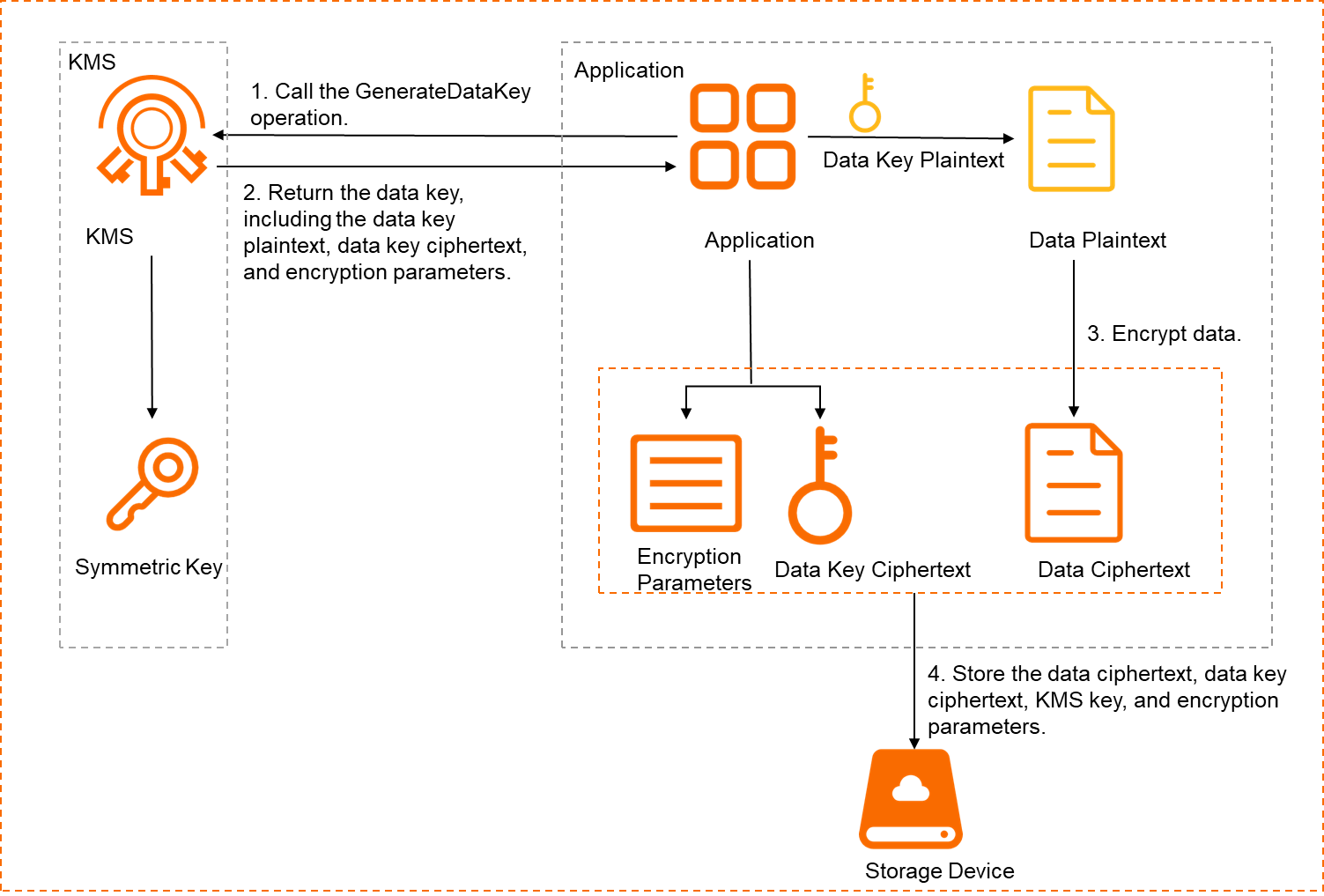
Call GenerateDataKey to generate a data key. Pass the following parameters:
Parameter Description KeyIdID or alias of the KMS key to use NumberOfBytesLength of the data key in bytes. Set to at least 24 bytes. For AES (Advanced Encryption Standard), use 16, 24, or 32 bytes. For 3DES (Triple Data Encryption Standard), use 16 or 24 bytes. Receive the data key from KMS. The response contains three fields:
WarningKeep the data key ciphertext safe. If it is lost, decryption is impossible and your data cannot be recovered.
Field Description Data key plaintext Used to encrypt data locally Data key ciphertext The plaintext encrypted with your KMS key in GCM (Galois/Counter Mode). Store this alongside the data ciphertext. Encryption parameters The encryption algorithm and initialization vector (IV) used to generate the data key ciphertext Use the data key plaintext to encrypt data locally with a cryptographic library or cryptographic module that meets your language and compliance requirements. We recommend that you destroy the data key plaintext at the earliest opportunity after encryption completes.
Store the data ciphertext together with the data key ciphertext, the KMS key identifier, and the encryption parameters.
Decryption flow

Read the stored data ciphertext, data key ciphertext, KMS key identifier, and encryption parameters.
Call Decrypt with the data key ciphertext and encryption parameters to get the data key plaintext from KMS.
Use the data key plaintext to decrypt the data ciphertext locally.
Use cases
Encrypting multiple files with independent keys
Using a single key for large numbers of files increases the risk of key compromise. With envelope encryption, each file gets a unique data key protected by a single KMS key, so each file's exposure is isolated.
Encrypting large volumes of data
Sending bulk data to KMS for encryption over the network adds latency and cost. Envelope encryption keeps data encryption local—only the small data key is exchanged with KMS—making it practical to encrypt datasets like full disk data.
Limitations
Envelope encryption requires a symmetric KMS key from a software or hardware key management instance. Supported key specifications:
| Instance type | Supported specifications |
|---|---|
| Software key management | Aliyun_AES_256 |
| Hardware key management | Aliyun_AES_256, Aliyun_AES_192, Aliyun_AES_128, Aliyun_DES3_192 |
Prerequisites
Before you begin, ensure that you have:
A symmetric KMS key. See Software-protected keys and Hardware-protected keys
An application access point (AAP). See Access a KMS instance by using an AAP
KMS Instance SDK installed for your language: Java, PHP, Go, or Python
Code samples
The following examples use a 32-byte AES data key encrypted in GCM mode.
Java
Uses the SunJCE Provider cryptographic library.
Python
Uses the cryptography.hazmat cryptographic library.
Go
Uses the golang/crypto cryptographic library.
PHP
Uses the OpenSSL cryptographic library.