KMS provides default encryption for Alibaba Cloud services. You can use either the service key that a cloud service creates automatically or a key that you create in KMS.
Benefits of integrating KMS encryption with Alibaba Cloud services
-
Enhance data security and privacy protection
KMS enables data encryption for most Alibaba Cloud services. You can configure encryption when you create a cloud service or afterward. KMS performs end-to-end encryption on data generated during cloud service usage, such as files produced by a database engine.
-
Reduce development costs associated with building custom data encryption
Building custom data encryption requires solving complex engineering and security challenges. Cloud services integrated with KMS handle these issues for you, reducing development costs.
-
Design a reasonable key hierarchy and data partitioning strategy to balance encryption performance and security.
-
Implement key rotation and data re-encryption.
-
Apply cryptographic expertise to select appropriate encryption algorithms and ensure the robustness, security, and tamper-proofing of the encryption system.
-
Key types supported for cloud service encryption
The default keys, software-protected keys, and hardware-protected keys provided by KMS all support integration with Alibaba Cloud services for server-side encryption. For more information, see Overview of KMS.
|
Key creator |
Key type |
Key material source |
Billing |
Description |
|
Create a Cloud Product |
Default key (service key) |
Generated by KMS. |
Free. |
Each Alibaba Cloud account supports only one service key per cloud service in each region. |
|
Created by user |
Default key (master key) |
Supported methods:
|
Free. |
After creating a key, grant the cloud service permission to use it. For more information, see Custom policy reference for Key Management Service. |
|
Software-protected key |
Generated by KMS. |
Paid. |
||
|
Hardware-protected key |
Supported methods:
|
Paid. |
Workflow for using keys in cloud service server-side encryption
The following example shows how to configure a key for server-side encryption when purchasing a cloud service. You can also configure encryption after purchase. For detailed steps, see the documentation for each cloud service.
Cloud product creation
This refers to a service key. You can view existing service keys in the KMS console.
-
When purchasing a cloud service, choose to encrypt server-side data using the KMS default key. The following example shows purchasing an ECS instance. In the System Disk configuration section, check the Encryption check box and select Default Service CMK from the key drop-down list.
NoteTo help you identify it, the service key is automatically assigned a special alias in the format
alias/acs/<cloud service code>. For example, the service key created for Elastic Compute Service (ECS) has the aliasalias/acs/ecs. -
View the service key created by the cloud service in the KMS console. On the Default Keys tab in the KMS console, you will see that the key specification is
Aliyun_AES_256and the key status is Enabled.Note-
A key with Key Usage set to Service Key is a key created for a cloud service.
-
The cloud service manages the lifecycle of service keys on your behalf. You cannot enable, disable, or otherwise manage service keys in the KMS console, but you can view their operation and usage records in the ActionTrail console.
-
User-created
-
Default key (master key)
-
Enable the master key in the KMS console. For more information, see Quick Start for key management.
For example, the alias of the master key is
alias/byok. -
When purchasing a cloud service, choose to encrypt server-side data using the default key (master key).
The following example shows purchasing an ECS instance. In the System Disk configuration section, check Encryption, then select your user-created key (such as alias/byok) from the key drop-down list.
-
-
Software-protected key
-
Purchase a software key management instance. For more information, see Purchase and enable a KMS instance.
-
Create a key in the KMS console. For more information, see Quick Start for key management.
-
When purchasing a cloud service, choose to encrypt server-side data using your software-protected key.
-
-
Hardware-protected key
-
Purchase a hardware key management instance. For more information, see Purchase and enable a KMS instance.
-
Create a key in the KMS console. For more information, see Quick Start for key management.
-
When purchasing a cloud service, choose to encrypt server-side data using your hardware-protected key.
-
Encryption integration methods for cloud services
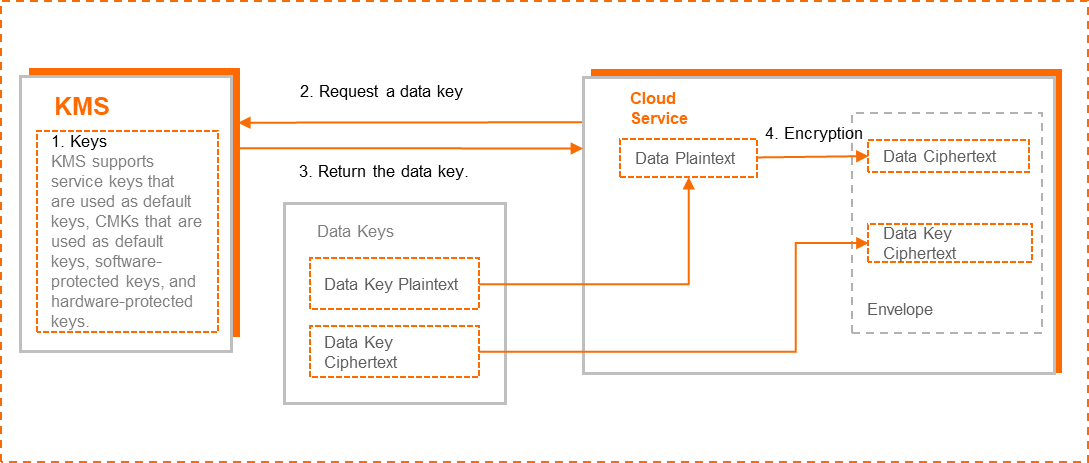
Different cloud services implement slightly different encryption designs. Typically, cloud services use envelope encryption to protect data: KMS encrypts a data key, and the data key encrypts the actual business data.
-
Create a key in KMS.
-
Call the KMS GenerateDataKey API to request a data key.
-
KMS returns the data key, including both plaintext and ciphertext versions. The ciphertext is generated by encrypting the plaintext data key with the specified KMS key.
-
The cloud service uses the plaintext data key to encrypt plaintext data. It then stores the encrypted data key (encrypted by KMS) together with the encrypted data (encrypted by the cloud service using the data key) in persistent storage.
-
In envelope encryption, the “envelope” conceptually refers to the packaging of the encrypted data key and encrypted data together.
-
KMS securely transmits the data key to the cloud service over a secure channel. The plaintext data key exists only in the cloud service’s memory and is never stored in plaintext on persistent storage.
Access control
KMS uses Resource Access Management (RAM) to verify whether a cloud service has permission to use a specific key. You can allow or deny access by following the RAM authorization guide for the cloud service or by configuring access policies in RAM. For more information, see Custom policy reference for Key Management Service.
Auditing
Use ActionTrail to audit how cloud services use your keys. For more information, see Query KMS operation events using ActionTrail.