If your application is deployed in virtual private clouds (VPCs) across multiple Alibaba Cloud regions and needs to use Key Management Service (KMS), you can enable cross-region access to a KMS instance. To do this, establish connections between the cross-region VPCs and use Alibaba Cloud DNS PrivateZone to configure domain name resolution for the KMS instance. This topic describes how to configure an application to access a KMS instance across regions.
Background information
To access resources in a KMS instance, an application's network must be connected to the VPC of the KMS instance. You must also correctly configure the domain name resolution for the KMS instance.
If the application's VPC and the KMS instance are in the same region, you can attach the VPC to the KMS instance. The application can then access the resources in the KMS instance. In this scenario, you do not need to manually configure domain name resolution for the KMS instance. For more information, see Access a KMS instance from multiple VPCs in the same region.
Solutions for VPC peering
This is the solution described in this topic. You can use Cloud Enterprise Network (CEN), VPN Gateway, VPC Peering Connection, or PrivateLink to enable private communication between VPCs. For more information about the features, details, and configuration methods of these VPC peering solutions, see VPC peering.
How to connect to a VPC from the internet
You can use static public IP addresses for Elastic Compute Service (ECS) instances, Elastic IP Addresses (EIPs), NAT Gateway, or Server Load Balancer (SLB) to allow cloud resources in a VPC to access the internet or be accessed from the internet. For more information, see Public network access.
How to connect a data center to a VPC
You can use VPN Gateway, Express Connect circuits, or Smart Access Gateway to connect your data center to a VPC on the cloud and build a hybrid cloud. For more information, see Connect a VPC to a data center or another cloud.
For more information about how to configure domain name resolution, see Introduction to internal DNS resolution.
Scenarios
You need to use KMS in a region where it is not available. You can purchase a KMS instance in a supported region and then configure your application to access the KMS instance across regions. For more information about the regions that support KMS, see Regions and zones.
Your application is deployed in VPCs across multiple regions, which may belong to the same or different Alibaba Cloud accounts. You want to purchase KMS in only a few regions to reduce IT service procurement costs and the workload of key management.
How it works
To configure cross-region access to a KMS instance, you must first connect the VPCs in different regions. Then, use PrivateZone to configure domain name resolution for the KMS instance and associate it with the VPCs. This allows your applications deployed in other regions to integrate with the KMS instance.
PrivateZone is a private Domain Name System (DNS) service based on the Alibaba Cloud VPC environment. It lets you map private domain names to IP addresses in one or more custom VPCs. For more information, see What is PrivateZone?.
For example, VPC1 is the VPC where the KMS instance resides. VPC2 is in a different region from VPC1. However, an application in VPC2 needs to access the keys and credentials in the KMS instance. The following figure shows the overall system architecture.

Notes
Before you use this solution, evaluate the costs of VPC connections and the PrivateZone service, the Service Level Agreement (SLA), bandwidth capacity, effective period, and other conditions. You should also create a system architecture, network architecture, operations management plan, and emergency plan for deploying applications across multiple regions.
NoteWhen calculating the availability of the KMS service, requests that fail to reach the KMS instance due to incorrect PrivateZone or VPC connection configurations are not counted as failed requests.
Cross-region access to a KMS instance is applicable only to scenarios where you integrate KMS with your self-built applications. It is not applicable to scenarios where you use server-side encryption of other cloud products with KMS.
If the VPC or private IP address of your KMS instance changes, the access channel to the KMS instance that you established using this solution becomes unavailable. You must reconfigure the DNS records in PrivateZone. The VPC or private IP address of a KMS instance changes if you use a hardware key management instance and perform a disconnect and reconnect operation.
Prerequisites
A KMS instance is purchased and enabled. For more information, see Purchase and enable a KMS instance.
Step 1: Query the VPC and private IP address of the KMS instance
Query the VPC and private IP address of the KMS instance. This information is required when you configure domain name resolution for the KMS instance using PrivateZone.
Query the VPC of the KMS instance
Method 1: Query in the console
Log on to the KMS console. In the top navigation bar, select a region. In the navigation pane on the left, choose .
Find the target instance and click Actions in the Details column.
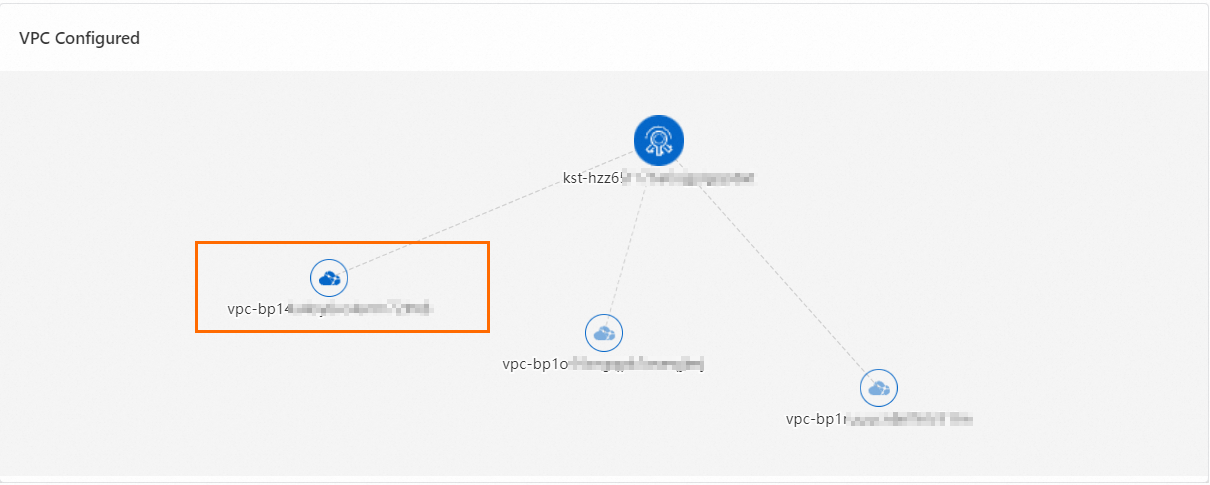
On the Share Resources tab, click the Multi-VPC tab. The VPC marked with the
 icon is the VPC where the KMS instance resides.
 Note
NoteThe VPCs displayed in the list are in the same region as the KMS instance. The cross-region VPC that you configure in this topic is not displayed in this list.
Method 2: Query using an API
Call the GetKmsInstance operation. The
VpcIdparameter in the response indicates the VPC of the KMS instance.
Query the private IP address of the KMS instance
Method 1: Query in the Alibaba Cloud DNS console
Log on to the Alibaba Cloud DNS console.
In the navigation pane on the left, click PrivateZone. Follow the on-screen instructions to activate PrivateZone. If you have already activated it, skip this step.
On the Authoritative PrivateZones page, click the Cloud Service Domain Names tab.
Set Cloud Service to Key Management Service, or enter cryptoservice.kms.aliyuncs.com in the Zone Name search box and click Search.
Hover the pointer over the VPC, find the target zone based on the VPC, and click View Records in the Actions column.
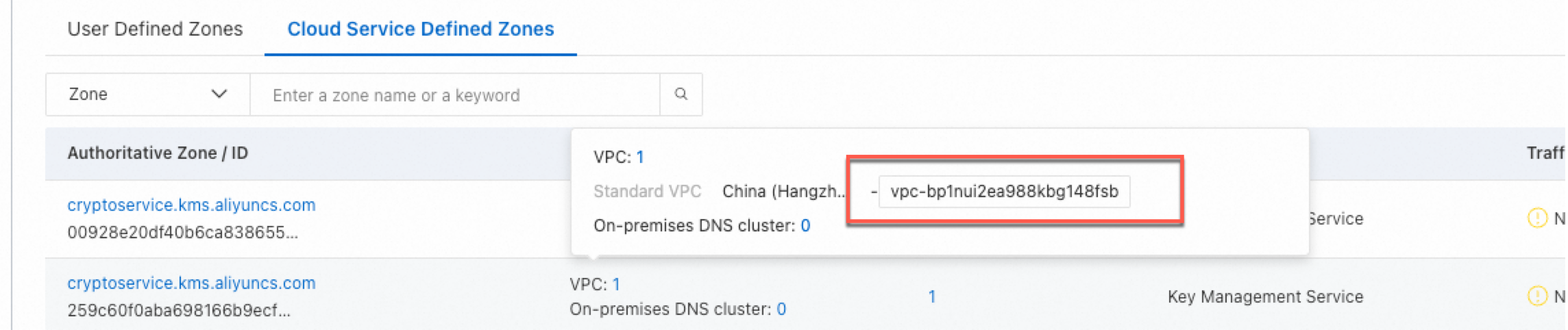
On the DNS Records page, view and record the Value. This is the private IP address of the KMS instance.
Method 2: Query using the
pingcommand.Run the
pingcommand on an ECS instance that is in the same VPC as the KMS instance. Obtain the private IP address of the KMS instance from the resolution result. The domain name format is{Instance ID}.cryptoservice.kms.aliyuncs.com.For example, run the command
ping kst-szz63292789pf******.cryptoservice.kms.aliyuncs.comto query the private IP address of the instance. The resolution result shows that the IP address is 172.16.XX.XX. The following is example output:Pinging kst-szz63292789pf******.cryptoservice.kms.aliyuncs.com [172.16.XX.XX] with 32 bytes of data
Step 2: Configure network communication between VPCs
By default, VPCs cannot communicate with each other. You must establish a connection between the VPC of the KMS instance and the VPCs in other regions.
Alibaba Cloud VPC provides several solutions to connect VPCs. These solutions include CEN and VPC Peering Connection. You can use them to connect VPCs that are in different regions or belong to the same or different Alibaba Cloud accounts. For more information, see the following documents:
Step 3: Use PrivateZone to configure domain name resolution and associate VPCs
Use PrivateZone to map the private domain name of the KMS instance to its IP address. This allows your applications deployed in other regions to access the KMS instance.
Log on to the Alibaba Cloud DNS console.
Add a zone.
In the navigation pane on the left, click PrivateZone. On the Authoritative PrivateZones page, click the Custom Domain Names tab. Then, click Add Zone.
Enter an Authoritative PrivateZone Name. For Scope, select the VPCs that you want to associate. Then, click OK.
Add a DNS record for the zone.
In the list of domain names, find the target zone and click DNS Records in the Actions column.
On the DNS Records page, click Add Record. Enter the required parameters and click OK.
Type: Select A.
Hostname: Enter the instance ID of the KMS instance.
Value: Enter the private IP address of the KMS instance.
TTL: The cache period. A smaller value means that the modified record takes effect faster. The default value is 1 minute. You can change the value as needed.
Step 4: Verify the configuration
Run the ping command on an ECS instance in the VPC that you associated in Step 3: Use PrivateZone to configure domain name resolution and associate VPCs. If the resolved private IP address is the same as the one you queried in Step 1: Query the VPC and private IP address of the KMS instance, the configuration is successful.
What to do next
To learn how to use keys in a KMS instance, see Alibaba Cloud SDKs.
To learn how to use credentials in a KMS instance, see Secrets Manager SDKs.