A source is an audio or video input sent to a MediaConnect flow. You can add sources that use different protocols, such as RTMP, SRT, or another flow.
Procedure
To add a source to an existing flow:
-
Log on to the Intelligent Media Services (IMS) console.
-
In the left-side navigation pane, select . On the Flows page, choose the one you want to add a source to.
-
On the Sources tab, click Add Source Stream. Configure the parameters in the right-side panel. For specific parameters based on the protocol, choose one of the following tabs:
RTMP-PUSH
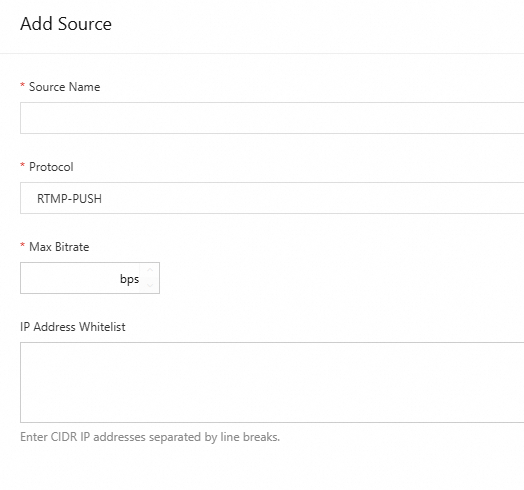
Parameter
Description
Source Name
Specify a name for your source stream. It supports letters, digits, hyphens (-), and underscores (_), with up to 128 characters.
Protocol
RTMP-PUSH. It cannot be modified after the source is added.
Max Bitrate
Specify a value based on your business requirements. Valid values: 100 to 100000000 bps.
Stuttering may occur if the actual bitrate exceeds this limit.
IP Address Whitelist
Specify IP addresses that are allowed to send content to the source. If the parameter is left empty, no access control is enforced.
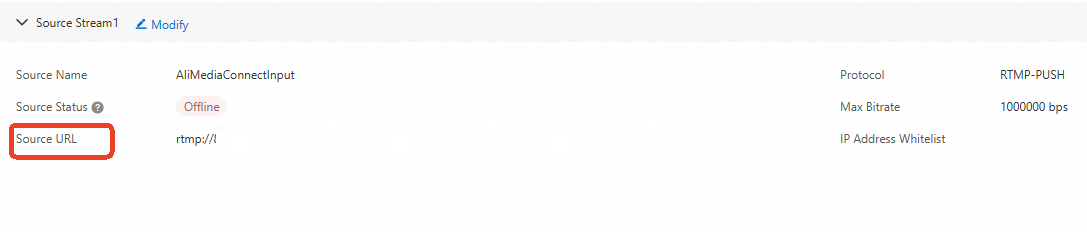
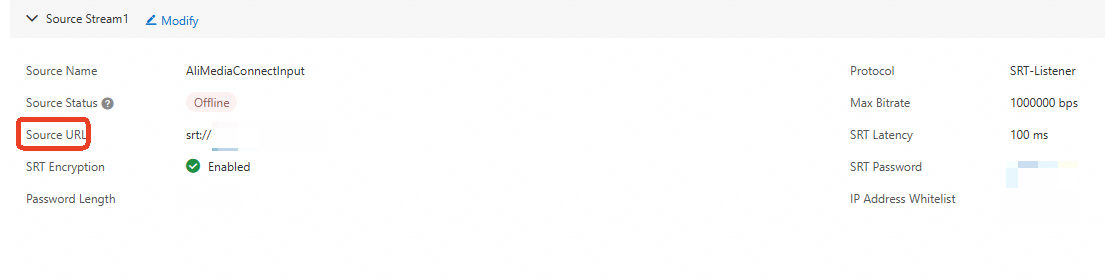
After the source is added, an RTMP URL is generated. Use this URL for stream ingest after starting the flow.
RTMP-PULL
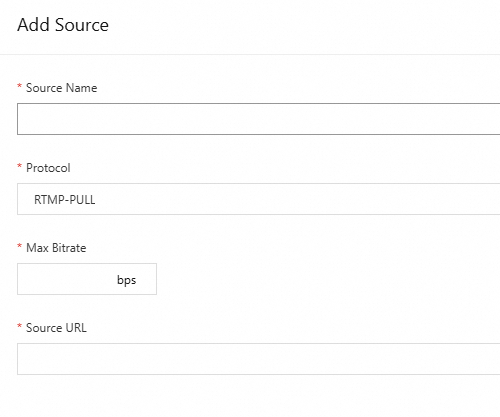
Parameter
Description
Source Name
Specify a name for your source stream. It supports letters, digits, hyphens (-), and underscores (_), with up to 128 characters.
Protocol
RTMP-PULL. It cannot be modified after the source is added.
Max Bitrate
Specify a value based on your business requirements. Valid values: 100 to 100000000 bps.
Stuttering may occur if the actual bitrate exceeds this limit.
Source URL
Specify an RTMP URL.
After you start the flow, MediaConnect will pull the stream from the specified source URL.
SRT-Listener
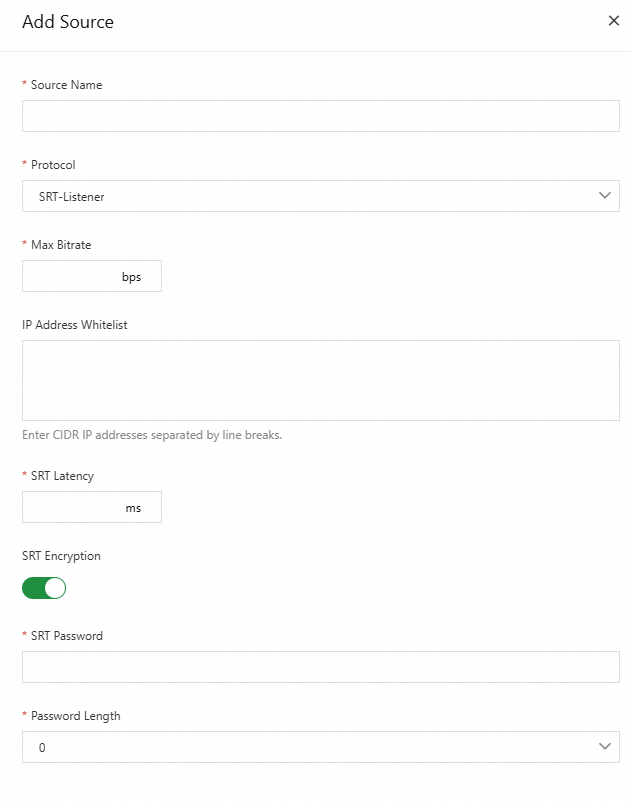
Parameter
Description
Source Name
Specify a name for your source stream. It supports letters, digits, hyphens (-), and underscores (_), with up to 128 characters.
Protocol
SRT-Listener. It cannot be modified after the source is added.
Max Bitrate
Specify a value based on your business requirements. Valid values: 100 to 100000000 bps.
Stuttering may occur if the actual bitrate exceeds this limit.
IP Address Whitelist
Specify IP addresses that are allowed to send content to the source. If the parameter is left empty, no access control is enforced.
SRT Latency
Specify the latency for the SRT stream. Valid values: 100 to 10000 ms.
-
If the latency is too low, stream interruptions may occur under unstable network conditions. If it is too high, there may be a longer delay in transmitting the stream.
Set the value based on actual network conditions. If the network is stable, use a smaller value. If the transmission distance is long or the input/output region differs from the flow region, use a larger value to allow more room for error correction.
-
You can obtain the IP address of the SRT service by creating an SRT listener and use the Ping command to measure the response latency of the IP address. This information helps you configure the appropriate latency.
SRT Encryption
After you turn on SRT Encryption, the connection password must be configured on the caller side to establish communication.
SRT Password
Specify a password for SRT connection. The password must contain between 10 and 79 ASCII characters.
Key Length
The key length for Advanced Encryption Standard (AES). Unit: bytes. Valid values: 0, 16, 24, 32.
After the source is added, an SRT URL is generated. Push the stream to this URL from your SRT client.
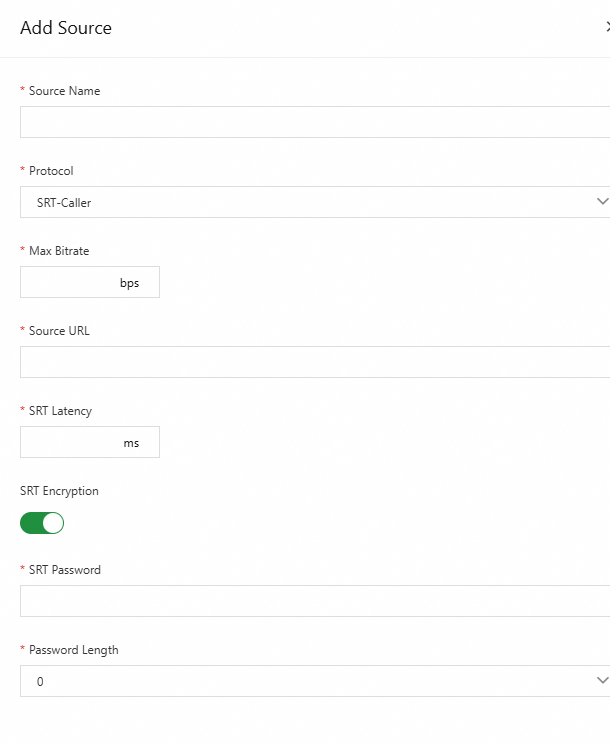
SRT-Caller
Parameter
Description
Source Name
Specify a name for your source stream. It supports letters, digits, hyphens (-), and underscores (_), with up to 128 characters.
Protocol
SRT-Caller. It cannot be modified after the source is added.
Max Bitrate
Specify a value based on your business requirements. Valid values: 100 to 100000000 bps.
Stuttering may occur if the actual bitrate exceeds this limit.
Source URL
Specify an SRT URL.
After you start the flow, MediaConnect will pull the stream from the specified source URL.
SRT Latency
Specify the latency for the SRT stream. Valid values: 100 to 10000 ms.
-
If the latency is too low, stream interruptions may occur under unstable network conditions. If it is too high, there may be a longer delay in transmitting the stream.
Set the value based on actual network conditions. If the network is stable, use a smaller value. If the transmission distance is long or the input/output region differs from the flow region, use a larger value to allow more room for error correction.
-
You can obtain the IP address of the SRT service by creating an SRT listener and use the Ping command to measure the response latency of the IP address. This information helps you configure the appropriate latency.
SRT Encryption
If a password is configured on the listener side, you must turn on SRT Encryption. Otherwise, the SRT connection cannot be established.
SRT Password
Specify the password configured on the listener side. The password must contain between 10 and 79 ASCII characters.
Key Length
The key length for Advanced Encryption Standard (AES). Unit: bytes. Valid values: 0, 16, 24, 32.
Flow
You can use the output of one flow as the source for another, connecting multiple flows for flexible and scalable cross-region distribution.
Note-
If you set the protocol to Flow, the source does not support source failover.
-
Ensure that the source flow is running when you use the downstream flow.
-
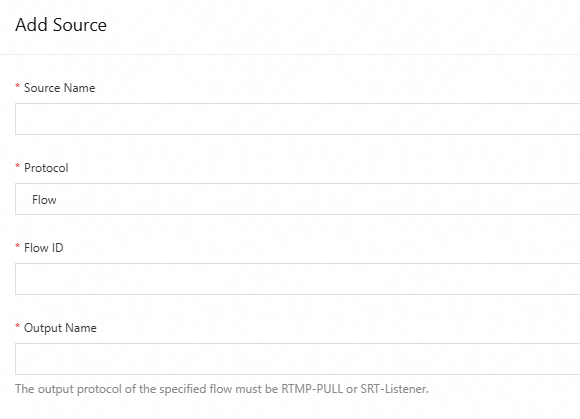
The protocol of the source flow output must be RTMP-PULL or SRT-Listener.
Parameter
Description
Source Name
Specify a name for your source stream. It supports letters, digits, hyphens (-), and underscores (_), with up to 128 characters.
Protocol
Flow.
Flow ID
The ID of the source flow, which can be obtained on the flow details page.
Output Name
The output of the source flow, which can be obtained on the Outputs tab of the flow details page.
NoteIf you fail to add the output, check whether the flow ID and source name of the source flow are available.
-
-
Click OK to add the source.