This topic describes how to transcode videos using the media transcoding API operation in Intelligent Media Management (IMM).
Feature description
Video transcoding converts a compressed and encoded video stream into another video stream. This process changes parameters, such as the video format, container format, resolution, frame rate, and bitrate, to adapt the video for playback on different devices and platforms. It also reduces the file size to optimize transmission efficiency.

Use cases
Multi-device compatibility: To ensure smooth playback on different devices, such as mobile phones, tablets, computers, and smart TVs, you can use video transcoding to convert videos into device-specific formats.
Streaming media playback: Streaming media services need to transcode videos into multiple formats and bitrates. This allows for dynamic adjustments based on a user's network conditions to improve the viewing experience.
Video compression: You can transcode a video to reduce its file size without significantly affecting its quality. This facilitates efficient storage and transmission, especially when network bandwidth is limited.
Supported audio and video formats
Category | Format |
Audio | Mainstream audio formats, such as AAC, MP3, WAV, FLAC, WMA, AC3, and Opus. |
Video | Mainstream video formats, such as MP4, MPEG-TS, MKV, MOV, AVI, FLV, M3U8, WebM, WMV, RM, and VOB. |
How to use
Prerequisites
An AccessKey pair is created and obtained. For more information, see Create an AccessKey pair.
Object Storage Service (OSS) is activated and a bucket is created. For more information, see Create a bucket.
IMM is activated. For more information, see Activate IMM.
A project is created in the IMM console. For more information, see Create a project.
NoteYou can call the CreateProject operation to create a project. For more information, see CreateProject.
You can call the ListProjects operation to list information of all projects in a region.
Step 1: Upload a file
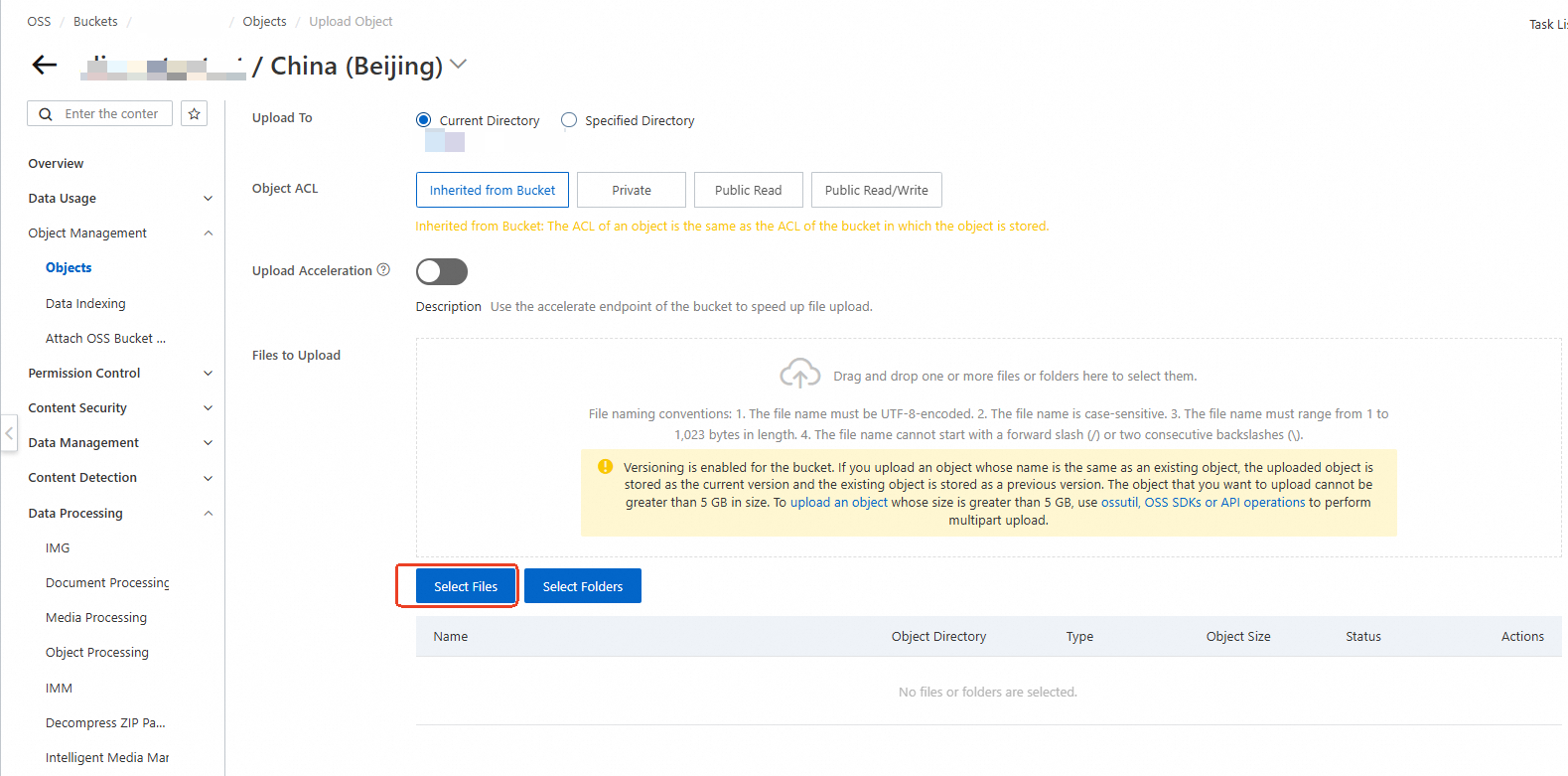
Use the OSS console to upload a media file to a bucket in the same region as your IMM project.
Step 2: Use IMM to transcode a video
Call the CreateMediaConvertTask operation to create a media transcoding task.
Parameter description
The following examples use the IMM project test-project to transcode the video file oss://test-bucket/video-demo/Shushan Commercial Building.mov.
For more information about the features and usage of ApsaraVideo Media Processing, see Media transcoding.
You can process the video file by calling the media transcoding API operation in the OpenAPI Portal and referring to the sample software development kit (SDK) code.
For the best playback compatibility, transcode the video to MP4 or HTTP Live Streaming (HLS). Set the video Codec to h264, PixelFormat to yuv420p, audio Codec to aac, and Channel to 2.
The transcoding process inevitably degrades video quality. You can adjust the quality of the transcoded video using the Bitrate and CRF parameters. Generally, higher quality results in a larger file size.
H.265 has better compression efficiency than H.264. For the same video quality, H.265 typically reduces storage space and bandwidth costs by more than 30%. However, H.265 requires a compatible player.
If you do not set the Codec parameter, the default value is copy. This value means the video stream is copied directly to the output file. The other parameters under TranscodeVideo are then invalid. The copy value is not used for video transcoding. It is typically used for container format conversion.
You can use variables to set the output file path for the URI in Targets. For more information, see TargetURI template.
Transcode to MP4
Convert a video to MP4 format without changing parameters such as resolution and frame rate.

Transcoding information
Video format: MOV to MP4
Video configuration: Set CRF to 24. Keep the original resolution, frame rate, and other video parameters.
Audio configuration: AAC format, 96 kbit/s bitrate, two sound channels, and 44.1 kHz sample rate.
Output video path:
oss://test-bucket/video-demo/Shushan Commercial Building.mp4Transcoding completion notification: Send an MNS message to the MNS topic "test-mns-topic".
For a sample SDK, see the OpenAPI Portal. The parameters in the example are automatically populated. You can modify the parameters as needed before you test the code.
Request parameters
{
  "ProjectName": "test-project",
  "Notification": {
    "MNS": {
      "TopicName": "test-mns-topic"
    }
  },
  "Sources": [
    {
      "URI": "oss://test-bucket/video-demo/Shushan Commercial Building.mov"
    }
  ],
  "Targets": [
    {
      "Audio": {
        "TranscodeAudio": {
          "Bitrate": 96000,
          "Channel": 2,
          "Codec": "aac",
          "SampleRate": 44100
        }
      },
      "Container": "mp4",
      "URI": "oss://test-bucket/video-demo/Shushan Commercial Building.mp4",
      "Video": {
        "TranscodeVideo": {
          "CRF": 24,
          "Codec": "h264",
          "PixelFormat": "yuv420p"
        }
      }
    }
  ]
}
Transcode to an HLS video with a 1920x1080 resolution at 30 fps
Transcode a video to an H.265 video with a 1920x1080 resolution at 30 frames per second (fps). Use the HLS format to segment the video. If the source video has a lower resolution or frame rate, the original parameters are used.

Transcoding information
Video format: MOV to M3U8
Segmentation: HLS format, 10 s segment length
Video configuration: H.265 encoding format, CRF set to 24, 1920x1080 resolution, and 30 frame rate.
Audio configuration: AAC format, 128 kbit/s bitrate, two sound channels, and 44.1 kHz sample rate.
Output video paths:
oss://test-bucket/video-demo/Shushan Commercial Building.m3u8,oss://test-bucket/video-demo/Shushan Commercial Building-%d.tsTranscoding completion notification: Send an MNS message to the MNS topic "test-mns-topic".
For a sample SDK, see the OpenAPI Portal. The parameters in the example are automatically populated. You can modify the parameters as needed before you test the code.
Request parameters
{
  "ProjectName": "test-project",
  "Notification": {
    "MNS": {
      "TopicName": "test-mns-topic"
    }
  },
  "Sources": [
    {
      "URI": "oss://test-bucket/video-demo/Shushan Commercial Building.mov"
    }
  ],
  "Targets": [
    {
      "Audio": {
        "TranscodeAudio": {
          "Bitrate": 128000,
          "Channel": 2,
          "Codec": "aac",
          "SampleRate": 44100
        }
      },
      "Container": "ts",
      "Segment": {
        "Duration": 10,
        "Format": "hls"
      },
      "URI": "oss://test-bucket/video-demo/Shushan Commercial Building.{autoext}",
      "Video": {
        "TranscodeVideo": {
          "AdaptiveResolutionDirection": true,
          "CRF": 24,
          "Codec": "h265",
          "FrameRate": 30,
          "FrameRateOption": "adaptive",
          "PixelFormat": "yuv420p",
          "Resolution": "1920x1080",
          "ResolutionOption": "adaptive",
          "ScaleType": "fit"
        }
      }
    }
  ]
}
Transcode to HLS videos with 1080p, 720p, and 480p resolutions
Transcode a video into three separate videos with 1080p, 720p, and 480p resolutions. The HLS format is used for segmentation.

Transcoding information
Before transcoding
Video format: MOV
Video encoding format: H.264
Resolution: 3840x2160
Frame rate: 30
After transcoding
Transcoding completion notification: Send an MNS message to the MNS topic "test-mns-topic".
Video 1
Video format: M3U8
Segmentation: HLS format, 10 s segment length
Video configuration: H.264 encoding format, CRF set to 25, 1920x1080 resolution, and 30 frame rate.
Audio configuration: AAC format, 256 kbit/s bitrate, two sound channels, and 44.1 kHz sample rate.
Output video paths:
oss://test-bucket/video-demo/Shushan Commercial Building-x1080.m3u8,oss://test-bucket/video-demo/Shushan Commercial Building-x1080-%d.ts
Video 2
Video format: M3U8
Segmentation: HLS format, 10 s segment length
Video configuration: H.264 encoding format, CRF set to 26, 1280x720 resolution, and 30 frame rate.
Audio configuration: AAC format, 128 kbit/s bitrate, two sound channels, and 44.1 kHz sample rate.
Output video paths:
oss://test-bucket/video-demo/Shushan Commercial Building-x720.m3u8,oss://test-bucket/video-demo/Shushan Commercial Building-x720-%d.ts
Video 3
Video format: M3U8
Segmentation: HLS format, 10 s segment length
Video configuration: H.264 encoding format, CRF set to 28, 854x480 resolution, and 25 frame rate.
Audio configuration: AAC format, 96 kbit/s bitrate, two sound channels, and 44.1 kHz sample rate.
Output video paths:
oss://test-bucket/video-demo/Shushan Commercial Building-x480.m3u8,oss://test-bucket/video-demo/Shushan Commercial Building-x480-%d.ts
For a sample SDK, see the OpenAPI Portal. The parameters in the example are automatically populated. You can modify the parameters as needed before you test the code.
Request parameters
{
  "ProjectName": "test-project",
  "Notification": {
    "MNS": {
      "TopicName": "test-mns-topic"
    }
  },
  "Sources": [
    {
      "URI": "oss://test-bucket/video-demo/Shushan Commercial Building.mov"
    }
  ],
  "Targets": [
    {
      "Audio": {
        "TranscodeAudio": {
          "Bitrate": 256000,
          "Channel": 2,
          "Codec": "aac",
          "SampleRate": 44100
        }
      },
      "Container": "ts",
      "Segment": {
        "Duration": 10,
        "Format": "hls"
      },
      "URI": "oss://test-bucket/video-demo/Shushan Commercial Building-{resolution}.{autoext}",
      "Video": {
        "TranscodeVideo": {
          "AdaptiveResolutionDirection": true,
          "CRF": 25,
          "Codec": "h264",
          "FrameRate": 30,
          "FrameRateOption": "adaptive",
          "PixelFormat": "yuv420p",
          "Resolution": "x1080",
          "ResolutionOption": "adaptive",
          "ScaleType": "fit"
        }
      }
    },
    {
      "Audio": {
        "TranscodeAudio": {
          "Bitrate": 128000,
          "Channel": 2,
          "Codec": "aac",
          "SampleRate": 44100
        }
      },
      "Container": "ts",
      "Segment": {
        "Duration": 10,
        "Format": "hls"
      },
      "URI": "oss://test-bucket/video-demo/Shushan Commercial Building-{resolution}.{autoext}",
      "Video": {
        "TranscodeVideo": {
          "AdaptiveResolutionDirection": true,
          "CRF": 26,
          "Codec": "h264",
          "FrameRate": 30,
          "FrameRateOption": "adaptive",
          "PixelFormat": "yuv420p",
          "Resolution": "x720",
          "ResolutionOption": "adaptive",
          "ScaleType": "fit"
        }
      }
    },
    {
      "Audio": {
        "TranscodeAudio": {
          "Bitrate": 96000,
          "Channel": 2,
          "Codec": "aac",
          "SampleRate": 44100
        }
      },
      "Container": "ts",
      "Segment": {
        "Duration": 10,
        "Format": "hls"
      },
      "URI": "oss://test-bucket/video-demo/Shushan Commercial Building-{resolution}.{autoext}",
      "Video": {
        "TranscodeVideo": {
          "AdaptiveResolutionDirection": true,
          "CRF": 28,
          "Codec": "h264",
          "FrameRate": 25,
          "FrameRateOption": "adaptive",
          "PixelFormat": "yuv420p",
          "Resolution": "x480",
          "ResolutionOption": "adaptive",
          "ScaleType": "fit"
        }
      }
    }
  ]
}
Transcode to MP4 and add watermarks
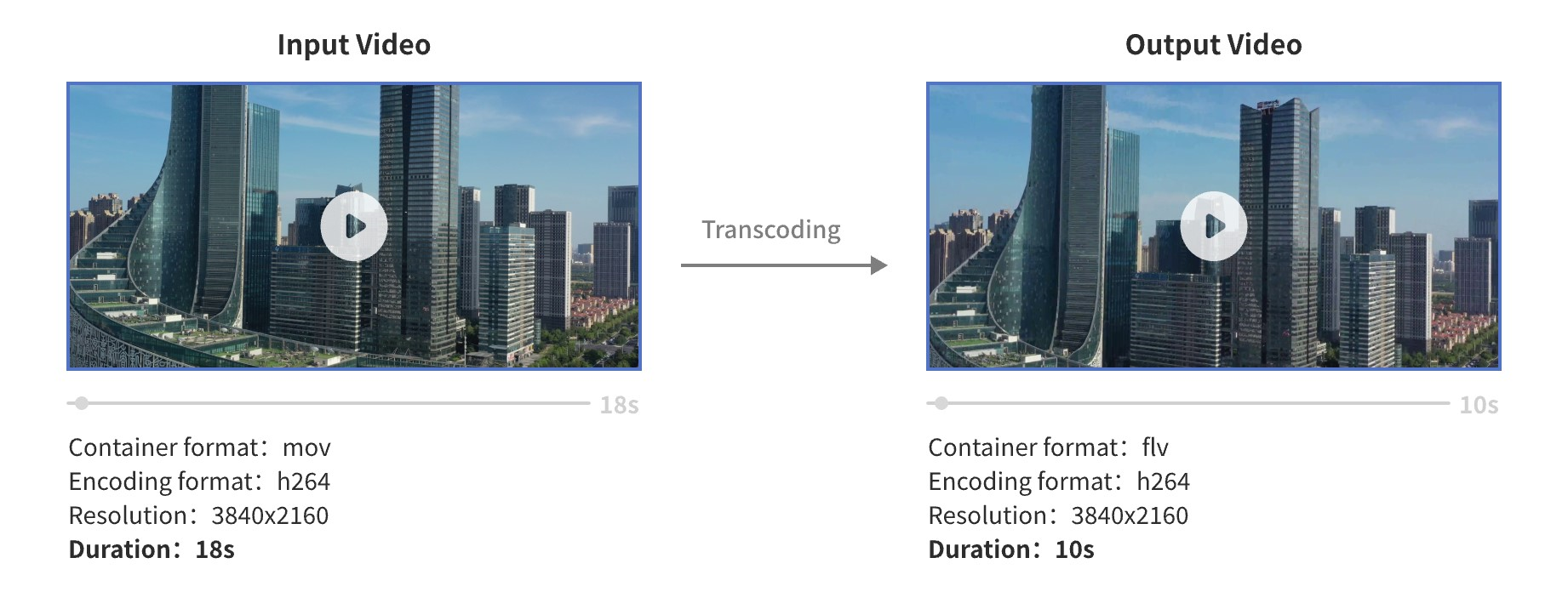
Transcode a video to MP4 format. Add a logo watermark to the upper-left corner and a text watermark to the lower-right corner.
Transcoding information
Video format: MOV to MP4
Video configuration: The video is encoded in H.264 format with the CRF set to 25. The original resolution and frame rate are retained. An Alibaba Cloud logo image watermark is added to the upper-left corner and an "Intelligent Media Management" text watermark is added to the lower-right corner.
Audio configuration: The audio is encoded in AAC format with a 256 kbit/s bitrate, two sound channels, and a 44.1 kHz sample rate.
Output video path:
oss://test-bucket/video-demo/Shushan Commercial Building.mp4Transcoding completion notification: An MNS message is sent to the MNS topic "test-mns-topic".
For a code sample, see the OpenAPI Portal. The parameters in the example are automatically populated. You can modify the parameters as needed before you test the code.

Request parameters
{
  "ProjectName": "test-project",
  "Notification": {
    "MNS": {
      "TopicName": "test-mns-topic"
    }
  },
  "Sources": [
    {
      "URI": "oss://test-bucket/video-demo/Shushan Commercial Building.mov"
    }
  ],
  "Targets": [
    {
      "Audio": {
        "TranscodeAudio": {
          "Bitrate": 256000,
          "Channel": 2,
          "Codec": "aac",
          "SampleRate": 44100
        }
      },
      "Container": "mp4",
      "URI": "oss://test-bucket/video-demo/Shushan Commercial Building.{autoext}",
      "Video": {
        "FilterVideo": {
          "Delogos": [],
          "Watermarks": [
            {
              "Dx": 0.05,
              "Dy": 0.1,
              "ReferPos": "topleft",
              "Type": "file",
              "URI": "oss://test-bucket/video-demo/aliyun.png",
              "Width": 0.1
            },
            {
              "Content": "Intelligent Media Management",
              "Dx": 0.05,
              "Dy": 0.1,
              "FontColor": "#FFFFFF",
              "FontSize": 100,
              "ReferPos": "bottomright",
              "Type": "text"
            }
          ]
        },
        "TranscodeVideo": {
          "CRF": 25,
          "Codec": "h264",
          "PixelFormat": "yuv420p"
        }
      }
    }
  ]
}
Clip a video segment and transcode it to FLV format
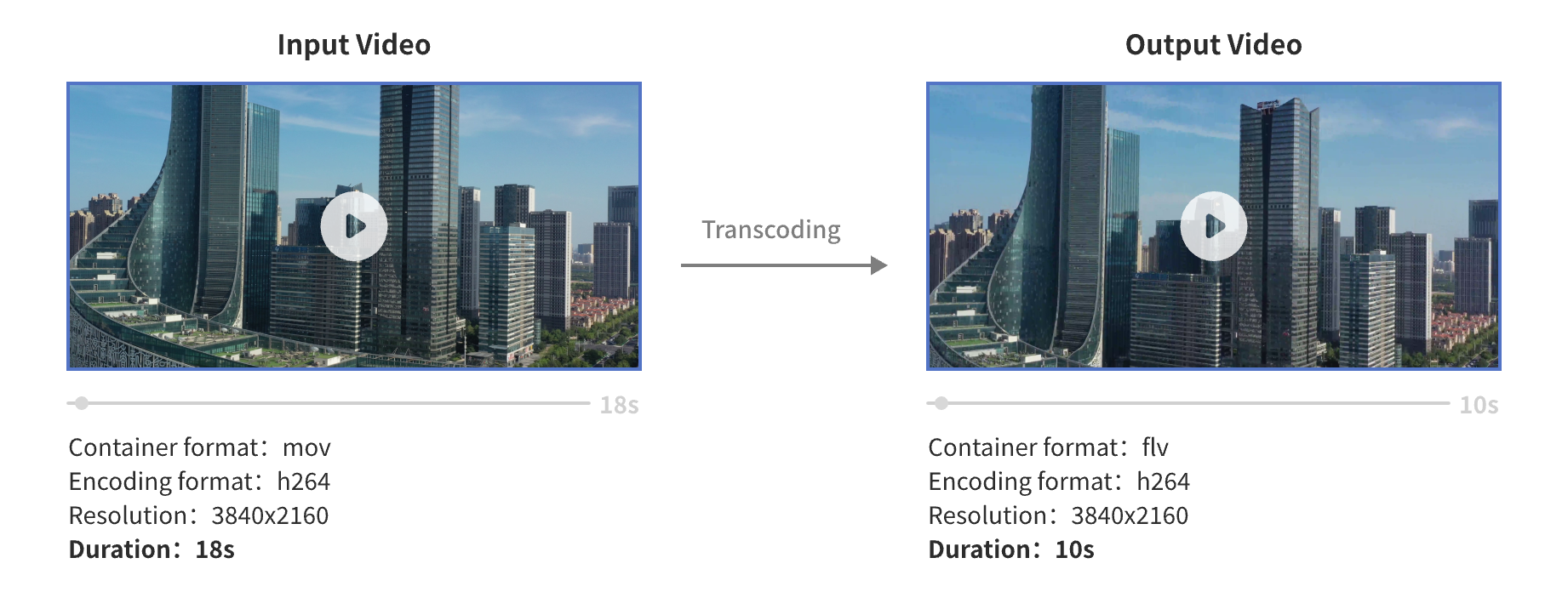
Clip a segment from the source video, transcode it to FLV format, and adjust the bitrate to 1 Mbps.
Transcoding Information
Video format: MOV to FLV
Clip start time: 5 s
Clip duration: 10 s
Video configuration: 1 Mbps bitrate. The original resolution, frame rate, and other video parameters are preserved.
Audio configuration: AAC format, 96 kbit/s bitrate, two sound channels, and 44.1 kHz sample rate.
Output video path:
oss://test-bucket/video-demo/Shushan Commercial Building.flvTranscoding completion notification: An MNS message is sent to the MNS topic "test-mns-topic".
For a sample call, see OpenAPI Portal. The parameters in the example are automatically populated. You can modify the parameters as needed before you test the code.
Request parameters
{
  "ProjectName": "test-project",
  "Notification": {
    "MNS": {
      "TopicName": "test-mns-topic"
    }
  },
  "Sources": [
    {
      "Duration": 10,
      "StartTime": 5,
      "URI": "oss://test-bucket/video-demo/Shushan Commercial Building.mov"
    }
  ],
  "Targets": [
    {
      "Audio": {
        "TranscodeAudio": {
          "Bitrate": 96000,
          "Channel": 2,
          "Codec": "aac",
          "SampleRate": 44100
        }
      },
      "Container": "flv",
      "URI": "oss://test-bucket/video-demo/Shushan Commercial Building.{autoext}",
      "Video": {
        "TranscodeVideo": {
          "Bitrate": 1000000,
          "Codec": "h264",
          "PixelFormat": "yuv420p"
        }
      }
    }
  ]
}
Convert the container format of a video to MP4
Convert the container format of a video to MP4. Container format conversion does not re-encode the audio or video data, but it may cause playback compatibility issues.
Transcoding information
Video format: MOV to MP4
Output video path:
oss://test-bucket/video-demo/Shushan Commercial Building.mp4Transcoding completion notification: Sends an MNS message to the MNS topic "test-mns-topic".
For a sample API call, see the OpenAPI Portal. The parameters in the example are automatically populated. You can modify the parameters as needed before you test the code.
Request parameters
{
  "ProjectName": "test-project",
  "Notification": {
    "MNS": {
      "TopicName": "test-mns-topic"
    }
  },
  "Sources": [
    {
      "URI": "oss://test-bucket/video-demo/Shushan Commercial Building.mov"
    }
  ],
  "Targets": [
    {
      "Container": "mp4",
      "URI": "oss://test-bucket/video-demo/Shushan Commercial Building.{autoext}"
    }
  ]
}
Mosaic watermark areas in a video
Mosaic the logo watermark area in the upper-left corner and the text watermark area in the lower-right corner of a video.

Transcoding information
Input video path:
oss://test-bucket/video-demo/Shushan Commercial Building.mp4Video configuration: H.264 encoding format with the CRF set to 24. The original resolution and frame rate are retained. A mosaic is applied to the logo area in the upper-left corner and the text watermark area in the lower-right corner.
Audio configuration: AAC format, 96 kbit/s bitrate, two sound channels, and 44.1 kHz sample rate.
Output video path:
oss://test-bucket/video-demo/Shushan Commercial Building-mosaic.mp4Transcoding completion notification: An MNS message is sent to the MNS topic "test-mns-topic".
For a code sample, see the OpenAPI Portal. The parameters in the example are automatically populated. You can modify the parameters as needed before you test the code.
Request parameters
{
  "ProjectName": "test-project",
  "Notification": {
    "MNS": {
      "TopicName": "test-mns-topic"
    }
  },
  "Sources": [
    {
      "URI": "oss://test-bucket/video-demo/Shushan Commercial Building.mp4"
    }
  ],
  "Targets": [
    {
      "Audio": {
        "TranscodeAudio": {
          "Bitrate": 96000,
          "Channel": 2,
          "Codec": "aac",
          "SampleRate": 44100
        }
      },
      "Container": "mp4",
      "URI": "oss://test-bucket/video-demo/Shushan Commercial Building-mosaic.{autoext}",
      "Video": {
        "FilterVideo": {
          "Delogos": [
            {
              "Dx": 0.05,
              "Dy": 0.1,
              "Height": 0.1,
              "ReferPos": "topleft",
              "Width": 0.1
            },
            {
              "Dx": 0.05,
              "Dy": 0.1,
              "Height": 100,
              "ReferPos": "bottomright",
              "Width": 600
            }
          ]
        },
        "TranscodeVideo": {
          "CRF": 24,
          "Codec": "h264",
          "PixelFormat": "yuv420p"
        }
      }
    }
  ]
}