Blind watermarking
Blind watermarking embeds imperceptible text into images for ownership verification, leak tracing, and duplicate detection. The watermark remains extractable even after compression, resizing, cropping, and color changes.
How it works
The following figure illustrates blind watermarking.
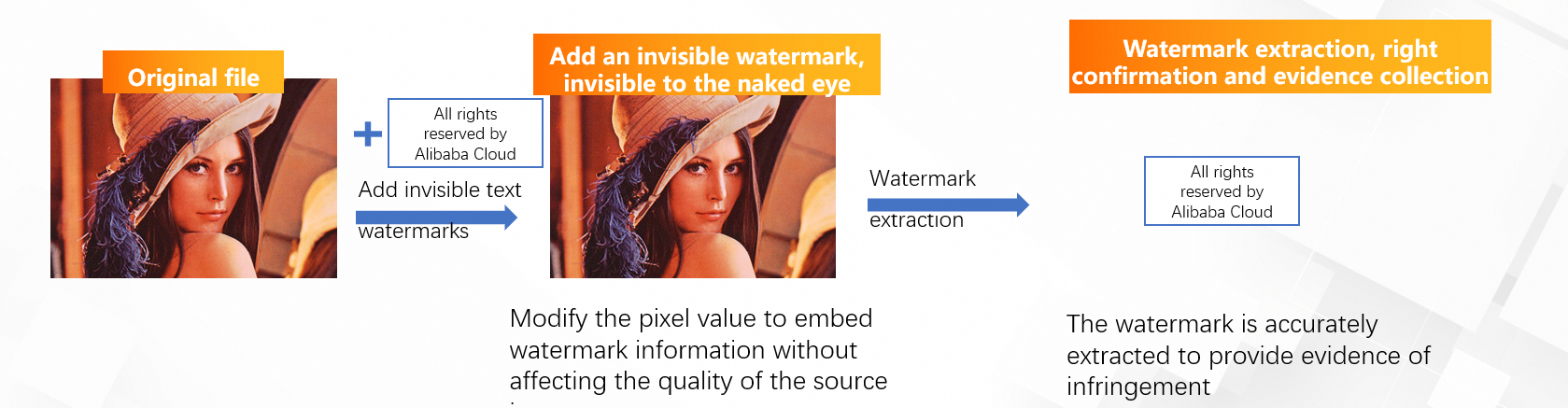
The workflow has two stages:
-
Encoding: You call the EncodeBlindWatermark API operation to embed a text watermark into an image. The operation reads the source image from OSS, embeds the watermark, and writes the watermarked image to a target location in OSS.
-
Decoding: You call the CreateDecodeBlindWatermarkTask API operation to create an asynchronous task that extracts the watermark text. After the task completes, you retrieve the result by calling the GetDecodeBlindWatermarkResult operation or from an asynchronous notification.
Use cases
Proof of ownership and legal evidence
Blind watermarks serve as tamper-resistant proof of image ownership. If an ownership dispute arises, you can extract the embedded watermark to prove that an image originated from your organization.
Image deduplication for uploads
By extracting the watermark from an incoming image, you can check it against existing records and avoid storing duplicate content.
Resource leak prevention
Each distributed copy can carry a unique watermark that identifies the recipient. If images are shared illegally, you can extract the watermark to trace the source of the leak.
Limits
Watermark constraints
| Constraint | Value |
|---|---|
| Watermark type | Text only (blind text watermarks) |
| Maximum watermark length | 256 characters |
Image requirements
| Requirement | Value |
|---|---|
| Supported formats | JPG, PNG, BMP, TIFF, and WebP |
| Minimum dimensions | 80 x 80 pixels (width and height) |
| Maximum dimensions | 10,000 x 10,000 pixels (width and height) |
| Aspect ratio | The ratio of the short edge to the long edge must be greater than 1:2 |
Blind watermarking does not support pure-white or pure-black images, or images with very low resolution (for example, less than 200 x 200 pixels). The ratio of the short edge to the long edge must be greater than 1:2.
Robustness
Blind watermarks are robust against the following common processing operations and attacks:
-
Screenshot
-
Cropping
-
JPEG compression
-
Resizing
-
Color changing
-
Saturation adjustment
-
Hue adjustment
-
Brightness adjustment
-
Addition of lightweight graffiti
Prerequisites
Before you begin, complete the following steps:
-
Create an AccessKey pair. For more information, see Create an AccessKey pair.
-
Upload the relevant objects to an OSS bucket. For more information, see Upload objects.
-
Activate Intelligent Media Management (IMM). For more information, see Activate IMM.
-
Create a project in the IMM console. For more information, see Create a project.
You can also call the CreateProject operation to create a project.
You can call the ListProjects operation to list all projects in the specified region.
Add a blind watermark
Call the EncodeBlindWatermark operation to add a blind watermark to an image.
Request parameters
| Parameter | Type | Description |
|---|---|---|
ProjectName |
String | The name of the IMM project. |
SourceURI |
String | The OSS URI of the source image. Format: oss://${Bucket}/${Object}. Supported formats: JPG, PNG, BMP, TIFF, and WebP. Image size: 80 px minimum, 10,000 px maximum. |
TargetURI |
String | The OSS URI where the watermarked image is saved. The output image format is the same as the input image format. |
Content |
String | The watermark text to embed. Maximum length: 256 characters. |
Example
Image information
-
IMM project: test-project
-
Image address: oss://test-bucket/test-object.jpg
-
Image:

Sample request
{
  "ProjectName": "test-project",
  "SourceURI": "oss://test-bucket/test-object.jpg",
  "TargetURI": "oss://test-bucket/blindwatermark-object.jpg",
  "Content": "All rights reserved by Alibaba Cloud",
}
Sample response
{
  "RequestId": "4FACCDBE-6D15-4E02-9924-1CC5FAF2A9B3",
}
Sample code
The following example uses the IMM SDK for Python to add a blind watermark:
# -*- coding: utf-8 -*-
# This file is auto-generated, don't edit it. Thanks.
import os
import sys

from typing import List

from alibabacloud_imm20200930.client import Client as imm20200930Client
from alibabacloud_tea_openapi import models as open_api_models
from alibabacloud_imm20200930 import models as imm_20200930_models
from alibabacloud_tea_util import models as util_models
from alibabacloud_tea_util.client import Client as UtilClient


class Sample:
    def __init__(self):
        pass

    @staticmethod
    def create_client() -> imm20200930Client:
        """
        Use the AccessKey ID and AccessKey secret to initialize the client.
        @param access_key_id:
        @param access_key_secret:
        @return: Client
        @throws Exception
        """
        # If the project code is leaked, the AccessKey pair may be leaked and the security of all resources within your account may be compromised. The following lines are provided for reference only.
        # For security reasons, we recommend that you use temporary access credentials that are provided by Security Token Service (STS). For more information, visit https://www.alibabacloud.com/help/en/sdk/developer-reference/v2-manage-php-access-credentials.
        config = open_api_models.Config(
            # Required. Make sure that the ALIBABA_CLOUD_ACCESS_KEY_ID environment variable is configured. ,
            access_key_id=os.environ['ALIBABA_CLOUD_ACCESS_KEY_ID'],
            # Required. Make sure that the ALIBABA_CLOUD_ACCESS_KEY_SECRET environment variable is configured. ,
            access_key_secret=os.environ['ALIBABA_CLOUD_ACCESS_KEY_SECRET']
        )
        # Specify the IMM endpoint. For a list of IMM endpoints for supported regions, visit https://api.alibabacloud.com/product/imm.
        config.endpoint = f'imm.cn-hangzhou.aliyuncs.com'
        return imm20200930Client(config)

    @staticmethod
    def main(
        args: List[str],
    ) -> None:
        client = Sample.create_client()
        encode_blind_watermark_request = imm_20200930_models.EncodeBlindWatermarkRequest(
            project_name='test-project',
            source_uri='oss://test-bucket/test-object.jpg',
            target_uri='oss://test-bucket/blindwatermark-object.jpg',
            content='All rights reserved by Alibaba Cloud'
        )
        runtime = util_models.RuntimeOptions()
        try:
            # Print the response of the API operation if necessary.
            client.encode_blind_watermark_with_options(encode_blind_watermark_request, runtime)
        except Exception as error:
            # Handle exceptions with caution in your actual business scenario and never ignore exceptions in your project. In this example, error messages are printed to the screen.
            # Display error messages.
            print(error.message)
            # Show the URL for troubleshooting.
            print(error.data.get("Recommend"))
            UtilClient.assert_as_string(error.message)

    @staticmethod
    async def main_async(
        args: List[str],
    ) -> None:
        client = Sample.create_client()
        encode_blind_watermark_request = imm_20200930_models.EncodeBlindWatermarkRequest(
            project_name='test-project',
            source_uri='oss://test-bucket/test-object.jpg',
            target_uri='oss://test-bucket/blindwatermark-object.jpg',
            content='All rights reserved by Alibaba Cloud'
        )
        runtime = util_models.RuntimeOptions()
        try:
            # Print the response of the API operation if necessary.
            await client.encode_blind_watermark_with_options_async(encode_blind_watermark_request, runtime)
        except Exception as error:
            # Handle exceptions with caution in your actual business scenario and never ignore exceptions in your project. In this example, error messages are printed to the screen.
            # Display error messages.
            print(error.message)
            # Show the URL for troubleshooting.
            print(error.data.get("Recommend"))
            UtilClient.assert_as_string(error.message)


if __name__ == '__main__':
    Sample.main(sys.argv[1:])
Decode a blind watermark
Decoding a blind watermark is an asynchronous operation. You first create a decoding task, then retrieve the result after the task completes.
-
Call the CreateDecodeBlindWatermarkTask operation to create a decoding task.
-
After the task completes, retrieve the extracted watermark text by calling the GetDecodeBlindWatermarkResult operation or from the asynchronous notification.
Request parameters
| Parameter | Type | Description |
|---|---|---|
ProjectName |
String | The name of the IMM project. |
SourceURI |
String | The OSS URI of the watermarked image to decode. |
Task information retention
The task information is retained for seven days after the task starts. Task information cannot be obtained after the seven-day window ends.
You can use one of the following methods to query task information:
-
In the region in which the IMM project is located, configure a Simple Message Queue (SMQ) subscription to receive task information notifications. For information about the asynchronous notification format, see Asynchronous message examples. For more information about SMQ SDKs, see Step 4: Receive and delete the message.
-
In the region in which the IMM project is located, create an ApsaraMQ for RocketMQ 4.0 instance, a topic, and a group to receive task notifications. For more information about the asynchronous notification format, see Asynchronous message examples. For more information about how to use ApsaraMQ for RocketMQ, see Use HTTP client SDKs to send and subscribe to normal messages.
-
In the region in which the IMM project is located, use EventBridge to receive task information notifications. For more information, see IMM events.
Example
Image information
-
IMM project: test-project
-
Image location: oss://test-bucket/blindwatermark-object.jpg
-
Image:
Sample request
{
  "ProjectName": "test-project",
  "SourceURI": "oss://test-bucket/blindwatermark-object.jpg",
}
Sample response
{
  "TaskId": "DecodeBlindWatermark-23dee5ea-d890-4f82-9357-fa6ad027b2a9",
  "RequestId": "79DD63F2-B72D-0E53-97AA-8B98C1758DBF",
  "EventId": "073-1oOm1dJjEUrCnQz0oFqtEwO7rJr"
}
The response contains the following fields:
| Field | Description |
|---|---|
TaskId |
The ID of the asynchronous decoding task. Use this ID to query the task status and result. |
RequestId |
The unique ID of the API request. |
EventId |
The event ID for tracking the task through asynchronous notification channels. |
Sample code
The following example uses the IMM SDK for Python to decode a blind watermark:
# -*- coding: utf-8 -*-
# This file is auto-generated, don't edit it. Thanks.
import os
import sys

from typing import List

from alibabacloud_imm20200930.client import Client as imm20200930Client
from alibabacloud_tea_openapi import models as open_api_models
from alibabacloud_imm20200930 import models as imm_20200930_models
from alibabacloud_tea_util import models as util_models
from alibabacloud_tea_util.client import Client as UtilClient


class Sample:
    def __init__(self):
        pass

    @staticmethod
    def create_client() -> imm20200930Client:
        """
        Use the AccessKey ID and AccessKey secret to initialize the client.
        @param access_key_id:
        @param access_key_secret:
        @return: Client
        @throws Exception
        """
        # If the project code is leaked, the AccessKey pair may be leaked and the security of all resources within your account may be compromised. The following lines are provided for reference only.
        # For security reasons, we recommend that you use temporary access credentials that are provided by Security Token Service (STS). For more information, visit https://www.alibabacloud.com/help/en/sdk/developer-reference/v2-manage-php-access-credentials.
        config = open_api_models.Config(
            # Required. Make sure that the ALIBABA_CLOUD_ACCESS_KEY_ID environment variable is configured. ,
            access_key_id=os.environ['ALIBABA_CLOUD_ACCESS_KEY_ID'],
            # Required. Make sure that the ALIBABA_CLOUD_ACCESS_KEY_SECRET environment variable is configured. ,
            access_key_secret=os.environ['ALIBABA_CLOUD_ACCESS_KEY_SECRET']
        )
        # Specify the IMM endpoint. For a list of IMM endpoints for supported regions, visit https://api.alibabacloud.com/product/imm.
        config.endpoint = f'imm.cn-hangzhou.aliyuncs.com'
        return imm20200930Client(config)

    @staticmethod
    def main(
        args: List[str],
    ) -> None:
        client = Sample.create_client()
        create_decode_blind_watermark_task_request = imm_20200930_models.CreateDecodeBlindWatermarkTaskRequest(
            project_name='test-project',
            source_uri='oss://test-bucket/blindwatermark-object.jpg'
        )
        runtime = util_models.RuntimeOptions()
        try:
            # Print the response of the API operation if necessary.
            client.create_decode_blind_watermark_task_with_options(create_decode_blind_watermark_task_request, runtime)
        except Exception as error:
            # Handle exceptions with caution in your actual business scenario and never ignore exceptions in your project. In this example, error messages are printed to the screen.
            # Display error messages.
            print(error.message)
            # Show the URL for troubleshooting.
            print(error.data.get("Recommend"))
            UtilClient.assert_as_string(error.message)

    @staticmethod
    async def main_async(
        args: List[str],
    ) -> None:
        client = Sample.create_client()
        create_decode_blind_watermark_task_request = imm_20200930_models.CreateDecodeBlindWatermarkTaskRequest(
            project_name='test-project',
            source_uri='oss://test-bucket/blindwatermark-object.jpg'
        )
        runtime = util_models.RuntimeOptions()
        try:
            # Print the response of the API operation if necessary.
            await client.create_decode_blind_watermark_task_with_options_async(create_decode_blind_watermark_task_request, runtime)
        except Exception as error:
            # Handle exceptions with caution in your actual business scenario and never ignore exceptions in your project. In this example, error messages are printed to the screen.
            # Display error messages.
            print(error.message)
            # Show the URL for troubleshooting.
            print(error.data.get("Recommend"))
            UtilClient.assert_as_string(error.message)


if __name__ == '__main__':
    Sample.main(sys.argv[1:])