Alibaba Cloud OpenAPI Explorer provides API documentation, API debugging, and SDK examples to help you get started with API development. This topic describes how to install and use Intelligent Media Management (IMM) SDK for PHP.
Prerequisites
An AccessKey pair is created and obtained. For more information, see Create an AccessKey pair.
OSS is activated, a bucket is created, and objects are uploaded to the bucket. For more information, see Upload objects.
IMM is activated. For more information, see Activate IMM.
A project is created in the IMM console. For more information about how to create a project by using the IMM console, see Create a project.
NoteYou can also create a project by calling the CreateProject operation. For more information, see CreateProject.
You can call the ListProjects operation to query existing projects in a specific region. For more information, see ListProjects.
Install and use the SDK
To use IMM API V2020-09-30, you must use IMM SDK V2020-09-30.
For more information about how to use IMM SDK for PHP, see Quick Start.
Install Composer
Download the
composer-setup.phpsetup file to the current directory.php -r "copy('https://install.phpcomposer.com/installer', 'composer-setup.php');"Open the file to start installation.
php composer-setup.phpDelete the setup file.
php -r "unlink('composer-setup.php');"Run the
sudo mv composer.phar /usr/local/bin/composercommand to install Composer globally. After the installation is complete, thecomposer.pharfile is created. Open thephp composer.pharfile to use Composer.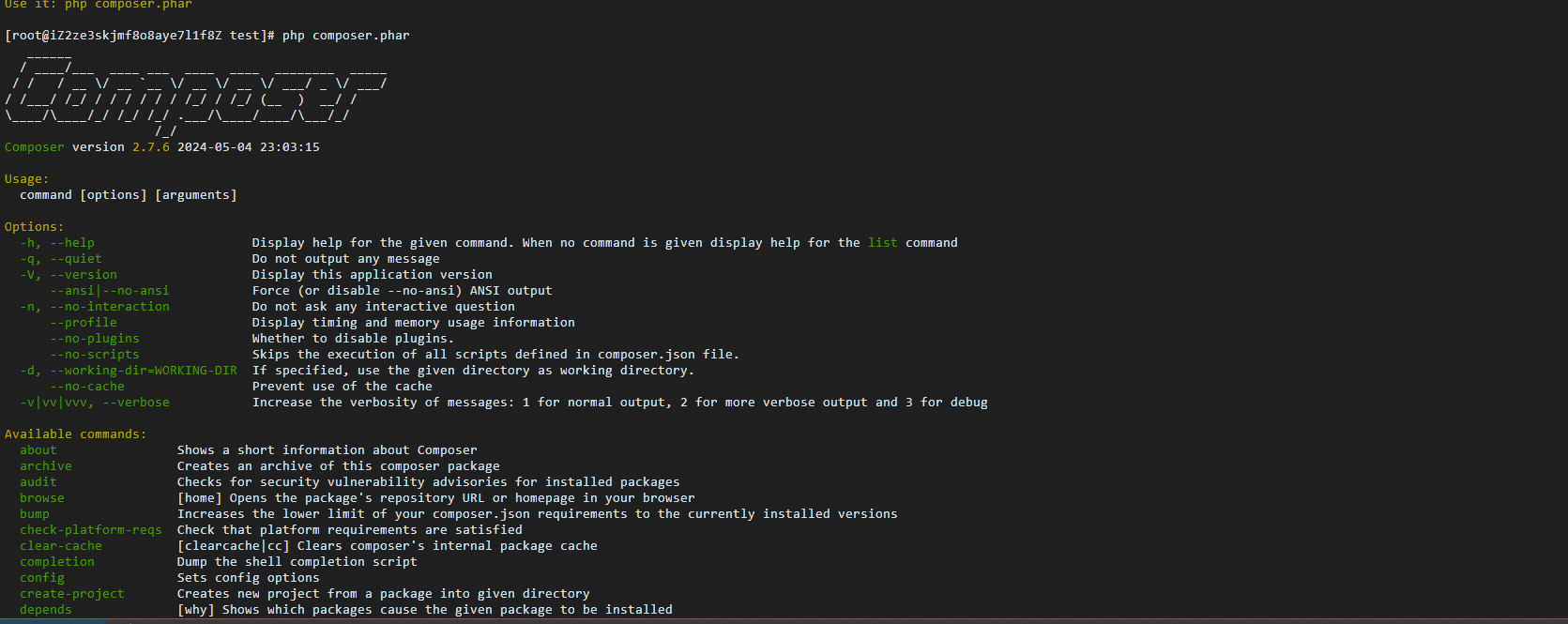
Install IMM dependencies
Run the composer require alibabacloud/imm-20200930 4.4.0 command.
Access credentials
The following types of access credentials are supported:
Temporary access credentials: In scenarios where high security is critical, such as temporary authorization of access to IMM, we recommend that you use temporary access credentials. Temporary access credentials are valid within the specified period of time, which helps prevent credential leaks. Temporary access credentials support fine-grained access control, which prevents security risks caused by excessive permissions.
Long-term access credentials: To ensure data security, we recommend that you do not use long-term access credentials. For scenarios that require convenience, long-term access credentials eliminate the need for multiple refreshes within a long period of time. We recommend that you change your long-term access credentials every three months to ensure account security. If long-term access credentials are leaked or no longer used, you can delete or disable the long-term access credentials to reduce security risks.
Use temporary access credentials
For more information about how to configure access credentials for temporary access to IMM by using IMM SDK for PHP, see Configure environment variables to store temporary access credentials.
The following sample code provides an example on how to detect faces and face attributes in an image within a project in the China (Beijing) region by using temporary access credentials.
To obtain temporary access credentials, you must run the following command to install an additional dependency:
composer require alibabacloud/sts-20150401 1.1.4
Create the demo.php file and write the following content to the file:
<?php

// This file is auto-generated, don't edit it. Thanks.
namespace AlibabaCloud\SDK\Sample;

use AlibabaCloud\SDK\Sts\V20150401\Sts;
use AlibabaCloud\Tea\Utils\Utils;
use \Exception;
use AlibabaCloud\Tea\Exception\TeaError;

use Darabonba\OpenApi\Models\Config;
use AlibabaCloud\SDK\Sts\V20150401\Models\AssumeRoleRequest;
use AlibabaCloud\Tea\Utils\Utils\RuntimeOptions;

use AlibabaCloud\SDK\Imm\V20200930\Imm;
use AlibabaCloud\SDK\Imm\V20200930\Models\DetectImageFacesRequest;


class Sample {
       /**
     * Use your AccessKey ID and AccessKey secret to initialize the client.
     * @return imm Client
     */
    public static function createClient(){
        // If the project code is leaked, the AccessKey pair may be leaked and the security of all resources within your account may be compromised. The following lines are provided for reference only.
        // For security reasons, we recommend that you use temporary access credentials that are provided by Security Token Service (STS). For more information, visit https://www.alibabacloud.com/help/en/sdk/developer-reference/v2-manage-php-access-credentials.
        $stsConfig = new Config([
            // Required. Make sure that the ALIBABA_CLOUD_ACCESS_KEY_ID environment variable is configured.
            "accessKeyId" => getenv("ALIBABA_CLOUD_ACCESS_KEY_ID"),
            // Required. Make sure that the ALIBABA_CLOUD_ACCESS_KEY_SECRET environment variable is configured.
            "accessKeySecret" => getenv('ALIBABA_CLOUD_ACCESS_KEY_SECRET')
        ]);
        // Specify the endpoint. For more information, visit https://api.aliyun.com/product/Sts.
        $stsConfig->endpoint = "sts.cn-hangzhou.aliyuncs.com";
        $stsClient = new Sts($stsConfig);
        $assumeRoleRequest = new AssumeRoleRequest([
            // Specify the ARN of the RAM role to be assumed. Example: acs:ram::123456789012****:role/adminrole
            "roleArn" => "acs:ram::125499367423****:role/STStokenTestRole",
            // Specify the name of the role session.
            "roleSessionName" => "ststest",
            // Specify the valid period of access credentials. Unit: seconds.
            "durationSeconds" => 3600
        ]);
        $runtime = new RuntimeOptions([]);
        $resp = $stsClient->assumeRoleWithOptions($assumeRoleRequest, $runtime);
        $config = new Config([
            "accessKeyId" => $resp->body->credentials->accessKeyId,
            "accessKeySecret" => $resp->body->credentials->accessKeySecret,
            "securityToken" => $resp->body->credentials->securityToken
        ]);
        // For a list of IMM endpoints for supported regions, visit https://api.alibabacloud.com/product/imm.
        $config->endpoint = "imm.cn-hangzhou.aliyuncs.com";
        return new Imm($config);
    }

    /**
     * @param string[] $args
     * @return void
     */
    public static function main($args){
        $client = self::createClient();
        $detectImageFacesRequest = new DetectImageFacesRequest([
            "projectName" => "imm-php-sdk-doc-demo",
            "sourceURI" => "oss://your-bucket-name/your-path/your-image.jpg"
        ]);
        $runtime = new RuntimeOptions([]);
        try {
            // Write your code to print the response of the API operation if necessary.
           print_r($client->detectImageFacesWithOptions($detectImageFacesRequest, $runtime));
        }
        catch (Exception $error) {
            if (!($error instanceof TeaError)) {
                $error = new TeaError([], $error->getMessage(), $error->getCode(), $error);
            }
            // In this example, errors are printed. In your actual project, process errors based on your business requirements.
            // Display error messages.
            var_dump($error->message);
            // Display the URL for troubleshooting.
            var_dump($error->data["Recommend"]);
            Utils::assertAsString($error->message);
        }
    }
}
$path = __DIR__ . \DIRECTORY_SEPARATOR . 'vendor' . \DIRECTORY_SEPARATOR . 'autoload.php';
if (file_exists($path)) {
    require_once $path;
}
Sample::main(array_slice($argv, 1));
Run the
php demo.phpcommand. The output is similar to the following content:AlibabaCloud\SDK\Imm\V20200930\Models\DetectImageFacesResponse Object ( [headers] => Array ( [Date] => Array ( [0] => Thu, 18 Jul 2024 03:42:20 GMT ) [Content-Type] => Array ( [0] => application/json;charset=utf-8 ) [Content-Length] => Array ( [0] => 680 ) [Connection] => Array ( [0] => keep-alive ) [Keep-Alive] => Array ( [0] => timeout=25 ) [Access-Control-Allow-Origin] => Array ( [0] => * ) [Access-Control-Expose-Headers] => Array ( [0] => * ) [x-acs-request-id] => Array ( [0] => 597781D7-B528-58BE-994A-EB45A845AB32 ) [x-acs-trace-id] => Array ( [0] => 305d56e78b78b8e26bb6f71d4c56778c ) [ETag] => Array ( [0] => 6G4qBOpKbiH3Vxe6OzA6yRw0 ) ) [statusCode] => 200 [body] => AlibabaCloud\SDK\Imm\V20200930\Models\DetectImageFacesResponseBody Object ( [faces] => Array ( [0] => AlibabaCloud\SDK\Imm\V20200930\Models\Figure Object ( [age] => 45 [ageSD] => 7 [attractive] => 0.044 [beard] => none [beardConfidence] => 0.987 [boundary] => AlibabaCloud\SDK\Imm\V20200930\Models\Boundary Object ( [height] => 381 [left] => 182 [polygon] => [top] => 175 [width] => 304 [_name:protected] => Array ( [height] => Height [left] => Left [polygon] => Polygon [top] => Top [width] => Width ) [_required:protected] => Array ( ) ) [emotion] => happiness [emotionConfidence] => 0.984 [faceQuality] => 0.942 [figureClusterConfidence] => [figureClusterId] => figure-cluster-id-unavailable [figureConfidence] => 1 [figureId] => b641a062-0f29-4bf3-b2f6-0f1972a260a3 [figureType] => face [gender] => female [genderConfidence] => 1 [glasses] => glasses [glassesConfidence] => 0.976 [hat] => none [hatConfidence] => 1 [headPose] => AlibabaCloud\SDK\Imm\V20200930\Models\HeadPose Object ( [pitch] => -16.206 [roll] => -5.124 [yaw] => 3.421 [_name:protected] => Array ( [pitch] => Pitch [roll] => Roll [yaw] => Yaw ) [_required:protected] => Array ( ) ) [mask] => none [maskConfidence] => 0.764 [mouth] => open [mouthConfidence] => 0.999 [sharpness] => 1 [_name:protected] => Array ( [age] => Age [ageSD] => AgeSD [attractive] => Attractive [beard] => Beard [beardConfidence] => BeardConfidence [boundary] => Boundary [emotion] => Emotion [emotionConfidence] => EmotionConfidence [faceQuality] => FaceQuality [figureClusterConfidence] => FigureClusterConfidence [figureClusterId] => FigureClusterId [figureConfidence] => FigureConfidence [figureId] => FigureId [figureType] => FigureType [gender] => Gender [genderConfidence] => GenderConfidence [glasses] => Glasses [glassesConfidence] => GlassesConfidence [hat] => Hat [hatConfidence] => HatConfidence [headPose] => HeadPose [mask] => Mask [maskConfidence] => MaskConfidence [mouth] => Mouth [mouthConfidence] => MouthConfidence [sharpness] => Sharpness ) [_required:protected] => Array ( ) ) ) [requestId] => 597781D7-B528-58BE-994A-EB45A845AB32 [_name:protected] => Array ( [faces] => Faces [requestId] => RequestId ) [_required:protected] => Array ( ) ) [_name:protected] => Array ( [headers] => headers [statusCode] => statusCode [body] => body ) [_required:protected] => Array ( ) )
Use long-term access credentials
For more information about how to configure long-term access credentials for access to IMM by using IMM SDK for PHP, see Configure environment variables to store the AccessKey pair.
The following sample code provides an example on how to detect faces and face attributes in an image within a project in the China (Beijing) region by using long-term access credentials.
Create the demo.php file and write the following content to the file:
<?php

// This file is auto-generated, don't edit it. Thanks.
namespace AlibabaCloud\SDK\Sample;

use AlibabaCloud\SDK\Imm\V20200930\Imm;
use \Exception;
use AlibabaCloud\Tea\Exception\TeaError;
use AlibabaCloud\Tea\Utils\Utils;

use Darabonba\OpenApi\Models\Config;
use AlibabaCloud\SDK\Imm\V20200930\Models\DetectImageFacesRequest;
use AlibabaCloud\Tea\Utils\Utils\RuntimeOptions;

class Sample {

    /**
     * Use your AccessKey ID and AccessKey secret to initialize the client.
     * @return Imm Client
     */
    public static function createClient(){
        // If the project code is leaked, the AccessKey pair may be leaked and the security of all resources within your account may be compromised. The following lines are provided for reference only.
        // For security reasons, we recommend that you use temporary access credentials that are provided by STS. For more information, visit https://www.alibabacloud.com/help/en/sdk/developer-reference/v2-manage-php-access-credentials.
        $config = new Config([
            // Required. Make sure that the ALIBABA_CLOUD_ACCESS_KEY_ID environment variable is configured.
            "accessKeyId" => getenv("ALIBABA_CLOUD_ACCESS_KEY_ID"),
            // Required. Make sure that the ALIBABA_CLOUD_ACCESS_KEY_SECRET environment variable is configured.
            "accessKeySecret" => getenv("ALIBABA_CLOUD_ACCESS_KEY_SECRET")
        ]);
        // For a list of IMM endpoints for supported regions, visit https://api.alibabacloud.com/product/imm.
        $config->endpoint = "imm.cn-beijing.aliyuncs.com";
        return new Imm($config);
    }

    /**
     * @param string[] $args
     * @return void
     */
    public static function main($args){
        $client = self::createClient();
        $detectImageFacesRequest = new DetectImageFacesRequest([
            "projectName" => "imm-php-sdk-doc-demo",
            "sourceURI" => "oss://your-bucket-name/your-path/your-image.jpg"
        ]);
        $runtime = new RuntimeOptions([]);
        try {
            // Write your code to print the response of the API operation if necessary.
           print_r($client->detectImageFacesWithOptions($detectImageFacesRequest, $runtime));
        }
        catch (Exception $error) {
            if (!($error instanceof TeaError)) {
                $error = new TeaError([], $error->getMessage(), $error->getCode(), $error);
            }
            // In this example, errors are printed. In your actual project, process errors based on your business requirements.
            // Display error messages.
            var_dump($error->message);
            // Display the URL for troubleshooting.
            var_dump($error->data["Recommend"]);
            Utils::assertAsString($error->message);
        }
    }
}
$path = __DIR__ . \DIRECTORY_SEPARATOR . 'vendor' . \DIRECTORY_SEPARATOR . 'autoload.php';
if (file_exists($path)) {
    require_once $path;
}
Sample::main(array_slice($argv, 1));
Run the
php demo.phpcommand. The output is similar to the following content:Array ( [Faces] => Array ( [0] => Array ( [Age] => 12 [AgeSD] => 5 [Attractive] => 0.12099999934435 [Beard] => none [BeardConfidence] => 0.99800002574921 [Boundary] => Array ( [Height] => 87 [Left] => 280 [Top] => 36 [Width] => 70 ) [Emotion] => none [EmotionConfidence] => 0.99500000476837 [FaceQuality] => 0.8289999961853 [FigureClusterId] => figure-cluster-id-unavailable [FigureConfidence] => 0.9990000128746 [FigureId] => 3acab8ff-48e7-4647-ac57-b48834db7278 [FigureType] => face [Gender] => male [GenderConfidence] => 0.95099997520447 [Glasses] => none [GlassesConfidence] => 1 [Hat] => hat [HatConfidence] => 0.9879999756813 [HeadPose] => Array ( [Pitch] => -12.309000015259 [Roll] => -11.362000465393 [Yaw] => 3.4430000782013 ) [Mask] => none [MaskConfidence] => 0.7509999871254 [Mouth] => open [MouthConfidence] => 0.56699997186661 [Sharpness] => 0.8870000243187 ) ) [RequestId] => F6D3FE7E-F0D7-0A5B-AE34-7453991DF9F2 )