Cloud Backup provides cloud disaster recovery, backup, and recovery services for enterprise applications. Common scenarios include backing up files to the cloud, backing up MySQL, Oracle, and SQL Server databases to the cloud, backing up large-scale NAS file systems to the cloud, agentless migration of VMware virtual machines (VMs) to the cloud, integrated agentless backup and disaster recovery for VMware, ECS backup, high-performance disaster recovery for ECS across availability zones (AZs) or regions, and agentless automatic backup for NAS and OSS.
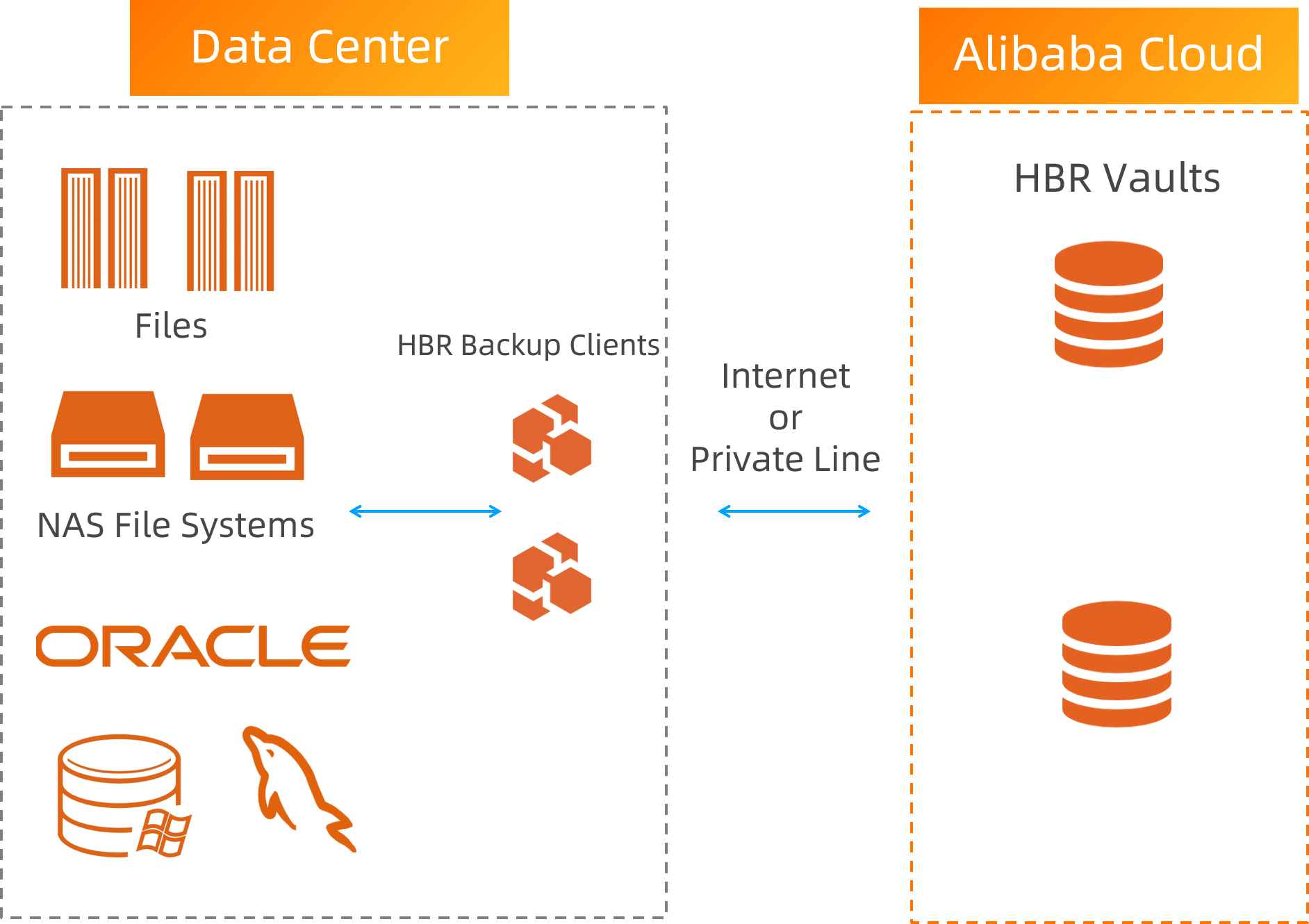
Back up files to the cloud
Item | Description |
Pain points | Files are scattered, which makes backup configuration difficult. Many files leads to slow backups, making it hard to guarantee the backup SLA. Large data volumes require expensive local backup hardware.
|
Solution | Back up local files and manage them centrally in the cloud for simplified administration. Use NAS backup with multi-node concurrent processing to increase backup speed by more than three times. Back up to the cloud to eliminate the need for local hardware. Deduplication and compression save storage space and bandwidth.
|
Value | Centralized management greatly simplifies backup configuration. Concurrent backups ensure one backup per day, exceeding the expected backup SLA. Reduces the Total Cost of Ownership (TCO) by 80%.
|
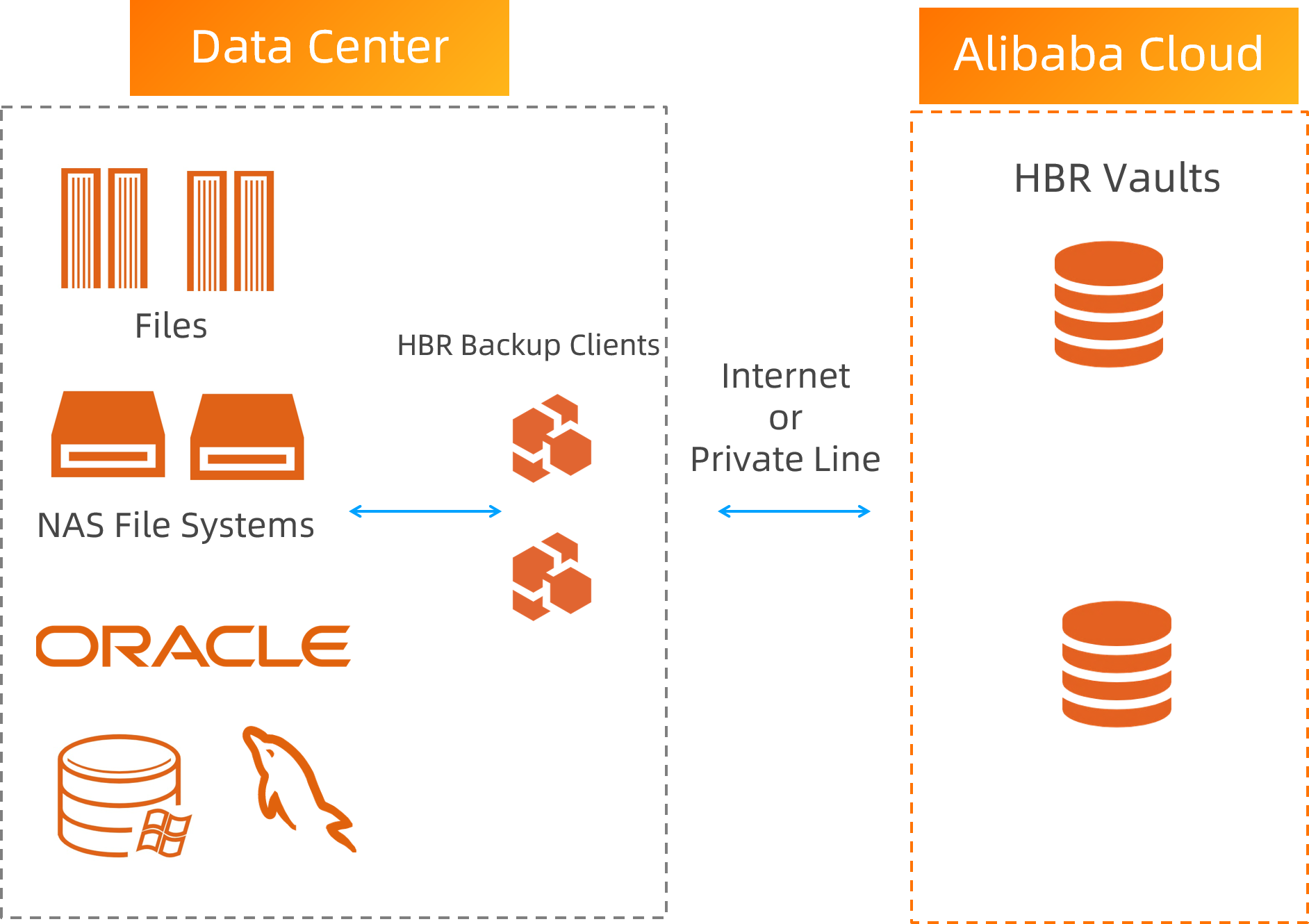
Back up MySQL, Oracle, and SQL Server databases to the cloud
Item | Description |
Pain points | Relying on simple scripts to back up core database systems is risky. Traditional all-in-one appliances are complex to install and require a large initial investment. Setting up geo-redundancy is difficult.
|
Solution | |
Value | Provides full support for MySQL, SQL Server, and Oracle. Eliminates the need to purchase all-in-one appliances. Installation and configuration are simple. Back up directly to the cloud for low-cost geo-redundancy.
|
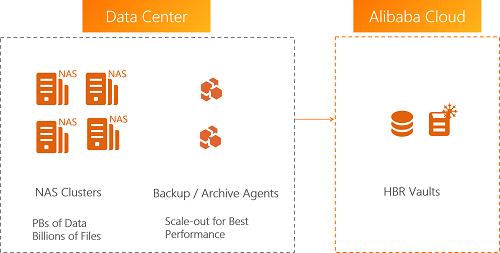
Policy-based archiving for on-premises NAS, HDFS, and S3 storage
Item | Description |
Pain points | Setting up archiving devices is time-consuming and expensive. Lack of data insights makes it impossible to plan archive policies or predict their effectiveness. Retrieving archived data is difficult and highly inefficient.
|
Solution | Use intelligent analysis to understand data characteristics from multiple dimensions. Create targeted archive plans and predict archiving results. Store data in Alibaba Cloud archive vaults at a very low cost. Supports global search to quickly find and retrieve archived files.
|
Value | Achieve precise archive planning. Configure a policy once for fully automatic execution. Search for archived files in seconds and retrieve them quickly. Reduces TCO by more than 50%.
|
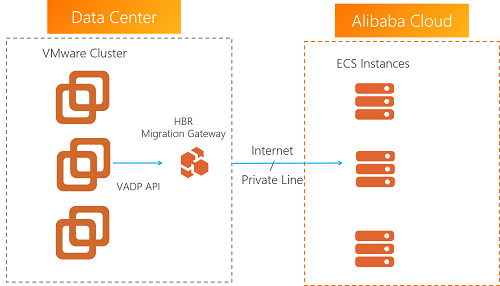
Agentless migration of VMware virtual machines to the cloud
Item | Description |
Pain points | Traditional migration solutions are intrusive to VMware, pose security risks, and are complex to operate. Database VMs require long downtimes for consistent migration, resulting in lengthy switchover times. Incremental migration is very inefficient when there are many files.
|
Solution | Use non-intrusive, agentless migration for VMware to the cloud. Supports agentless incremental migration while ensuring data consistency. Supports concurrent migration of multiple VMs.
|
Value | Non-intrusive, agentless migration is convenient. Efficient incremental migration shortens the switchover period for database VMs to 15 minutes.
|
Integrated agentless backup and disaster recovery for VMware
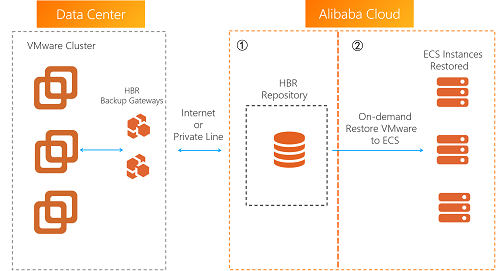
Item | Description |
Pain points | Traditional VM backup requires all-in-one backup appliances, which are complex to install and configure. Backup and disaster recovery both require separate hardware, which is expensive.
|
Solution | Use agentless VMware backup to the cloud, which eliminates the need for local hardware. Restore VMware backups directly to your on-premises environment. You can also restore them as ECS instances in the cloud for disaster recovery. When the on-premises VMware environment is back online, migrate the services from ECS back to the on-premises environment to recover your production environment.
|
Value | |
ECS file, database, and SAP HANA backup
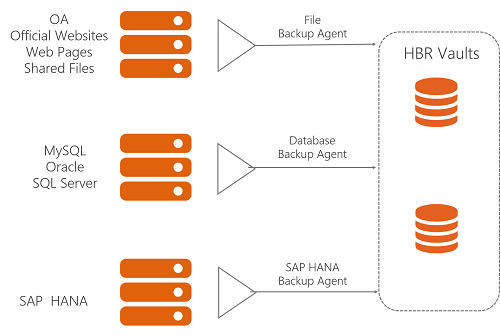
Item | Description |
Pain points | Many ECS instances makes backup configuration and management difficult. Snapshots cannot provide file-level or database-level protection. Database backup has high requirements that are difficult to meet with standard backup software. Different data sources have vastly different requirements, making configuration difficult and error-prone.
|
Solution | Use ECS backup, a single service that supports all data types on ECS instances. Provides full support for old and new database versions. Offers multiple backup methods, such as full, incremental, and log backups. Achieve a near-zero Recovery Point Objective (RPO) with continuous log backup for Oracle and MySQL databases.
|
Value | Provides a unified solution for backing up all data types on ECS instances. Achieve a deduplication and compression ratio of up to 5:1 for database backups and up to 30:1 for file backups. This saves 60% on storage costs for data retained for one month.
|
High-performance disaster recovery for ECS across AZs or regions
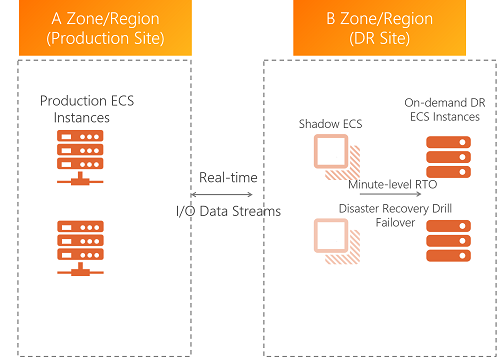
Item | Description |
Pain points | Business disaster recovery has high RPO and Recovery Time Objective (RTO) requirements. Traditional solutions are difficult to implement, expensive, and not integrated with the cloud platform. Disaster recovery operations are complex. Drills are difficult to perform, and their correctness cannot be guaranteed.
|
Solution | A high-performance disaster recovery solution based on disk-level Continuous Data Replication (CDR) that can achieve an RPO in seconds and an RTO in minutes. Provides cross-region disaster recovery for entire ECS instances. No application-level replication is needed. Configuration is simple, and applications can be started with one click.
|
Value | RPO < 1 minute, RTO < 15 minutes. Disaster recovery for entire instances is easy to operate. You can run drills at any time to verify correctness without affecting the production environment.
|
Agentless automatic backup for OSS, NAS, and Tablestore
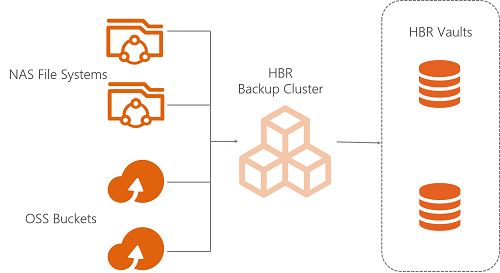
Item | Description |
Pain points | NAS, OSS, and Tablestore handle large data volumes but lack a built-in scheduled backup mechanism. Traditional solutions require creating custom scripts or installing disaster recovery software on ECS instances, which is complex to configure and expensive.
|
Solution | Use agentless backup for Alibaba Cloud NAS, OSS, and Tablestore. This does not consume your ECS resources. Use scheduled, forever-incremental backups to ensure backup efficiency.
|
Value | Zero compute resource consumption. Back up NAS, OSS, and Tablestore directly. Forever-incremental backups with deduplication and compression can save up to 80% on storage costs. Centrally configure backup policies in the Cloud Backup console. The service is simple to operate and fully managed.
|
References
What is Cloud Backup?
To learn about the features of Cloud Backup, see Features and Limits.
Activating the Cloud Backup service is free of charge. You are charged only when you perform backup operations in the Cloud Backup console. For more information about specific billable items, see Billing methods and billable items.
Activating the Cloud Backup service only enables the service and does not back up any data. We strongly recommend that you use this service to back up your important data. Note that if you only activate the service without performing any backups, your data cannot be recovered in the event of data loss or accidental deletion. For more information about how to activate the service, see Activate Cloud Backup.
For more information about the scenarios for Cloud Backup, see Enterprise Cloud Disaster Recovery Solutions.