Cloud Backup delivers enterprise-grade cloud backup, disaster recovery, and data archival services. Protect files, databases, NAS storage, ECS instances, and VMware VMs with agentless backup, cross-region disaster recovery, and policy-based archiving, all while reducing total cost of ownership (TCO) by up to 80%.
Back up on-premises files to the cloud
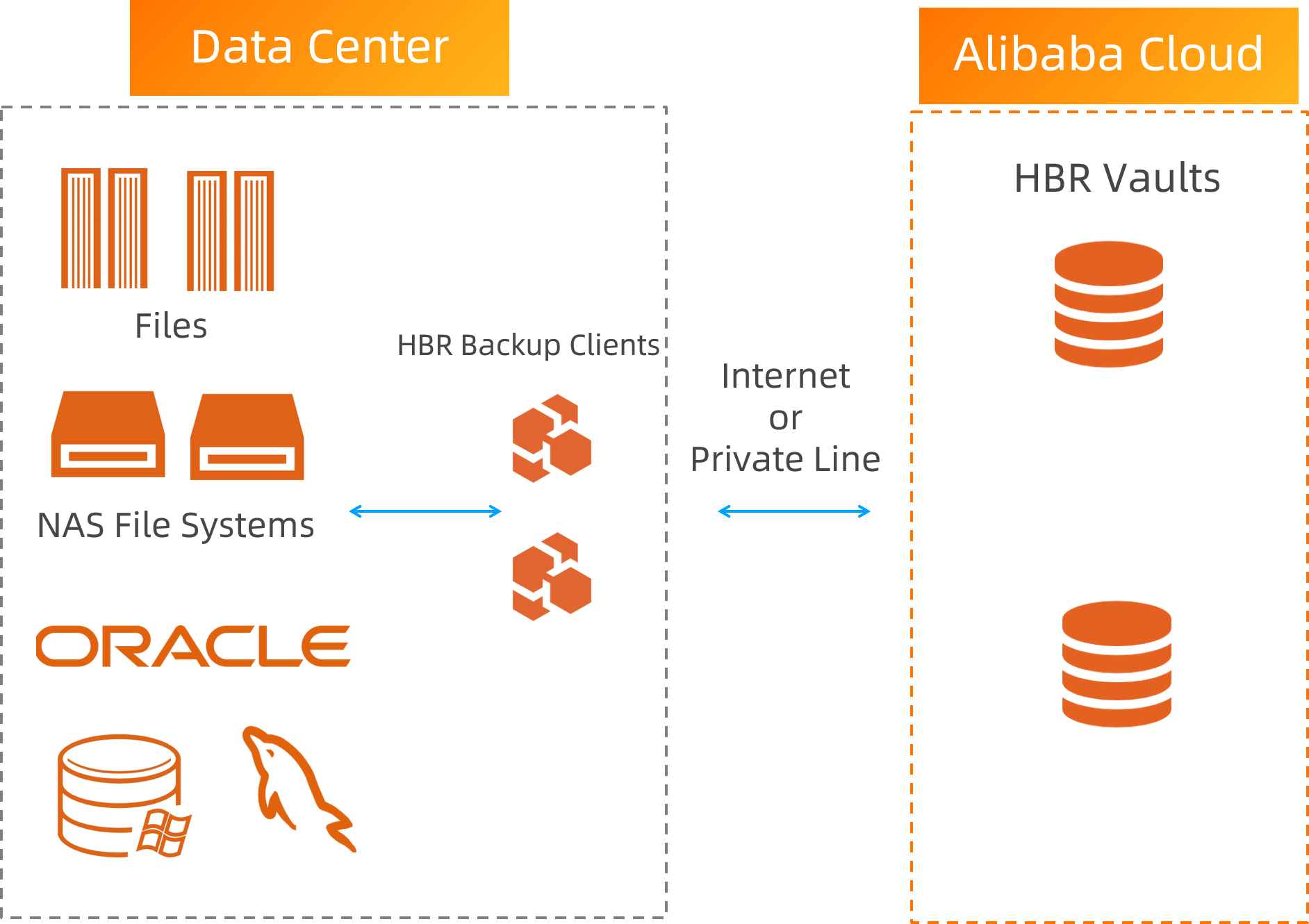
Item | Description |
Pain points | Files are scattered across locations, which complicates backup configuration. Large NAS data volumes make it difficult to meet backup SLA targets. On-premises backup appliances require a long setup period and high upfront investment.
|
Solution | Back up on-premises files to the cloud and manage them centrally from a single console. Accelerate NAS backup with multi-node concurrent processing, which increases backup speed by more than 3x. Eliminate on-premises hardware by backing up directly to the cloud. Source-side deduplication and compression reduce storage space and bandwidth consumption.
|
Value | Simplify backup configuration with a centralized policy center. Get up and running within days. Multi-threaded concurrent backups ensure daily backup SLA targets are met. Reduce TCO by 80% compared to on-premises backup appliances.
|
Back up on-premises databases to the cloud
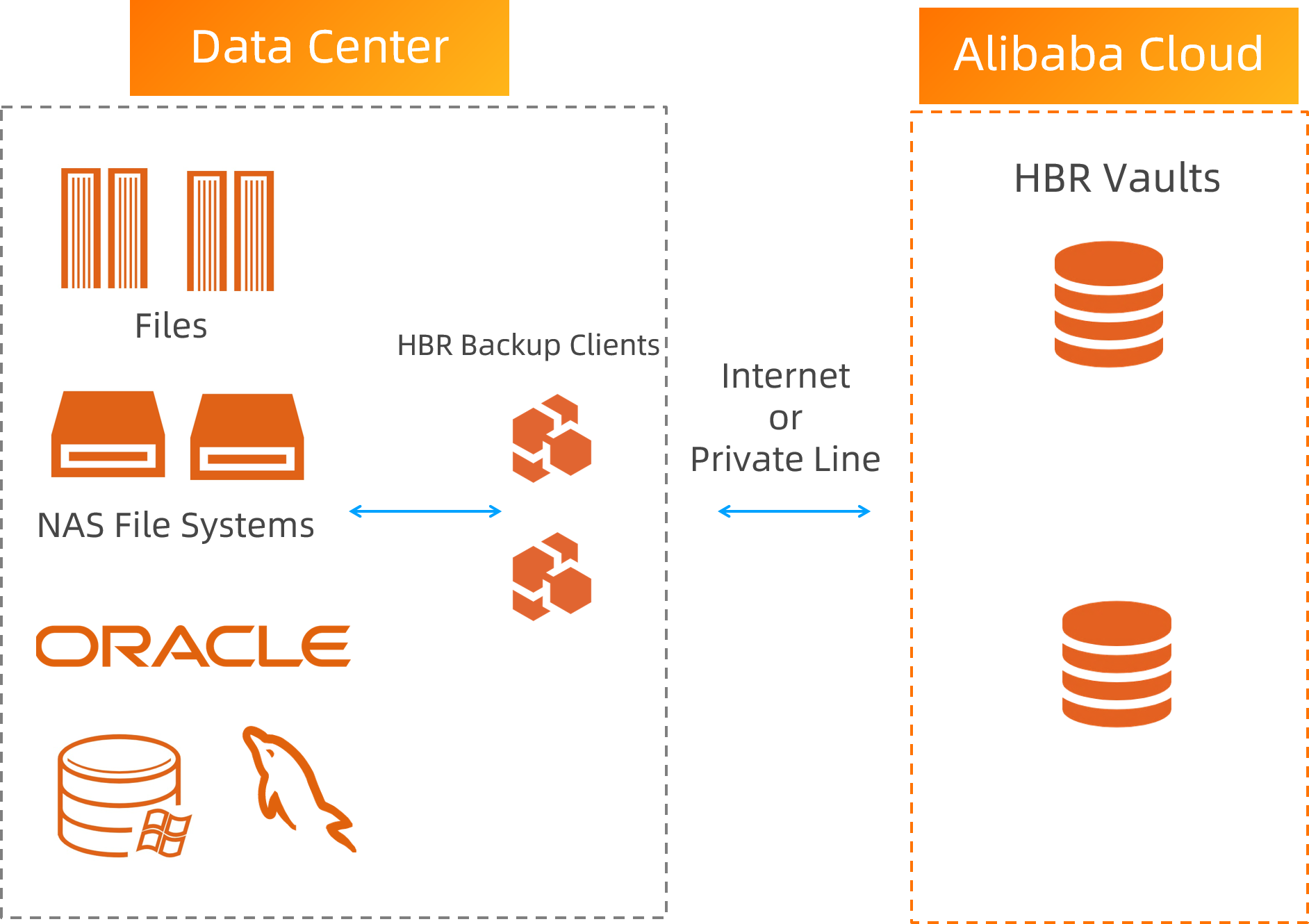
Item | Description |
Pain points | Relying on custom scripts to back up core database systems cannot guarantee data consistency. Open-source backup tools cannot guarantee service-level SLAs. On-premises backup appliances require a long setup period and high upfront investment.
|
Solution | Back up Oracle, SQL Server, and MySQL databases directly to the cloud with support for log-based backup that achieves near-zero RPO. Connect to Alibaba Cloud through VPN or Express Connect to further enhance data security during transfer.
|
Value | Simplify configuration with the centralized policy center. Get up and running within days. Native database backup guarantees data consistency and recoverability. Reduce TCO by 80% compared to on-premises backup appliances.
|
Policy-based archiving for on-premises NAS, HDFS, and S3-compatible storage
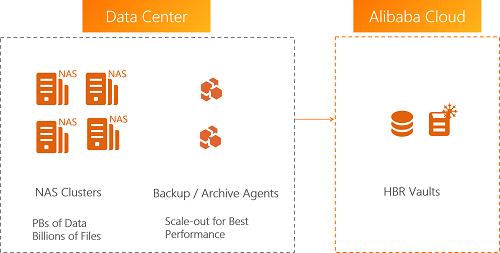
Item | Description |
Pain points | Building archiving infrastructure requires a long lead time and high upfront cost. Limited visibility into data characteristics makes it impossible to plan archive policies or predict their effectiveness. Searching and retrieving archived data is difficult and highly inefficient.
|
Solution | Analyze data characteristics across multiple dimensions with intelligent profiling. Create targeted archive plans and preview expected archiving results before execution. Store data in Alibaba Cloud archive vaults at minimal cost. Search archived files globally and retrieve them quickly.
|
Value | Precise archive planning with one-time policy configuration for fully automatic execution. Sub-second search for archived files with rapid retrieval. Reduce TCO by more than 50%.
|
Agentless VMware VM migration to the cloud
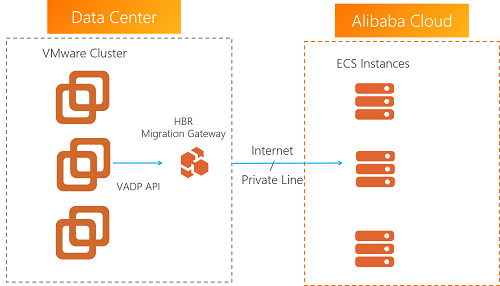
Item | Description |
Pain points | Traditional migration solutions require agents on VMware VMs, which introduces security risks and operational complexity. Database VMs require extended downtime for consistent migration, resulting in long switchover periods. Incremental migration becomes highly inefficient when the number of files is large.
|
Solution | Migrate VMware VMs to the cloud without installing any agents. Perform agentless incremental migration while ensuring data consistency. Migrate multiple VMs concurrently to accelerate the process.
|
Value | Non-intrusive, agentless migration simplifies the entire process. Efficient incremental migration reduces the switchover period for database VMs to as little as 15 minutes.
|
Unified agentless backup and disaster recovery for VMware
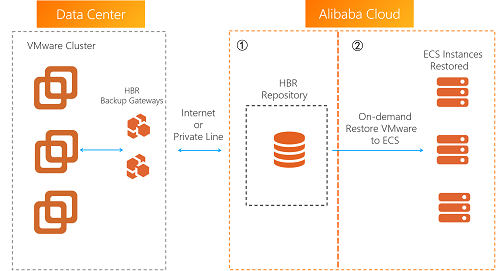
Item | Description |
Pain points | Traditional VM backup requires dedicated backup appliances with complex installation and configuration. Backup and disaster recovery require separate hardware investments, which drives up costs.
|
Solution | Back up VMware VMs to the cloud without agents, eliminating the need for on-premises hardware. Restore VMware backups directly to your on-premises environment, or restore them as ECS instances in the cloud for disaster recovery. After the on-premises VMware environment is back online, migrate services from ECS back to the on-premises environment to recover your production workloads.
|
Value | |
ECS file, database, and SAP HANA backup
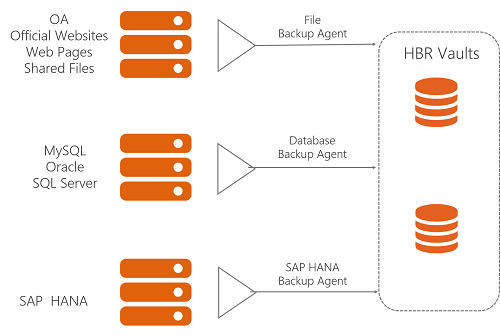
Item | Description |
Pain points | Managing backup configuration across a large number of ECS instances is difficult. Snapshots cannot provide file-level or database-level protection. Database backup has stringent requirements that standard backup software cannot meet. Different data sources have vastly different requirements, which makes configuration complex and error-prone.
|
Solution | Back up all data types on ECS instances with a single, unified service. Support both legacy and current database versions with full, incremental, and log backup methods. Achieve near-zero RPO with continuous log backup for Oracle and MySQL databases.
|
Value | A unified solution for backing up all data types on ECS instances. Deduplication and compression ratios of up to 5:1 for database backups and up to 30:1 for file backups. Save 60% on storage costs for data retained over one month.
|
Cross-AZ and cross-region disaster recovery for ECS
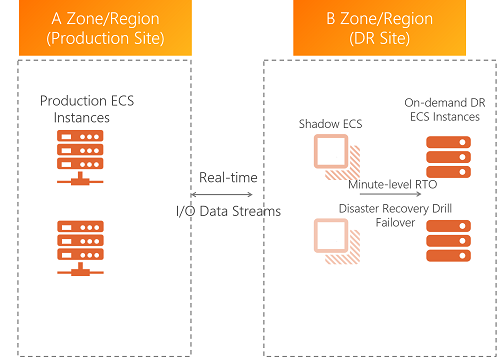
Item | Description |
Pain points | Business continuity requires stringent RPO and RTO targets. Traditional disaster recovery solutions are difficult to implement, expensive, and not integrated with cloud platforms. Disaster recovery operations are complex. Running drills is difficult, and their correctness cannot be verified without affecting production.
|
Solution | High-performance disaster recovery based on disk-level Continuous Data Replication (CDR) achieves second-level RPO and minute-level RTO. Protect entire ECS instances across regions without application-level replication. Simple configuration with one-click application startup.
|
Value | |
Agentless automatic backup for OSS, NAS, and Tablestore
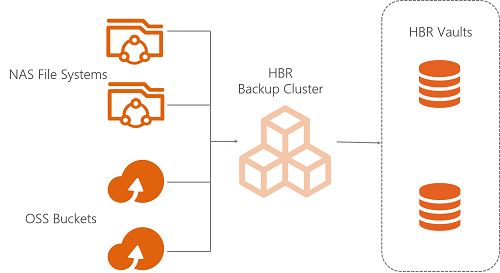
Item | Description |
Pain points | NAS, OSS, and Tablestore handle large data volumes but lack built-in scheduled backup mechanisms. Traditional solutions require custom scripts or disaster recovery software on ECS instances, which adds configuration complexity and cost.
|
Solution | Back up Alibaba Cloud NAS, OSS, and Tablestore without agents. No ECS compute resources are consumed. Schedule forever-incremental backups to maximize backup efficiency.
|
Value | Zero compute resource consumption. Back up NAS, OSS, and Tablestore directly without provisioning additional instances. Forever-incremental backups with deduplication and compression save up to 80% on storage costs. Centrally configure backup policies in the Cloud Backup console. The service is simple to operate and fully managed.
|
References
What is Cloud Backup?
For the features of Cloud Backup, see Features and Limits.
Activating Cloud Backup is free of charge. Fees are incurred only when you perform backup operations in the Cloud Backup console. For more information about billable items, see Billing methods and billable items.
Activating Cloud Backup only enables the service and does not back up any data. We strongly recommend that you back up your important data as soon as possible. If you only activate the service without performing any backups, your data cannot be recovered in the event of data loss or accidental deletion. For more information about how to activate the service, see Activate Cloud Backup.
For more information about the scenarios for Cloud Backup, see Enterprise Cloud Disaster Recovery Solutions.