1. Introduction
In mobile or cross-platform applications, HTTPDNS is often used to avoid issues such as local DNS hijacking and cache pollution. However, not all network libraries provide a DNS Hook interface for integration. Direct IP connection is a workaround for scenarios where you can only modify request details. First, you retrieve the resolution result from HTTPDNS. Then, you rewrite the URL to use the direct IP address. You must also ensure that the TLS handshake and routing still use the original domain name.
For example, https://www.example.com becomes https://1.2.3.4, but the request header retains Host: www.example.com.
The following sections cover when to use a direct IP connection, the problems it introduces, and how to solve them.
2. When to use a direct IP connection
Determine the level of control you have over your network library to decide whether to enable a direct IP connection:
-
Has a DNS Hook or Host-IP mapping interface: Libraries such as OkHttp, libcurl, and HarmonyOS Network Kit allow you to inject HTTPDNS results directly into the DNS interface. You can then make requests using the domain name. This method is compatible with HTTPS, Server Name Indication (SNI), cookies, and connection reuse without extra changes.
-
No DNS Hook, but has API request control: If the network library does not allow you to replace the DNS but lets you rewrite details such as the URL, request headers, certificate policies, or redirections, you can use a direct IP connection. The process involves retrieving the IP address from HTTPDNS, rewriting the URL with the IP address, and adding the necessary handling for the Host, certificate, proxy, and cookies.
-
Completely closed: If the network library has no DNS Hook and no API control entry point, such as some WebView kernels, a direct IP connection is not feasible. Instead, consider using an SDK, DNS over HTTPS (DoH), a local proxy, or vendor-specific features.
In summary, for "semi-open" network libraries that do not support a DNS Hook, you can use a direct IP connection to integrate with HTTPDNS.
-
How H5 integrates with HTTPDNS: When JavaScript runs in a browser, it follows the Fetch Standard. The standard specifies that the Host is a forbidden header name. Therefore, for requests made through APIs such as XMLHttpRequest and fetch(), scripts cannot change the Host. This means you cannot use a direct IP connection to integrate with HTTPDNS. In these scenarios, you must rely on the runtime environment, such as WebView, CEF, or Electron, to perform this handling at the host layer. Alternatively, use a local proxy or a DoH solution.
3. Problems and solutions
The following subsections explain the relevant network concepts, the problems that direct IP connections introduce, and how to resolve them.
3.1 Concepts related to domain name semantics
-
Server Name Indication (SNI): SNI is an extension to the Transport Layer Security (TLS) protocol. The client tells the server the target domain name during the handshake. This allows the server to select the correct certificate and virtual host. SNI is especially important in shared IP or multitenancy scenarios. For example, when a CDN node serves multiple domain names, SNI ensures that the correct HTTPS certificate is returned. This confirms the connection's legitimacy and security.
-
CN/SAN certificate validation: During the TLS handshake, the client strictly validates the HTTPS certificate returned by the server. The network library usually extracts the target domain name from the URL. It uses this domain name as the expected Common Name (CN) or Subject Alternative Name (SAN). Then, it parses the actual CN/SAN from the certificate for comparison. If they do not match, the connection is rejected or considered an untrusted, insecure connection.
-
Host header: Since HTTP/1.1, the Host header is a mandatory field. It is used to distinguish the target site when multiple sites are hosted on the same IP address and port. For the server, it is the key basis for a virtual host or reverse proxy to accurately route requests. For the middle layer, cache keys, authentication policies, and rate-limiting rules are often defined at the Host level. Client-side cookie management also relies on the Host for domain isolation. If the Host is configured incorrectly, the logon state might be written to the IP domain or fail to be reused.
3.2 Problems introduced by direct IP connections
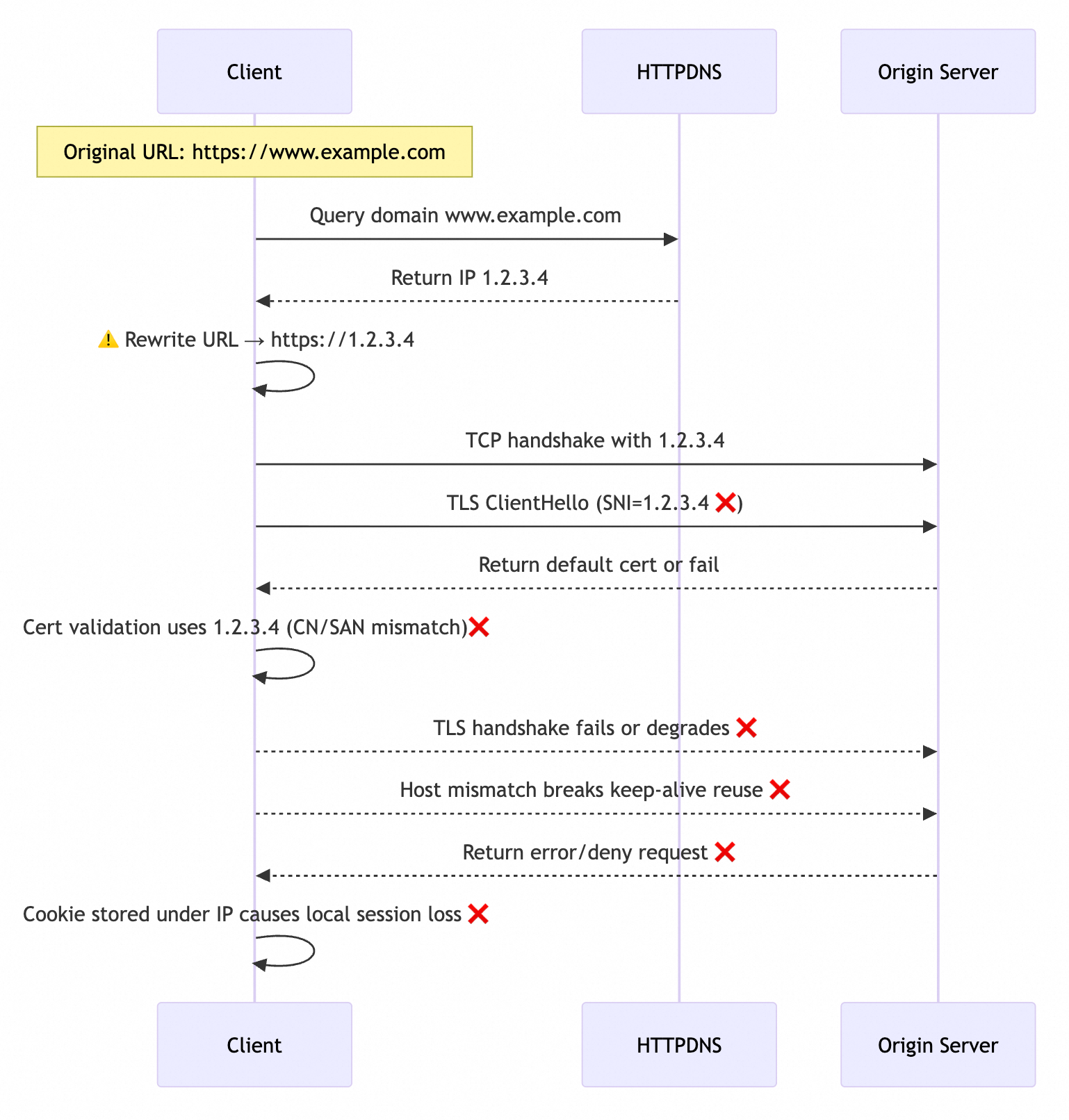
As shown in the following figure, the client's original request URL is https://www.example.com. Because the network library does not provide a DNS Hook, you must rewrite the URL to https://1.2.3.4 to apply the DNS resolution result from HTTPDNS. When the URL is rewritten for a direct IP connection, the following problems occur during the interaction between the client and the target service:
-
The server returns an abnormal HTTPS certificate: When the SNI value extracted by the network library from the URL changes from
www.example.comto1.2.3.4, the target server cannot find a matching certificate. It can only return a default HTTPS certificate, which causes the handshake to fail. -
The client fails HTTPS certificate validation: The network library parses the expected CN/SAN as
1.2.3.4instead ofwww.example.com. Because the CN/SAN in the certificate, such aswww.example.comor*.example.com, does not match the IP address, the TLS validation fails and the handshake cannot be completed. -
The server cannot route to the target service: Web server software such as
Nginx,Apache, and otherweb serverssupport virtual hosts. This feature allows different sites to be deployed on the same physical server and port. Requests are routed to the correct site based on theHostheader. When the client extracts the expected Host from the URL, it changes fromwww.example.comto1.2.3.4. This causes the server to be unable to find the corresponding service and return a404status code. -
Client-side cookie management fails: The client network library usually caches
Cookiesbased on theHostheader. It binds theCookieto the specific IP address1.2.3.4instead of the domain namewww.example.com. This prevents the reuse ofCookiesunder the original domain. Because the resolution result for the same domain name often switches to a different IP address after the cache expires,Cookiescan only be bound to their respective IP addresses. This leads to lost logon states and an inability to share sessions. It can also cause security policies to fail. -
Client connections cannot be reused: Modern network libraries commonly support HTTP connection reuse based on the Host to reduce TCP handshake overhead and improve response efficiency. When you switch to a direct IP connection, the reuse granularity changes from the domain name
www.example.comto the IP address1.2.3.4. Existing connections cannot be shared between different IP addresses, which creates additional handshake overhead.
3.3 Solutions to direct IP connection problems
These problems occur because the IP address replaces the domain name in the URL. To resolve them, manually restore the original domain name for SNI, certificate validation, and the HTTP Host header so that the network stack continues to operate on domain name semantics.
-
Manually set the SNI: Call the TLS/SNI configuration or SocketFactory API exposed by the network library to write the original domain name into the SNI extension.
-
Manually set the CN/SAN for validation: Use the certificate validation APIs provided by the network library, such as
HostnameVerifier. Explicitly pass the original domain name during the TLS validation phase to ensure the CN/SAN comparison is correct. -
Manually set the Host header: Use the API provided by the network library to explicitly set
Host: [original domain name]. This prevents the IP address from being written to the Host header by default.NoteAn HTTP proxy follows the absolute-form of HTTP/1.1 (for more information, see origin-form). The request line carries the full URL. When the URL is rewritten to an IP address, the proxy often treats this IP as the real host. It might even discard the domain name
Hostheader set by the client when sending the request to the origin server. This can cause the origin server to return a 404 error, a certificate error, or reject the request. In most cases, disable HTTPDNS in a proxy environment.
How each network library extracts the SNI, certificate validation domain, and Host header varies, as do the APIs for restoring domain information. Choose the adaptation solution that matches your network library. HTTPDNS provides the following solutions:
-
Android
HttpURLConnection: UsesHostnameVerifier/SSLSocketFactoryto overwrite the TLS verification logic and thesetRequestPropertymethod to explicitly set theHostheader. For more information, see Best practices for using HTTPDNS with HttpURLConnection on Android. -
iOS
NSURLSession: InURLSession:task:didReceiveChallenge:, attach the domain name for certificate validation, and set theHostheader when constructing the request. For more information, see Using HTTPDNS in Native Scenarios on iOS. -
Unity
HttpWebRequest: UseServicePointManager.ServerCertificateValidationCallbackto specify domain name validation, and userequest.Host = original domain nameto rewrite the Host header. For more information, see Unity Framework Best Practices.
For other network stack or IP direct connection solutions, please contact Technical Support.
4. Summary
A direct IP connection is a fallback for network libraries that do not allow DNS customization. The key principle is to preserve the original domain name for certificate validation, SNI, and the Host header. By doing so, you can safely apply HTTPDNS resolution results even in semi-open network stacks.