Implement direct IP connections with HTTPDNS in your iOS app. For more information about how to integrate HTTPDNS on iOS, see iOS SDK integration.
1. Introduction
In mobile networks, DNS hijacking and local DNS cache pollution can cause domain resolution failures. Alibaba Cloud HTTPDNS provides a reliable recursive resolution service that bypasses local DNS risks and improves the success rate and stability of network requests.
HTTPDNS on iOS requires replacing the domain in each request URL with the resolved IP address before sending the request. This introduces challenges in HTTPS and Server Name Indication (SNI) scenarios that you must understand before integration.
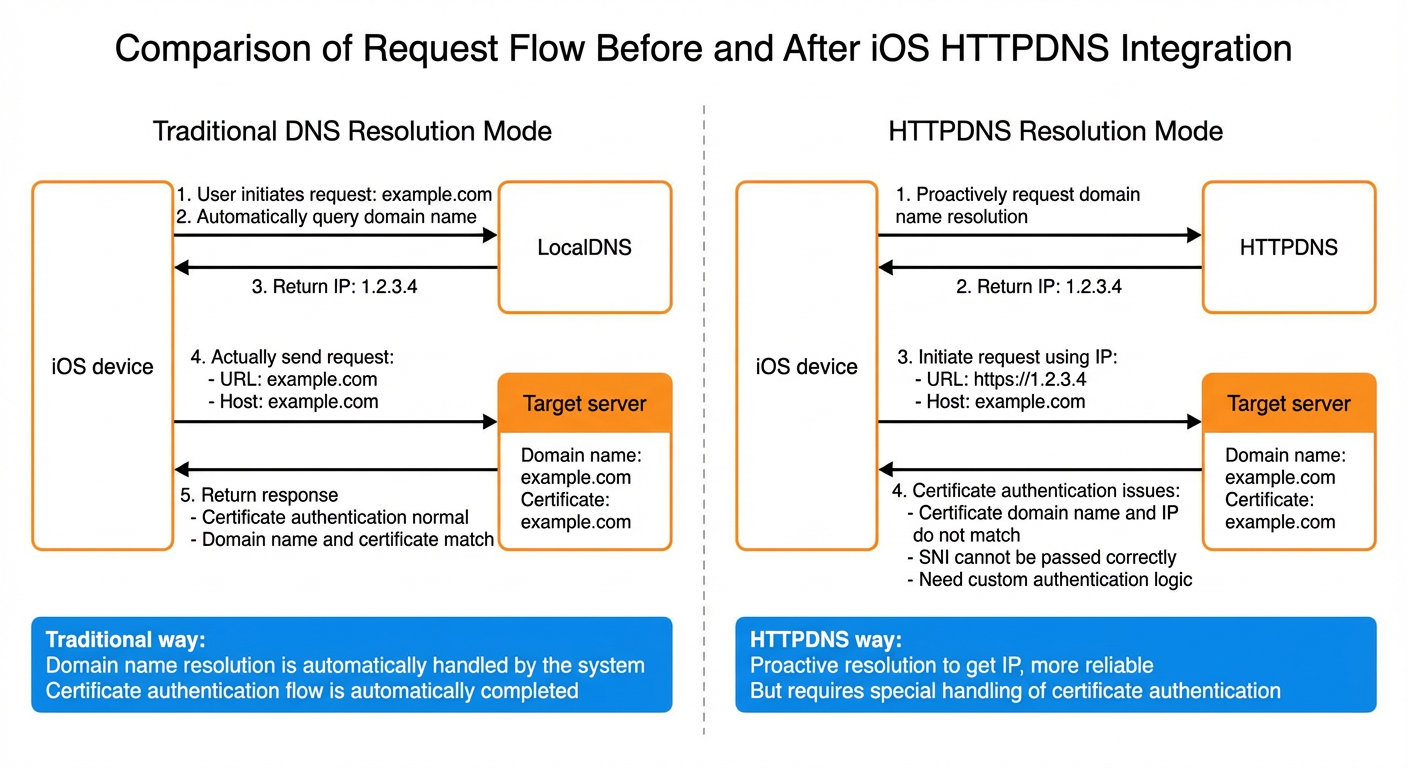
This topic covers common HTTPDNS issues on iOS and provides integration solutions with pros and cons for each scenario.
2. Issues when using HTTPDNS on iOS
Replacing the domain in a URL (such as example.com) with the HTTPDNS-resolved IP address introduces issues at two HTTPS protocol layers: TLS/SSL and HTTP.
-
TLS/SSL layer: During the HTTPS handshake, the client uses the URL Host for:
-
Certificate verification: Checks that the server certificate domain (CN or SAN) matches the requested Host.
-
SNI: Sends the requested domain to the server during TLS setup so the server returns the correct certificate.
-
-
HTTP layer: After the TLS handshake, the
Hostheader tells the server which site to serve. If the URL contains an IP address and you do not setHostto the original domain, the server cannot identify the target site, causing request failures or incorrect responses.
Replacing the URL domain with a HTTPDNS-resolved IP causes these issues:
-
Domain-certificate mismatch: Using the HTTPDNS-resolved IP as the URL Host prevents the TLS layer from matching the certificate domain (CN or SAN), causing the SSL handshake to fail.
-
SNI issues: A single server IP may host certificates for multiple domains. If only the IP is sent during the SSL handshake, the server returns the wrong certificate, causing handshake failure. High-level iOS APIs like
NSURLSessiondo not expose SNI configuration, making this difficult to solve directly. -
Host header mismatch: If you replace the URL domain with an IP but do not set the
Hostheader to the original domain, the server cannot route the request correctly. For example, CDN servers rely on Host to serve the correct content. -
Network library choice: Built-in iOS APIs like
NSURLSessionoffer limited control over SNI and certificate verification. Handling these requires lower-level interfaces such asCFNetworkorlibcurl, which increases development costs.
In summary, directly replacing the URL domain with the HTTPDNS-resolved IP affects certificate verification and SNI at the TLS layer, and Host routing at the HTTP layer. Address these issues when integrating HTTPDNS on iOS to ensure reliable and secure network requests.
3. Recommended solution: Integrate with EMASCurl
HTTPS with CDN, multi-domain IPs, and SNI is common in iOS apps. The Alibaba Cloud EMAS team provides EMASCurl, an open-source iOS network library built on libcurl that integrates directly with HTTPDNS. This is the recommended solution for direct IP connections on iOS.
The GitHub README covers installation instructions, interception configuration, and API details.
-
Installation and interception
-
EMASCurl supports two integration modes:
1) Intercept requests from an
NSURLSessioncreated with a specificNSURLSessionConfiguration.2) Intercept requests from the system's global
[NSURLSession sharedSession].
-
-
Integration with HTTPDNS
-
Implement the
EMASCurlProtocolDNSResolverprotocol to pass the HTTPDNS resolution results to EMASCurl. -
In
resolveDomain:, call[HttpDnsService resolveHostSyncNonBlocking:]to get the IP address and return it to EMASCurl for SNI setup and request handling.
-
-
Certificate verification
-
EMASCurl uses
libcurlcertificate verification. You can extend or customize verification through the provided interfaces.
-
-
HTTP/3 support
-
EMASCurl/HTTP3 provides a QUIC-enabled
libcurlbuild. Integrate it to use HTTP/3 without extra adaptation.
-
Basic EMASCurl + HTTPDNS integration example:
@interface MyDNSResolver : NSObject <EMASCurlProtocolDNSResolver>
@end

@implementation MyDNSResolver

+ (nullable NSString *)resolveDomain:(nonnull NSString *)domain {
    HttpDnsService *httpdns = [HttpDnsService sharedInstance];
    HttpdnsResult *result = [httpdns resolveHostSyncNonBlocking:domain
                                                      byIpType:HttpdnsQueryIPTypeBoth];
    if (!result || (!result.hasIpv4Address && !result.hasIpv6Address)) {
        return nil;
    }

    NSMutableArray<NSString *> *allIPs = [NSMutableArray array];
    if (result.hasIpv4Address) {
        [allIPs addObjectsFromArray:result.ips];
    }
    if (result.hasIpv6Address) {
        [allIPs addObjectsFromArray:result.ipv6s];
    }
    return [allIPs componentsJoinedByString:@","];
}

@end

- (void)setupEMASCurl {
    EMASCurlConfiguration *config = [EMASCurlConfiguration defaultConfiguration];

    // Configure the HTTPDNS resolver
    config.dnsResolver = [MyDNSResolver class];

    NSURLSessionConfiguration *sessionConfig = [NSURLSessionConfiguration defaultSessionConfiguration];

    // Install EMASCurl
    [EMASCurlProtocol installIntoSessionConfiguration:sessionConfig
                                    withConfiguration:config];

    // Create a specific session
    self.session = [NSURLSession sessionWithConfiguration:sessionConfig];

    // Use this session for subsequent requests
}Pros:
-
Wraps
libcurlwith an iOS-friendly API. -
Integrates with HTTPDNS through a DNS hook mechanism.
-
Handles SNI domain transmission and certificate verification, reducing integration cost.
-
Supports HTTP/3 out of the box and does not require custom compilation or adaptation.
Cons:
-
Depends on EMASCurl and libcurl. Consider compatibility and version upgrades.
-
Complex features or custom requirements may require understanding EMASCurl internals.
-
Test common HTTP/HTTPS features (redirection, cookies, concurrent requests) to verify they meet your requirements.
-
For strict security or performance requirements, evaluate EMASCurl on your current iOS version.
-
Verify requests and handshakes across network environments: Wi-Fi, cellular, and proxies.
4. Integration solutions for simplified scenarios
For plain HTTP or HTTPS without SNI, you can use the built-in NSURLSession with minor adjustments to integrate HTTPDNS. These solutions are simpler but have limited applicability.
Plain HTTP requires no TLS handling. HTTPS without SNI still requires certificate verification, which you handle by hooking the verification process in NSURLSession.
4.1 Plain HTTP scenarios
Plain HTTP has no TLS handshake or certificate verification. HTTPDNS integration requires only HTTP-layer changes:
-
Replace the Host in the request URL with the IP address from HTTPDNS
-
For example, if the original request URL is
http://example.com/apiand HTTPDNS resolves it to the IP address1.2.3.4, change the URL tohttp://1.2.3.4/api.
-
-
Explicitly set the
Hostheader to the original domain-
If you use
NSMutableURLRequest, you can addrequest.allHTTPHeaderFields[@"Host"] = @"example.com";to the request header. This ensures that the server can identify the correct domain at the application layer.
-
Pros: Simple to implement. It only requires replacing the Host and setting the header in the existing HTTP request, with minimal development effort.
Cons: Only applicable to plain HTTP. It cannot solve certificate verification and SNI-related issues in HTTPS scenarios.
4.2 HTTPS scenarios without SNI
For HTTPS sites without SNI or with a few fixed certificate domains, integrate HTTPDNS at the NSURLSession layer:
-
Replace the Host in the request URL with the IP address from HTTPDNS
-
For example, if the original request URL is
https://example.com/apiand HTTPDNS resolves it to the IP address1.2.3.4, change the URL tohttps://1.2.3.4/api.
-
-
Explicitly set the
Hostheader to the original domain-
Similarly, you can set
request.allHTTPHeaderFields[@"Host"] = @"example.com";inNSMutableURLRequest.
-
-
Hook the certificate verification process
-
During the TLS handshake, using the IP address for certificate verification causes a domain-certificate mismatch.
-
In the
NSURLSessionDelegatecallbackURLSession:didReceiveChallenge:completionHandler:, replace the IP with the original domain (example.com) when verifyingserverTrustto pass certificate verification. -
Code example:
- (void)URLSession:(NSURLSession *)session
              task:(NSURLSessionTask *)task
didReceiveChallenge:(NSURLAuthenticationChallenge *)challenge
  completionHandler:(void (^)(NSURLSessionAuthChallengeDisposition disposition,
                              NSURLCredential *credential))completionHandler {
    if ([challenge.protectionSpace.authenticationMethod isEqualToString:NSURLAuthenticationMethodServerTrust]) {
        NSString *originalHost = [self getOriginalHostFromRequest:task.originalRequest];
        SecTrustRef serverTrust = challenge.protectionSpace.serverTrust;
        if ([self evaluateServerTrust:serverTrust forDomain:originalHost]) {
            // The certificate is verified.
            NSURLCredential *credential = [NSURLCredential credentialForTrust:serverTrust];
            completionHandler(NSURLSessionAuthChallengeUseCredential, credential);
        } else {
            // Certificate verification failed. Use the default handler.
            completionHandler(NSURLSessionAuthChallengePerformDefaultHandling, nil);
        }
    } else {
        completionHandler(NSURLSessionAuthChallengePerformDefaultHandling, nil);
    }
}

- (BOOL)evaluateServerTrust:(SecTrustRef)serverTrust forDomain:(NSString *)domain {
    // Create a certificate verification policy.
    NSMutableArray *policies = [NSMutableArray array];
    if (domain) {
        [policies addObject:(__bridge_transfer id) SecPolicyCreateSSL(true, (__bridge CFStringRef) domain)];
    } else {
        [policies addObject:(__bridge_transfer id) SecPolicyCreateBasicX509()];
    }

    // Bind the verification policy to the server certificate.
    SecTrustSetPolicies(serverTrust, (__bridge CFArrayRef) policies);
    // Evaluate whether the current serverTrust is trusted. Apple recommends that the serverTrust can be verified if the result is kSecTrustResultUnspecified or kSecTrustResultProceed. For more information, see https://developer.apple.com/library/ios/technotes/tn2232/_index.html.
    // For more information about SecTrustResultType, see SecTrust.h.
    SecTrustResultType result;
    SecTrustEvaluate(serverTrust, &result);
    return (result == kSecTrustResultUnspecified || result == kSecTrustResultProceed);
}
-
Pros:
-
Uses native
NSURLSessionwithout third-party libraries. -
Manageable implementation cost for non-SNI scenarios.
Cons:
-
Does not handle SNI. If multiple domains share an IP (such as CDN), the handshake fails because the server returns the wrong certificate.
5. Other solutions for HTTPS + SNI scenarios
For HTTPS + SNI, you can implement HTTPDNS integration using lower-level capabilities instead of EMASCurl. These solutions offer more flexibility but have higher development and maintenance costs. Use EMASCurl unless you need custom network stacks, low-level control, or cross-platform unification.
5.1 Custom NSURLProtocol
Subclass NSURLProtocol to intercept system network requests and implement HTTP/HTTPS logic at a lower level using CFNetwork or NSInputStream/NSOutputStream:
-
Intercept requests
-
In
canInitWithRequest:, determine whether to intercept the request. -
In
startLoading, replace the URL domain with the IP address. Retain the original domain for certificate verification and SNI.
-
-
Set SNI
-
Use
CFStreamorSecureTransportAPIs to setkCFStreamSSLPeerNameto the original domain for correct SNI during the SSL handshake.
-
-
Verify certificates
-
Manually verify that the certificate domain matches the original domain.
-
Pros: No third-party dependencies. Based on low-level system APIs with high flexibility.
Cons: High implementation cost. Requires manual handling of redirection, cookies, caching, encoding, and traffic statistics. No connection reuse (average performance). High maintenance risk with OS and network upgrades.
Alibaba Cloud EMAS provides a sample implementation in HttpDnsNSURLProtocolImpl.m in the httpdns_ios_demo. Modify or reuse it based on your requirements.
5.2 Using libcurl
libcurl is a cross-platform C network library that supports manual SNI configuration for correct SSL handshake domain resolution when multiple domains share an IP. The integration process:
-
Resolve the domain to get the corresponding IP address
-
Use an HTTPDNS method such as
resolveHostSyncNonBlocking:to resolve the target domain.
-
-
Set the SNI and IP mapping
-
Use
CURLOPT_RESOLVEor another API to write the "domain:port:resolved_IP" mapping to curl's internal DNS cache. -
Keep the original domain in
CURLOPT_URLso the TLS handshake includes correct domain information.
-
-
Verify certificates
-
libcurlenables certificate verification by default. Use callbacks for more fine-grained certificate checks as needed.
-
HTTPDNS + libcurl integration example (pseudocode):
CURL *curl_handle = curl_easy_init();
if (curl_handle) {
    // For example, get IP = 1.2.3.4 from HTTPDNS, target domain = example.com, and port = 443
    struct curl_slist *dnsResolve = NULL;
    dnsResolve = curl_slist_append(dnsResolve, "example.com:443:1.2.3.4");
    // Set the domain-to-IP mapping
    curl_easy_setopt(curl_handle, CURLOPT_RESOLVE, dnsResolve);

    // Continue to use the original domain as the URL
    curl_easy_setopt(curl_handle, CURLOPT_URL, "https://example.com");

    // Enable SSL verification
    curl_easy_setopt(curl_handle, CURLOPT_SSL_VERIFYPEER, 1L);
    curl_easy_setopt(curl_handle, CURLOPT_SSL_VERIFYHOST, 2L);

    // Initiate the request
    CURLcode res = curl_easy_perform(curl_handle);

    // Check the result
    if (res != CURLE_OK) {
        fprintf(stderr, "curl_easy_perform() failed: %s\n", curl_easy_strerror(res));
    }

    // Clean up
    curl_easy_cleanup(curl_handle);
    curl_slist_free_all(dnsResolve);
}Pros:
-
Mature and stable with built-in SNI support, a rich protocol set, and the ability to adapt to complex network environments.
Cons:
-
Requires compiling
libcurlinto the project. C interface has a learning curve for Objective-C/Swift developers. -
Requires manual encapsulation of cookies, redirection, and caching.
6. Summary
Choose a solution based on your SNI, multi-domain, and certificate verification requirements:
|
Solution |
Scenarios |
Pros |
Cons |
|
EMASCurl (Recommended) |
All scenarios For simple integration on iOS |
- Provides a good wrapper for libcurl - Simple integration with HTTPDNS - Implements SNI and certificate verification - Supports HTTP/3 |
- Depends on a third-party library, requires attention to compatibility and upgrades - Special requirements may require reading the source code for customization |
|
Set Host and Header only |
Plain HTTP scenarios |
- Lowest integration cost |
- Only for plain HTTP protocol |
|
NSURLSession + Hook certificate verification (Still requires setting Host and Header) |
HTTPS (non-SNI) scenarios |
- Low integration cost - Uses system APIs, no extra libraries needed |
- Does not support SNI |
|
Custom NSURLProtocol |
All scenarios Requires more flexible low-level control |
- Completely based on low-level system APIs - High flexibility |
- High development and maintenance costs - No connection reuse, average performance - Requires manual handling of redirection, cookies, caching, encoding, and other special cases |
|
libcurl |
All scenarios Cross-platform or custom HTTP flows |
- Mature and stable - Supports SNI field setting and rich protocols - Flexible certificate verification extension |
- C interface has a learning curve for Objective-C/Swift developers - Requires manual encapsulation for cookies, redirection, caching, etc. |
Evaluate these solutions based on your multi-domain needs, security requirements, compatibility, maintenance costs, and acceptance of third-party libraries. Thoroughly test network request availability and security before deploying.