This topic covers using HTTPDNS-resolved IP addresses in WKWebView. For HTTPDNS resolution basics, see the or the iOS SDK Integration Manual.
1. Introduction
In Use HTTPDNS in native scenarios on iOS, you learned how to use HTTPDNS in native iOS scenarios for anti-hijacking, precise scheduling, and instant DNS resolution.
WKWebView, the modern WebKit-based web view that replaced UIWebView, is another iOS scenario that frequently involves network requests. Integrating HTTPDNS with WKWebView improves network security and performance.
2. Current technology
Technical solutions for integrating HTTPDNS with WKWebView have evolved alongside iOS:
-
Before iOS 17.0: Apple provided no official hook interfaces for WKWebView DNS resolution or custom network requests, requiring complex solutions based on private API hooking.
-
iOS 17.0 and later: Apple introduced the ProxyConfiguration API, which provides official proxy configuration for WKWebView. This API reliably intercepts all network requests, enabling seamless HTTPDNS integration.
According to Apple (as of June 4, 2025), iOS 17 and later runs on over 85% of iPhones. HTTPDNS brings anti-hijacking, precise scheduling, and instant resolution to WKWebView. This solution covers most users, and users on older versions gain the capability automatically upon upgrade.
3. Recommended solution: Local proxy-based solution for iOS 17+
3.1 Solution overview
The ProxyConfiguration API (iOS 17.0+) lets applications configure a local proxy server for WKWebView. The proxy intercepts all WKWebView network requests, resolves domain names through HTTPDNS, and forwards requests to the target server.
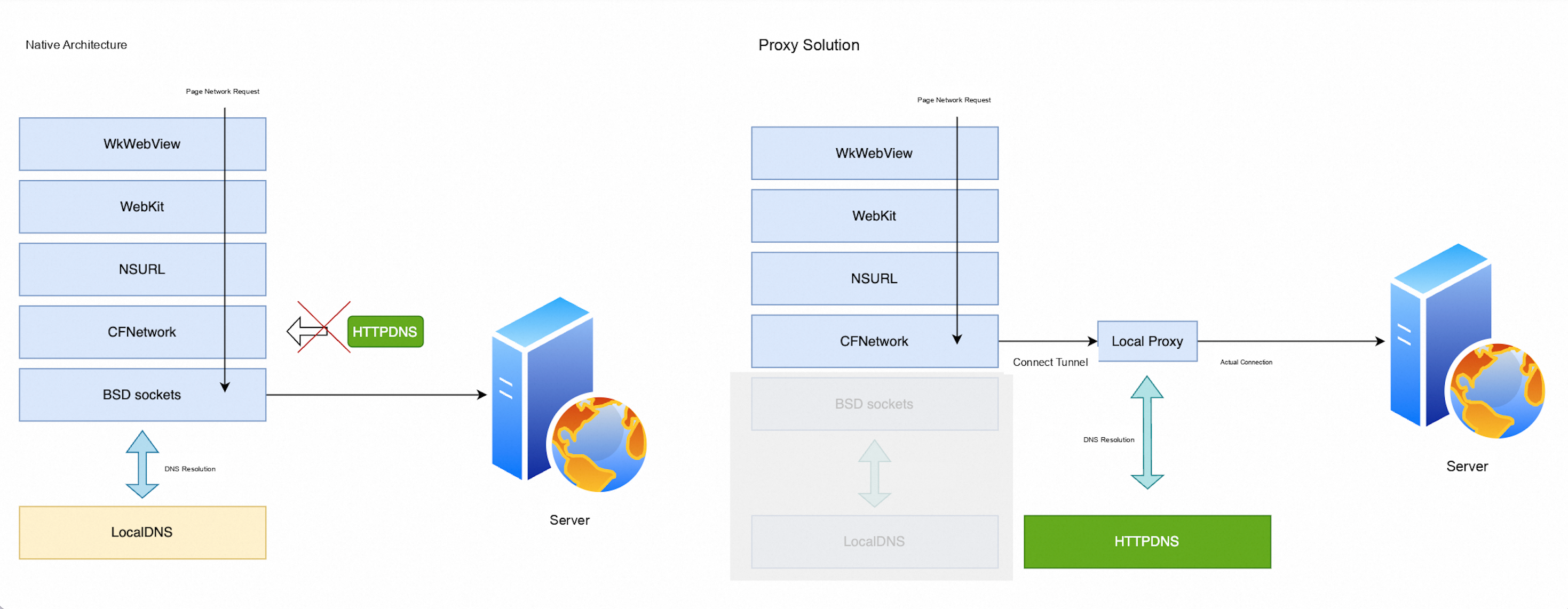
Compared with traditional solutions, the local proxy approach offers these advantages:
-
Stability: Built on official iOS 17+ APIs without private API dependencies, ensuring long-term stability and compatibility.
-
Applicability: Fully transparent to WebView — no need to handle cookies, redirection, or CORS. Supports HTTP, HTTPS, and WebSocket.
-
Security: Isolated within the app sandbox with no external exposure or attack surface.
-
High performance: Purely local with single memory-level data copy. Negligible client overhead.
-
Easy maintenance: Clear implementation logic with low maintenance cost.
3.2 Integration reference
Implementing a local proxy with HTTPDNS resolution requires significant effort. An open-source SDK is available on GitHub: Open-source repository. Adjust this implementation as needed for your business requirements.
3.2.1 Cocoapods integration
Add the EMASLocalProxy dependency to your Podfile:
source 'https://github.com/aliyun/aliyun-specs.git'

target 'yourAppTarget' do
    use_framework!

    pod 'AlicloudHTTPDNS', 'x.x.x'
    pod 'EMASLocalProxy', 'x.x.x'
end
3.2.2 Usage example
After integration, you can configure WKWebView during initialization as follows:
#import <EMASLocalProxy/EMASLocalProxy.h>
#import <AlicloudHttpDNS/AlicloudHttpDNS.h>

// Create a WKWebViewConfiguration
WKWebViewConfiguration *config = [[WKWebViewConfiguration alloc] init];

// Configure the DNS resolver
[EMASLocalHttpProxy setDNSResolverBlock:^NSArray<NSString *> *(NSString *hostname) {
    // Get the HTTPDNS service instance
    HttpDnsService *httpdns = [HttpDnsService sharedInstance];
    HttpdnsResult *result = [httpdns resolveHostSyncNonBlocking:hostname byIpType:HttpdnsQueryIPTypeBoth];

    if (result && (result.hasIpv4Address || result.hasIpv6Address)) {
        NSMutableArray<NSString *> *allIPs = [NSMutableArray array];
        if (result.hasIpv4Address) {
            [allIPs addObjectsFromArray:result.ips];
        }
        if (result.hasIpv6Address) {
            [allIPs addObjectsFromArray:result.ipv6s];
        }
        NSLog(@"HTTPDNS resolution successful. Domain name: %@, IP: %@", hostname, allIPs);
        return allIPs;
    }

    NSLog(@"HTTPDNS resolution failed. Domain name: %@", hostname);
    return nil;
}];

// Set the log level
[EMASLocalHttpProxy setLogLevel:EMASLocalHttpProxyLogLevelDebug];

// Configure the WebView proxy
BOOL proxyConfigured = [EMASLocalHttpProxy installIntoWebViewConfiguration:config];
if (proxyConfigured) {
    NSLog(@"WebView proxy configuration successful.");
} else {
    NSLog(@"WebView proxy configuration failed. Using system network.");
}

WKWebView *webView = [[WKWebView alloc] initWithFrame:self.view.bounds configuration:config];Before you deploy to a production environment, read and understand the code implementation logic. Perform thorough testing to ensure full compatibility.
3.3 Implementation details
EMASLocalProxy is built on the ProxyConfigurations API and Network.framework (iOS 17.0+), providing a high-performance local proxy service. The full source code is available on GitHub:
GitHub source code: https://github.com/aliyun/alicloud-ios-sdk-emascurl/tree/master/EMASLocalProxy
The core technical points are:
-
Use the Network framework to create a local HTTP proxy server.
-
Process HTTP requests through a CONNECT tunnel.
-
Implement transparent data forwarding between the client and the target server.
-
Integrate a custom DNS resolver to support HTTPDNS.
-
Provide a complete fallback and error handling mechanism.
3.4 Fallback and optimization solutions
EMASLocalHttpProxy includes multilayer protection and automatic fallback mechanisms to ensure high availability and request reachability even when components fail or external dependencies encounter errors.
The following table lists abnormal scenarios and corresponding measures:
|
Scenario |
Trigger |
Fallback or protection measure |
Final effect |
|
Proxy startup |
Port conflict |
Automatically retry with a random port |
Increases the startup success rate |
|
Startup blocked |
Exits on startup timeout |
Prevents the application from freezing |
|
|
Proxy runtime |
|
Marks the service as "not running" |
Triggers subsequent fallback policies |
|
External access attempt |
Listens only on 127.0.0.1 |
Rejects local area network (LAN) access to ensure security |
|
|
WebView configuration |
Service not running |
Uses a non-persistent |
Falls back to the default system network |
|
System version is earlier than iOS 17 |
Skips proxy configuration |
Maintains consistency with the default system behavior |
|
|
DNS resolution |
Custom resolver throws an exception |
Catches the exception and uses the original domain name for local DNS resolution |
Prevents connection failures due to resolution errors |
|
Network connection |
Connection to the target server failed |
Returns a |
Provides standardized failure feedback |
This multilayer design allows HttpdnsLocalHttpProxy to operate reliably in changing network environments. The fallback mechanism ensures uninterrupted request paths even when components fail.
4. Global NSURLProtocol interception solution
This was the earliest feasible option for integrating HTTPDNS with iOS WebView. It has a very high barrier to entry and is not very effective. It persisted because iOS offered no alternatives in its early years. The approach uses NSURLProtocol to intercept network requests from NSURLConnection/NSURLSession, including WKWebView requests, and applies HTTPDNS resolution. The steps are as follows:
-
Register a custom
NSURLProtocolto intercept WKWebView network requests. The custom protocol takes over data sending, receiving, and redirection, then feeds results back to the original request.[NSURLProtocol registerClass:[HttpDnsNSURLProtocolImpl class]]; -
Overview of the custom
NSURLProtocolprocessing flow:-
In
canInitWithRequest, filter the requests that require HTTPDNS domain name resolution. -
After the request is intercepted, perform HTTPDNS domain name resolution.
-
After resolution is complete, replace the URL.host field and the HTTP Header Host field, similar to a normal request. Then, take over the data sending, receiving, redirection, and other processing for this request.
-
Use the
NSURLProtocolinterface to feed the request processing results back to the original WebView request.
-
-
The custom
NSURLProtocolimplementation is available in HttpDnsNSURLProtocolImpl.m in the demo project.
Apple has not officially disclosed many protocol details. You must handle cookies, redirection, and similar details yourself for production use. Use this solution only if you have specific requirements.
5. Solution summary and comparison
This topic covers two solutions for integrating HTTPDNS with WKWebView on iOS: the local proxy solution (iOS 17+) and global NSURLProtocol interception.
The following table compares the two solutions:
|
Dimension / Solution |
Local Proxy (ProxyConfiguration) (iOS 17+) |
Global NSURLProtocol Interception |
|
Official Support |
Official Apple API (iOS 17+), stable for long-term use. |
Public NSURLProtocol API, but WKWebView internals are undocumented. |
|
Effective Version |
iOS 17+. On earlier versions, the proxy is inactive with no side effects. |
iOS 11 and later |
|
Protocol Coverage |
HTTP, HTTPS, WebSocket, HTTP/2 (transparent forwarding). |
Limited to NSURLSession and NSURLConnection protocols. |
|
Implementation Complexity |
Medium: Requires local proxy, port management, and bidirectional forwarding. |
Medium: Requires request rewriting, thread management, and cache handling. |
|
Intrusiveness to Business Code |
Low: Only proxy configuration needed for WKWebView. |
Medium: Global NSURLProtocol registration may affect existing NSURLSession logic. |
|
Cookies / Cache / CORS |
Transparent at the proxy layer. No extra handling is needed. |
Manual maintenance required; easy to miss edge cases. |
|
Maintenance Cost |
Low: Official API-based, minimal upgrade risk. |
Medium: Stable system API, but requires monitoring WKWebView behavior changes. |
|
Failure Fallback Policy |
Built-in. Falls back to system network on proxy failure. |
Requires self-implementation. |
|
Recommended Scenario |
Recommended: Best for iOS 17+ deployments requiring high security and compatibility. |
Quick verification with basic compatibility needs. |
For stability, low maintenance, and future-proofing, we strongly recommend the local proxy solution (iOS 17+).
With iOS 17+ adoption exceeding 85%, this solution serves most users at minimal cost. It prevents domain hijacking and improves network performance with long-term official API support. Devices on earlier iOS versions fall back to default system networking and gain HTTPDNS benefits automatically upon upgrade.
The NSURLProtocol solution carries inherent complexity and uncertainty. Use it only with specific requirements, deep technical expertise, and thorough testing.