Use the ai_gen function to generate images and videos by calling AI models deployed in Hologres. The function supports text-to-image, image editing, multi-image fusion, text-to-video, image-to-video, keyframe-to-video, and reference-to-video.
Prerequisites
-
An image or video generation model is deployed in Hologres. For information about how to deploy models, see AI models and deployment. Supported model sources include managed models. For more information, see Managed models.
-
To save results to OSS, prepare an OSS bucket and configure a RAM role with the required permissions.
Syntax
ai_gen
Syntax:
SELECT ai_gen('<model>', <prompt>::TEXT, <file>);Parameters:
|
Parameter |
Type |
Description |
|
|
TEXT |
The name of the model deployed in the Hologres console. Both AI node built-in models and managed models are supported. |
|
|
TEXT |
A JSON string containing the prompt and generation parameters. Parameters vary by scenario. |
|
|
FILE |
Carries multimodal data (images, videos, audio) with OSS permissions. The model does not read this directly — use |
Return value: A JSON TEXT value containing the result URL, usage metrics, and other metadata.
to_file()
to_file() converts an OSS path to a FILE type with OSS access credentials. Syntax:
to_file('<oss_path>', '<oss_endpoint>', '<role_arn>')Parameters:
|
Parameter |
Type |
Description |
|
|
TEXT |
The OSS file path. For example, |
|
|
TEXT |
The internal OSS endpoint. For example, |
|
|
TEXT |
The Alibaba Cloud Resource Name (ARN) of the Resource Access Management (RAM) role for OSS access. For example, |
Return value: A FILE value. Returns an error if the path is invalid or the file does not exist.
Image generation
Text-to-image
Generates an image from a text description.
Supported models:
-
Managed models:
qwen-image-2.0-pro, wan2.7-image|wan2.7-image-pro. For details on the wan2.7 series, see Wan. For usage details, see Managed models.
Prompt parameters:
|
Parameter |
Type |
Required |
Description |
|
|
STRING |
Yes |
The text description used to generate the image. |
|
|
INT |
No |
The number of images to generate. Default: 1. |
|
|
STRING |
No |
Output image dimensions, such as |
|
|
BOOL |
No |
Whether to add a watermark. |
|
|
STRING |
No |
The OSS path to save the output. Saving to OSS incurs outbound data transfer fees. |
Example 1: Generate an image for preview without saving it to OSS.
-- Generate an image for preview without saving the result to OSS, using the qwen-image-2.0-pro model.
SELECT
    ai_gen('qwen_image_2_pro',
    json_build_object(
        'prompt', 'Generate a Q-style character of Liu Bei',
        'parameters', json_build_object(
            'n', 1,
            'size', '1024*1024',
            'watermark', FALSE
            )
        )::TEXT,
    to_file('oss://xxxx/holo_ai_powered_marketing_content/xxx', 'oss-cn-hangzhou-internal.aliyuncs.com', 'acs:ram::186xxx:role/xxx')-- Use to_file() for authentication.
    );
Sample response:
{
  "requestId": "xxx",-- The request ID.
  "usage": {...},-- Image parameters, such as width, height, and count.
  "image_urls": ["https://..."], -- Public URLs of the generated images. Access is time-limited.
  "image_oss_paths": ["oss://bucket/output/xxx.png"]  -- This field is empty if an output directory is not specified.
}
Response fields:
-
requestId: The request ID. -
usage: Image parameters, including width, height, and count. -
image_urls: Public URLs of the generated images. These URLs are time-limited. -
image_oss_paths: The OSS paths where the images are saved. This field is empty ifoutput_diris not specified.
Example 2: Generate an image using the wan2.7-image-pro model.
-- Generate an image using the wan2.7-image-pro model.
SELECT
    ai_gen ('wan_27_image_pro',
    json_build_object(
        'prompt', 'Futuristic tech city nightscape with neon lights in a cyberpunk style',
        'parameters',  json_build_object(
            'n', 1,
            'size', '1920*1080',
            'watermark', FALSE
            ),
         'output_dir', 'oss://xxx/holo_ai_powered_marketing_content/'
        )::text,
    to_file ('oss://xxx/holo_ai_powered_marketing_content/xxx', 'oss-cn-hangzhou-internal.aliyuncs.com', 'acs:ram::186xxx:role/xxx')
    );
Example 3: Generate an image and save it to OSS.
-- Generate an image and save it to your OSS bucket.
SELECT
    ai_gen('qwen_image_2_pro',
    json_build_object(
        'prompt', 'Generate a Q-style character of Liu Bei',
        'parameters', json_build_object(
            'n', 1,
            'size', '1024*1024',
            'watermark', FALSE
            ),
        'output_dir', 'oss://xxx/holo_ai_powered_marketing_content/'-- The OSS file path.
        )::TEXT,
    to_file('oss://xxx/holo_ai_powered_marketing_content/xxx', 'oss-cn-hangzhou-internal.aliyuncs.com', 'acs:ram::186xxx:role/xxx')
    );
The result is saved to the specified OSS directory.
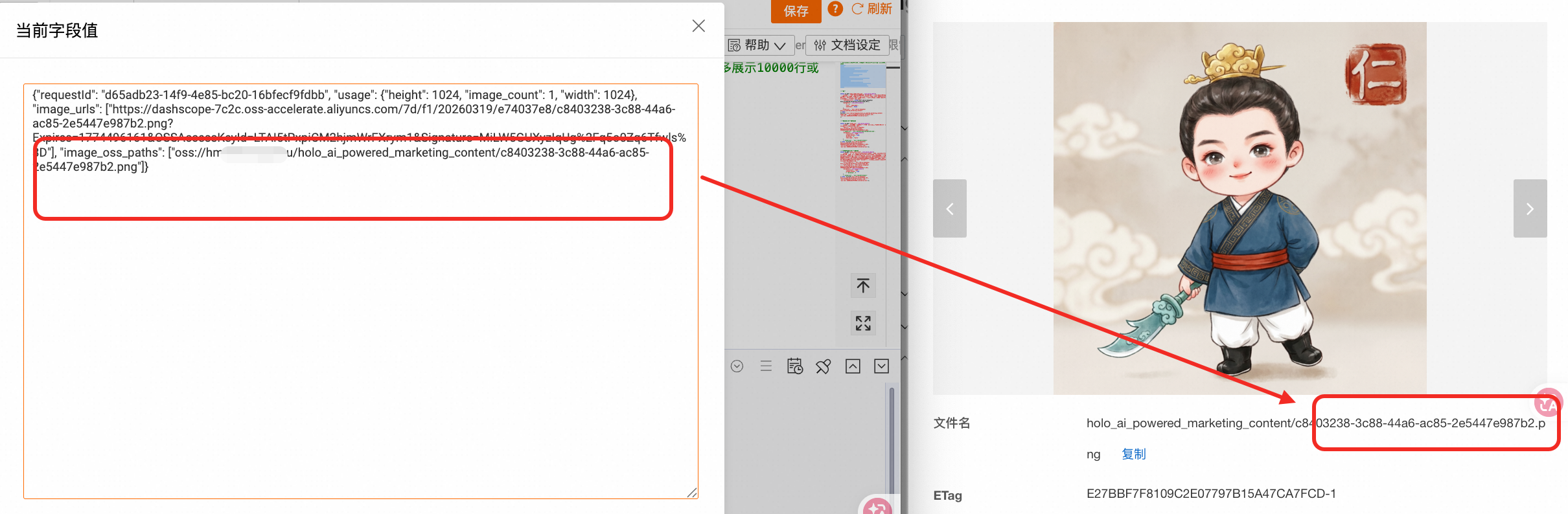
Image editing
Edits a reference image based on a text prompt to generate a new image.
Supported models:
-
Managed models:
wan2.7-image-proandqwen-image-2.0-pro. For more information, see Managed models.
Prompt parameters:
|
Parameter |
Type |
Required |
Description |
|
|
STRING |
Yes |
A description of the desired edits. |
|
|
STRING[] |
Yes |
An array containing the OSS path of the reference image. Currently, only one image is supported. |
|
|
INT |
No |
The number of images to generate. |
|
|
STRING |
No |
The dimensions of the image to generate, such as |
|
|
BOOL |
No |
Whether to add a watermark. |
|
|
STRING |
No |
The OSS path to save the output. Saving to OSS incurs outbound data transfer fees. |
SQL example: Edit an image and generate a new one.
-- Image editing
SELECT ai_gen('qwen_image_edit', json_build_object(
    'prompt', 'Maintain the original Q-style Liu Bei character and the traditional Chinese comic style. Liu Bei rides a tall horse and looks ahead, calm and commanding. The background merges an ancient-style city with a futuristic data city. Floating data charts, dashboards, blue glowing grids, and data streams appear on the buildings. Liu Bei holds a scroll or token that represents command and decision. The "Hologres" logo appears on it. The composition should feel grand and brand-forward, and convey the tone of "control the big picture, real-time insight, and strategic planning."',
    'reference_urls', array['oss://xxx/holo_ai_powered_marketing_content/c8403238-3c88-44a6-ac85-2e5447e987b2.png'],
    'parameters', json_build_object(
        'n', 2,
        'size', '1024*1024',
        'watermark', FALSE
    )
)::TEXT, to_file('oss://xxx/holo_ai_powered_marketing_content/xx', 'oss-cn-hangzhou-internal.aliyuncs.com', 'acs:ram::xxx:role/xxx'));
Example output:

Multi-image fusion
Merges multiple reference images into a single new image.
Supported models:
-
Managed models:
qwen-image-2.0-pro. For more information, see Managed models.
Prompt parameters:
|
Parameter |
Type |
Required |
Description |
|
|
STRING |
Yes |
A description of the desired final image. |
|
|
STRING[] |
Yes |
A list of OSS paths for the reference images. |
|
|
INT |
No |
The number of images to generate. |
|
|
STRING |
No |
The dimensions of the image to generate, such as |
|
|
BOOL |
No |
Whether to add a watermark. |
|
|
STRING |
No |
The OSS path to save the output. Saving to OSS incurs outbound data transfer fees. |
SQL example: Merge two images into a new image.
SELECT ai_gen('qwen_image_2_pro', json_build_object(
    'prompt', 'Maintain consistency with the Q-style Liu Bei image and costume design from the first image. The character stands in the center of the frame holding a "Hologres" scroll. A glowing data magic circle or a blue tech ring appears under his feet. A fine horse gradually appears behind him. The left side keeps traditional Chinese auspicious clouds, Xuan paper texture, and an ancient atmosphere. The right side gradually transitions to a blue futuristic data city with floating large screens, real-time charts, and digital light streams. Liu Bei''s expression shifts from calm to determined, showing a sense of mission to step into the tech world and promote the real-time data warehouse.',
    'reference_urls', array['oss://hm-ai-hangzhou/holo_ai_powered_marketing_content/c8403238-3c88-44a6-ac85-2e5447e987b2.png', 'oss://hm-ai-hangzhou/holo_ai_powered_marketing_content/bde5d500-5efc-4d77-9651-6d6bd81906fe-1.png'],
    'parameters', json_build_object(
        'n', 1,
        'size', '1024*1024',
        'watermark', FALSE
    )
)::TEXT,
to_file('oss://xxxx/holo_ai_powered_marketing_content/xxx', 'oss-cn-hangzhou-internal.aliyuncs.com', 'acs:ram::xxxx:role/xxxx')
);
Example output:

Video generation
Text-to-video
Generates a video based on a text description, with optional background audio.
Supported models:
-
Managed models:
wan2.7-t2vandhappyhorse-1.0-t2v. For more information, see Managed models.
Prompt parameters:
|
Parameter |
Type |
Required |
Description |
|
|
STRING |
Yes |
A description of the video content. |
|
|
STRING |
No |
The OSS path of the background audio file. |
|
|
STRING |
No |
The dimensions of the video, for example, |
|
|
BOOL |
No |
Whether to enable prompt extension. |
|
|
INT |
No |
The duration of the video in seconds. |
|
|
STRING |
No |
The shot type, for example, |
|
|
STRING |
No |
The OSS path to save the output. Saving to OSS incurs outbound data transfer fees. |
|
|
STRING |
No |
The video resolution, for example, |
|
|
STRING |
No |
The video aspect ratio, for example, |
SQL example 1: Generate a video from a text description using the wan2.6-t2v model.
-- Text-to-video
select ai_gen('wan26_t2v', json_build_object(
    'prompt', 'A Q-style Liu Bei wearing a golden crown, a blue ancient-style robe, and a red belt, gallops in from a distance on a fine horse. He has a determined expression and a natural leadership aura. The horse runs with powerful strides, kicking up light dust, and Liu Bei''s robes flutter in the wind, creating a smooth and natural motion. The background features an ancient city gate, auspicious clouds, and morning light, blending an epic feel with a cute cartoon style. The camera starts with a wide shot to show the whole scene, then quickly pushes in to a medium close-up to enhance the impact of the character''s entrance, making it suitable for a short video opening.',
   -- 'audio_url', 'oss://bucket/path/background.mp3',
    'parameters', json_build_object(
        'size', '1280*720',
        'prompt_extend', TRUE,
        'duration', 5,
        'shot_type', 'multi'
        )
    )::TEXT,
to_file ('oss://xx/holo_ai_powered_marketing_content/xxx', 'oss-cn-hangzhou-internal.aliyuncs.com', 'acs:ram::xxx:role/xxx')
);
Example response:
{"request_id":
"output":
    {"task_id": ,
    "task_status": ,
    "submit_time": ,
    "scheduled_time": ,
    "end_time": ,
    "orig_prompt": ,
    "video_url": "https://xxxx"},
    "usage":{
        "duration": 5,
        "size": "1280*720",
        "input_video_duration": 0,
        "output_video_duration": 5,
        "video_count": 1,
        "SR": 720
        }
    }
SQL example 2: Generate a video from a text description using the wan2.7-t2v model.
-- Text-to-video using the wan2.7-t2v model
select ai_gen('wan_27_t2v', json_build_object(
    'prompt', 'A Q-style Liu Bei, wearing a golden crown, a blue ancient-style robe, and a red belt, gallops in from a distance on a fine horse.',
    'parameters', json_build_object(
        'resolution', '720P',
        'ratio', '16:9',
        'prompt_extend', TRUE,
        'duration', 5
        )
    )::TEXT,
to_file ('oss://xx/holo_ai_powered_marketing_content/xxx', 'oss-cn-hangzhou-internal.aliyuncs.com', 'acs:ram::xxx:role/xxx')
);
The response format matches the wan2.6-t2v model.
Sample output:
Image-to-video
Generates a video from a starting image and a text description, with optional background audio.
Supported models:
-
Managed models:
wan2.7-i2vandhappyhorse-1.0-i2v. For more information, see Managed models.
Prompt parameters:
|
Parameter |
Type |
Required |
Description |
|
|
STRING |
Yes |
A description of the video content. |
|
|
STRING |
Yes |
The OSS path of the starting image. |
|
|
STRING |
No |
The OSS path of the background audio file. |
|
|
STRING |
No |
The resolution of the video, for example, |
|
|
BOOL |
No |
Whether to enable prompt extension. |
|
|
INT |
No |
The duration of the video in seconds. |
|
|
STRING |
No |
The shot type, for example, |
|
|
STRING |
No |
The OSS path to save the output. Saving to OSS incurs outbound data transfer fees. |
|
|
BOOL |
No |
Whether to add a watermark. Only supported by wan2.7-i2v. |
SQL example 1: Generate a video from a starting image using the wan2.6-i2v model.
SELECT ai_gen('wan26_i2v', json_build_object(
    'prompt', 'Using this image as the starting frame, generate a 5-second character entrance video. A Q-style Liu Bei slowly rides a horse towards the camera, maintaining his cute and refined Chinese comic style. His blue ancient costume and red belt sway slightly, and he steadily raises a "Hologres" scroll. The horse steps forward naturally, gently lifting its head, with its tail and mane swaying in the breeze. Floating data charts and tech screens around him flicker dynamically with flowing blue light effects. The ground grid extends forward, glowing. The background blends ancient-style pavilions with a futuristic data city. The camera slowly pushes in, creating a brand IP entrance and tech ad atmosphere. The video is stable, smooth, and detailed.',
    'img_url', 'oss://xxx/holo_ai_powered_marketing_content/bde5d500-5efc-4d77-9651-6d6bd81906fe-1.png',
    --'audio_url', 'oss://bucket/path/background.mp3',
    'parameters', json_build_object(
        'resolution', '720P',
        'prompt_extend', TRUE,
        'duration', 5,
        'shot_type', 'multi'
    )
)::TEXT,
    to_file('oss://xxx/holo_ai_powered_marketing_content/39dd0230-5260-48b7-98cd-17c2a58b5052-1.png', 'oss-cn-hangzhou-internal.aliyuncs.com', 'acs:ram::xxx:role/xxx'));
SQL example 2: Generate a video from a starting image using the wan2.7-i2v model.
-- Image-to-video using the wan2.7-i2v model
SELECT ai_gen('wan_27_i2v', json_build_object(
    'prompt', 'A Q-style Liu Bei slowly rides a horse towards the camera, his blue ancient-style robe and red belt swaying slightly.',
    'img_url', 'oss://xxx/holo_ai_powered_marketing_content/xxx.png',
    'parameters', json_build_object(
        'resolution', '720P',
        'prompt_extend', TRUE,
        'duration', 5,
        'watermark', FALSE
    )
)::TEXT,
    to_file('oss://xxx/holo_ai_powered_marketing_content/xxx.png', 'oss-cn-hangzhou-internal.aliyuncs.com', 'acs:ram::xxx:role/xxx'));
Keyframe-to-video
Generates a transition video between a starting image and an ending image.
Supported model: wan2.2-kf2v-flash. For more information, see Image-to-video: first and last frames.
Prompt parameters:
|
Parameter |
Type |
Required |
Description |
|
|
STRING |
Yes |
A description of the video content. |
|
|
STRING |
Yes |
The OSS path of the starting image. |
|
|
STRING |
Yes |
The OSS path of the ending image. |
|
|
STRING |
No |
The resolution of the video, for example, |
|
|
BOOL |
No |
Whether to enable prompt extension. |
|
|
STRING |
No |
The OSS path, including a specific file name, to save the output. Note
Important: Saving output to OSS incurs outbound data transfer fees. |
SQL example: Generate a transition video from a starting and ending image.
-- Image-to-video, keyframe-to-video
SELECT ai_gen('wan22_kf2v_flash', json_build_object(
  'prompt', 'Generate a 5-second smooth transition video, starting with the first image and ending with the second. A Q-style Liu Bei on a horse holds a "Hologres" scroll against a background of tech data panels and a blue grid floor. The horse steps slightly, and the character moves up and down. Then, the tech screens, blue light effects, and city background gradually fade out. The scroll is put away, the horse slowly disappears, and the character lands naturally, transitioning to a standing pose with a short cyan blade in hand. The background changes to simple rice paper and auspicious clouds, finally transitioning smoothly to the state of the second image. Maintain consistency in character costume, crown, Q-style proportions, and art style. Ensure natural movements, a seamless transition, and a stable camera.',
  'first_frame_url', 'oss://xxx/holo_ai_powered_marketing_content/xxx',
  'last_frame_url', 'oss://xxx/holo_ai_powered_marketing_content/yyyy',
  'parameters', json_build_object(
    'resolution', '720P',
    'prompt_extend', TRUE
    -- 'duration', 5
          )
   )::TEXT,
  to_file('oss://hm-ai-xxx/holo_ai_powered_marketing_content/xxx', 'oss-cn-hangzhou-internal.aliyuncs.com', 'acs:ram::xxx:role/xxx'));
Reference-to-video
Generates a video from one or more reference images, with optional audio and watermarks.
Supported models:
-
Managed models:
wan2.7-r2vandhappyhorse-1.0-r2v. For more information, see Managed models.
Prompt parameters:
|
Parameter |
Type |
Required |
Description |
|
|
STRING |
Yes |
A description of the video content, which can include references to image paths. |
|
|
STRING[] |
Yes |
A list of OSS paths for the reference images. |
|
|
STRING |
No |
The dimensions of the video, for example, |
|
|
INT |
No |
The duration of the video in seconds. |
|
|
STRING |
No |
The video resolution, for example, |
|
|
STRING |
No |
The shot type, for example, |
|
|
BOOL |
No |
Whether to generate audio. Not supported by wan2.7-r2v. |
|
|
BOOL |
No |
Whether to add a watermark. |
|
|
STRING |
No |
The OSS path to save the output. Saving to OSS incurs outbound data transfer fees. |
|
|
STRING |
No |
The video aspect ratio, for example, |
SQL example 1: Generate a video from reference images using the wan2.6-r2v model.
SELECT ai_gen('wan26_r2v', json_build_object(
  'prompt', 'Merge oss://bucket/path/golden_man.png and oss://bucket/path/stone_man.png into one scene and generate a video of them shaking hands and smiling.',
  'reference_urls', array['oss://bucket/path/golden_man.png', 'oss://bucket/path/stone_man.png'],
  'parameters', json_build_object(
    'size', '1280*720',
    'duration', 5,
    'shot_type', 'multi',
    'audio', TRUE,
    'watermark', FALSE
  ),
  'output_dir', 'oss://bucket/output/'
)::TEXT, to_file('oss://bucket/path/golden_man.png', 'oss-cn-hangzhou-internal.aliyuncs.com', '****role'));
SQL example 2: Generate a video from reference images using the wan2.7-r2v model.
-- Reference-to-video using the wan2.7-r2v model
SELECT ai_gen('wan_27_r2v', json_build_object(
  'prompt', 'Generate a video of the characters from the reference images shaking hands and smiling.',
  'reference_urls', array['oss://bucket/path/golden_man.png', 'oss://bucket/path/stone_man.png'],
  'parameters', json_build_object(
    'resolution', '720P',
    'ratio', '16:9',
    'duration', 5,
    'watermark', FALSE
  ),
  'output_dir', 'oss://bucket/output/'
)::TEXT, to_file('oss://bucket/path/golden_man.png', 'oss-cn-hangzhou-internal.aliyuncs.com', '****role'));
Video editing
Edits the style of or applies special effects to an input video based on a text description.
Supported models:
-
Managed models:
wan2.7-videoeditandhappyhorse-1.0-video-edit. For more information, see Managed models.
Prompt parameters:
|
Parameter |
Type |
Required |
Description |
|
|
STRING |
Yes |
A description of the stylistic edits or special effects to apply to the video. |
|
|
STRING |
Yes |
The OSS path of the input video. |
|
|
STRING |
No |
The resolution of the video, for example, |
|
|
BOOL |
No |
Whether to enable prompt extension. |
|
|
BOOL |
No |
Whether to add a watermark. |
|
|
STRING |
No |
The OSS path to save the output. Saving to OSS incurs outbound data transfer fees. |
SQL example: Edit the style of a video.
-- Video editing using the wan2.7-videoedit model
SELECT ai_gen('wan_27_videoedit', json_build_object(
  'prompt', 'Convert the video to a cyberpunk style and add neon light effects.',
  'video', 'oss://bucket/path/input_video.mp4',
  'parameters', json_build_object(
    'resolution', '720P',
    'prompt_extend', TRUE,
    'watermark', FALSE
  ),
  'output_dir', 'oss://bucket/output/'
)::TEXT, to_file('oss://bucket/path/input_video.mp4', 'oss-cn-hangzhou-internal.aliyuncs.com', 'acs:ram::xxx:role/xxx'));
Scenarios and models
|
Scenario |
Supported models |
|
Text-to-image |
|
|
Image editing |
|
|
Multi-image fusion |
|
|
Text-to-video |
|
|
Image-to-video |
|
|
Keyframe-to-video |
|
|
Reference-to-video |
|
|
Video editing |
|