Hologres connects to the Model Context Protocol (MCP). This connection lets you build a data analysis agent that spans multiple data sources and breaks down analysis into multiple steps. The agent interacts with various platforms that support MCP. Hologres provides high-performance data analysis and data lakehouse analytics. It can quickly return data results and run joint analyses on historical data from the data lakehouse. This capability greatly simplifies the analysis process and improves efficiency.
Background
In data analytics, large language models (LLMs) have powerful language understanding capabilities. Intelligent tools such as natural language to SQL (NL2SQL) also greatly improve the efficiency of data analysts. However, several challenges remain:
LLMs lack real-time data access: LLMs cannot access real-time data in a data warehouse. They dynamically call professional toolchains and have short context memory. As a result, they may hallucinate when data analysis is broken down into multiple steps.
Difficult cross-data source analysis: Data is distributed across different systems, such as online data platforms and local CSV or Excel files. Cross-system data integration requires a long preparation time. Data retrieval still depends heavily on data engineers and data retrieval platforms.
The Model Context Protocol (MCP) uses a standardized interface architecture to decouple the decision-making logic of an AI model from external resources. This creates a collaborative pattern of a "smart brain with external limbs" and aims to solve the integration challenges between LLMs and external tools or data sources. When an LLM accesses various data analysis tools or data warehouse capabilities through MCP, you can build a data analysis agent that spans data sources and breaks down analysis into multiple steps.
Use cases
Hologres implements Hologres MCP Server based on MCP to empower LLMs with real-time data warehouse analysis capabilities. When an LLM connects to Hologres MCP Server, the following scenarios are possible:
Real-time data hub: You can use MCP pipelines to achieve millisecond-level data ingestion into Hologres from multiple sources, such as APIs, databases, and Internet of Things (IoT) devices. As a high-performance real-time data warehouse, Hologres also returns results faster when an agent performs step-by-step analysis.
Data lakehouse acceleration: Agents can directly access data lakehouse data in sources such as MaxCompute and OSS through Hologres. This avoids frequent data migration and improves the transparent acceleration performance of MaxCompute.
Intelligent data factory: The Hologres real-time database automatically performs data cleansing, data standardization, and metadata management to improve pre-processing efficiency.
Conversational analysis engine: LLMs directly call real-time data interfaces. This supports using natural language questions to generate dynamic visualization reports.
Resource fencing and cost reduction: Hologres supports scaling in seconds. This allows the data analysis resources of an agent to be isolated from the production system, which reduces analysis costs.
Features
Hologres MCP Server is an external implementation of Hologres product features. Hologres MCP Server 0.1.7 provides the following components.
Tools
Tool name | Description |
execute_select_sql | Execute a SELECT SQL query on the Hologres server. |
execute_dml_sql | Execute a DML (INSERT, UPDATE, or DELETE) SQL query on the Hologres server. |
execute_ddl_sql | Execute a DDL (CREATE, ALTER, or DROP) SQL query on the Hologres server. |
gather_table_statistics | Collect table statistics. |
get_query_plan | Get the query plan. |
get_execution_plan | Get the execution plan. |
Resources
Resource name | Description |
hologres:///schemas | Get all schemas in the database. |
hologres:///{schema}/tables | List all tables in the schema. |
hologres:///{schema}/{table}/partitions | List all partitions of a partitioned table. |
hologres:///{schema}/{table}/ddl | Get the DDL of a table. |
hologres:///{schema}/{table}/statistic | Display the collected table statistics. |
system:///{+system_path} | The system_path parameter contains the following system paths:
|
For the latest updates, see Release notes.
Quickstart
After you build an agent with Hologres, MCP, and an LLM, you can try it out. This example uses Cline as the agent's chat window and the Qwen model to demonstrate real-time data analysis through the agent.
Enter and run the preset question: Read data from Hologres and analyze the data in the hologres_dataset_tpch_10g schema. Analyze the change in sales in BRAZIL in 1995 compared to 1994, and suggest how to increase sales. Use HTML to create charts in the answer to explain the information.
The agent breaks down the data analysis steps and runs them using Hologres:
Call the
execute_select_sqltool to query the schema information and retrieve all tables.Call the
execute_select_sqltool to query the table schema of the orders table and confirm that it is related to sales.Call the
execute_select_sqltool to query the table schema of the nation table to retrieve the country field.Call the
execute_select_sqltool to query the table schema of the customer table to explore the relationship between the country and sales fields.Call the
execute_select_sqltool to construct a join query statement to retrieve the target sales data.Call the
execute_select_sqltool to sum the sales and obtain the final result.The LLM generates the final result and chart based on the SQL result.
You will be prompted to confirm information access. Approve or reject the operation.
Key steps, LLM outputs, and the overall process may vary.
Build an agent
This topic uses Cline to demonstrate how to build a data analysis agent using Hologres, MCP, and an LLM.
Preparations
Prepare a Hologres instance: Purchase a Hologres instance and create a database. You can prepare test data as needed, or use your business data directly.
Prepare the Python environment: Install Python 3.10+ and uv 0.6.7+.
Prepare an MCP client: Install VS Code and the Cline extension. You can also use other MCP clients, such as Claude Desktop, Cursor, and Cherry Studio.
In VS Code, click the
 icon in the left navigation bar to go to the extensions page.
In the search box, enter
Cline.Select Cline.
Click Install.

Step 1: Configure the API key
After you install the Cline extension, follow these steps to configure an API key. This example uses the OpenAI compatible mode to connect to Alibaba Cloud Model Studio APIs.
To connect to an LLM in other modes, follow on-screen instructions.
In the left navigation bar of VS Code, click the
 icon to open Cline.
In the Cline panel, select Bring my own API key and enter the following information:
Parameter
Description
API Provider
Select OpenAI Compatible to connect to Alibaba Cloud Model Studio.
Base URL
The base URL of the API service. This specifies the root address for API requests.
For example, the OpenAI compatible API endpoint provided by Alibaba Cloud Model Studio is
https://dashscope-intl.aliyuncs.com/compatible-mode/v1.OpenAI Compatible API Key
The API key. See Create an API key.
Model ID
The model to use. Recommended:
qwen-max-latestorqwq-plus-latest.Complete the API key configuration.
Step 2: Download the MCP server
Install Hologres MCP Server by downloading the source code to your local computer or installing the Python package using PIP.
This example uses macOS. The operations for other systems are similar.
Install Python package
Install the hologres-mcp-server Python package.
pip3 install hologres-mcp-server
Download source code
Install Git. If you have already installed it, skip this step.
brew install gitDownload the source code from GitHub.
git clone https://github.com/aliyun/alibabacloud-hologres-mcp-server.git
Step 3: Configure the MCP Server
In VS Code, go to Cline to configure the MCP Server.
On the Cline panel, click the
 icon to go to MCP Server marketplace.
Switch to the Configure tab.
Click Configure MCP Servers.
NoteTo use DataWorks OpenAPI capabilities, you can also connect to DataWorks MCP Server.
PIP package mode
{
  "mcpServers": {
    "hologres-mcp-server": {
      "command": "uv",
      "args": [
        "run",
        "--with",
        "hologres-mcp-server",
        "hologres-mcp-server"
      ],
      "env": {
        "HOLOGRES_HOST": "host",
        "HOLOGRES_PORT": "port",
        "HOLOGRES_USER": "access_id",
        "HOLOGRES_PASSWORD": "access_key",
        "HOLOGRES_DATABASE": "database"
      }
    }
  }
}
Parameter
Description
command
Enter
uv. This is the command method that hologres-mcp-server provides.args
The command arguments for hologres-mcp-server.
env
HOLOGRES_HOST
The public endpoint of the Hologres instance. To obtain the endpoint, navigate to the page in the Hologres console.
NoteRemember to enable public endpoint for the instance.
HOLOGRES_PORT
HOLOGRES_USER
The AccessKey ID and secret of your Alibaba Cloud account. You can obtain them from the Resource Access Management (RAM) console.
HOLOGRES_PASSWORD
HOLOGRES_DATABASE
The database name that Hologres needs to connect to.
Local file mode
{
  "mcpServers": {
    "hologres-mcp-server": {
      "command": "uv",
      "args": [
        "--directory",
        "/path/to/alibabacloud-hologres-mcp-server",
        "run",
        "hologres-mcp-server"
      ],
      "env": {
        "HOLOGRES_HOST": "host",
        "HOLOGRES_PORT": "port",
        "HOLOGRES_USER": "access_id",
        "HOLOGRES_PASSWORD": "access_key",
        "HOLOGRES_DATABASE": "database"
      }
    }
  }
}
Parameter
Description
command
Enter
uv. This is the command method that hologres-mcp-server provides.args
The command arguments for hologres-mcp-server. Replace
/path/to/alibabacloud-hologres-mcp-serverwith the absolute path of your local hologres-mcp-server directory.env
HOLOGRES_HOST
The public endpoint of the Hologres instance. To obtain it, go to in the Hologres console.
NoteRemember to enable public endpoint for the Hologres instance.
HOLOGRES_PORT
HOLOGRES_USER
The AccessKey ID and secret of your Alibaba Cloud account. You can obtain them from the Resource Access Management (RAM) console.
HOLOGRES_PASSWORD
HOLOGRES_DATABASE
The name of the database to connect to.
After you edit the configuration, save it and load the MCP Server. If the tools are loaded successfully,
alibabacloud-hologres-mcp-serveris installed.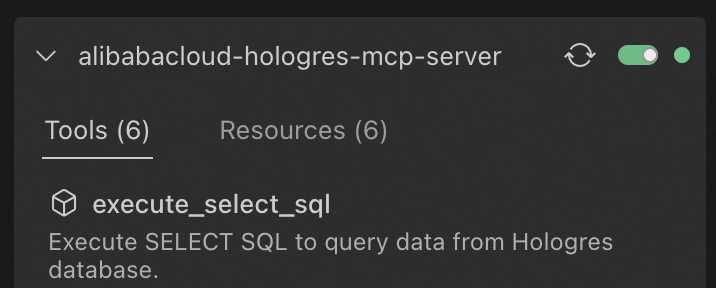
Step 4: Use the agent
Your agent is now configured in Cline. Use the agent:
In the Cline panel toolbar, click the
 icon to open the chat interface.
Enter and send your prompt.
Prompt example: Read data from Hologres and analyze the data in the
hologres_dataset_tpch_10gschema. Analyze the change in sales in BRAZIL in 1995 compared to 1994, and suggest how to increase sales. Answer in Chinese. Use HTML to create charts in the answer to explain the information.
References
For more information about using DataWorks MCP Server, see DataWorks Agent. You can connect to more Alibaba Cloud MCP Servers and open-source MCP Servers as needed.