HoloWeb provides a visual interface to sync data from MaxCompute with a single click. This lets you quickly query your MaxCompute data. This topic describes how to create a MaxCompute data sync task and view its status in HoloWeb.
Prerequisites
You have purchased a Hologres instance and created a database.
Create a MaxCompute data sync task
To create a MaxCompute data sync task, see Import data from MaxCompute using HoloWeb.
View MaxCompute data sync task information
-
On the HoloWeb developer page, click Data Solutions in the top menu bar.
-
In the navigation pane on the left, click Import MaxCompute Data.
-
Configure the parameters on the One-click MaxCompute Data Synchronization page and click Search.
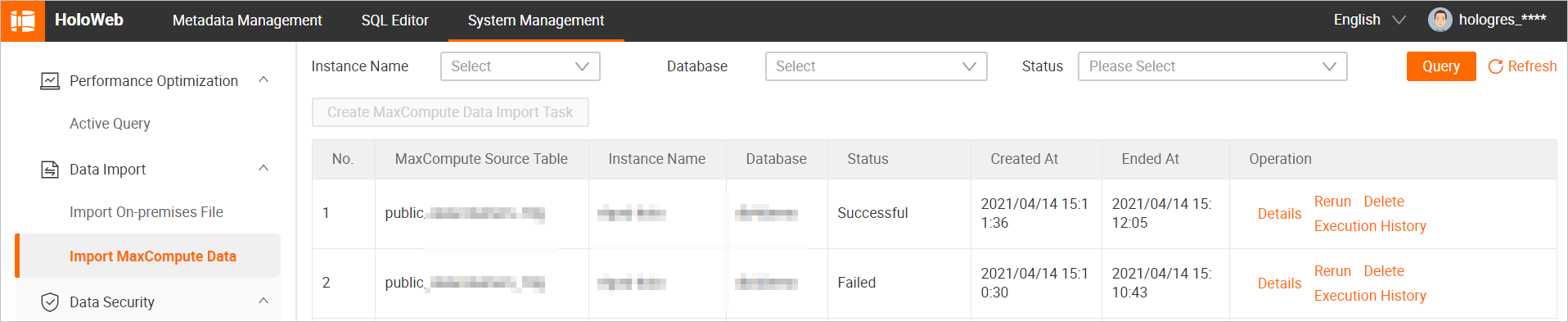
If you do not specify values for Instance Name, Database, and Status, the query returns all MaxCompute data sync tasks of all statuses for your account.
The following table describes the parameters.
Parameter
Description
Instance Name
The name of the logged-on instance.
Database
The name of the database that corresponds to the current Hologres instance.
Status
The valid values are:
-
Running: The sync task is running.
-
Successful: The sync task was successfully executed.
-
Execution Failed: The sync task failed to execute.
-
Interrupted: The sync task was interrupted.
You can perform the following operations on the listed tasks:
-
View task details.
Click Details in the Actions column for the sync task to open the MaxCompute Data Synchronization Details page, where you can view detailed information about the task.
-
Rerun a task.
Click Rerun in the Actions column for the sync task to re-execute the task.
After the task restarts, you can click Stop in the Actions column to stop it.
-
Delete a sync task.
Click Delete in the Actions column for the sync task to delete it.
-
View the execution history of a sync task.
In the Actions column for the sync task, click Execution History to view the execution status of each SQL command in the task. For example, you can view the execution result and duration of an SQL statement.
 You can click an SQL statement to copy it.
-