Hologres provides a Multi-zone deployment feature that extends an instance's availability from a single availability zone to three availability zones within the same region. This feature provides fault isolation at the availability zone level to protect your services from single-zone failures, such as carrier network outages or compute infrastructure failures. This enhances disaster recovery for your business.
Usage notes
-
Only instances of V3.0.19 or later can be upgraded to use Zone-redundant Storage.
-
This feature is currently available in the following regions: China (Shenzhen), China (Hangzhou), China (Shanghai), China (Beijing), China (Hong Kong), Singapore, Japan (Tokyo), China (Shanghai) Finance, and China (Hangzhou) Finance.
Overview
Introduction
Hologres's Multi-zone deployment feature extends the availability of an instance from a single availability zone to three availability zones within the same region. It provides fault isolation at the availability zone level to prevent a single-zone failure from interrupting your business services. You can use this feature to handle scenarios such as carrier network failures or compute infrastructure failures in a single availability zone, which enhances your business's disaster recovery capabilities.
Hologres Multi-zone deployment includes storage disaster recovery across three availability zones and high availability for compute across multiple availability zones:
-
Storage disaster recovery across three availability zones: Also known as Zone-redundant Storage, this feature replicates an instance's data across multiple availability zones within a single region. The underlying availability zones are managed by the Pangu distributed storage system, and you do not need to manage their specific locations. If the storage in one availability zone becomes unavailable, the system automatically accesses a replica in another availability zone. This process requires no manual intervention and ensures continuous data access, providing zone-level disaster recovery for storage.
-
High availability for compute nodes across multiple availability zones: If an instance uses Zone-redundant Storage, you can manually fail over its compute nodes to a healthy availability zone if a compute infrastructure failure occurs. This capability enhances the high availability of the compute layer, provided that the target availability zone has sufficient compute resources.
How it works
-
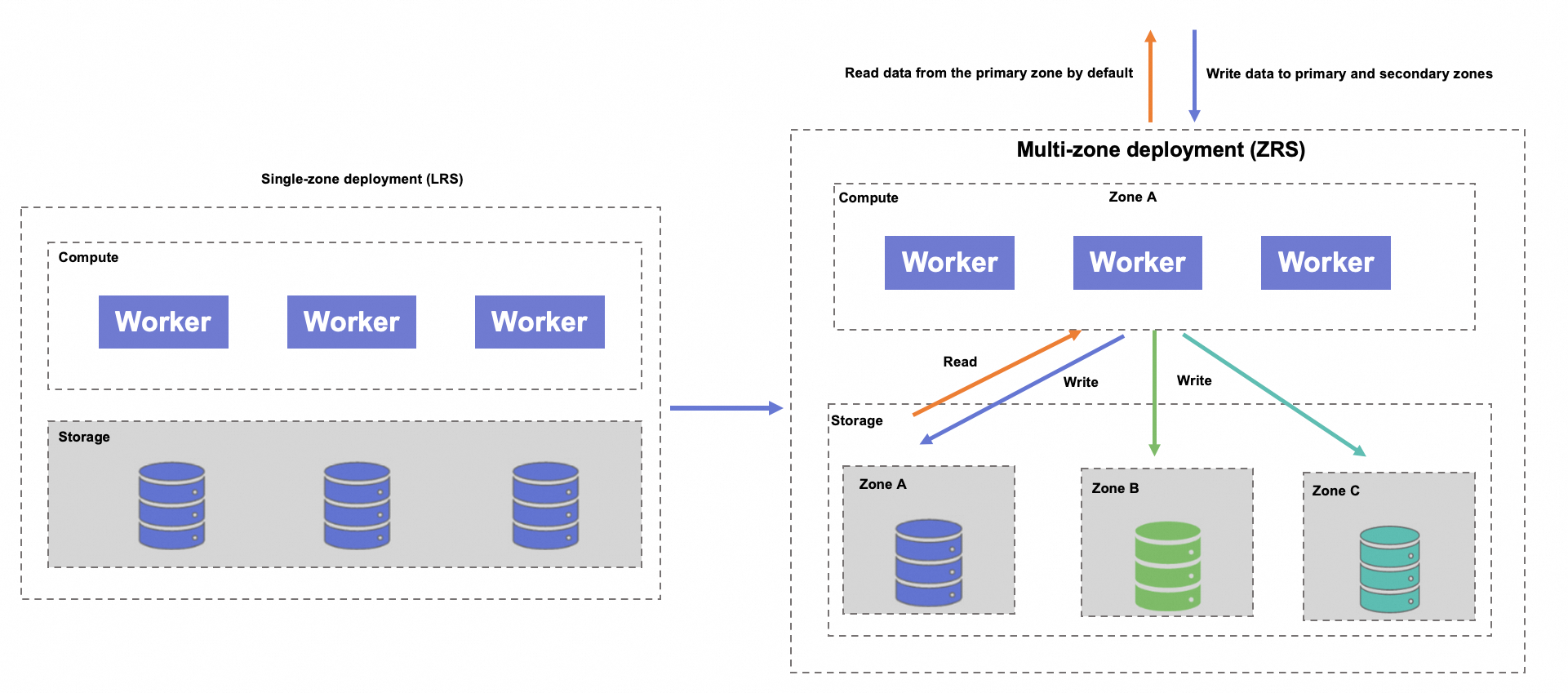
Locally Redundant Storage: When an instance uses Locally Redundant Storage, it stores data in a single availability zone within a region. If this availability zone becomes unavailable, the data becomes inaccessible, and high availability for storage and compute cannot be achieved.
-
Zone-redundant Storage: When an instance uses Zone-redundant Storage (for Multi-zone deployment), its data is replicated across multiple availability zones within the same region. If one availability zone becomes unavailable, Zone-redundant Storage ensures continuous data access, providing zone-level disaster recovery for storage and enabling it for compute.
Compared to Locally Redundant Storage, Zone-redundant Storage offers higher availability and more resilient disaster recovery capabilities, but it also increases storage costs. For details, see Billing overview. Other costs remain unchanged.
Multi-zone deployment provides storage disaster recovery and compute disaster recovery. The following sections describe how they work.
Storage disaster recovery
With Zone-redundant Storage, an instance's data is stored across multiple availability zones in the same region. The availability zone where the instance is created serves as the primary availability zone, while the others are selected from other available zones.
The system automatically selects secondary availability zones based on the primary availability zone of your instance. You do not need to manage or know which specific availability zones are used.
-
During normal operation:
-
Data writes: The system writes data simultaneously across multiple availability zones. A write operation is atomic and is confirmed only after it succeeds in all zones. If a write fails in any one zone, the entire operation is rolled back.
-
Data queries: By default, the system routes queries to the primary availability zone.
-
-
If the primary availability zone fails:
-
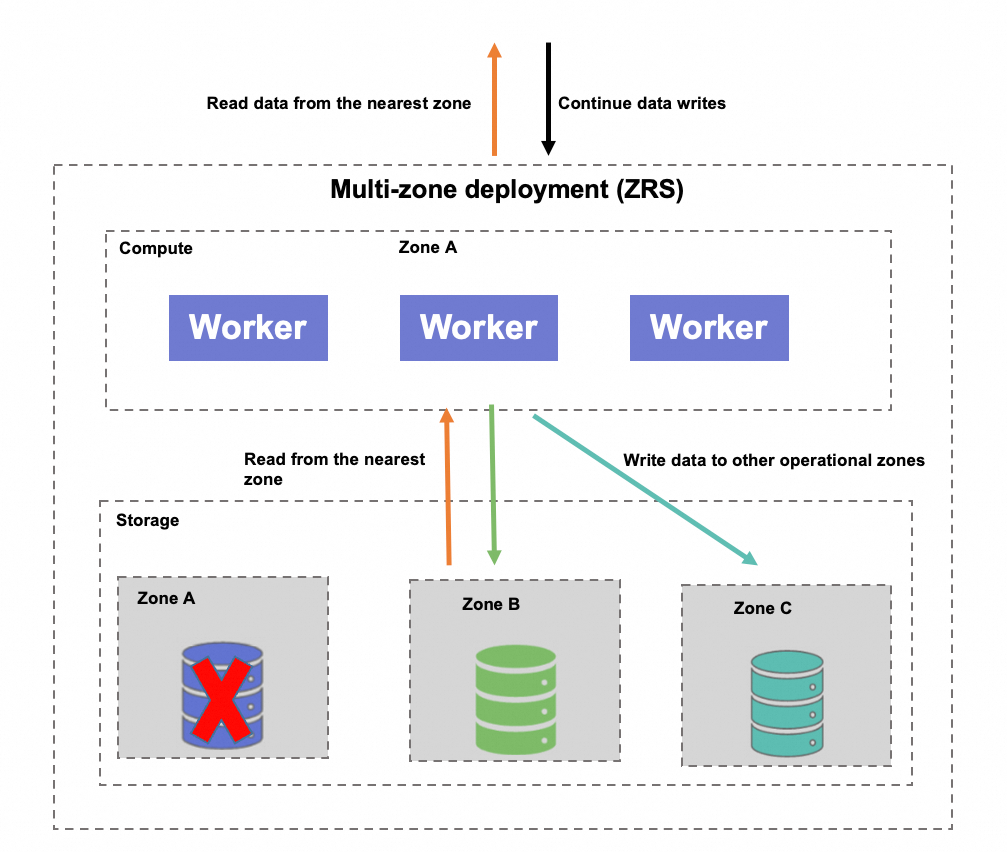
Data writes: The system automatically directs writes to a healthy availability zone, bypassing the failed one. The system ensures that multiple data replicas are always maintained. In extreme cases, at least one availability zone remains operational.
-
Data queries: The system automatically routes queries to the nearest available replica to ensure service continuity and availability.
-
-
After the primary availability zone recovers:
-
Data writes: Writes resume to the original primary availability zone. The system asynchronously replicates data written during the outage from the secondary zones back to the recovered primary zone.
-
Data queries: The storage engine automatically routes read requests. It prioritizes data from the primary availability zone. If the latest data is not available in the primary zone, the engine automatically redirects the query to a replica zone to ensure data correctness. Data freshness and accuracy are guaranteed by the system's automatic routing, so you do not need to monitor the completion of data synchronization.
-
With Zone-redundant Storage, the system provides high availability and automatic failover for storage, ensuring business continuity without manual intervention.
Compute disaster recovery
Compute disaster recovery is possible only for instances that use Zone-redundant Storage. Unlike storage disaster recovery, which features automatic failover and routing, compute recovery requires manual intervention. If the data center hosting your compute nodes fails, you must manually trigger a failover from the console by using the Switch Computing Zone feature. This action migrates the compute nodes to a healthy availability zone, ensuring the availability of your compute resources.
A compute failover may fail if the target availability zone has insufficient resources. The system does not guarantee 100% resource availability. If you encounter this issue, promptly submit a ticket or join the Real-time Data Warehouse Hologres Exchange Group on DingTalk to contact Hologres technical support.
Purchase an instance with Multi-zone deployment
When you purchase a new instance, set the Storage Redundancy Type to ZRS.
-
Billing: You are charged based on the unit price of Zone-redundant Storage. This only increases your storage costs compared to a standard instance. For more information, see Billing overview.
-
Existing instances use Locally Redundant Storage by default. Only instances of V3.0.19 or later can be upgraded to use Zone-redundant Storage. For more information, see Enable Multi-zone deployment for an existing instance.
After creating the instance, go to the Instance Details page. In the Storage Resources section, verify that the Storage Redundancy Type is set to Zone-redundant Storage (ZRS). If an availability zone failure occurs, follow the instructions in Disaster recovery guide. You can use this type of instance in the same way as an instance that uses Locally Redundant Storage.
Disaster recovery
Storage disaster recovery
If a storage failure occurs in the availability zone hosting your instance, Hologres notifies you by SMS or email. The system then begins automatic recovery:
-
Hologres automatically fails over the storage to another availability zone. No action is required from you, and your services recover automatically.
-
After the failover, data writes continue in a healthy availability zone, unaffected by the failed zone. The system automatically routes queries to the nearest available data replica. No application changes are required. If any jobs failed during the incident, you must rerun them.
-
Monitor your business operations to ensure that they are fully restored.
Compute disaster recovery
If your instance uses Zone-redundant Storage, Hologres lets you manually switch the compute availability zone to achieve high availability for compute nodes and quickly restore your services.
If a failure occurs in the compute availability zone of your instance, Hologres notifies you by SMS or email. Then, follow these steps to manually recover your compute resources:
-
Go to the Hologres console. On the Instances page, click the target instance's ID to open the Instance Details page.
-
In the left-side navigation pane, click Backup and Disaster Recovery and then click the Zone-disaster Recovery tab.
-
In the Compute Disaster Recovery section, click Switch Computing Zone.
-
If the target availability zone has sufficient compute resources, select a Computing Zone for Disaster Recovery in the Switch Computing Zone dialog box and click OK to migrate the compute nodes.
After the migration is complete, the instance's basic configuration, such as its endpoint, remains unchanged. When the instance status changes to Running, rerun any failed jobs and monitor your business operations until they are fully restored.
-
You can manually switch compute availability zones only for instances that use Zone-redundant Storage (for Multi-zone deployment). If your instance uses Locally Redundant Storage, see Enable Multi-zone deployment for an existing instance.
-
If the target availability zone has insufficient compute resources, the switchover will fail. In this case, promptly submit a ticket or join the Real-time Data Warehouse Hologres Exchange Group on DingTalk to contact Hologres technical support.
-
After you manually migrate the compute availability zone, the basic configurations of the instance, such as its endpoint and network settings, remain unchanged.
-
Manually migrating the compute availability zone does not incur additional compute costs.
Enable Multi-zone deployment for an existing instance
If an instance's storage redundancy type is Locally Redundant Storage, it stores data in only one availability zone within a region. If the storage in that availability zone becomes unavailable, the data is inaccessible.
If your business requires Multi-zone deployment capabilities, submit a ticket or join the Real-time Data Warehouse Hologres Exchange Group on DingTalk to have Hologres operations personnel perform the backend conversion. Note the following:
-
Only Hologres instances of V3.0.19 or later support Zone-redundant Storage. If your instance runs an earlier version, you must upgrade the instance or join the Real-time Data Warehouse Hologres Exchange Group on DingTalk to request an upgrade. For more information, see How do I get more online support?.
-
Impacts of the conversion process:
-
During the conversion, writes to the instance are suspended, but reads remain available. If your jobs have an automatic failover mechanism, you do not need to manually stop them.
-
The conversion time depends on the number of tables in the instance. For most instances, the conversion is completed in under 10 minutes. Contact Hologres technical support for a more specific time estimate.
-
-
After the conversion, storage fees are based on the unit price of Zone-redundant Storage. Your storage costs will increase. Monitor your bills accordingly.