Use the UPDATE statement to modify column values in rows that match a specified condition.
Syntax
UPDATE <table> [ * ] [ [ AS ] <alias> ]
    SET { <column> = { <expression> } |
          ( <column> [, ...] ) = ( { <expression> } [, ...] ) } [, ...]
    [ FROM <from_list> ]
    [ WHERE <condition> ]
Parameters
| Parameter | Description |
|---|---|
table | The name of the table to update. |
alias | An alternative name for the table. |
column | The name of the column to update. |
expression | The expression that produces the new value for the column. |
from_list | A column in the source table, used when updating with data from another table. |
condition | The condition that rows must meet to be updated. Rows that do not match the condition are left unchanged. |
For the full PostgreSQL UPDATE specification, see UPDATE.
How it works
Each Hologres table has three associated files: a data file, a primary key index file, and a tag file. Tag files are mainly used in scenarios where data is to be deleted or updated by using the DELETE, UPDATE, INSERT ON CONFLICT, or another statement. For more information about a primary key index file, see PK.
When you run UPDATE, Hologres first writes new data to the memory table (Mem Table), then asynchronously flushes it to disk:
Row-oriented tables: New data is flushed to a new file. The old data is merged out during background compaction.
Column-oriented tables: Hologres builds a tag table in memory that records the file ID and row ID of the data to be replaced. New data is flushed to a new file, and the tag table is flushed to a tag file. During compaction, Hologres clears the old data and merges in the new data.
Because compaction is asynchronous, storage usage increases while an UPDATE is running and returns to normal after compaction completes.
The update efficiency of a row-oriented table is higher than that of a column-oriented table.
Tables with a primary key
When a table has a primary key, Hologres uses the primary key index file to look up the row identifier (RID) and then locates the target data files directly. This lets Hologres skip unrelated files and update only the matching rows.
Without a primary key, Hologres must scan the entire table to find matching rows, which affects performance. For more information, see PK.
Partial updates
A partial update modifies only a subset of columns in a row while leaving other columns unchanged. Partial updates are unique to Hologres and can meet different business requirements. All three storage formats support partial updates, but they handle the read-before-write differently:
| Storage format | Partial update behavior |
|---|---|
| Row-oriented | Data is written in Append Only mode using the log-structured merge (LSM) structure. No read-before-write required. |
| Column-oriented | Empty columns must be read before new data is written, which increases resource consumption. |
| Row-column hybrid | Empty columns are read from the row-oriented portion, which reduces resource consumption compared to column-oriented tables. |
With fixed plans, partial update performance ranks as follows (fastest to slowest):
row-oriented > row-column hybrid > column-oriented
Without fixed plans, partial updates behave like a join between two tables. In this case, performance ranks differently:
column-oriented > row-column hybrid > row-oriented
For most real-time update workloads with fixed plans, row-oriented tables provide the best performance. See UPDATE statement for guidance on enabling fixed plans.
Limitations
Distribution keys cannot be updated. To change a distribution key value, delete the row and re-insert it with the new value.
Updating a partitioned table updates child tables, not the parent table. Run UPDATE against the specific child table that contains the rows you want to modify.
Use fixed plans for better performance. Without fixed plans, partial updates are treated as table joins, which changes both performance characteristics and the performance ranking across storage formats. See UPDATE statement.
Examples
The following examples use a sample table:
CREATE TABLE update_test (
  a text primary key,
  b int not null,
  c text not null,
  d text
);

INSERT INTO update_test VALUES ('b1', 10, '', '');
Update a column using an arithmetic expression
UPDATE update_test SET b = b + 10 WHERE a = 'b1';Update multiple columns using a condition on another column
UPDATE update_test SET c = 'new_' || a, d = null WHERE b = 20;Update multiple columns without a WHERE condition (updates all rows)
UPDATE update_test SET (b, c, d) = (1, 'test_c', 'test_d');Update a column using data from another table
CREATE TABLE tmp (a int);
INSERT INTO tmp VALUES (2);

UPDATE update_test SET b = tmp.a FROM tmp;
Partial update: update one column and leave others unchanged
CREATE TABLE update_test2 (
  col1 text NOT NULL PRIMARY KEY,
  col2 text,
  col3 text
);

INSERT INTO update_test2 VALUES ('a1', 'a2', 'a3'), ('a11', 'a22', 'a33');

-- Update col2 only; col3 is unchanged
UPDATE update_test2 SET col2 = 'tom' WHERE col1 = 'a1';
Result:
 col1 | col2 | col3
------+------+------
 a1   | tom  | a3
 a11  | a22  | a33
(2 rows)
The same partial update can also be written using INSERT ON CONFLICT:
INSERT INTO update_test2 (col1, col2) VALUES ('a1', 'tom')
ON CONFLICT (col1) DO UPDATE
SET col2 = EXCLUDED.col2;
FAQ
Why does storage usage spike during an UPDATE and then drop afterward?
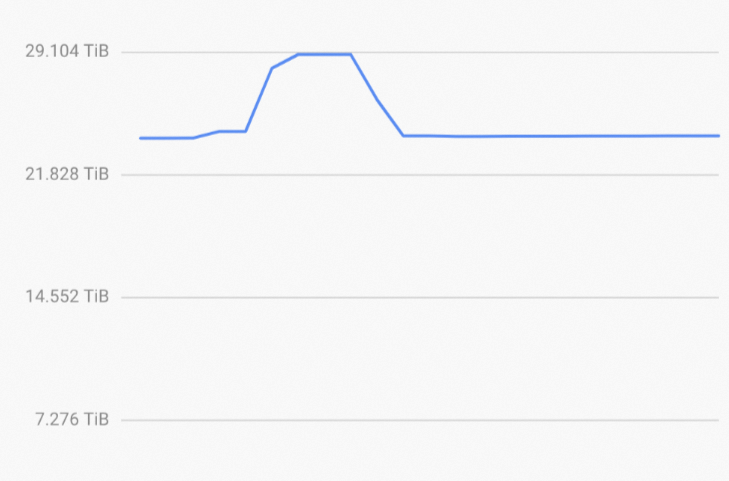
During an UPDATE, Hologres tags the old data for deletion and flushes the new data to small files immediately. The tagged old data and the new files coexist until background compaction runs. Compaction merges the new data, clears the old data, and consolidates the small files — at which point storage usage returns to normal. See How it works for details.