An event function can respond to various events generated by cloud services, such as a file upload to Object Storage Service (OSS) or an alert triggered by a monitoring product. With an event function, you write only the processing logic without managing event integration or underlying compute resources. Function Compute automatically runs, scales, and terminates instances as needed. You pay only for the resources that you use.
Use case
Imagine you need to store files in Object Storage Service (OSS). To speed up uploads, you compress the files into a ZIP archive first. However, when you need to use the files, you want the original files, not the ZIP archive. This requires automatically decompressing the files and saving them back to OSS.
An event function lets you focus on the file processing code. Each time a file is uploaded to OSS, an event is generated. If the event meets your configured conditions, it automatically triggers the function to run your handler. After the handler finishes, the compute resources are released to save costs.
Since you might not have an OSS bucket, this tutorial demonstrates how to implement an event function using a simulated event.
You will create a simulated Object Storage Service (OSS) file upload event. This event invokes an event function to process the file and print information such as the file name and bucket name to the console.
By completing this example, you will learn how to:
Create an event function, write a handler, and test the function using the console.
Understand key concepts like the Function Compute runtime and built-in runtimes.
Learn about the
eventandcontexthandler parameters.
Prerequisites
Procedure
1. Select a function type
Log on to the Function Compute console. In the left-side navigation pane, choose . In the top navigation bar, select the region where you want to create the function. Click Create Function, and then follow the on-screen instructions to select and create an Event Function.
2. Select a runtime
Python
For Runtime, select Built-in Runtime > Python > Python 3.10.
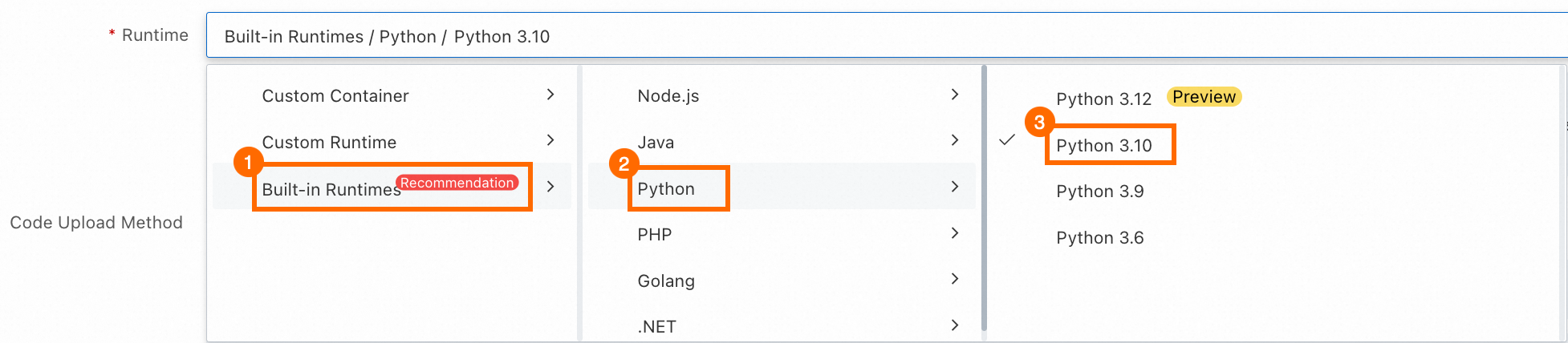
We recommend using a built-in runtime for your event function. A built-in runtime includes dependencies required to respond to events from other cloud services, such as the oss2 module for Python. For more information, see Runtime environment overview. If you use a custom runtime or a custom image, you must install the required dependencies. For a detailed comparison of runtimes, see Select a runtime.
Node.js
For Runtime, select Built-in Runtime > Node.js > Node.js 20.
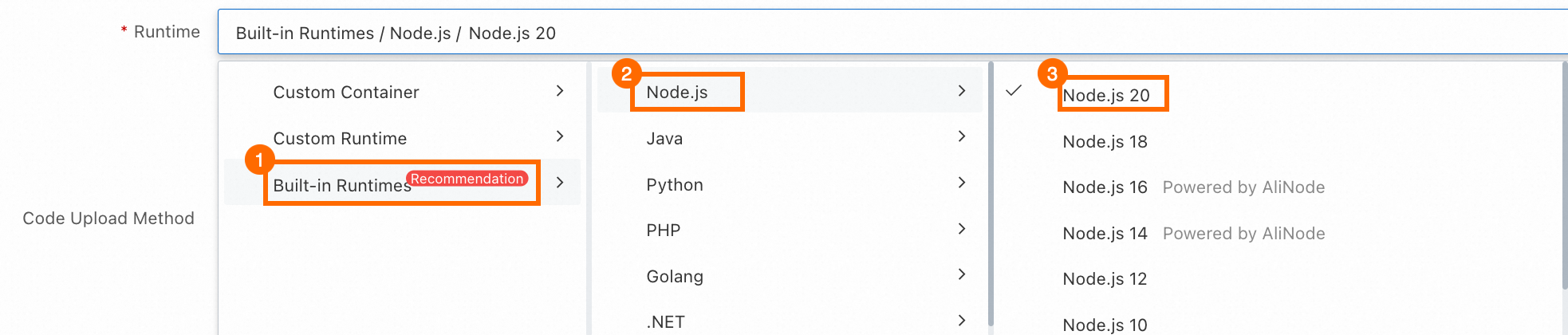
We recommend using a built-in runtime for your event function. A built-in runtime includes dependencies required to respond to events from other cloud services, such as the ali-oss module for Node.js. For more information, see Runtime environment overview. If you use a custom runtime or a custom image, you must install the required dependencies. For a detailed comparison of runtimes, see Select a runtime.
3. Create a function
Select the Hello, world! example. Keep the default values for Advanced Settings and click Create. Wait for the function creation to complete.
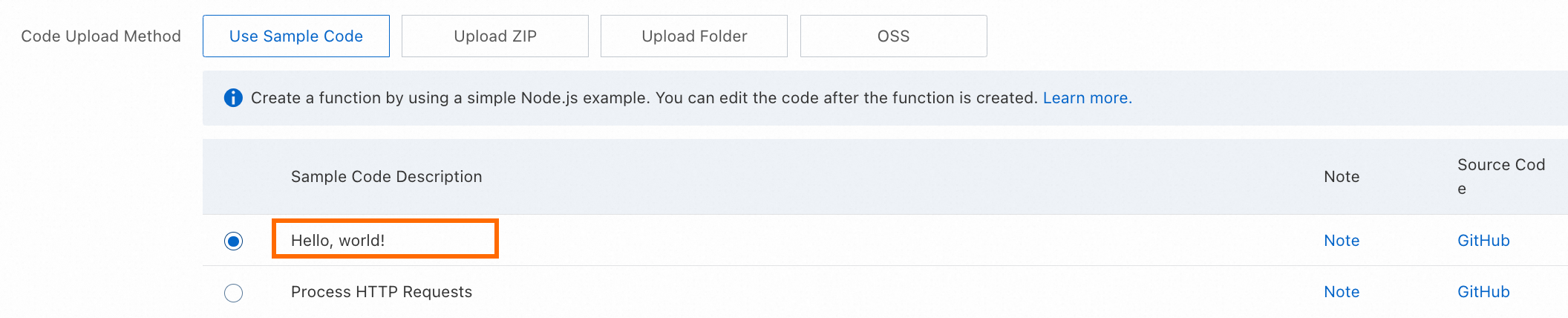
After the function is created, you can view the generated sample code in the WebIDE on the Code tab. The following figure shows an example in Python.
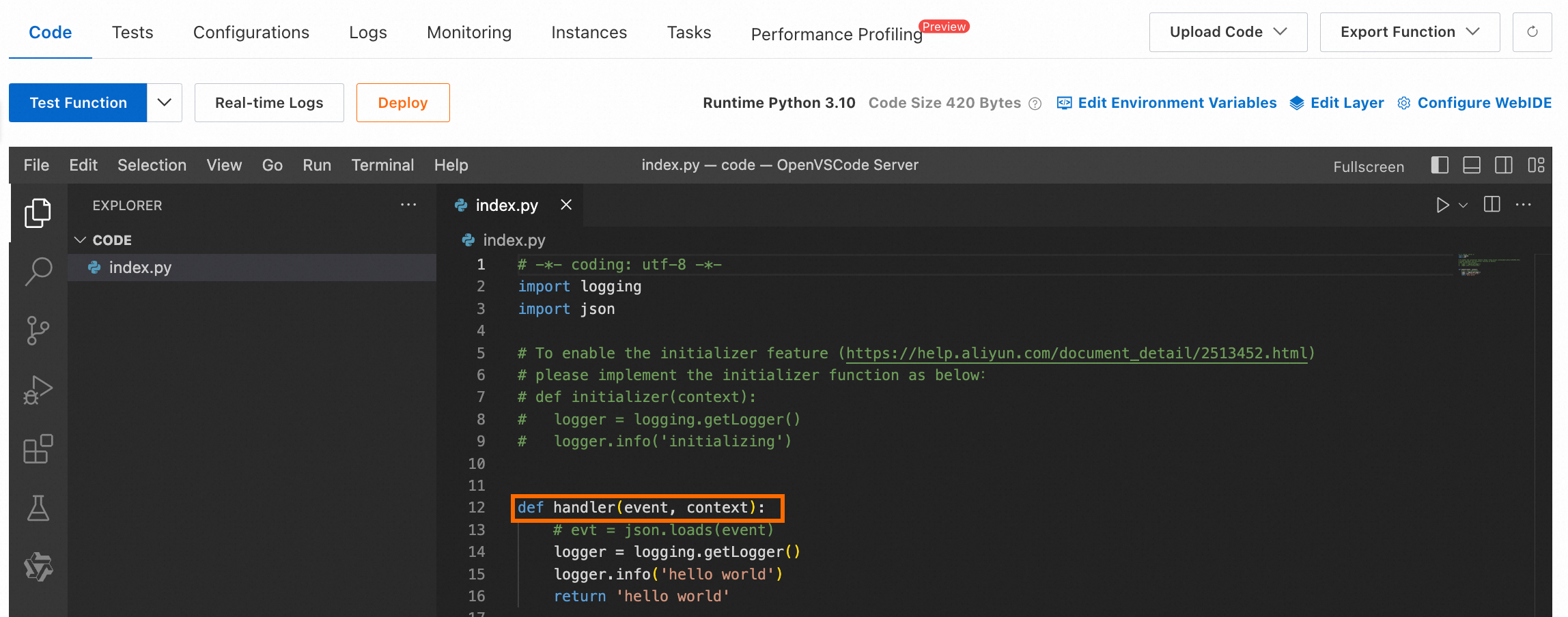
The Hello, world sample code automatically generates a function template with an entrypoint. You can build your business code directly from this template in the following steps.
4. Modify and deploy the sample code
Interpreted languages such as Python and Node.js let you directly modify and deploy code in the WebIDE. Compiled languages such as Java only support compiling a code package locally and then uploading it. They do not support the WebIDE.
Python
In the WebIDE of the console, open index.py. Replace the current code with the following code, and then click Deploy to apply the changes.
# -*- coding: utf-8 -*-
import logging
import json
# import oss2  # Uncomment this line if you need to create an OSS client.
logger = logging.getLogger()


def handler(event, context):  # The handler is the entry point for code execution.
    logger.info("Parsing event information...")
    input_events = json.loads(event)
    if not input_events.get('events'):  # Check the format of the incoming event.
        raise Exception("Invalid event format: The events array does not exist or is empty.")
    event_obj = input_events['events'][0]
    bucket_name = event_obj['oss']['bucket']['name']  # Parse the OSS Bucket name.
    object_name = event_obj['oss']['object']['key']  # Parse the file name.
    region = context.region  # Parse the region where the function resides.
    logger.info(f"OSS bucket name: {bucket_name}, File name: {object_name}, Region: {region}")
    # If you have an OSS Bucket, you can uncomment the following line to create an OSS client instance.
    # bucket = get_bucket(region, bucket_name, context)
    bucket = None
    result = process_event(bucket, object_name)  # Call a subroutine to execute the event processing logic.
    return result


def process_event(bucket, object_name):
    logger.info("Starting event processing...")
    # You can write your event processing logic here.
    # zip_file = download_file(bucket, object_name)
    # result = extract_and_upload(bucket, zip_file)
    logger.info("Event processing finished.")
    result = 0
    return result  # A return value of 0 indicates that the event was processed successfully.


# def get_bucket(region, bucket_name, context):
#     # Create an OSS Bucket client instance. The required authentication information can be obtained from the context.
#     creds = context.credentials  # Obtain the STS token.
#     auth = oss2.StsAuth(
#         creds.access_key_id,
#         creds.access_key_secret,
#         creds.security_token)
#     endpoint = f'oss-{region}-internal.aliyuncs.com'
#     bucket = oss2.Bucket(auth, endpoint, bucket_name)
#     return bucket


# def download_file(bucket, object_name):
#     # This is sample code for downloading a file from OSS.
#     try:
#         file_obj = bucket.get_object(object_name)
#         return file_obj
#     except oss2.exceptions.OssError as e:
#         logger.error(f"Failed to download the file. {e}")


# def extract_and_upload(bucket, file_obj):
#     # You can define the logic to decompress and upload the file to OSS here.
#     return 0;
Understand the function code
def handler(event, context):handler: This Python function is the handler. Your code may contain multiple Python functions, but the handler is always the entry point for code execution. When you modify the code, do not change the name of the handler. This ensures that Function Compute (FC) can correctly identify it. For more information, see What is a handler?.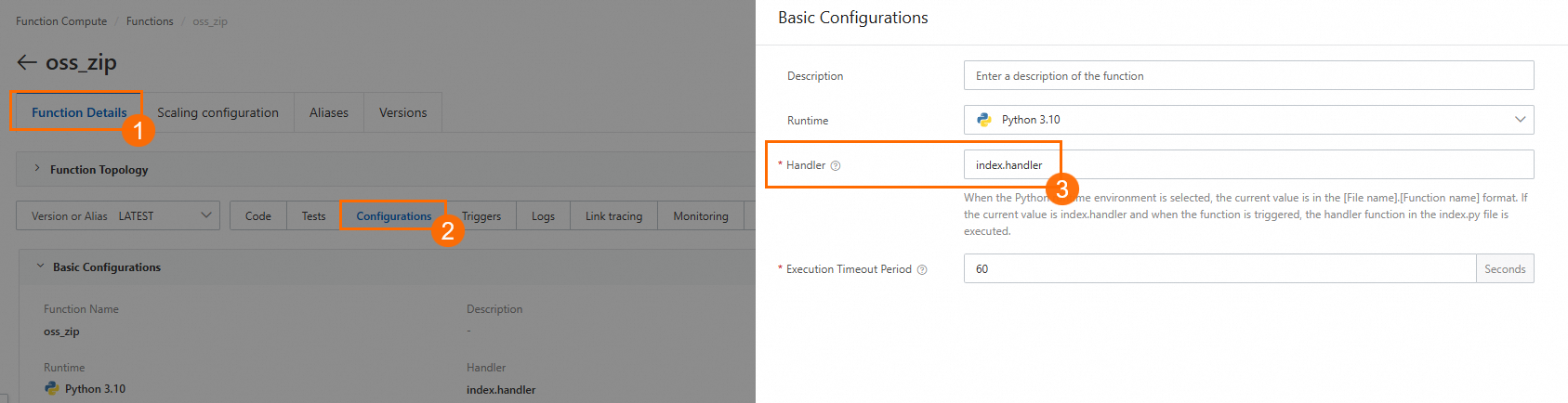
event: When an event triggers the function, event-related information is passed in through theeventparameter. Examples include the Bucket name and file name in an OSS file upload event. This parameter is a JSON object. To learn what information theeventfor different event types contains, see Trigger event formats.context: The context object for the function runtime is passed to the function through thecontextparameter. It contains information about the invocation, function configuration, and authentication. The authentication information comes from the role permissions configured for the function. After you configure a role for the function, FC obtains an STS token by calling AssumeRole. FC then passes the STS token to your function in thecontextobject'scredentialsfield. For more information, see Use a function role to grant a function permissions to access other cloud services. To learn what information the context object contains, see Context.
logger.info(): You can use the standard logging features of your programming language to output logs. For example, in Python, use methods from theloggingmodule to output information to the log. The example in this topic uses a statement to print the Bucket name, file name, and region name. After the function is called, you can view the log output in the console. For more information, see Logs.
Node.js
In the WebIDE of the console, open index.mjs. Replace the current code with the following code, and then click Deploy to apply the changes.
'use strict';
// import OSSClient from 'ali-oss'; // Uncomment this line if you need to create an OSS client.

export const handler = async (event, context) => { // The handler is the entry point for code execution.
  console.log("Parsing event information...");
  const inputEvents = JSON.parse(event);
  if (!Array.isArray(inputEvents.events) || inputEvents.events.length === 0) { // Check the format of the incoming event.
    throw new Error("Invalid event format: The events array does not exist or is empty.");
  }
  const eventObj = inputEvents.events[0];
  const bucketName = eventObj.oss.bucket.name; // Parse the OSS Bucket name.
  const objectName = eventObj.oss.object.key; // Parse the file name.
  const region = context.region;  // Parse the region where the function resides.
  console.log(`OSS bucket name: ${bucketName}, Object file name: ${objectName}, Region: ${region}`);
  // If you have an OSS Bucket, you can uncomment the following line to create an OSS client instance.
  // const bucket = getBucket(region, context)
  const bucket = null;
  const result = processEvent(bucket, objectName); // Call a subroutine to execute the event processing logic.
  return result;
};


async function processEvent (bucket, objectName) {
  console.log("Starting event processing...");
  // You can write your event processing logic here.
  // const zipFile = downloadFile(bucket, objectName);
  // const result = extractAndUpload(bucket, zipFile);
  console.log("Event processing finished.");
  const result = 0;
  return result;
}


// function getBucket (region, context) {
//   // Create an OSS Bucket client instance. The required authentication information can be obtained from the context.
//   const bucket = new OSSClient({
//     region: region,
//     accessKeyId: context.credentials.accessKeyId,
//     accessKeySecret: context.credentials.accessKeySecret,
//     securityToken: context.credentials.securityToken
//   });
//   return bucket;
// }


// async function downloadFile (bucket, objectName) {
//   try {
//     // This is sample code for downloading a file from OSS.
//     const result = await bucket.get(objectName, objectName);
//     console.log(result);
//     return result;
//   } catch (e) {
//     console.log(e);
//   }
// }

// async function extractAndUpload (bucket, zipFile) {
//     // You can define the logic to decompress and upload the file to OSS here.
//     return 0;
// }
Understand the function code
export const handler = async (event, context)handler: This Node.js function is the handler. Your code may contain multiple Node.js functions, but the handler is always the entry point for code execution. When you modify the code, do not change the name of the handler. This ensures that Function Compute (FC) can correctly identify it. For more information, see What is a handler?.
event: When an event triggers the function, event-related information is passed in through theeventparameter. Examples include the Bucket name and file name in an OSS file upload event. This parameter is a JSON object. To learn what information theeventfor different event types contains, see Trigger event formats.context: The context object for the function runtime is passed to the function through thecontextparameter. It contains information about the invocation, function configuration, and authentication. The authentication information comes from the role permissions configured for the function. After you configure a role for the function, FC obtains an STS token by calling AssumeRole. FC then passes the STS token to your function in thecontextobject'scredentialsfield. For more information, see Use a function role to grant a function permissions to access other cloud services. To learn what information the context object contains, see Context.
console.log(): You can use the standard logging features of your programming language to output logs. For example, in Node.js, use theconsolemodule to output information to the log. The example in this topic uses a statement to print the Bucket name, file name, and region name. After the function is called, you can view the log output in the console. For more information, see Logs.
5. Test the function
To simulate a scenario where a file upload to OSS triggers a function, define a mock event and use it to trigger the function.
In addition to testing with a mock event, you can also use a real OSS event to trigger the function for testing. For more information, see Advanced operations.
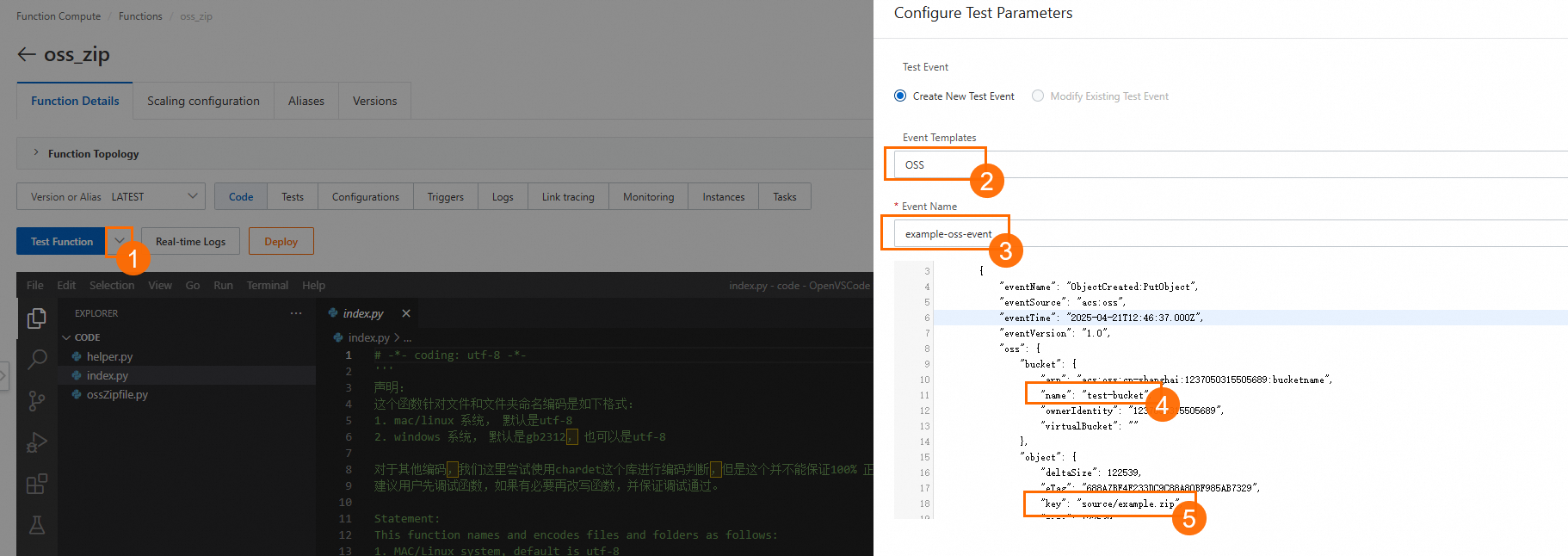
Create a mock event: On the Function Details page, click the Code tab. Click the drop-down arrow next to Test Function and select Configure Test Parameters. In the Event Template section, select Object Storage Service (OSS). A mock event is automatically generated. The format of this event is the same as that of a real OSS event.
You can customize the Event Name and the parameter values in the event object, such as the OSS Bucket name and file name. After you are finished, click OK.
On the Code tab, click Test Function to immediately trigger the function. After the function runs successfully, view the Response. The sample code returns 0, which indicates that the event was processed successfully. Click Log Output to view the log information that was output during the function execution.
When you test the function, Function Compute passes the content of the mock event to the
handlerthrough theeventparameter. It then runs the code that you defined in the previous step, which parses theeventparameter and processes the file.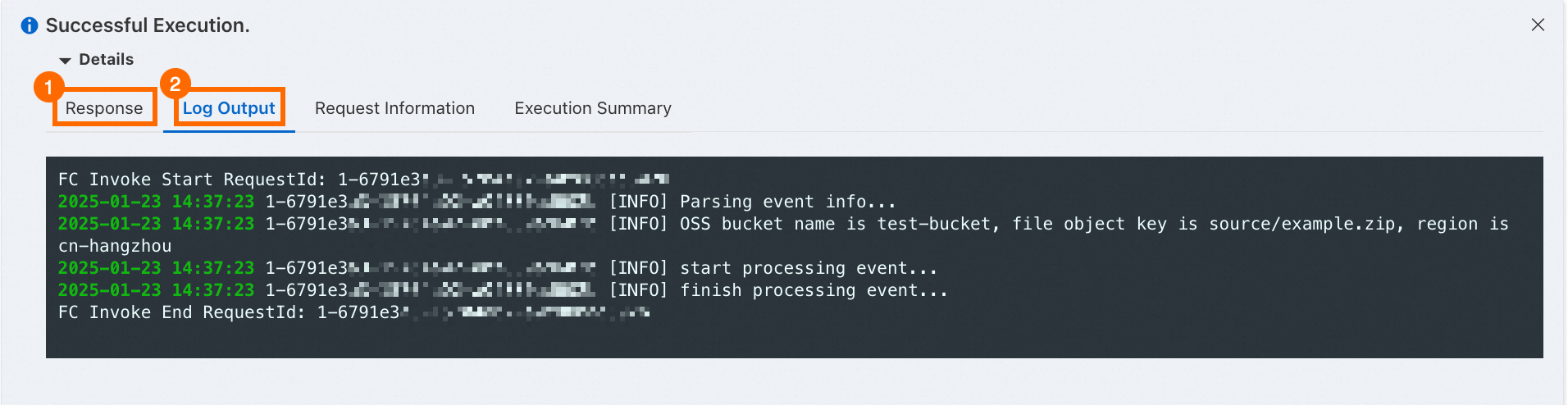
6. (Optional) Clean up resources
Function Compute is billed based on resource usage. You are not charged for functions that you do not use. However, be aware that associated resources from other cloud services, such as data stored in Object Storage Service (OSS) and Apsara File Storage NAS, can incur separate charges.
To delete a function, log on to the Function Compute console. In the navigation pane on the left, choose . Select a region. Find the function that you want to delete and click Delete in the Actions column. In the dialog box that appears, confirm that the function has no associated resources, such as triggers, and then confirm the deletion.
Advanced operations
You have now created an event function, modified the handler, and tested the function with a simulated event in the console. Refer to the following advanced operations as needed:
Add a trigger:
This topic uses a simulated Object Storage Service (OSS) file upload event for testing. This is because you might not have an OSS bucket. If you want to use the function for your business, add an OSS trigger to the function. For more information, see Configure a native OSS trigger.
In addition to OSS, events from many other Alibaba Cloud services can also trigger Function Compute. These services include various message queues, Tablestore, and Simple Log Service (SLS). For a list of supported triggers, see Introduction to triggers.
Add dependencies: The built-in runtime includes common dependency libraries for event processing. However, these libraries might not meet all your business requirements. The simplest solution is to package your code and extra dependencies into a ZIP file. Then, upload and deploy the code package to Function Compute. For more information, see Deploy a code package. To reduce the code package size and speed up cold starts, manage dependencies using layers. For more information, see Create a custom layer.
Configure logs: Configure logs for your function to help with debugging, troubleshooting, and security audits. For detailed steps, see Configure the logging feature.
Related documents
You can also use the Serverless Devs command-line tool to create functions. For more information, see Quick start.
See the following tutorials to learn more about event functions: