Function Compute supports attribute-based access control (ABAC) using tags. By attaching tag-scoped policies to Resource Access Management (RAM) user groups, you can isolate function management across teams.
How it works
Tag-based access control uses three RAM policy condition keys that work together to enforce tag boundaries:
| Condition key | What it controls |
|---|---|
acs:RequestTag/<tag-key> | Requires the specified tag when a RAM user creates a function. The function must be tagged at creation. |
acs:ResourceTag/<tag-key> | Restricts all management operations to functions that already carry the specified tag. |
fc:TagResources / fc:UntagResources (Deny) | Prevents RAM users from adding or removing tags. Without this restriction, a user could re-tag a function to gain access to resources outside their boundary. |
Together, these three elements form a closed permission boundary: users can only create tagged functions, can only act on functions with their tag, and cannot change tags to escape the boundary.
Use case
An enterprise manages multiple functions under one Alibaba Cloud account and needs to restrict each team to only the functions they own:
Developer team: can only view and manage functions tagged for the development environment
O&M team: can only view and manage functions tagged for the production environment
The following table shows the setup plan:
| Team | RAM user group | Access policy | Tag |
|---|---|---|---|
| Developer team | developer | FCPolicyForDevTeam | team:dev |
| O&M team | operator | FCPolicyForOpsTeam | team:ops |
Prerequisites
Before you begin, make sure you have:
An Alibaba Cloud account with administrator access
Access to the Function Compute console and the RAM console
Do not attach high-privilege policies such as AliyunFCFullAccess or AliyunFCReadOnlyAccess to RAM users. Those policies bypass tag-based conditions and allow the user to see all functions, which breaks the permission isolation this setup provides.
Sub-resources and configurations of a function — such as aliases, triggers, function asynchronous configurations, function concurrent configurations, instances, VPC attachments, and asynchronous tasks — inherit the access control settings of the function. They can be managed only by RAM users who have the corresponding tags.
Set up tag-based access control
Step 1: Tag your functions
Log in to the Function Compute console using your Alibaba Cloud account. Create functions and attach tags to identify which team each function belongs to:
Attach the
team:devtag to functions for the developer team.Attach the
team:opstag to functions for the O&M team.
For instructions on attaching tags, see Configure tags.
Step 2: Create RAM users
Log in to the RAM console using your Alibaba Cloud account and create two RAM users — one for each team. See Create a RAM user.
Step 3: Create RAM user groups and add members
Create two user groups named developer and operator. Add the corresponding RAM users to each group. RAM users automatically inherit the permissions of their group.
See Create a RAM user group and Add a RAM user to a RAM user group.
Step 4: Create custom policies
Log in to the RAM console using your Alibaba Cloud account and create a custom policy.
Each policy contains four statements that together enforce the tag boundary:
Allow all FC actions when the
teamtag matches on resource creation (acs:RequestTag)Allow all FC actions on resources that already carry the matching
teamtag (acs:ResourceTag)Allow listing tags and retrieving account settings (required for tag filtering to work in the console)
Deny tag modification — if omitted, a user could re-tag any function to gain access to resources outside their boundary
FCPolicyForDevTeam (for the developer user group):
{
    "Version": "1",
    "Statement": [
        {
            "Effect": "Allow",
            "Action": "fc:*",
            "Resource": "*",
            "Condition": {
                "StringEquals": {
                    "acs:RequestTag/team": [
                        "dev"
                    ]
                }
            }
        },
        {
            "Effect": "Allow",
            "Action": "fc:*",
            "Resource": "*",
            "Condition": {
                "StringEquals": {
                    "acs:ResourceTag/team": [
                        "dev"
                    ]
                }
            }
        },
        {
            "Effect": "Allow",
            "Action": [
                "fc:ListTaggedResources",
                "tag:ListTagKeys",
                "fc:GetAccountSettings"
            ],
            "Resource": "*"
        },
        {
            "Effect": "Deny",
            "Action": [
                "fc:UntagResources",
                "fc:TagResources"
            ],
            "Resource": "*"
        }
    ]
}
FCPolicyForOpsTeam (for the operator user group):
{
    "Version": "1",
    "Statement": [
        {
            "Effect": "Allow",
            "Action": "fc:*",
            "Resource": "*",
            "Condition": {
                "StringEquals": {
                    "acs:RequestTag/team": [
                        "ops"
                    ]
                }
            }
        },
        {
            "Effect": "Allow",
            "Action": "fc:*",
            "Resource": "*",
            "Condition": {
                "StringEquals": {
                    "acs:ResourceTag/team": [
                        "ops"
                    ]
                }
            }
        },
        {
            "Effect": "Allow",
            "Action": [
                "fc:ListTaggedResources",
                "tag:ListTagKeys",
                "fc:GetAccountSettings"
            ],
            "Resource": "*"
        },
        {
            "Effect": "Deny",
            "Action": [
                "fc:UntagResources",
                "fc:TagResources"
            ],
            "Resource": "*"
        }
    ]
}To configure and use products such as OSS, NAS, and VPC in Function Compute, grant the required permissions for those products as well. See Access policies and examples.
Step 5: Attach policies to the user groups
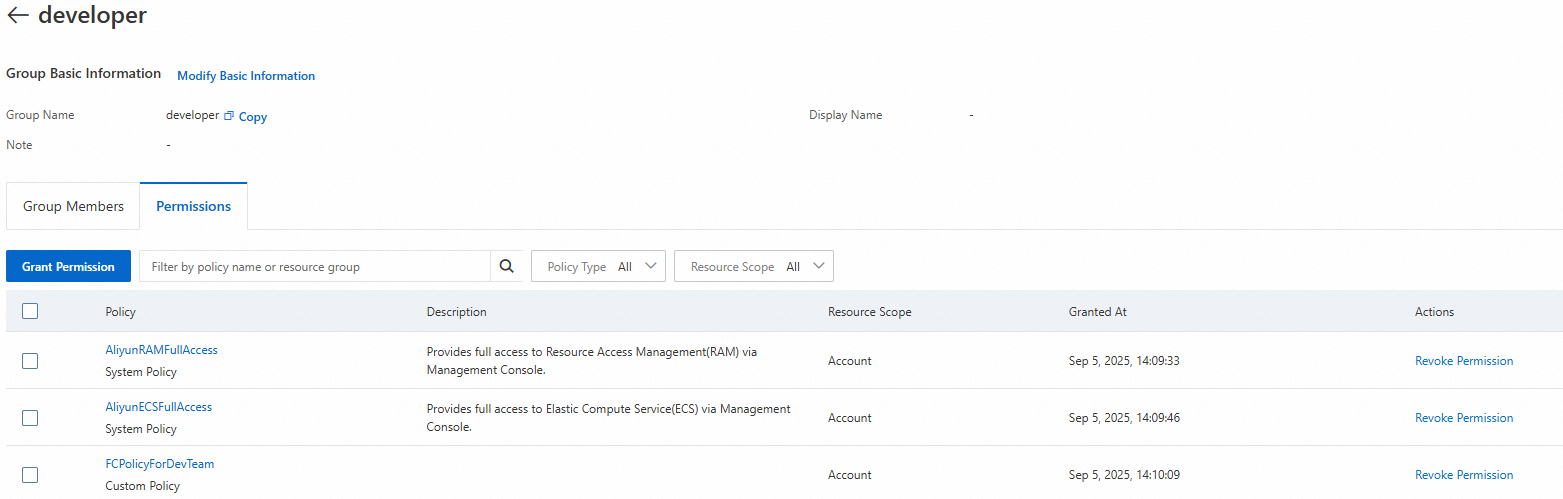
Attach FCPolicyForDevTeam to the
developeruser group and FCPolicyForOpsTeam to theoperatoruser group.Attach the system policies AliyunRAMFullAccess and AliyunECSFullAccess to both user groups. These allow RAM users in the groups to create functions with the specified tags, create RAM users and groups, and create and attach access policies.
See Grant permissions to a RAM user group.
The following figure shows the recommended policies for the developer user group.
Step 6: Verify the setup
Log in to the Function Compute console as each RAM user. See Log on to the Alibaba Cloud Management Console as a RAM user.
In the left navigation pane, choose Function Management > Functions.
In the top menu bar, select the region where the tagged functions are located.
On the Functions page, click Tag Filtering and filter by Tag Key
teamand the corresponding Tag Value (devorops).
A RAM user can view and manage functions only when filtering by a tag included in the policies granted to their user group. Without tag filtering, no functions are visible.
Select the same region as the functions when performing operations. Cross-region access does not work with this configuration.
The following figure shows a developer RAM user filtering authorized functions by the team:dev tag.
