All Products
Search
Document Center

Realtime Compute for Apache Flink:Grant permissions for the Management Console

Last Updated:Nov 24, 2025

To access Realtime Compute for Apache Flink's Management Console via a Resource Access Management (RAM) identity and perform operations such as viewing, purchasing, or deleting workspaces, you must have the necessary permissions. To ensure security, all access principals must be granted the corresponding permission policies in the RAM console by the Alibaba Cloud account administrator who purchased the Flink workspace. This topic describes the supported permission policies and the procedure for configuring authorization.

Authorization scenarios

Scenario

Description

Cause and solution

Unable to access the Management Console

You cannot see any workspace information, and the following error is displayed.

image

This indicates you do not have permission to access the Management Console. Contact the Alibaba Cloud account administrator who purchased the workspace to grant you at least read-only access to Realtime Compute for Apache Flink (AliyunStreamReadOnlyAccess) by following the authorization procedure. After authorization is complete, refresh the page to access the console.

Unable to perform a specific operation

image

This indicates that the current account does not have permission to perform this operation. To proceed, contact the Alibaba Cloud account administrator who purchased the workspace to adjust the custom permission policy based on your specific requirements and complete the corresponding authorization by following the authorization procedure. For example, as shown in the image on the left, your account requires permissions related to resource scaling for subscription workspaces.

Policy types

A permission policy is a set of permissions defined by a syntax structure that precisely describes the authorized resource set, operation set, and authorization conditions. The RAM console supports the following two types of permission policies:

  • System policy: Ready-to-use permission sets created, updated, and managed by Alibaba Cloud. Realtime Compute for Apache Flink-related system policies:

    Permission set

    Policy

    Description

    Full access to Realtime Compute for Apache Flink

    AliyunStreamFullAccess

    Includes all permissions available in Custom policies.

    Read-only access to Realtime Compute for Apache Flink

    AliyunStreamReadOnlyAccess

    Includes HasStreamDefaultRole and all permissions that start with Describe, Query, Check, List, Get, and Search in Permissions on workspace and namespace management.

    Permissions to view and pay for orders in Expenses and Costs

    AliyunBSSOrderAccess

    Allows you to view and pay for orders in the Expenses and Costs console.

    Permissions to unsubscribe in Expenses and Costs

    AliyunBSSRefundAccess

    Allows you to unsubscribe from orders in the Expenses and Costs console.

  • Custom policy: Permission sets defined and managed by users. You manage the policy versions yourself. For more information about the custom policies supported by Realtime Compute for Apache Flink and how to create them, see Permissions on workspace and namespace management and (Optional) Step 1: Create a custom policy.

Prerequisites

You have read and understood the authorization notes.

Authorization procedure

(Optional) Step 1: Create a custom policy

A custom policy is recommended to include read-only access to Realtime Compute for Apache Flink and more granular permissions, including custom permission policies and permission operations on related products. The following is an example of a custom policy for read-only access to Realtime Compute for Apache Flink, which is equivalent to the AliyunStreamReadOnlyAccess system policy.

{
  "Version": "1",
  "Statement": [
    {
      "Action": [
        "stream:Describe*",
        "stream:Query*",
        "stream:Check*",
        "stream:List*",
        "stream:Get*",
        "stream:Search*",
        "stream:HasStreamDefaultRole"
      ],
       "Resource": "acs:stream:{#regionId}:{#accountId}:vvpinstance/{#instanceId}/vvpnamespace/{#namespace}",
      "Effect": "Allow"
    }
  ]
}
  • Steps and examples for creating custom permission policies: Create a custom permission policy and Custom permission policy examples.

  • In a permission policy, Action indicates the operation to be performed, Resource indicates the object on which the operation is performed, and Effect indicates whether the authorization allows or denies the action. For more information, see Policy elements and Policy structure and syntax. Replace the following parameters in the policy code with your actual values:

    • {#regionId}: The region where your workspace is located.

    • {#accountId}: Your Alibaba Cloud account UID.

    • {#instanceId}: The ID of your workspace.

    • {#namespace}: Your namespace name.

Step 2: Attach the target policy to members

Attaching a permission policy to a RAM identity grants them the access permissions specified in that policy. This section describes how to grant a policy to a RAM user. The procedure for granting permissions to a RAM role is similar. For more information, see Grant permissions to a RAM role.

  1. Log on to the RAM console as a RAM administrator.

  2. In the left-side navigation pane, choose Identities > Users.

  3. On the Users page, find the required RAM user, and click Add Permissions in the Actions column.

    image

    You can also select multiple RAM users and click Add Permissions in the lower part of the page to grant permissions to the RAM users at a time.

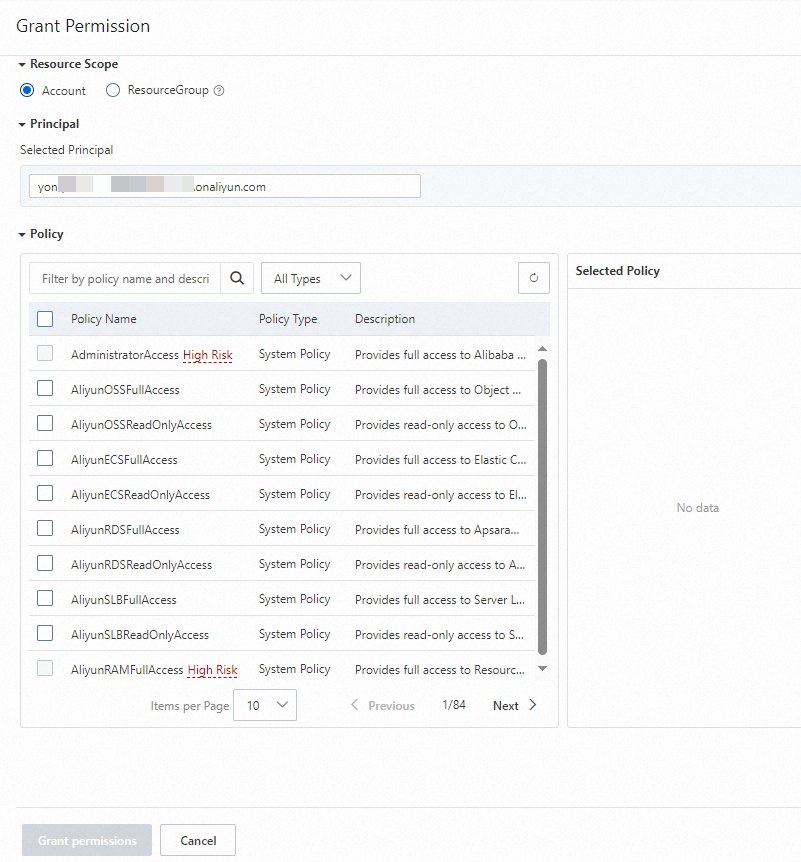
  4. In the Grant Permission panel, add permission policies for the RAM user.
    image

    Parameter

    Description

    Resource Scope

    Select the required resource scope:

    • Account: The permissions are granted to the current Alibaba Cloud account.

    • ResourceGroup: The permissions are valid for a specific resource group.

    Principal

    The principal is the RAM user to which you want to grant permissions. Defaults to the RAM user selected in step 3. You can also specify another RAM user.

    Policy

    Select a system or custom policy.

  5. Click Grant permissions.

  6. Click Close.

Step 3: Log on to Management Console after authorization

After the authorization is complete, the RAM identity can log on to or refresh the current Management Console page to perform operations.

Logon type

Logon method

How to log on

RAM user

RAM user login

Log on to the Alibaba Cloud Management Console as a RAM user

RAM role

RAM user assumes a role within the same Alibaba Cloud account to log on

Assume a RAM role

RAM user assumes a role of another Alibaba Cloud account to log on

Use a RAM role to grant permissions across Alibaba Cloud accounts

Resource directory member

RAM user of the management account assumes a member RAM role to log on

Use a RAM role to log on to the Alibaba Cloud Management Console

Log on via a member's RAM user

Log on to the Alibaba Cloud Management Console as a RAM user

Log on via a cloud account (root user) (not recommended)

Log on to the Alibaba Cloud Management Console as the root user of a member

CloudSSO user logs on via a RAM role

Use CloudSSO to manage the identities and permissions of multiple accounts of an enterprise in a centralized manner

CloudSSO user logs on via a RAM user

Custom policy examples

Example 1: A RAM user creates a subscription workspace

To allow a RAM user to create a subscription workspace, create and grant it a custom policy that includes the following permissions:

  • Read-only access to Realtime Compute for Apache Flink: stream:Describe*, stream:Query*, stream:Check*, stream:List*, stream:Get*, stream:Search*, and stream:HasStreamDefaultRole

  • Permission to create a workspace: stream:CreateVvpInstance

  • Permission to allow Realtime Compute for Apache Flink to query existing VPCs: vpc:DescribeVpcs

  • Permission to allow Realtime Compute for Apache Flink to query existing vSwitches: vpc:DescribeVSwitches

  • Permissions to view and pay for orders: bss:DescribeOrderList, bss:DescribeOrderDetail, bss:PayOrder, and bss:CancelOrder

The custom policy code:

{
  "Version": "1",
  "Statement": [
    {
      "Action": [
        "stream:Describe*",
        "stream:Query*",
        "stream:Check*",
        "stream:List*",
        "stream:Get*",
        "stream:Search*",
        "stream:HasStreamDefaultRole",
        "stream:CreateVvpInstance",
        "vpc:DescribeVpcs",
        "vpc:DescribeVSwitches",
        "bss:DescribeOrderList",
        "bss:DescribeOrderDetail",
        "bss:PayOrder",
        "bss:CancelOrder"
      ],
      "Resource": "*",
      "Effect": "Allow"
    }
  ]
}

Example 2: A RAM user creates a subscription workspace (with existing system policy)

Assume a RAM user already has the AliyunStreamFullAcces system permission. To allow it to create a subscription workspace, create and grant an additional custom policy that includes the following permissions:

  • Permission to allow Realtime Compute for Apache Flink to query existing VPCs: vpc:DescribeVpcs

  • Permission to allow Realtime Compute for Apache Flink to query existing vSwitches: vpc:DescribeVSwitches

  • Permissions to view and pay for orders: bss:DescribeOrderList, bss:DescribeOrderDetail, bss:PayOrder, and bss:CancelOrder

The custom policy code:

{
  "Version": "1",
  "Statement": [
    {
      "Action": [
        "vpc:DescribeVpcs",
        "vpc:DescribeVSwitches",
        "bss:DescribeOrderList",
        "bss:DescribeOrderDetail",
        "bss:PayOrder",
        "bss:CancelOrder"
      ],
      "Resource": "*",
      "Effect": "Allow"
    }
  ]
}

Example 3: A RAM user releases a subscription workspace

To allow a RAM user to release a subscription workspace, create and grant a custom policy including the following permissions:

  • Read-only access to Realtime Compute for Apache Flink: stream:Describe*, stream:Query*, stream:Check*, stream:List*, stream:Get*, stream:Search*, and stream:HasStreamDefaultRole

  • Permissions for unsubscribe operations in Expenses and Costs console: bss:Describe* and bss:Refund*

The custom policy code:

{
  "Version": "1",
  "Statement": [
    {
      "Action": [
        "stream:Describe*",
        "stream:Query*",
        "stream:Check*",
        "stream:List*",
        "stream:Get*",
        "stream:Search*",
        "stream:HasStreamDefaultRole",
        "bss:Describe*",
        "bss:Refund*"
      ],
      "Resource": "*",
      "Effect": "Allow"
    }
  ]
}

RAM user releases a pay-as-you-go Flink workspace

To allow a RAM user to release a pay-as-you-go workspace, create and grant a custom policy including the following permissions:

  • Read-only access to Realtime Compute for Apache Flink: stream:Describe*, stream:Query*, stream:Check*, stream:List*, stream:Get*, stream:Search*, and stream:HasStreamDefaultRole

  • Permission to release workspaces: stream:DeleteVvpInstance

The custom policy code:

{
  "Version": "1",
  "Statement": [
    {
      "Action": [
        "stream:Describe*",
        "stream:Query*",
        "stream:Check*",
        "stream:List*",
        "stream:Get*",
        "stream:Search*",
        "stream:HasStreamDefaultRole",
        "stream:DeleteVvpInstance"
      ],
      "Resource": "*",
      "Effect": "Allow"
    }
  ]
}

RAM user scales resources for a subscription namespace

When using a RAM user to modify resources for a subscription Realtime Compute for Apache Flink namespace, create and grant a custom policy including the following permissions:

  • Read-only access to Realtime Compute for Apache Flink: stream:Describe*, stream:Query*, stream:Check*, stream:List*, stream:Get*, stream:Search*, and stream:HasStreamDefaultRole.

  • Permission to modify subscription namespace resources: ModifyVvpNamespaceSpec.

The custom policy code:

{
  "Version": "1",
  "Statement": [
    {
      "Action": [
        "stream:Describe*",
        "stream:Query*",
        "stream:Check*",
        "stream:List*",
        "stream:Get*",
        "stream:Search*",
        "stream:HasStreamDefaultRole",
        "stream:ModifyVvpNamespaceSpec"
      ],
      "Resource": "*",
      "Effect": "Allow"
    }
  ]
}

Custom policies

Permissions on workspace and namespace management

Important

Before configuring namespace permissions, first grant permission to view existing workspaces (DescribeVvpInstances) to avoid permission errors.

Workspace management

{
  "Version": "1",
  "Statement": [
    {
      "Action": [
        "stream:CreateVvpInstance",
        "stream:DescribeVvpInstances",
        "stream:DeleteVvpInstance",
        "stream:RenewVvpInstance",
        "stream:ModifyVvpPrepayInstanceSpec",
        "stream:ModifyVvpInstanceSpec",
        "stream:ConvertVvpInstance",
        "stream:QueryCreateVvpInstance",
        "stream:QueryRenewVvpInstance",
        "stream:QueryModifyVvpPrepayInstanceSpec",
        "stream:QueryConvertVvpInstance"
      ],
      "Resource": "acs:stream:{#regionId}:{#accountId}:vvpinstance/{#InstanceId}",
      "Effect": "Allow"
    }
  ]
}

action

Description

CreateVvpInstance

Create workspaces.

DescribeVvpInstances

View workspaces.

DeleteVvpInstance

Release a workspace.

RenewVvpInstance

Renew a subscription workspace.

ModifyVvpPrepayInstanceSpec

Scale a subscription workspace.

ModifyVvpInstanceSpec

Adjust the Compute Unit (CU) quota of a pay-as-you-go workspace.

ConvertVvpInstance

Change the billing method of a workspace.

QueryCreateVvpInstance

Query the price for creating a workspace.

QueryRenewVvpInstance

Query the price for renewing a workspace.

QueryModifyVvpPrepayInstanceSpec

Query the price for scaling a workspace.

QueryConvertVvpInstance

Query the price for converting from pay-as-you-go to subscription.

Note

For purchasing Realtime Compute for Apache Flink and viewing workspaces, change Resource": "acs:stream:{#regionId}:{#accountId}:vvpinstance/{#instanceId} to "Resource": "acs:stream:{#regionId}:{#accountId}:vvpinstance/*".

Namespace management

{
  "Version": "1",
  "Statement": [
    {
      "Action": [
        "stream:CreateVvpNamespace",
        "stream:DeleteVvpNamespace",
        "stream:ModifyVvpPrepayNamespaceSpec",
        "stream:ModifyVvpNamespaceSpec",
        "stream:DescribeVvpNamespaces"
      ],
       "Resource": "acs:stream:{#regionId}:{#accountId}:vvpinstance/{#instanceId}/vvpnamespace/{#namespace}",
      "Effect": "Allow"
    }
  ]
}

action

Description

CreateVvpNamespace

Create a namespace.

DeleteVvpNamespace

Delete a namespace.

ModifyVvpPrepayNamespaceSpec

Change resources for a subscription namespace.

ModifyVvpNamespaceSpec

Change resources for a pay-as-you-go namespace.

DescribeVvpNamespaces

View namespaces under a workspace.

After configuring this policy, you can click the image.png icon to the left of the target workspace ID to view the list of namespaces under that workspace. To access the Development Console of a specific namespace, get relevant Development Console permissions for the namespace. For more information, see Development Console.

Note

To create and view a namespace, you can use "Resource": "acs:stream:{#regionId}:{#accountId}:vvpinstance/{#instanceId}/vvpnamespace/*",.

Permissions on accessing related services

ECS-related permissions

Accessing Realtime Compute for Apache Flink's Development Console over the Internet requires an Elastic IP Address (EIP) instance in your Alibaba Cloud account. Accessing other services within a VPC needs elastic network interfaces (ENIs) in the VPC. The ENIs are added to the dedicated security group of Realtime Compute for Apache Flink. Therefore, Realtime Compute for Apache Flink must have the permissions on the EIP, security group, and ENIs.

Action

Description

ecs:AssociateEipAddress

Applies for an EIP to access Realtime Compute for Apache Flink over the Internet.

ecs:AttachNetworkInterface

Binds your ENI to a resource pool in Realtime Compute for Apache Flink.

ecs:AuthorizeSecurityGroup

Creates a security group in Realtime Compute for Apache Flink and adds an inbound rule to the security group.

ecs:AuthorizeSecurityGroupEgress

Creates a security group in Realtime Compute for Apache Flink and adds an outbound rule to the security group.

ecs:CreateNetworkInterface

Creates an ENI in your VPC and connects Realtime Compute for Apache Flink to your VPC.

ecs:CreateNetworkInterfacePermission

Allow Flink service access authorization for elastic network interfaces (ENIs).

ecs:CreateSecurityGroup

Creates a security group in Realtime Compute for Apache Flink.

ecs:DeleteNetworkInterface

Deletes the ENIs of the resources that are used in a task of Realtime Compute for Apache Flink after the task is complete.

ecs:DeleteNetworkInterfacePermission

Unbinds your ENI from Realtime Compute for Apache Flink.

ecs:DeleteSecurityGroup

Deletes a security group in Realtime Compute for Apache Flink.

ecs:DescribeNetworkInterfacePermissions

Unbinds your ENI from a serverless resource pool in Realtime Compute for Apache Flink.

ecs:DescribeNetworkInterfaces

Queries ENIs bound to Realtime Compute for Apache Flink.

ecs:DescribeSecurityGroupAttribute

Queries the security group rules of a security group in Realtime Compute for Apache Flink.

ecs:DescribeSecurityGroupReferences

Queries security groups and security group-level authorization in Realtime Compute for Apache Flink.

ecs:DescribeSecurityGroups

Queries basic information about the created security groups in Realtime Compute for Apache Flink.

ecs:DetachNetworkInterface

Unbinds your ENI from a resource pool in Realtime Compute for Apache Flink.

ecs:JoinSecurityGroup

Adds ENIs to a security group in Realtime Compute for Apache Flink.

ecs:LeaveSecurityGroup

Removes ENIs from a security group in Realtime Compute for Apache Flink.

ecs:ModifyNetworkInterfaceAttribute

Modifies information about an ENI, such as the name, the description, and the security group to which the ENI belongs.

ecs:ModifySecurityGroupAttribute

Modifies the name or description of a security group in Realtime Compute for Apache Flink.

ecs:ModifySecurityGroupPolicy

Modifies the access control policy within a security group in Realtime Compute for Apache Flink.

ecs:ModifySecurityGroupRule

Modifies the description of security group inbound rules in Realtime Compute for Apache Flink.

ecs:RevokeSecurityGroup

Deletes a security group inbound rule in Realtime Compute for Apache Flink.

ecs:RevokeSecurityGroupEgress

Deletes a security group outbound rule in Realtime Compute for Apache Flink.

ecs:UnassociateEipAddress

Releases EIPs that are used by Realtime Compute for Apache Flink.

OSS-related permissions

Before you can query OSS buckets, you must obtain the permissions on OSS resources.

Action

Description

oss:ListBuckets

Queries OSS buckets.

oss:GetBucketInfo

Queries the details about a bucket.

oss:GetObjectMetadata

Obtains the metadata of an object.

oss:GetObject

Obtains an object.

oss:ListObjects

Lists all objects in a bucket.

oss:PutObject

Uploads an object.

oss:CopyObject

Copies objects.

oss:CompleteMultipartUpload

Completes multipart upload of an object after all parts of the object are uploaded.

oss:AbortMultipartUpload

Cancels a multipart upload task and deletes the uploaded parts.

oss:InitiateMultipartUpload

Instructs OSS to initiate a multipart upload task before data is transmitted using multipart upload.

oss:UploadPartCopy

Copies data from an existing object and uploads a part of the object.

oss:UploadPart

Uploads an object by part based on the specified object name and upload ID.

oss:DeleteObject

Deletes an object.

oss:PutBucketcors

Configures cross-origin resource sharing (CORS) rules for a bucket.

oss:GetBucketCors

Queries the CORS rules configured for a bucket.

oss:PutBucket

Creates a bucket.

Note

To use Key Management Service (KMS) for encryption in OSS, attach KMS-related policies to the AliyunStreamAsiDefaultRole role. For more information, see Permissions.

ARMS-related permissions

To use Managed Service for Prometheus of ARMS as your workspace's monitoring service, you may need the following permissions:

Action

Description

arms:ListDashboards

Queries ARMS dashboards.

arms:CreateContact

Creates a contact.

arms:DeleteContact

Deletes a contact.

arms:SearchContact

Queries a contact.

arms:UpdateContact

Updates a contact.

arms:CreateContactGroup

Creates a contact group.

arms:DeleteContactGroup

Deletes a contact group.

arms:SearchContactGroup

Queries a contact group.

arms:UpdateContactGroup

Updates a contact group.

arms:SearchAlertRules

Queries one or more alert rules.

arms:CreateAlertRules

Creates one or more alert rules.

arms:UpdateAlertRules

Updates one or more alert rules.

arms:DeleteAlertRules

Deletes one or more alert rules.

arms:StartAlertRule

Enables an alert rule.

arms:StopAlertRule

Disables an alert rule.

arms:SearchAlarmHistories

Queries historical alerts.

arms:OpenArmsService

Activates ARMS.

arms:CreateWebhook

Creates a webhook.

arms:UpdateWebhook

Updates a webhook.

arms:CreateDispatchRule

Creates a dispatch rule.

arms:ListDispatchRule

Queries dispatch rules.

arms:DeleteDispatchRule

Deletes a dispatch rule.

arms:UpdateDispatchRule

Updates a dispatch rule.

arms:DescribeDispatchRule

Queries details about a dispatch rule.

arms:GetAlarmHistories

Gets alerting history.

arms:SaveAlert

Saves an alert rule.

arms:DeleteAlert

Deletes an alert rule.

arms:GetAlert

Gets an alert rule.

arms:CheckServiceStatus

Checks product activation status.

arms:InstallManagedPrometheus

Installs a Managed Service for Prometheus agent.

arms:UninstallManagedPrometheus

Uninstalls a Managed Service for Prometheus agent.

arms:GetManagedPrometheusStatus

Get the installation status of a Managed Service for Prometheus instance.

VPC-related permissions

The Describe permissions are required for creating a workspace.

Action

Description

vpc:DescribeVpcAttribute

Queries the configurations of a VPC.

vpc:DescribeVpcs

Queries existing VPCs.

vpc:DescribeVSwitchAttributes

Queries information about a vSwitch.

vpc:DescribeVSwitches

Queries existing vSwitches.

vpc:DescribeRouteTableList

Queries route tables.

vpc:DescribeRouteTables

Queries a route table.

vpc:DescribeRouteEntryList

Queries route entries in a route table.

vpc:DescribeRouterInterfaceAttribute

Queries the configurations of the router interface.

vpc:DescribeRouterInterfaces

Queries router interfaces.

vpc:DescribeVRouters

Queries vRouters.

vpc:CreateVpc

Creates a VPC.

vpc:CreateVSwitch

Creates a vSwitch.

RAM-related permissions

Relevant RAM permissions to configure resources:

Action

Description

ram:*

Adds, removes, modifies, and queries the following RAM resources: domains and applications.

TAG-related permissions

Action

Description

tag:ListTagResources

Query resource tags.

tag:ListTagKeys

Query tag keys.

tag:ListTagValues

Query tag values corresponding to a specified tag key.

DLF-related permissions

Permissions to access Data Lake Formation (DLF) resources:

Action

Description

dlf:BatchCreatePartitions

Creates multiple partitions in a batch.

dlf:BatchCreateTables

Creates multiple tables in a batch.

dlf:BatchDeletePartitions

Deletes multiple partitions in a batch.

dlf:BatchDeleteTables

Deletes multiple tables in a batch.

dlf:BatchGetPartitions

Queries multiple partitions in a batch.

dlf:BatchGetTables

Queries multiple tables in a batch.

dlf:BatchUpdatePartitions

Updates multiple partitions in a batch.

dlf:BatchUpdateTables

Updates multiple tables in a batch.

dlf:CreateCatalog

Creates a catalog.

dlf:CreateDatabase

Creates a database.

dlf:CreateFunction

Creates a function.

dlf:CreatePartition

Creates a partition.

dlf:CreateTable

Creates a table.

dlf:DeleteCatalog

Deletes a catalog.

dlf:DeleteDatabase

Deletes a database.

dlf:DeleteFunction

Deletes a function.

dlf:DeletePartition

Deletes a partition.

dlf:DeleteTable

Deletes a table.

dlf:GetAsyncTaskStatus

Queries the status of an asynchronous task.

dlf:GetCatalog

Queries a catalog.

dlf:GetCatalogByInstanceId

Queries catalogs by instance ID.

dlf:GetCatalogSettings

Queries the catalog configuration.

dlf:GetDatabase

Queries a database.

dlf:GetFunction

Queries a function.

dlf:GetPartition

Queries a partition.

dlf:GetTable

Queries a table.

dlf:ListCatalogs

Queries catalogs.

dlf:ListDatabases

Queries databases.

dlf:ListFunctionNames

Queries function names.

dlf:ListFunctions

Queries functions.

dlf:ListPartitionNames

Queries partition names.

dlf:ListPartitions

Queries partitions.

dlf:ListPartitionsByExpr

Queries partitions using an expression.

dlf:ListPartitionsByFilter

Queries partitions using a filter.

dlf:ListTableNames

Queries table names.

dlf:ListTables

Queries tables.

dlf:RenamePartition

Renames a partition.

dlf:RenameTable

Renames a table.

dlf:UpdateCatalog

Updates a catalog.

dlf:UpdateDatabase

Updates a database.

dlf:UpdateFunction

Updates a function.

dlf:UpdateTable

Updates a table.

dlf:BatchGetPartitionColumnStatistics

Queries partition column statistics in a batch.

dlf:DeletePartitionColumnStatistics

Deletes partition column statistics.

dlf:DeleteTableColumnStatistics

Deletes table column statistics.

dlf:GetPartitionColumnStatistics

Queries partition column statistics.

dlf:GetTableColumnStatistics

Queries table column statistics.

dlf:UpdateTableColumnStatistics

Updates table column statistics.

dlf:UpdatePartitionColumnStatistics

Updates partition column statistics.

dlf:CreateLock

Creates a metadata lock.

dlf:UnLock

Removes a metadata lock.

dlf:AbortLock

Aborts a metadata lock.

dlf:RefreshLock

Refreshes a metadata lock.

dlf:GetLock

Queries a metadata lock.

dlf:GetCatalogAccessInfo

Queries the information such as the storage name and storage endpoint about backend storage based on the catalog UUID.

dlf:GetDataToken

Queries catalog- or table-level keys based on the catalog UUID.

dlf:GetDataTokenByName

Queries catalog- or table-level data tokens based on the catalog UUID, database name, or table name.

dlf-auth:ActOnBehalfOfAnotherUser

Uses a service-linked role or service role to access DLF.

dlf:GrantPermissions

Grants permissions to a principal.

dlf:RevokePermissions

Revokes permissions from a principal.

dlf:BatchGrantPermissions

Grants multiple permissions at a time.

dlf:BatchRevokePermissions

Revokes multiple permissions at a time.

dlf:UpdatePermissions

Updates permissions granted to a principal.

dlf:ListPermissions

Queries the permissions of principal.

dlf:CreateRole

Creates a DLF role.

dlf:UpdateRole

Updates a DLF role.

dlf:DeleteRole

Deletes a DLF role.

dlf:GetRole

Queries a DLF role.

dlf:ListRoles

Queries DLF roles.

dlf:GrantRolesToUser

Grants multiple DLF roles to a user.

dlf:RevokeRolesFromUser

Revokes multiple DLF roles from a user.

dlf:GrantRoleToUsers

Grants a DLF role to multiple users.

dlf:RevokeRoleFromUsers

Revokes a DLF role from multiple users.

dlf:UpdateRoleUsers

Updates users with a DLF role.

dlf:ListRoleUsers

Queries users with a DLF role.

dlf:ListUserRoles

Queries a user's DLF roles.

dlf:GrantRolesToPrincipal

Grants multiple DLF roles to a principal.

dlf:RevokeRolesFromPrincipal

Revokes multiple DLF roles from a principal.

dlf:GrantRoleToPrincipals

Grants a DLF role to multiple principals.

dlf:RevokeRoleFromPrincipals

Revokes a DLF role from multiple principals.

dlf:UpdateRolePrincipals

Updates the principals with a DLF role.

dlf:BatchDeleteRoles

Deletes multiple DLF roles in a batch.

dlf:CheckPermissions

Checks permissions.

dlf:GetCatalogStorageStatistics

Queries catalog storage statistics.

dlf:GetCatalogStorageIndicatorDetails

Queries catalog storage metrics.

dlf:GetCatalogStorageRank

Ranks catalogs by storage statistics.

dlf:GetCatalogStorageAnalysis

Queries the storage distribution in a catalog.

dlf:GetDatabaseProfile

Queries the database profile.

dlf:GetDatabaseStorageAnalysis

Queries the storage distribution in a database.

dlf:GetTableProfile

Queries the table profile.

dlf:GetTableStorageAnalysis

Queries the storage distribution in a table.

dlf:ListPartitionProfiles

Queries partition data profiles.

dlf:getLatestStorageStatisticsDate

Queries the time when the storage overview data was last updated.

dlf:SubscribeOptimize

Submits optimization.

dlf:GetOptimizeRegionStatus

Queries the region and status of optimization.

dlf:GetOptimizeWorkspaceAuthorization

Queries authorization for the optimized workspace.

dlf:AddOptimizeWorkspace

Adds an optimized workspace.

dlf:ListOptimizeWorkspaces

Queries optimized workspaces.

dlf:PreCheckOptimizeWorkspaceConnection

Prechecks the connection to an optimized workspace.

dlf:CheckOptimizeWorkspaceConnection

Checks the connection to an optimized workspace.

dlf:DeleteOptimizeWorkspace

Deletes an optimized workspace.

dlf:SetOptimizeEnable

Enables storage optimization.

dlf:SetOptimizePolicy

Configures a storage optimization policy.

dlf:GetOptimizePolicy

Queries a storage optimization policy.

dlf:SetOptimizeScheduleRule

Adds a storage optimization scheduling rule.

dlf:ListOptimizeScheduleRules

Queries optimization scheduling rules.

dlf:DeleteOptimizeScheduleRule

Deletes a storage optimization scheduling rule.

dlf:RunOptimizeImmediately

Immediately runs storage optimization.

dlf:GetOptimizeInfo

Queries optimization information.

dlf:UpdateOptimizeTaskResult

Updates the result of a storage optimization task.

dlf:BatchDeleteTableVersions

Deletes specified table versions in a batch.

dlf:DeleteTableVersion

Deletes a table version.

dlf:GetTableVersion

Gets a table version.

dlf:ListTableVersions

Lists table versions.

dlf:Search

Performs metadata retrieval.

dlf:SearchAcrossCatalog

Retrieves databases, tables, fields, and other content across catalogs.

dlf:GetServiceStatus

Gets DLF activation status.

dlf:GetRegionStatus

Get DLF activation status in a specified region.

References