To access the Realtime Compute for Apache Flink console and perform operations such as viewing, purchasing, or deleting workspaces, RAM users and RAM roles must have the required permissions. The Alibaba Cloud account administrator who owns the Flink workspace grants access by attaching policies in the RAM console.
Who should read this topic
How you use Resource Access Management (RAM) depends on your role:
-
RAM user — If you see a permission error when accessing the Flink console or performing an operation, contact your Alibaba Cloud account administrator and ask them to grant you the relevant policy. See Authorization scenarios to identify the permission you need.
-
Alibaba Cloud account administrator — Determine what access your users need, then follow the Authorization procedure to attach the appropriate policies.
-
Policy author — Write custom policies by combining actions from Realtime Compute for Apache Flink permission policies and Permission operations for related products.
Authorization scenarios
| Scenario | Description |
|---|---|
| Unable to access the Realtime Compute for Apache Flink console | You cannot view any workspace information and receive a Current account lacks permissions error. The error message shows the required action descriptor stream:ListRegionWithClusterQuantity and resource descriptor acs:stream:*:<AccountID>:vvpinstance/*, with error code 903065. This means you do not have permission to access the Flink console. Contact the Alibaba Cloud account administrator who purchased the workspace and ask them to grant your account at least read-only permissions (AliyunStreamReadOnlyAccess). See Authorization procedure. After authorization, re-enter or refresh the page. |
| Unable to perform a specific operation | The console displays a Current account lacks permissions dialog box that shows the missing action descriptor (such as stream:ModifyVvpInstanceSpec) and resource descriptor, with error code 401. You can expand Error Details to view the request ID. This means the current account lacks permission for the operation. Contact the Alibaba Cloud account administrator to adjust the custom policy based on your requirements. See Authorization procedure. For example, if you need to allocate resources for a subscription workspace, your account must be granted the corresponding resource allocation permission. |
Policy types
An access policy defines a set of permissions using policy syntax and structure. It specifies the authorized resources, allowed operations, and authorization conditions. The RAM console supports two types of access policies:
-
System policies: Created and maintained by Alibaba Cloud. You can use but cannot modify these policies. The following table lists the system policies that Flink supports.
Access policy Name Description Full access to Realtime Compute for Apache Flink AliyunStreamFullAccess Includes all permissions in Custom policies. Read-only access to Realtime Compute for Apache Flink AliyunStreamReadOnlyAccess Includes the HasStreamDefaultRolepermission and all permissions that start withDescribe,Query,Check,List,Get, andSearchin Realtime Compute for Apache Flink permission policies.View and pay for orders in User Center (BSS) AliyunBSSOrderAccess Grants permissions to view and pay for orders in User Center. Unsubscribe from orders in User Center (BSS) AliyunBSSRefundAccess Grants permission to unsubscribe from orders in User Center. -
Custom policies: Created, updated, and deleted by you. For more information about the custom policies that Flink supports and how to create one, see Realtime Compute for Apache Flink permission policies and (Optional) Step 1: Create a custom policy.
Prerequisites
Before you begin, ensure that you have:
-
Reviewed the authorization instructions
Authorization procedure
(Optional) Step 1: Create a custom policy
Skip this step if you plan to use the AliyunStreamFullAccess system policy.
Start from the read-only permission set for Realtime Compute for Apache Flink, then add more fine-grained access control points as needed. These include the custom policies and permission operations for related products that Realtime Compute for Apache Flink supports.
The following policy grants read-only permissions for Realtime Compute for Apache Flink, equivalent to the AliyunStreamReadOnlyAccess system policy.
{
  "Version": "1",
  "Statement": [
    {
      "Action": [
        "stream:Describe*",
        "stream:Query*",
        "stream:Check*",
        "stream:List*",
        "stream:Get*",
        "stream:Search*",
        "stream:HasStreamDefaultRole"
      ],
      "Resource": "acs:stream:{#regionId}:{#accountId}:vvpinstance/{#instanceId}/vvpnamespace/{#namespace}",
      "Effect": "Allow"
    }
  ]
}
Replace the placeholders with your actual values:
| Placeholder | Description |
|---|---|
{#regionId} |
The region where the destination Flink workspace resides |
{#accountId} |
The UID of the Alibaba Cloud account |
{#instanceId} |
The ID of the destination Realtime Compute for Apache Flink order instance |
{#namespace} |
The name of the destination project |
In an access policy, Action defines the operation, Resource defines the target object, and Effect defines whether the operation is allowed or denied. For more information about policy syntax, see Policy elements and Policy structure and syntax.
For detailed instructions and examples, see Create a custom policy and Custom policy examples.
Step 2: Attach the policy to a member
Attach an access policy to a RAM user or RAM role to grant the specified permissions. The following steps show how to grant permissions to a RAM user. The procedure for a RAM role is similar. For more information, see Manage RAM roles.
-
Log on to the RAM console as a RAM administrator.
-
In the left-side navigation pane, choose Identities > Users.
-
On the Users page, find the required RAM user, and click Add Permissions in the Actions column. To grant the same permissions to multiple RAM users at once, select them and click Add Permissions at the bottom of the page.

-
In the Add Permissions panel, configure the following parameters.
Parameter Description Scope Select the application scope: Alibaba Cloud Account (permissions take effect within the current account) or Specific Resource Group (permissions take effect within the specified resource group). Principal The RAM user to authorize. The system pre-selects the current RAM user. Add other RAM users as needed. Access Policy Select a system policy or a custom policy that you have created. 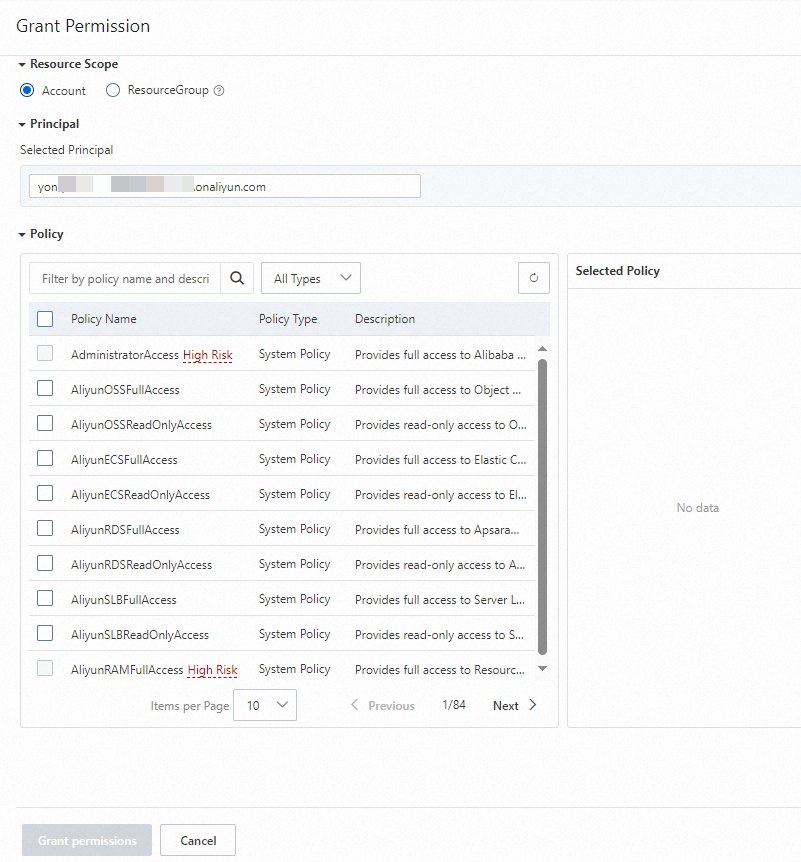
-
Click Confirm New Authorization.
-
Click Close.
Step 3: Log on to the console after authorization
After authorization is complete, the RAM user or RAM role can log on to the Realtime Compute for Apache Flink console or refresh the current page.
| Logon type | Logon method | Reference |
|---|---|---|
| Alibaba Cloud RAM user | Log on as a RAM user | Log in to the Alibaba Cloud Management Console as a RAM user |
| Alibaba Cloud RAM role | A RAM user of account A assumes a role of account A | Assuming a RAM role |
| Alibaba Cloud RAM role | A RAM user of account B assumes a role of account A | Accessing resources across Alibaba Cloud accounts |
| Resource directory member | A RAM user of the management account assumes a RAM role of a member | Log on to the Alibaba Cloud console by assuming a RAM role |
| Resource directory member | Log on as a RAM user of a member | Sign in to the Alibaba Cloud Management Console as a RAM user |
| Root user (not recommended) | Log on as an Alibaba Cloud account | Log in to the Alibaba Cloud Management Console as the root user |
| CloudSSO user | Log on by assuming a RAM role | Use CloudSSO to centrally manage identities and permissions across multiple enterprise accounts |
| CloudSSO user | Log on as a RAM user | — |
Custom policy examples
All examples below follow the same pattern: start with read-only permissions for Realtime Compute for Apache Flink, then add the specific actions required for the task.
Example 1: A RAM user activates a subscription workspace
Example 2: A RAM user activates a subscription workspace (with AliyunStreamFullAccess already attached)
Example 3: A RAM user releases a subscription workspace
Example 4: A RAM user releases a pay-as-you-go workspace
Example 5: A RAM user allocates resources for a project
Custom policies
Realtime Compute for Apache Flink permission policies
Before configuring permissions for a project, configure the DescribeVvpInstances permission first. Without it, a permission error occurs when users try to view workspaces.
Flink workspaces
{
  "Version": "1",
  "Statement": [
    {
      "Action": [
        "stream:CreateVvpInstance",
        "stream:DescribeVvpInstances",
        "stream:DeleteVvpInstance",
        "stream:RenewVvpInstance",
        "stream:ModifyVvpPrepayInstanceSpec",
        "stream:ModifyVvpInstanceSpec",
        "stream:ConvertVvpInstance",
        "stream:QueryCreateVvpInstance",
        "stream:QueryRenewVvpInstance",
        "stream:QueryModifyVvpPrepayInstanceSpec",
        "stream:QueryConvertVvpInstance"
      ],
      "Resource": "acs:stream:{#regionId}:{#accountId}:vvpinstance/{#InstanceId}",
      "Effect": "Allow"
    }
  ]
}| Action | Description |
|---|---|
CreateVvpInstance |
Purchase a Realtime Compute for Apache Flink workspace. |
DescribeVvpInstances |
View workspaces. |
DeleteVvpInstance |
Release a Flink workspace. |
RenewVvpInstance |
Renew a subscription workspace. |
ModifyVvpPrepayInstanceSpec |
Scale a subscription workspace. |
ModifyVvpInstanceSpec |
Adjust the quota of a pay-as-you-go workspace. |
ConvertVvpInstance |
Change the billing method of a workspace. |
QueryCreateVvpInstance |
Query the price for creating a workspace. |
QueryRenewVvpInstance |
Query the price for renewing a workspace. |
QueryModifyVvpPrepayInstanceSpec |
Query the price for scaling a workspace. |
QueryConvertVvpInstance |
Query the price for changing the billing method from pay-as-you-go to subscription. |
For purchasing and viewing workspaces, change"Resource": "acs:stream:{#regionId}:{#accountId}:vvpinstance/{#instanceId}"to"Resource": "acs:stream:{#regionId}:{#accountId}:vvpinstance/*".
Flink projects
{
  "Version": "1",
  "Statement": [
    {
      "Action": [
        "stream:CreateVvpNamespace",
        "stream:DeleteVvpNamespace",
        "stream:ModifyVvpPrepayNamespaceSpec",
        "stream:ModifyVvpNamespaceSpec",
        "stream:DescribeVvpNamespaces"
      ],
      "Resource": "acs:stream:{#regionId}:{#accountId}:vvpinstance/{#instanceId}/vvpnamespace/{#namespace}",
      "Effect": "Allow"
    }
  ]
}| Action | Description |
|---|---|
CreateVvpNamespace |
Create a project. |
DeleteVvpNamespace |
Delete a project. |
ModifyVvpPrepayNamespaceSpec |
Change the resources of a subscription project. |
ModifyVvpNamespaceSpec |
Change the resources of a pay-as-you-go project. |
DescribeVvpNamespaces |
View a list of projects. After you configure this policy, click the expand icon to the left of a destination workspace ID to view the list of projects in the workspace. To access the development console of a destination project, you must also have permissions to develop jobs in that project. For more information, see Development console authorization. |
For creating and viewing projects, change"Resource": "acs:stream:{#regionId}:{#accountId}:vvpinstance/{#instanceId}/vvpnamespace/{#namespace}"to"Resource": "acs:stream:{#regionId}:{#accountId}:vvpinstance/{#instanceId}/vvpnamespace/*".
Permission operations for related products
ECS
OSS
Application Real-Time Monitoring Service (ARMS)
VPC
RAM
TAG
Data Lake Formation (DLF)
What's next
-
To allow multiple users to share a Flink project and perform operations such as job development and O&M in the Realtime Compute for Apache Flink development console, authorize the project. See Development console authorization.
-
Why am I unable to go to the RAM console after I click Authorize in RAM during service activation?
-
Why cannot a RAM user view jobs after the AliyunStreamFullAccess policy is attached?