Batch jobs in Realtime Compute for Apache Flink have different execution mechanics than streaming jobs—different resource allocation, data transmission, and failure recovery behavior. This guide explains those differences and shows you how to configure resources and parallelism to get the best performance from your batch jobs.
Realtime Compute for Apache Flink supports batch processing in draft development, job O&M, workflows, queue management, and data profiling. For an end-to-end walkthrough, see Quick start with batch processing.
How batch jobs differ from streaming jobs
Understanding these differences helps you configure batch jobs correctly and avoid common pitfalls.
Execution mode
Streaming jobs process continuous, unbounded data streams with low latency. Data flows between operators in pipeline mode, so all subtasks across all operators are deployed and run simultaneously.
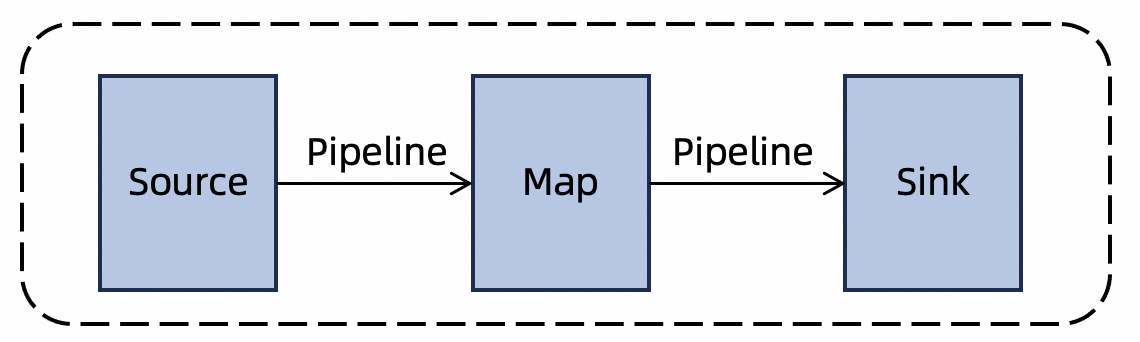
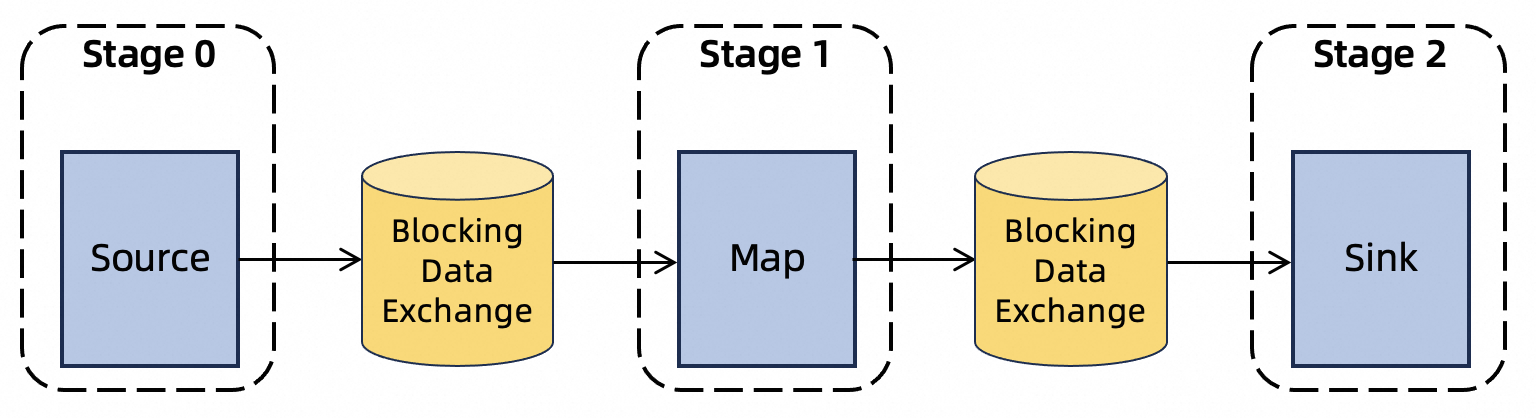
Batch jobs process bounded datasets with high throughput. A job runs in multiple phases:
-
Independent phases run in parallel to maximize resource utilization.
-
Dependent phases wait: downstream subtasks start only after upstream subtasks complete.
Data transmission
Streaming jobs keep intermediate data in memory and pass it directly between operators. Because data is not persisted, downstream slowness causes backpressure on upstream operators.
Batch jobs write intermediate results to external storage before downstream operators consume them. By default, results are stored on the local disk of each TaskManager. If the remote shuffle service is enabled, results go there instead.
Resource requirements
Streaming jobs must have all resources allocated before startup, because every subtask runs at the same time.
Batch jobs do not pre-allocate resources. Realtime Compute for Apache Flink schedules subtasks in batches as their input data becomes ready, making it possible to run a batch job with as few as one slot.
Failure recovery
Streaming jobs resume from the last checkpoint or savepoint. Because intermediate data is not persisted, all subtasks restart.
Batch jobs store intermediate results on disk, so only the failed subtask and its downstream subtasks need to restart—no full backtrack is required. Batch jobs have no checkpoint mechanism, so restarted subtasks begin from the start of their phase.
Configure resources
CPU and memory
Set CPU and memory for the JobManager and TaskManagers in Resources on the Configuration tab.
| Component | Recommended | Minimum |
|---|---|---|
| JobManager | 1 CPU core, 4 GiB memory | 0.5 CPU core, 2 GiB memory |
| TaskManager (per slot) | 1 CPU core, 4 GiB memory | 0.5 CPU core, 2 GiB memory |
For a TaskManager with *n* slots, allocate *n* CPU cores and 4*n* GiB of memory.
Disk space is proportional to CPU cores: each core provides 20 GiB, with a minimum of 20 GiB and a maximum of 200 GiB per TaskManager.
By default, each TaskManager in a batch job has one slot. To reduce TaskManager scheduling overhead, set slots per TaskManager to 2 or 4. Keep in mind that more slots on a single TaskManager means more subtasks share its local disk—if disk space runs out, the job fails and restarts. See No space left on device for solutions.
For jobs with a large-scale topology or complex network routing, increase resources beyond the defaults based on your workload.
If you run into resource-related issues, see Flink memory troubleshooting.
Maximum number of slots
Configure a maximum slot limit to cap the resources a batch job can consume, preventing it from starving other jobs. For configuration details, see How do I limit the number of TaskManagers?
Configure parallelism
Set parallelism in Resources on the Configuration tab.
Global parallelism
Global parallelism sets the upper limit on how many subtasks an operator can run in parallel. Enter a value in the Parallelism field.
Automatic parallelism inference
In Realtime Compute for Apache Flink with Ververica Runtime (VVR) 8.0 or later, automatic parallelism inference is enabled by default for batch jobs. The feature analyzes the total data volume consumed by each operator and the configured average data volume per subtask, then infers an appropriate parallelism automatically.
The global parallelism you set acts as the upper limit for the inferred parallelism.
Configure the following parameters in Parameters on the Configuration tab:
| Parameter | Description | Default |
|---|---|---|
execution.batch.adaptive.auto-parallelism.enabled |
Enable automatic parallelism inference. | true |
execution.batch.adaptive.auto-parallelism.min-parallelism |
Minimum inferred parallelism. | 1 |
execution.batch.adaptive.auto-parallelism.max-parallelism |
Maximum inferred parallelism. If not set, the global parallelism is used. | 128 |
execution.batch.adaptive.auto-parallelism.avg-data-volume-per-task |
Average data volume each subtask is expected to process. The inferred parallelism scales with total operator data divided by this value. | 16MiB |
execution.batch.adaptive.auto-parallelism.default-source-parallelism |
Parallelism for source operators. Because source data volume cannot be measured before reading, set this explicitly. If not set, the global parallelism is used. | 1 |
FAQ
How do I limit the number of TaskManagers?
TaskManagers (TMs) are created and released dynamically in batch jobs. With a parallelism of 16 and one slot per TaskManager, the job starts 16 TMs. As subtasks finish and their TMs are released, new TMs are created for subsequent operators—so the total count can briefly exceed 16 (for example, 17, 18, or 19). This is normal elastic scheduling behavior.
To enforce a strict limit, configure the maximum number of slots for the job. This bounds how many TMs can run at the same time.
What is the difference between parallelism and slots?
Parallelism defines the maximum number of subtask instances an operator can run concurrently.
Slot is the unit of resource allocation. The total available slots determine how many subtasks can run simultaneously across the entire job.
-
Streaming jobs use slot sharing by default and request slots equal to the global parallelism at startup, so all subtasks begin immediately.
-
Batch jobs do not pre-allocate slots. Actual concurrency is limited by available slots, even if global parallelism is set higher.
For example: a streaming job with parallelism 4 requires 4 slots upfront. A batch job with parallelism 4 runs at most 4 subtasks if 4 slots are available; remaining subtasks wait for slots to free up.
What do I do if a batch job is stuck?
Monitor the memory usage, CPU utilization, and thread activity of your TaskManagers. See Monitor job performance.
| Symptom | Where to look | Action |
|---|---|---|
| High memory usage or frequent GC pauses | Memory metrics | Increase TaskManager memory |
| A thread consuming high CPU | CPU and thread metrics | Identify the hot thread from thread stack traces |
| Job not making progress | Thread stack traces | Analyze execution bottlenecks by operator |
No space left on device
When a batch job fails with No space left on device, the TaskManagers have exhausted their local disk space storing intermediate result files. Disk space is proportional to CPU cores: each core provides 20 GiB, up to 200 GiB per TaskManager.
Fix the issue with one of the following approaches:
-
Reduce slots per TaskManager. Fewer slots mean fewer concurrent subtasks on a single node, which reduces intermediate data written to local disk.
-
Increase CPU cores per TaskManager. More cores expand the available disk space proportionally.
What's next
-
Quick start with batch processing — end-to-end walkthrough of key batch processing features
-
Configure custom parameters for job running — full reference for job parameters