This page answers common questions about activation and billing for Realtime Compute for Apache Flink.
Activation
Billing and workspace management
Can I switch a workspace between subscription and pay-as-you-go billing?
Am I charged for a pay-as-you-go workspace if I don't run any deployments?
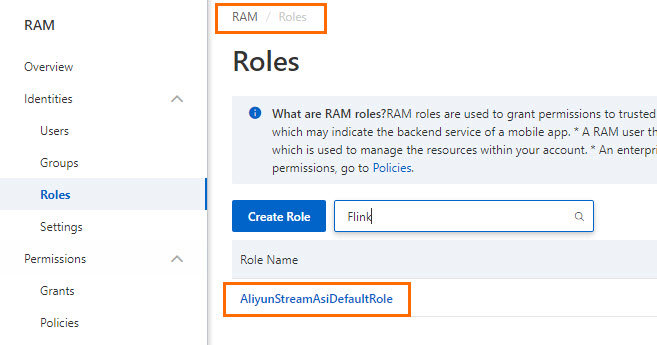
Why am I redirected back to the Flink console instead of the RAM console after I click Authorize in RAM?
After you click Purchase in the Realtime Compute for Apache Flink console, the Authorization Request page appears. When you click Authorize in RAM, you are redirected back to the Flink console instead of the Resource Access Management (RAM) console. This happens because the AliyunStreamAsiDefaultRole role already exists in your RAM account — likely added manually before you started the authorization flow. When the system detects the role, it skips the authorization step and redirects you back to the Flink console.
To fix this, log on to the RAM console, delete the manually added AliyunStreamAsiDefaultRole role, and then click Authorize in RAM on the buy page again to complete authorization.
What does the "exceeded quota: resourcequota" error mean, and how do I fix it?
This error means the workspace has run out of compute units (CUs). The full error looks like this:
Caused by: io.fabric8.kubernetes.client.KubernetesClientException: Failure executing: POST at: https://kubernetes.default:6443/api/v1/namespaces/vvp-workload/pods. Message: Forbidden!Configured service account doesn't have access. Service account may have been revoked. pods "job-8c99342c-8ac5-43df-8c60-b43f1db5****-taskmanager-2-5" is forbidden: exceeded quota: resourcequota, requested: limits.memory=5Gi, used: limits.memory=39424Mi, limited: limits.memory=40Gi.
    at io.fabric8.kubernetes.client.dsl.base.OperationSupport.requestFailure(OperationSupport.java:694) ~[flink-dist_2.11-1.13-vvr-4.0.14-2-SNAPSHOT.jar:1.13-vvr-4.0.14-2-SNAPSHOT]
    at io.fabric8.kubernetes.client.dsl.base.OperationSupport.requestFailure(OperationSupport.java:673) ~[flink-dist_2.11-1.13-vvr-4.0.14-2-SNAPSHOT.jar:1.13-vvr-4.0.14-2-SNAPSHOT]
    at io.fabric8.kubernetes.client.dsl.base.OperationSupport.assertResponseCode(OperationSupport.java:624) ~[flink-dist_2.11-1.13-vvr-4.0.14-2-SNAPSHOT.jar:1.13-vvr-4.0.14-2-SNAPSHOT]
    at io.fabric8.kubernetes.client.dsl.base.OperationSupport.handleResponse(OperationSupport.java:566) ~[flink-dist_2.11-1.13-vvr-4.0.14-2-SNAPSHOT.jar:1.13-vvr-4.0.14-2-SNAPSHOT]
    at io.fabric8.kubernetes.client.dsl.base.OperationSupport.handleResponse(OperationSupport.java:527) ~[flink-dist_2.11-1.13-vvr-4.0.14-2-SNAPSHOT.jar:1.13-vvr-4.0.14-2-SNAPSHOT]
    at io.fabric8.kubernetes.client.dsl.base.OperationSupport.handleCreate(OperationSupport.java:315) ~[flink-dist_2.11-1.13-vvr-4.0.14-2-SNAPSHOT.jar:1.13-vvr-4.0.14-2-SNAPSHOT]
    at io.fabric8.kubernetes.client.dsl.base.BaseOperation.handleCreate(BaseOperation.java:734) ~[flink-dist_2.11-1.13-vvr-4.0.14-2-SNAPSHOT.jar:1.13-vvr-4.0.14-2-SNAPSHOT]
    at io.fabric8.kubernetes.client.dsl.base.BaseOperation.handleCreate(BaseOperation.java:87) ~[flink-dist_2.11-1.13-vvr-4.0.14-2-SNAPSHOT.jar:1.13-vvr-4.0.14-2-SNAPSHOT]
    at io.fabric8.kubernetes.client.dsl.base.CreateOnlyResourceOperation.create(CreateOnlyResourceOperation.java:61) ~[flink-dist_2.11-1.13-vvr-4.0.14-2-SNAPSHOT.jar:1.13-vvr-4.0.14-2-SNAPSHOT]
    at org.apache.flink.kubernetes.kubeclient.Fabric8FlinkKubeClient.lambda$createTaskManagerPod$0(Fabric8FlinkKubeClient.java:153) ~[flink-dist_2.11-1.13-vvr-4.0.14-2-SNAPSHOT.jar:1.13-vvr-4.0.14-2-SNAPSHOT]
    at java.util.concurrent.CompletableFuture$AsyncRun.run(CompletableFuture.java:1640) ~[?:1.8.0_302]
    ... 3 more
Either increase the CU quota for the workspace, or reduce the resources requested by the deployment. For details, see Reconfigure resources.
Can I switch a workspace between subscription and pay-as-you-go billing?
Yes. In the Realtime Compute for Apache Flink console, find the workspace, then choose More > Convert To Subscription Billing Method or More > Convert To Metered Billing in the Actions column.
What items are billed when I renew a workspace?
Two items are billed:
| Billable item | Description |
|---|---|
| Management resource | When a workspace is created, the system deploys a console and its components, which consume approximately 2 CUs. |
| Computing resource | Resources used for running jobs, billed by subscription or pay-as-you-go. The billing unit is CU. |
Renewal charges cover only Realtime Compute for Apache Flink itself. Supporting services — Virtual Private Cloud (VPC), Object Storage Service (OSS), and Application Real-Time Monitoring Service (ARMS) — are billed separately under their own pricing rules. For details, see Billing rules for supporting services.
How do I renew a workspace?
Workspaces support manual renewal and auto-renewal. For instructions, see Renewal.
How do I get a refund for a workspace I no longer need?
It depends on the billing method:
Pay-as-you-go workspaces: Refunds are not supported, because charges are based on actual usage. To stop being billed, go to the Fully Managed Flink tab in the console, find the workspace, and choose More > Release Resources in the Actions column. Back up or migrate your data and ensure your business is not affected before releasing.
Subscription workspaces: Refunds are supported. For refund rules and how to apply, see Refunds.
Am I charged if workspace creation fails?
No. If the workspace fails to create, no fee is deducted. To view billing details, see View your bills.
Am I charged for a pay-as-you-go workspace if I don't run any deployments?
Yes. Management resources — the 2 CUs used by the workspace console — are billed as long as the workspace exists, regardless of whether any deployments are running. To stop the charges, go to the Fully Managed Flink tab in the console, find the workspace, and choose More > Release Resources in the Actions column.