Stream Load is a synchronous HTTP-based method for loading CSV files from a local machine into StarRocks. Because results are returned immediately after each job completes, Stream Load is well-suited for scenarios where you need to confirm success before proceeding.
When to use Stream Load: Stream Load works best for files up to 10 GB stored on-premises or in memory. For larger files or network-attached storage, use Broker Load instead.
How it works
Submit an import job by sending an HTTP PUT request to the frontend (FE) node. The FE node redirects the request to a backend (BE) node, which acts as a coordinator node: it splits the data according to the table schema, distributes it to the relevant BE nodes, and returns the result.
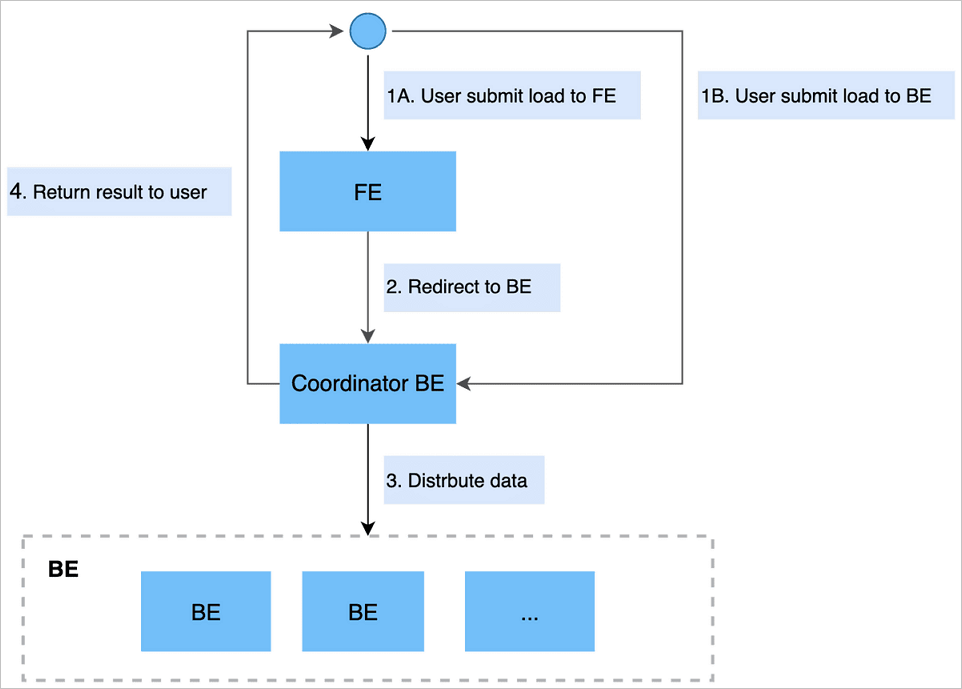
You can submit the request directly to a BE node to skip the redirect.
Prerequisites
Before you begin, make sure that:
-
The machine running the import has network access to the FE node on port 8030 and BE nodes on port 8040.
Submit an import job
All Stream Load parameters are passed as HTTP headers using the -H "key:value" format. The example below uses curl.
Syntax
curl --location-trusted -u <user>:<password> \
  [-H "<header-key>:<header-value>" ...] \
  -T <data-file> -XPUT \
  http://<fe-host>:8030/api/<db>/<table>/_stream_load
Notes on HTTP encoding:
-
For non-chunked transfer encoding, include the
Content-Lengthheader to preserve data integrity. -
Set the
Expectheader to100-continueto avoid sending data when the server returns an early error.
Parameters
| Parameter | Required | Description |
|---|---|---|
user:password |
Yes | Credentials for HTTP basic authentication. StarRocks verifies identity and import permissions from this signature. |
label |
No | A unique label for the import job. StarRocks rejects duplicate labels for jobs completed in the last 30 minutes. If omitted, a label is generated automatically. |
column_separator |
No | Column delimiter in the source file. Default: \t. For non-printable characters, use hex with the \x prefix — for example, -H "column_separator:\x01" for a Hive file. |
row_delimiter |
No | Row delimiter in the source file. Default: \n. Note: curl interprets \n as a backslash followed by n. To pass a literal newline or tab, use a $'...' string — for example, -H $'row_delimiter:\n'. |
columns |
No | Column mapping between the source file and the StarRocks table. Required when columns differ in order, count, or when computed columns are needed. See Column mapping examples. |
where |
No | Filter condition to exclude rows. For example, -H "where: k1 = 20180601" imports only rows where k1 equals 20180601. |
max_filter_ratio |
No | Maximum fraction of rows that can be filtered due to quality issues. Default: 0. Range: 0 to 1. Rows excluded by where do not count toward this ratio. |
partitions |
No | Target partitions for the import. Rows outside the specified partitions are filtered. For example, -H "partitions: p1, p2". |
timeout |
No | Import job timeout in seconds. Default: 600. Range: 1 to 259200. |
strict_mode |
No | Enables strict type checking. Default: enabled. To disable: -H "strict_mode: false". |
timezone |
No | Time zone for time zone-sensitive functions. Default: UTC+8. |
exec_mem_limit |
No | Memory limit for the import job. Default: 2 GB. |
Column mapping examples
Example 1 — Reordering columns: The StarRocks table has columns c1, c2, c3. The source file has three columns in the order c3, c2, c1:
-H "columns: c3, c2, c1"Example 2 — Extra column in source file: The StarRocks table has c1, c2, c3. The source file has four columns, where the fourth has no matching table column:
-H "columns: c1, c2, c3, temp"Assign a placeholder name (such as temp) to the unmatched column.
Example 3 — Computed columns: The StarRocks table has year, month, day. The source file has one column in 2018-06-01 01:02:03 format:
-H "columns: col, year = year(col), month=month(col), day=day(col)"Example
curl --location-trusted -u root \
  -T /mnt/disk1/data.csv \
  -H "label:load-20240101" \
  -H "column_separator:|" \
  http://fe-c-xxxx-internal.starrocks.aliyuncs.com:8030/api/test/orders/_stream_load
Import result
After the job completes, StarRocks returns a JSON result:
{
    "TxnId": 11672,
    "Label": "f6b62abf-4e16-4564-9009-b77823f3c024",
    "Status": "Success",
    "Message": "OK",
    "NumberTotalRows": 199563535,
    "NumberLoadedRows": 199563535,
    "NumberFilteredRows": 0,
    "NumberUnselectedRows": 0,
    "LoadBytes": 50706674331,
    "LoadTimeMs": 801327,
    "BeginTxnTimeMs": 103,
    "StreamLoadPlanTimeMs": 0,
    "ReadDataTimeMs": 760189,
    "WriteDataTimeMs": 801023,
    "CommitAndPublishTimeMs": 199
}| Field | Description |
|---|---|
TxnId |
Transaction ID for the import job. |
Label |
The label used for the job. |
Status |
Import result. Valid values: Success, Publish Timeout, Label Already Exists, Fail. |
ExistingJobStatus |
Status of the existing job that holds the conflicting label. Only returned when Status is Label Already Exists. Values: RUNNING, FINISHED. |
Message |
Detailed status description. Contains the failure reason when Status is Fail. |
NumberTotalRows |
Total rows read from the data stream. |
NumberLoadedRows |
Rows successfully loaded. Only returned when Status is Success. |
NumberFilteredRows |
Rows filtered due to quality issues. |
NumberUnselectedRows |
Rows excluded by the where condition. |
LoadBytes |
Size of the source file in bytes. |
LoadTimeMs |
Duration of the import job in milliseconds. |
ErrorURL |
URL to download filtered-out rows. Only the first 1,000 filtered rows are retained. |
Handle import errors
When ErrorURL appears in the result, retrieve the filtered rows to diagnose issues:
# View error details directly
curl "http://<host>:8040/api/_load_error_log?file=<error-log-file>"

# Or download for offline analysis
wget "http://<host>:8040/api/_load_error_log?file=<error-log-file>"
Review the output to identify malformed rows, then adjust the import parameters and resubmit the job.
Cancel an import job
Stream Load is synchronous — stop the curl process to cancel an in-progress job:
ps -ef | grep stream_load
# Then kill the relevant process
If a job times out or encounters an unrecoverable error, StarRocks cancels it automatically.
Best practices
Choose the right file size
Stream Load performs best with files between 1 GB and 10 GB. The default maximum is 10 GB (controlled by streaming_load_max_mb on the BE node).
To import a file larger than 10 GB, increase the limit on the BE node before submitting the job:
curl --location-trusted -u 'admin:<password>' \
  -XPOST \
  http://<be-host>:8040/api/update_config?streaming_load_max_mb=15360
Set the value to at least the size of your file in MB. For example, a 15 GB file requires 15360.
Adjust the timeout
The default timeout is 600 seconds. To increase it, change the stream_load_default_timeout_second parameter in the EMR console:
-
Open the Instance Configuration tab for your StarRocks instance.
-
Update
stream_load_default_timeout_secondto the required value.
Complete end-to-end example
This example loads a 150,000-row customer file into the stream_load database.
Download the sample data: customer.tbl
The number of import jobs in Stream Load mode that can be concurrently processed is not affected by the instance size.
Step 1. If the file exceeds 10 GB, increase the BE node limit first:
curl --location-trusted -u 'admin:<password>' \
  -XPOST \
  http://be-c-xxxx-internal.starrocks.aliyuncs.com:8040/api/update_config?streaming_load_max_mb=15360
Step 2. On the Instance Configuration tab, set stream_load_default_timeout_second to 3600.
Step 3. Create the destination table:
CREATE TABLE `customer` (
  `c_custkey`    bigint(20)      NULL COMMENT "",
  `c_name`       varchar(65533)  NULL COMMENT "",
  `c_address`    varchar(65533)  NULL COMMENT "",
  `c_nationkey`  bigint(20)      NULL COMMENT "",
  `c_phone`      varchar(65533)  NULL COMMENT "",
  `c_acctbal`    double          NULL COMMENT "",
  `c_mktsegment` varchar(65533)  NULL COMMENT "",
  `c_comment`    varchar(65533)  NULL COMMENT ""
) ENGINE=OLAP
DUPLICATE KEY(`c_custkey`)
COMMENT "OLAP"
DISTRIBUTED BY HASH(`c_custkey`) BUCKETS 24
PROPERTIES (
  "replication_num"          = "1",
  "in_memory"                = "false",
  "storage_format"           = "DEFAULT",
  "enable_persistent_index"  = "false",
  "compression"              = "LZ4"
);
Step 4. Submit the import job:
curl --location-trusted -u 'admin:<password>' \
  -T /mnt/disk1/customer.tbl \
  -H "label:labelname" \
  -H "column_separator:|" \
  http://fe-c-xxxx-internal.starrocks.aliyuncs.com:8030/api/stream_load/customer/_stream_load
A successful run returns:
{
    "TxnId": 575,
    "Label": "labelname",
    "Status": "Success",
    "Message": "OK",
    "NumberTotalRows": 150000,
    "NumberLoadedRows": 150000,
    "NumberFilteredRows": 0,
    "NumberUnselectedRows": 0,
    "LoadBytes": 24196144,
    "LoadTimeMs": 1081,
    "BeginTxnTimeMs": 104,
    "StreamLoadPlanTimeMs": 106,
    "ReadDataTimeMs": 85,
    "WriteDataTimeMs": 850,
    "CommitAndPublishTimeMs": 20
}
If ErrorURL appears in the result, run curl "<ErrorURL>" to view filtered rows and adjust the job configuration.
What's next
-
For Java-based Stream Load integration, see the stream_load demo.
-
For Spark Streaming integration, see Spark Streaming to StarRocks.