Routine Load continuously ingests data from Apache Kafka into StarRocks on EMR. Once a load job is running, StarRocks polls the Kafka topic automatically — you control the job lifecycle with SQL statements (pause, resume, or stop).
Terms
RoutineLoadJob: a routine import job that is submitted
JobScheduler: the routine import job scheduler that is used to schedule and split a RoutineLoadJob into multiple tasks
Task: the task that is split from a RoutineLoadJob by JobScheduler based on rules
TaskScheduler: the task scheduler that is used to schedule the execution of a task
Basic principles
The following figure shows the import process of Routine Load. 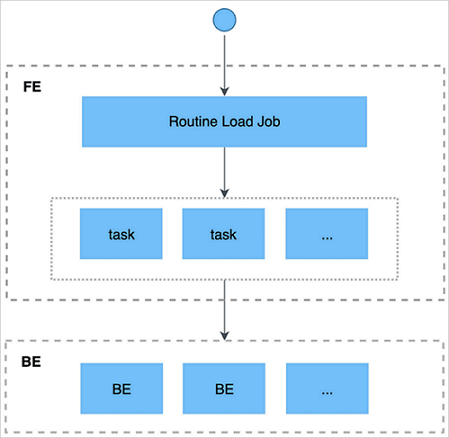
The following steps show how to import data by using Routine Load.
You submit a Kafka import job to the frontend by using a client that supports the MySQL protocol.
The frontend splits the import job into multiple tasks. Each task imports a specified part of data.
Each task is assigned to the specified backend for execution. On the backend, a task is regarded as a regular import job and imports data based on the import mechanism of Stream Load.
After the import process is completed on the backend, the backend reports the import result to the frontend.
The frontend continues to generate new tasks or retry failed tasks based on the import result.
The frontend continuously generates new tasks to achieve the uninterrupted import of data.
The images and some information in this topic are from Continuously load data from Apache Kafka of open source StarRocks.
Import process
Prerequisites
You can connect to Kafka clusters that use either no authentication or SSL authentication.
The following message formats are supported:
CSV format, where each message is a single line without a trailing newline character.
JSON format.
The Array data type is not supported.
Only Kafka 0.10.0.0 and later are supported.
Create an import job
Syntax
CREATE ROUTINE LOAD <database>.<job_name> ON <table_name>
    [COLUMNS TERMINATED BY "column_separator" ,]
    [COLUMNS (col1, col2, ...) ,]
    [WHERE where_condition ,]
    [PARTITION (part1, part2, ...)]
    [PROPERTIES ("key" = "value", ...)]
    FROM [DATA_SOURCE]
    [(data_source_properties1 = 'value1',
    data_source_properties2 = 'value2',
    ...)]
The following table describes the parameters.
Parameter
Required
Description
job_name
Yes
The name of the import job. The name of the import database can be placed in the front. The name is usually in the format of timestamp plus table name. The name of the job must be unique in a database.
table_name
Yes
The name of the destination table.
COLUMNS TERMINATED clause
No
The column delimiter in the source data file. Default value: \t.
COLUMNS clause
No
The mapping between columns in the source data file and columns in the destination table.
Mapped columns: For example, the destination table has three columns, col1, col2, and col3, whereas the source data file has four columns, and the first, second, and fourth columns in the destination table correspond to col2, col1, and col3 in the source data file. In this case, the clause can be written as
COLUMNS (col2, col1, temp, col3). The temp column does not exist and is used to skip the third column in the source data file.Derived columns: StarRocks can not only read the data in a column of the source data file but also provide processing operations on data columns. For example, a column col4 is added to the destination table, and the value of col4 is equal to the value of col1 plus the value of col2. In this case, the clause can be written as
COLUMNS (col2, col1, temp, col3, col4 = col1 + col2).
WHERE clause
No
The filter conditions that you want to use to filter out the rows that you do not need. The filter conditions can be specified on mapped columns or derived columns.
For example, if only rows with k1 greater than 100 and k2 equal to 1000 are imported, the clause can be written as
WHERE k1 > 100 and k2 = 1000.PARTITION clause
No
The partition of the destination table. If you do not specify the partition, the source data file is automatically imported to the corresponding partition.
PROPERTIES clause
No
The common parameters for the import job.
desired_concurrent_number
No
The maximum number of tasks into which the import job can be split. The value must be greater than 0. Default value: 3.
max_batch_interval
No
The maximum execution time of each task. Valid values: 5 to 60. Unit: seconds. Default value: 10.
In V1.15 and later, this parameter specifies the scheduling time of the task. You can specify how often the task is executed. routine_load_task_consume_second in fe.conf specifies the amount of time required by the task to consume data. Default value: 3s. routine_load_task_timeout_second in fe.conf specifies the execution timeout period of the task. Default value: 15s.
max_batch_rows
No
The maximum number of rows that each task can read. The value must be greater than or equal to 200000. Default value: 200000.
In V1.15 and later, this parameter is used only to define the range of the error detection window. The range of the window is 10 × max-batch-rows.
max_batch_size
No
The maximum number of bytes that each task can read. Unit: bytes. Valid value: 100 MB to 1 GB. Default value: 100 MB.
In V1.15 and later, this parameter is discarded. routine_load_task_consume_second in fe.conf specifies the amount of time required by the task to consume data. Default value: 3s.
max_error_number
No
The maximum number of error rows allowed in the sampling window. The value must be greater than or equal to 0. Default value: 0. No error row is allowed.
ImportantRows filtered out by the WHERE condition are not error rows.
strict_mode
No
Specifies whether to enable the strict mode. By default, this mode is enabled.
If the column type of non-empty raw data is changed to NULL after you enable the strict mode, the data is filtered out. To disable the strict mode, set this parameter to false.
timezone
No
The time zone that is used for the import job.
By default, the value of the timezone parameter of the session is used. This parameter affects the results of all time zone-related functions involved in the import.
DATA_SOURCE
Yes
The type of the data source. Set the value to KAFKA.
data_source_properties
No
The information about the data source. The value includes the following fields:
kafka_broker_list: the connection information about the Kafka broker. Format:
ip:host. Separate multiple brokers with commas (,).kafka_topic: the Kafka topic to which you want to subscribe.
NoteThe kafka_broker_list and kafka_topic fields are required.
kafka_partitions and kafka_offsets: the Kafka partitions to which you want to subscribe and the start offset of each partition.
property: Kafka-related properties. This field is equivalent to the
--propertyparameter in Kafka Shell. You can run theHELP ROUTINE LOAD;command to view the more detailed syntax for creating an import job.
NoteYou can run the
HELP ROUTINE LOAD;command to view the more detailed syntax for creating an import job.This example creates a Routine Load import job named example_tbl2_ordertest. The job does not use authentication and continuously consumes messages from the ordertest2 topic in a Kafka cluster and imports them into the example_tbl table. The job starts consuming from the earliest available offset in the specified partitions.
CREATE ROUTINE LOAD load_test.example_tbl2_ordertest ON example_tbl
COLUMNS(commodity_id, customer_name, country, pay_time, price, pay_dt=from_unixtime(pay_time, '%Y%m%d'))
PROPERTIES
(
    "desired_concurrent_number"="5",
    "format" ="json",
    "jsonpaths" ="[\"$.commodity_id\",\"$.customer_name\",\"$.country\",\"$.pay_time\",\"$.price\"]"
 )
FROM KAFKA
(
    "kafka_broker_list" ="<kafka_broker1_ip>:<kafka_broker1_port>,<kafka_broker2_ip>:<kafka_broker2_port>",
    "kafka_topic" = "ordertest2",
    "kafka_partitions" ="0,1,2,3,4",
    "property.kafka_default_offsets" = "OFFSET_BEGINNING"
);
Example: The following example shows how to configure a connection to Kafka using SSL.
-- Specify SSL as the security protocol.
"property.security.protocol" = "ssl",

 -- Specify the location of the CA certificate.
"property.ssl.ca.location" = "FILE:ca-cert",

-- If client authentication is enabled on the Kafka server, you must also set the following three parameters:
-- The location of the client's public key.
"property.ssl.certificate.location" = "FILE:client.pem",
-- The location of the client's private key.
"property.ssl.key.location" = "FILE:client.key",
-- The password for the client's private key.
"property.ssl.key.password" = "******"
For more information about creating files, see CREATE FILE.
NoteWhen you use CREATE FILE, use the HTTP endpoint of Object Storage Service (OSS) as the
url. For more information, see Use an endpoint that supports IPv6 to access OSS.
View job status
Display all Routine Load jobs in the
load_testdatabase, including stopped or canceled jobs. The result can contain one or more rows.USE load_test; SHOW ALL ROUTINE LOAD;Display the currently running Routine Load job named
example_tbl2_ordertestin theload_testdatabase.SHOW ROUTINE LOAD FOR load_test.example_tbl2_ordertest;In the EMR StarRocks Manager console, click Metadata Management. Click the name of the target database, click Tasks, and then view the job status on the Kafka Import tab.
StarRocks displays only running jobs. Completed and pending jobs are not visible.
Run the SHOW ALL ROUTINE LOAD command to view all running Routine Load jobs. The following output is an example.
*************************** 1. row ***************************

                  Id: 14093
                Name: routine_load_wikipedia
          CreateTime: 2020-05-16 16:00:48
           PauseTime: N/A
             EndTime: N/A
              DbName: default_cluster:load_test
           TableName: routine_wiki_edit
               State: RUNNING
      DataSourceType: KAFKA
      CurrentTaskNum: 1
       JobProperties: {"partitions":"*","columnToColumnExpr":"event_time,channel,user,is_anonymous,is_minor,is_new,is_robot,is_unpatrolled,delta,added,deleted","maxBatchIntervalS":"10","whereExpr":"*","maxBatchSizeBytes":"104857600","columnSeparator":"','","maxErrorNum":"1000","currentTaskConcurrentNum":"1","maxBatchRows":"200000"}
DataSourceProperties: {"topic":"starrocks-load","currentKafkaPartitions":"0","brokerList":"localhost:9092"}
    CustomProperties: {}
           Statistic: {"receivedBytes":150821770,"errorRows":122,"committedTaskNum":12,"loadedRows":2399878,"loadRowsRate":199000,"abortedTaskNum":1,"totalRows":2400000,"unselectedRows":0,"receivedBytesRate":12523000,"taskExecuteTimeMs":12043}
            Progress: {"0":"13634667"}
ReasonOfStateChanged:
        ErrorLogUrls: http://172.26.**.**:9122/api/_load_error_log?file=__shard_53/error_log_insert_stmt_47e8a1d107ed4932-8f1ddf7b01ad2fee_47e8a1d107ed4932_8f1ddf7b01ad2fee, http://172.26.**.**:9122/api/_load_error_log?file=__shard_54/error_log_insert_stmt_e0c0c6b040c044fd-a162b16f6bad53e6_e0c0c6b040c044fd_a162b16f6bad53e6, http://172.26.**.**:9122/api/_load_error_log?file=__shard_55/error_log_insert_stmt_ce4c95f0c72440ef-a442bb300bd743c8_ce4c95f0c72440ef_a442bb300bd743c8
            OtherMsg:
1 row in set (0.00 sec)
This example shows a running import job named routine_load_wikipedia. The following table describes the parameters in the output.
Parameter | Description |
State | The state of the import job. |
Statistic | Statistics about the import job since its creation. |
receivedBytes | The size of the data received, in bytes. |
errorRows | The number of rows that failed to be imported. |
committedTaskNum | The number of tasks the frontend node (FE) submitted. |
loadedRows | The number of rows imported. |
loadRowsRate | The data import rate, in rows per second (rows/s). |
abortedTaskNum | The number of failed tasks on the BEs. |
totalRows | The total number of rows received. |
unselectedRows | The number of rows filtered out by the WHERE condition. |
receivedBytesRate | The data receiving rate, in bytes per second (bytes/s). |
taskExecuteTimeMs | The duration of the import, in milliseconds. |
ErrorLogUrls | Provides URLs to view error messages from the import process. |
Pause an import job
Use the PAUSE statement to pause an import job. The job enters the PAUSED state, and data import is suspended. A paused job is not terminated and can be resumed by using the RESUME statement.
PAUSE ROUTINE LOAD FOR <job_name>;After you pause an import job, its State changes to PAUSED, and the information in Statistic and Progress stops updating. Because the job is not terminated, you can still view it by running the SHOW ROUTINE LOAD statement.
Resume an import job
Use the RESUME statement to resume a paused job. The job briefly enters the NEED_SCHEDULE state, which indicates that it is being rescheduled. It then returns to the RUNNING state and continues to import data.
RESUME ROUTINE LOAD FOR <job_name>;Stop an import job
Use the STOP statement to stop an import job. The job enters the STOPPED state, data import ceases, and the job is terminated. You cannot resume a stopped job.
STOP ROUTINE LOAD FOR <job_name>;After you stop an import job, the State of the job changes to STOPPED, and the import information in Statistic and Progress is no longer updated. You can no longer view the stopped import job by using the SHOW ROUTINE LOAD statement.
Tutorial
This tutorial shows you how to create a Routine Load import job to continuously consume CSV-formatted data from a Kafka cluster and load it into StarRocks.
In your Kafka cluster, perform the following steps.
Create a test topic.
kafka-topics.sh --create --topic order_sr_topic --replication-factor 3 --partitions 10 --bootstrap-server "core-1-1:9092,core-1-2:9092,core-1-3:9092"Run the following command to start the Kafka producer console.
kafka-console-producer.sh --broker-list core-1-1:9092 --topic order_sr_topicEnter the test data.
2020050802,2020-05-08,Johann Georg Faust,Deutschland,male,895
2020050802,2020-05-08,Julien Sorel,France,male,893
2020050803,2020-05-08,Dorian Grey,UK,male,1262
2020051001,2020-05-10,Tess Durbeyfield,US,female,986
2020051101,2020-05-11,Edogawa Conan,japan,male,8924
In your StarRocks cluster, perform the following steps.
Run the following command to create a destination database and table.
Create a table named
routine_load_tbl_csvin theload_testdatabase of your StarRocks cluster. The table schema should match the columns you want to import from the CSV data. In this example, you import data into five columns while skipping the source data's fifth column (gender).CREATE TABLE load_test.routine_load_tbl_csv ( `order_id` bigint NOT NULL COMMENT "Order ID", `pay_dt` date NOT NULL COMMENT "Payment date", `customer_name` varchar(26) NULL COMMENT "Customer name", `nationality` varchar(26) NULL COMMENT "Nationality", `price` double NULL COMMENT "Payment amount" ) ENGINE=OLAP PRIMARY KEY (order_id,pay_dt) DISTRIBUTED BY HASH(`order_id`) BUCKETS 5;Run the following command to create the import job.
CREATE ROUTINE LOAD load_test.routine_load_tbl_ordertest_csv ON routine_load_tbl_csv
COLUMNS TERMINATED BY ",",
COLUMNS (order_id, pay_dt, customer_name, nationality, temp_gender, price)
PROPERTIES
(
    "desired_concurrent_number" = "5"
)
FROM KAFKA
(
    "kafka_broker_list" ="192.168.**.**:9092,192.168.**.**:9092,192.168.**.**:9092",
    "kafka_topic" = "order_sr_topic",
    "kafka_partitions" ="0,1,2,3,4",
    "property.kafka_default_offsets" = "OFFSET_BEGINNING"
)
Run the following command to view information about the
routine_load_tbl_ordertest_csvimport job.SHOW ROUTINE LOAD FOR routine_load_tbl_ordertest_csv;If the
StateisRUNNING, the job is operating correctly.Run the following command to query the destination table and verify that the data has been loaded.
SELECT * FROM routine_load_tbl_csv;You can also perform the following operations on the job:
Pause the import job
PAUSE ROUTINE LOAD FOR routine_load_tbl_ordertest_csv;Resume the import job
RESUME ROUTINE LOAD FOR routine_load_tbl_ordertest_csv;Modify the import job
NoteYou can modify only jobs that are in the PAUSED state.
For example, change
desired_concurrent_numberto 6.ALTER ROUTINE LOAD FOR routine_load_tbl_ordertest_csv PROPERTIES ( "desired_concurrent_number" = "6" )Stop the import job
STOP ROUTINE LOAD FOR routine_load_tbl_ordertest_csv;