This topic describes the E-MapReduce (EMR) Serverless StarRocks health report and illustrates its use cases. Using data from the previous day (T+1), the report provides insights into SQL queries, import tasks, table analysis, compaction analysis, and cache analysis.
Health report
-
Go to the E-MapReduce Serverless StarRocks instance list page.
-
Log on to the E-MapReduce console.
-
In the navigation pane on the left, choose .
-
In the top menu bar, select the required region.
-
-
Click the ID of the target instance.
-
Click the Business Insights tab.
The Business Insights page displays details about SQL queries, import tasks, table analysis, compaction analysis, and cache analysis.
Query insight
This page displays the Query time, database lock, SQL analysis, and parameterized SQL analysis sections. You can view top SQL metrics by selecting a specific date, SQL type, and catalog.
The following SQL types are supported:
-
DML: Data Manipulation Language (DML) statements used to query and modify data, such as
SELECT,UPDATE, andDELETE. -
DDL: Data Definition Language (DDL) statements used to define and modify data structures, such as
CREATEandALTER. -
Other: Auxiliary SQL commands other than DML and DDL statements, such as
SHOW.
Query latency
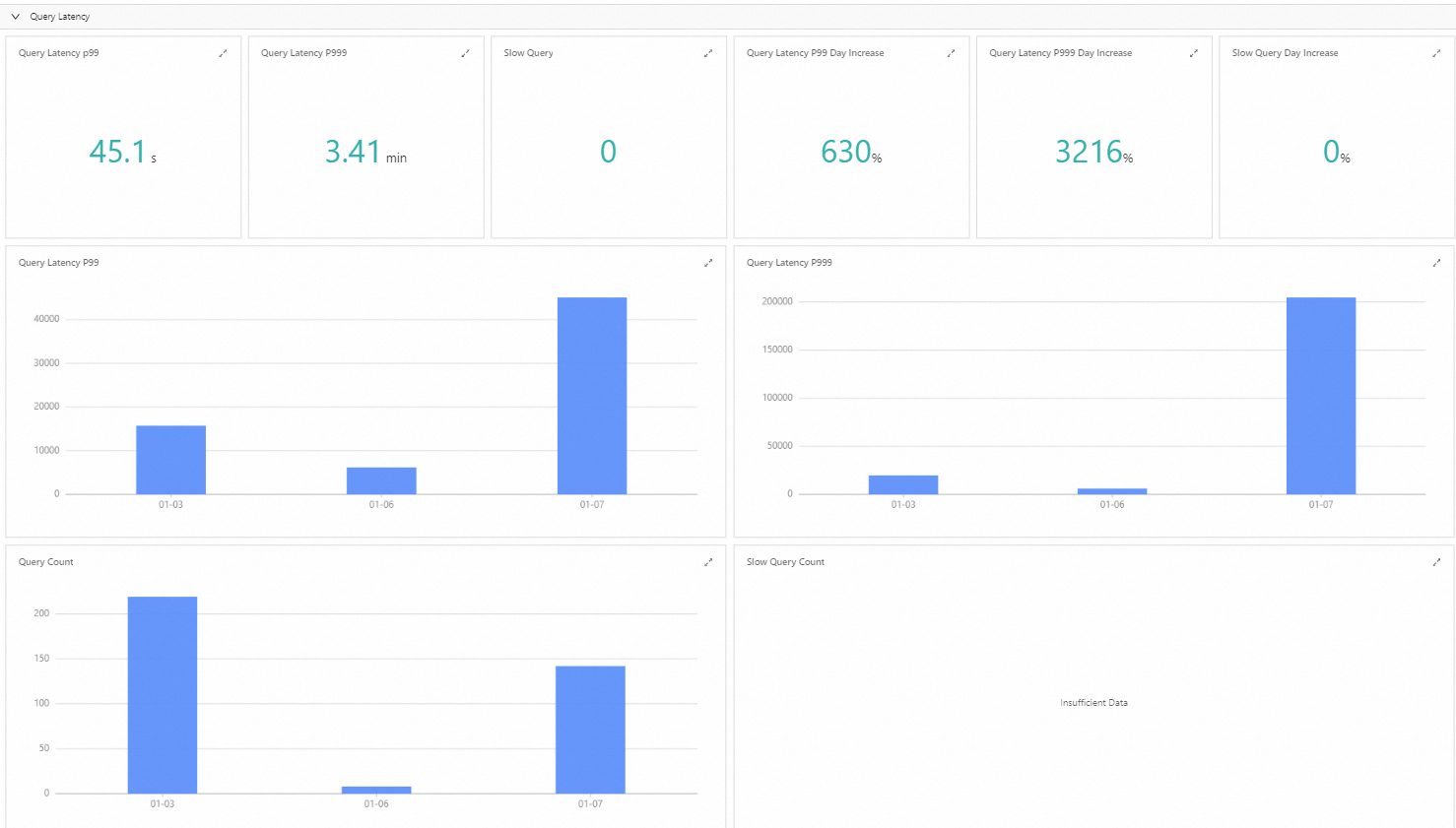
Query latency data is statistically analyzed from daily audit data.
P99 query latency, for example, is a key performance metric that measures the distribution of system response times. Specifically, P99 indicates that 99% of requests complete within this specified time. This metric is crucial for evaluating service quality and user experience.
By monitoring P99 latency, you can understand the response speed most users experience. If P99 latency is high, you may need to add more computing resources or optimize query logic to improve processing efficiency.
The seven-day query latency data helps you proactively identify performance risks in an instance and prevent significant impacts on your services.
Database lock
The database lock feature helps you monitor and analyze lock contention that occurs during a database access, especially when multiple transactions attempt to access or modify the same data resource simultaneously. To ensure data consistency and integrity, the database uses a locking mechanism to control concurrent access to specific data rows or tables. If a transaction waits for a long time to acquire a lock, it can degrade the overall system response speed and service quality. You can use the database lock data to analyze performance issues.
SQL analysis
This section ranks SQL statements executed in StarRocks by metrics such as query time, CPU cost, and memory usage to identify top SQL statements and display their execution metrics. You can use these metrics to optimize queries and address potential performance issues. For example, you can view the 10 longest-running SQL statements for a specific date in the Slow Query Top 10 report. Then, use the detailed information provided in the query profile to optimize these slow queries. For more information about profile analysis, see query profile.
The following table describes the fields in the report.
|
Parameter |
Description |
|
QueryId |
The unique identifier for an SQL execution in StarRocks. A new ID is generated for each execution. |
|
User |
The StarRocks database user who ran the SQL statement. |
|
Query latency |
The execution time of the SQL statement. Unit: ms. |
|
CPU cost |
The total CPU time consumed to execute the SQL statement, summed across all CPU cores involved. Unit: ns. |
|
Memory usage |
The memory used by the SQL execution. Unit: bytes. |
|
Scan bytes |
The amount of data accessed during the SQL execution. Unit: bytes. |
|
Scan rows |
The number of rows scanned during SQL execution. |
|
Return rows |
The number of rows returned by the SQL execution. |
|
SQL text |
The text of the executed SQL statement. |
Parameterized SQL analysis
Parameterized SQL refers to replacing constants in an SQL statement with ? parameters, while preserving the original syntax structure, removing comments, and adjusting spaces to generate a new SQL statement. Parameterized SQL maps original SQL statements with the same syntax structure to an identical parameterized SQL statement, which facilitates the comprehensive analysis of similar types of SQL.
For example, parameterization groups the following two SQL statements into the same category:
-
Original SQL
SELECT * FROM orders WHERE customer_id=10 AND quantity>20 SELECT * FROM orders WHERE customer_id=20 AND quantity>100 -
Parameterized SQL
SELECT * FROM orders WHERE customer_id=? AND quantity>?
Parameterized SQL analysis ranks SQL patterns by dimensions such as execution count, total execution time, dispersion of query time, total CPU cost, total memory usage, and execution error count. This ranking helps you identify top SQL patterns and view their related metrics.
With parameterized SQL analysis, you can:
-
Get an overview of the overall SQL execution patterns in your StarRocks database.
-
Optimize more effectively by focusing on SQL patterns that have high execution counts, long execution times, or high CPU and memory usage.
-
Measure the stability of query execution times using the CV of query time. This measurement helps identify potential performance issues. For example, an increase in the execution time of similar queries might be caused by issues like data skew or resource contention leading to pending tasks.
The following table describes these fields.
Parameter
Description
Parameterized SQL ID
The hash value that identifies the parameterized SQL.
CV of query time
The ratio of the standard deviation of the query execution time to its mean. A higher coefficient of variation (CV) typically indicates a greater variance in the execution time among queries of the same pattern.
Executions
The total number of times the parameterized SQL was executed.
Parameterized SQL text
The text of the parameterized SQL statement.
-
Use the execution error count to identify the root causes of SQL failures and detect potential issues.
The following table describes these fields.
Parameter
Description
Parameterized SQL ID
The hash value that identifies the parameterized SQL.
Execution error count
The number of failed executions of the parameterized SQL.
Executions
The total number of executions of the parameterized SQL.
Parameterized SQL text
The text of the parameterized SQL statement.
Import insights
This page offers statistical and multi-dimensional analysis of import tasks.
Statistics and analysis are currently available only for import tasks on shared-nothing instances.
The "too many versions" scenario
This section identifies tables with high-frequency imports by analyzing logs that contain the "too many versions" error message. When the compaction score exceeds 1,000, StarRocks reports this error. To resolve this issue, reduce the import concurrency and frequency.
Top analysis
Top tables by small files
The system analyzes the data files generated by all import tasks for each table to assess the severity of the small file issue and calculates an impact score. It then ranks tables by this score in descending order to identify the 20 most affected tables. The small file issue can degrade query performance and reduce compaction efficiency. To address this issue, we recommend the following:
-
Select an appropriate number of partitions and buckets based on your table's actual data size to prevent the small file issue.
-
Increase the batch size for data processing. This improves overall throughput and reduces the number of small files in Object Storage Service (OSS).
-
Although compaction consolidates data files and improves system performance, it consumes system resources. If resources are limited, consider adjusting the compaction frequency to balance resource utilization.
The formula for the small file impact score varies by table type:
-
For a primary key table, the formula is
Total number of written files / Average size of written files. A higher score, resulting from a smaller average file size and a larger number of files, indicates a more severe small file issue. -
For a non-primary key table, the formula is
Total number of written files / Average time to write a single file. A higher score, resulting from a shorter average write time and a larger number of files, indicates a more severe small file issue.
By quantifying the small file issue for each table, these formulas help you optimize the 20 most affected tables and improve overall instance performance.
The following table describes the key fields.
|
Parameter |
Description |
|
Tables |
All related tables that an import task can write to simultaneously. |
|
Table type |
The table type, which can be a primary key table or a non-primary key table. Non-primary key tables include fact tables, aggregate tables, and update tables. |
|
Small File Score |
A score that indicates the severity of the small file issue. A higher score means a more severe issue. |
|
Update Bucket Count |
The total number of buckets updated during an import task. |
|
Write File Count |
The total number of segment files written. |
|
AVG of Write File (KB) |
The average amount of data written per file, calculated as Total Write Size / Write File Count. |
|
AVG of Write Time (ms) |
The average time to write a file, calculated as Total Write Time / Write File Count. |
Top tables by import
This section lists the 20 tables with the most import tasks, which corresponds to the highest import frequency.
Top nodes by import load
You can analyze the statistics for each node to check data balance. For example, you can compare the Total Write Size (MB) values across brokers to determine if writes are evenly distributed.
Table analysis
This page displays metrics such as query frequency, SQL query types, data distribution, and tables that have not been accessed in the last 90 days. Use this information to optimize your tables. The following table describes the key metrics.
|
Metric |
Description |
|
SQL Exec Count |
The total number of SQL executions on this table. A high execution count suggests that the table design should be optimized to improve StarRocks instance performance. |
|
Associated Parameterized SQL Count |
The number of parameterized SQL patterns associated with the table. You can analyze these patterns to optimize your table design. You can also identify commonalities among different query types to determine if creating a materialized view can accelerate queries on this table. |
|
CV of tablet data size |
The coefficient of variation (CV) of tablet data size within a partition. This metric shows how evenly a table's data is distributed across its tablets. It is the standard deviation of tablet data sizes divided by their average size within the same partition. A high CV suggests data skew in the partition. |
Cache Insight
This topic describes the statistical methodology for DataCache-related metrics in Cache Insight. Cache Insight parses Query Profile data to obtain scan metrics for internal tables and external tables, and calculates Cache Read Volume, Logical Remote Read Volume, Physical Remote Read Volume, and their corresponding cache hit rates.
This feature is not available for shared-nothing instances.
Basic Profile Metrics
Internal Table Metrics
Internal tables refer to StarRocks shared-data internal tables. A scan first accesses the PageCache in-memory cache. If the PageCache misses, it accesses the DataCache local disk cache. If the DataCache also misses, it reads from OSS.
|
Profile Metric |
Description |
|
|
The number of pages hit in the PageCache. |
|
|
The total number of pages accessed during the scan. |
|
|
The logical bytes of compressed pages that the BE requests from DataCache after a PageCache miss. |
|
|
The bytes within |
|
|
The bytes actually read from OSS remote storage after a DataCache miss. |
PageCache hit bytes are calculated as follows:
|
Metric |
Formula |
|
|
64KB × |
External Table Metrics
External tables refer to scans of external tables such as Hive, Iceberg, and Hudi. External tables use DataCache as the local cache.
|
Profile Metric |
Description |
|
|
The total bytes read at the application scan layer, representing the data volume required by external table scans. |
|
|
The bytes read from the DataCache local cache. |
|
|
The bytes read from the underlying file system or remote storage. |
Logical Reads vs Physical Reads
Read amplification may occur when reading from remote storage. For example, a query may need to read only a small range of data, but the underlying file format, cache filling, block alignment, or prefetching mechanisms may cause the actual read volume from remote storage to be larger. Therefore, Cache Insight displays two types of remote read volumes:
|
Metric |
Description |
Use Case |
|
Logical Remote Read Volume |
The cache miss volume calculated based on the actual data required by the scan. |
Used to measure how much data was not hit by the cache from the query perspective. |
|
Physical Remote Read Volume |
The actual bytes read from remote storage such as OSS. |
Used to measure actual remote I/O and remote storage access costs. |
Hit Rate Calculation
Internal tables
The Cache Read Volume for internal tables includes both PageCache hits and DataCache local disk hits:
|
Metric |
Formula |
|
Cache Read Volume |
|
|
Logical Remote Read Volume |
|
|
Physical Remote Read Volume |
|
|
Logical Hit Rate |
Cache Read Volume / (Cache Read Volume + Logical Remote Read Volume) |
|
Physical Hit Rate |
Cache Read Volume / (Cache Read Volume + Physical Remote Read Volume) |
External tables
External tables use DataCache as the local cache. The formulas are as follows:
|
Metric |
Formula |
|
Cache Read Volume |
|
|
Logical Remote Read Volume |
|
|
Physical Remote Read Volume |
|
|
Logical Hit Rate |
Cache Read Volume / (Cache Read Volume + Logical Remote Read Volume) |
|
Physical Hit Rate |
Cache Read Volume / (Cache Read Volume + Physical Remote Read Volume) |
Dashboard
Cards
Cards display the core metrics for the current day and the change compared to the previous day. Internal tables and external tables are displayed separately:
|
Metric |
Description |
|
Cache read data volume |
The data volume hit in the local cache. For internal tables, this includes both PageCache hit volume and DataCache local disk hit volume. For external tables, this is the DataCache hit volume. |
|
Logical remote read data volume |
The remote miss data volume calculated based on scan logic requirements. |
|
Physical remote read data volume |
The data volume actually read from remote storage such as OSS. |
|
Logical Hit Rate |
Calculated based on Cache Read Volume and Logical Remote Read Volume. |
|
Physical Hit Rate |
Calculated based on Cache Read Volume and Physical Remote Read Volume. |
|
Hit rate increase compared to previous day |
The difference between the current day's hit rate and the previous day's hit rate. Logical Hit Rate and Physical Hit Rate are calculated separately. |
Trend Charts
Trend Charts are used to observe how cache performance changes over time, supporting time ranges of the last 30 days, last 7 days, and last 24 hours. The charts include:
|
Metric |
Description |
|
Internal table cache read data volume |
Internal table PageCache hit volume + DataCache local disk hit volume. |
|
Internal table remote read data volume |
Internal table Logical Remote Read Volume and Physical Remote Read Volume. |
|
External table cache read data volume |
External table DataCache hit volume. |
|
External table remote read data volume |
External table Logical Remote Read Volume and Physical Remote Read Volume. |
|
Internal table hit rate |
Internal table hit rate calculated separately by logical and physical metrics. |
|
External table hit rate |
External table hit rate calculated separately by logical and physical metrics. |
Detailed Analysis
Table Dimension
The Table Dimension displays the cache access status of each table, useful for identifying tables with the highest remote read volume or the lowest cache hit rate.
|
Field |
Description |
|
Table type |
Internal tables or External tables. |
|
Catalog |
The catalog of the scanned table. |
|
Database |
The database of the scanned table. |
|
Table name |
The scanned table. |
|
Total Cache Read Volume |
The data volume hit by the cache for this table. |
|
Total Logical Remote Read Volume |
The remote read volume calculated by logical metric for this table. |
|
Total Physical Remote Read Volume |
The data volume actually read from remote storage such as OSS for this table. |
|
Scan count |
The number of times this table was scanned. |
The Top 100 tables by remote read volume are sorted by Physical Remote Read Volume, and both Logical Remote Read Volume and Physical Remote Read Volume are displayed. Internal table Top 100 and external table Top 100 are counted separately.
SQL Dimension
The SQL Dimension displays the cache access status of individual SQL queries, useful for identifying specific queries with high remote read volumes.
|
Field |
Description |
|
SQL ID |
The query identifier. |
|
SQL statement |
The original SQL. |
|
Total Cache Read Volume |
The data volume hit by the cache for this SQL. |
|
Total Logical Remote Read Volume |
The remote read volume calculated by logical metric for this SQL. |
|
Total Physical Remote Read Volume |
The data volume actually read from remote storage such as OSS for this SQL. |
|
Query duration |
The execution duration of this SQL. |
|
Table name |
All base table names queried by this SQL. |
The Top 100 SQL queries by remote read volume are sorted by Physical Remote Read Volume, and both Logical Remote Read Volume and Physical Remote Read Volume are displayed.
Parameterized SQL Dimension
The Parameterized SQL Dimension aggregates SQL queries with the same structure but different parameter values under the same fingerprint, useful for identifying recurring remote read hotspots.
|
Field |
Description |
|
SQL fingerprint |
The parameterized SQL identifier. |
|
Parameterized SQL |
The SQL template with specific parameters removed. |
|
Total Cache Read Volume |
The data volume hit by the cache for this SQL fingerprint. |
|
Total Logical Remote Read Volume |
The remote read volume calculated by logical metric for this SQL fingerprint. |
|
Total Physical Remote Read Volume |
The data volume actually read from remote storage such as OSS for this SQL fingerprint. |
|
Query count |
The number of SQL queries matching this SQL fingerprint. |
|
Total query duration |
The total execution duration of all SQL queries matching this SQL fingerprint. |
|
Table name |
All base table names queried by this SQL fingerprint. |
The Top 100 parameterized SQL queries by remote read volume are sorted by Physical Remote Read Volume, and both Logical Remote Read Volume and Physical Remote Read Volume are displayed.
Field Calculation Reference
|
Display Field |
Internal Table Calculation |
External Table Calculation |
|
Cache Read Volume |
|
|
|
Logical Remote Read Volume |
|
|
|
Physical Remote Read Volume |
|
|
|
Logical Hit Rate |
Cache Read Volume / (Cache Read Volume + Logical Remote Read Volume) |
Cache Read Volume / (Cache Read Volume + Logical Remote Read Volume) |
|
Physical Hit Rate |
Cache Read Volume / (Cache Read Volume + Physical Remote Read Volume) |
Cache Read Volume / (Cache Read Volume + Physical Remote Read Volume) |
Notes
-
compressedBytesReadRemoteandFSIOBytesReadreflect the actual remote read volume, which may be affected by block filling, alignment, and prefetching. These metrics are typically suitable for analyzing remote read costs. -
Logical Remote Read Volume is closer to the data volume that the query actually needs but was not hit by the cache, making it suitable for analyzing cache effectiveness.