This topic describes how to use built-in Serverless Spark functions to identify and remove near-duplicate content from large text corpora, a common data cleaning task for large language models (LLMs).
MinHash-LSH overview
MinHash-LSH is a classic algorithm combination for approximate similarity detection, widely used for large-scale set similarity calculations, such as Jaccard similarity. Its core ideas are:
-
MinHash: Converts text into a set of n-grams, then uses multiple hash functions to generate a compact signature vector that preserves the similarity features of the original set.
-
locality-sensitive hashing (LSH): Divides the signature vector into multiple bands. Each band is hashed separately, making it more likely for highly similar texts to fall into the same hash bucket, enabling rapid filtering of candidate pairs.
Serverless Spark integrates MinHash-LSH capabilities through the minhash_lsh and build_lsh_edges functions. It leverages the Fusion engine for vectorized execution, accelerating deduplication tasks by eliminating the overhead of row-to-column data conversion.
Built-in functions
minhash_lsh
Tokenizes the input text, generates a MinHash signature, divides the signature into bands, and returns a list of hash values for each band.
Syntax
minhash_lsh(
  tokens: ARRAY<STRING>,
  perms_a: ARRAY<BIGINT>,
  perms_b: ARRAY<BIGINT>,
  hash_ranges: ARRAY<INT>,
  ngram_size: INT,
  min_length: INT
)
Parameters
|
Parameter |
Type |
Required |
Description |
|
|
|
Yes |
An array of tokens, typically generated by a function like |
|
|
|
Yes |
The multiplier parameter |
|
|
|
Yes |
The addend parameter |
|
|
|
Yes |
The band division boundaries, formatted as |
|
|
|
Yes |
The size of each n-gram. For long texts, a value of 5–9 is recommended. |
|
|
|
Yes |
The minimum number of input tokens. Records with fewer tokens are skipped. |
Return value
-
Type:
ARRAY<STRING> -
Description: An array of
hexadecimal hash strings, where each string corresponds to a band. Example output:
["a1b2c3", "d4e5f6", ...]
build_lsh_edges
This function generates an edge list for document IDs that fall into the same LSH bucket, based on a "minimum node connection" policy. This list is used for subsequent connected components analysis to cluster duplicate documents.
Syntax
build_lsh_edges(doc_ids: ARRAY<BIGINT>)Parameters
|
Parameter |
Type |
Required |
Description |
|
|
|
Yes |
A list of document IDs in the same LSH bucket. |
Return value:
-
Type:
ARRAY<STRUCT<src: LONG, dst: LONG>> -
Description: An edge list where the node with the smallest ID in the bucket is the source node, connected to all other nodes in the bucket.
Example: For bucket IDs
[1003, 1001, 1005], the function sorts them, selects the minimum ID1001, and generates the edges(1001,1003)and(1001,1005).
Example: Deduplicate the fineweb-edu dataset
This example uses the sample/10BT subset of the open-source fineweb-edu dataset to demonstrate the process.
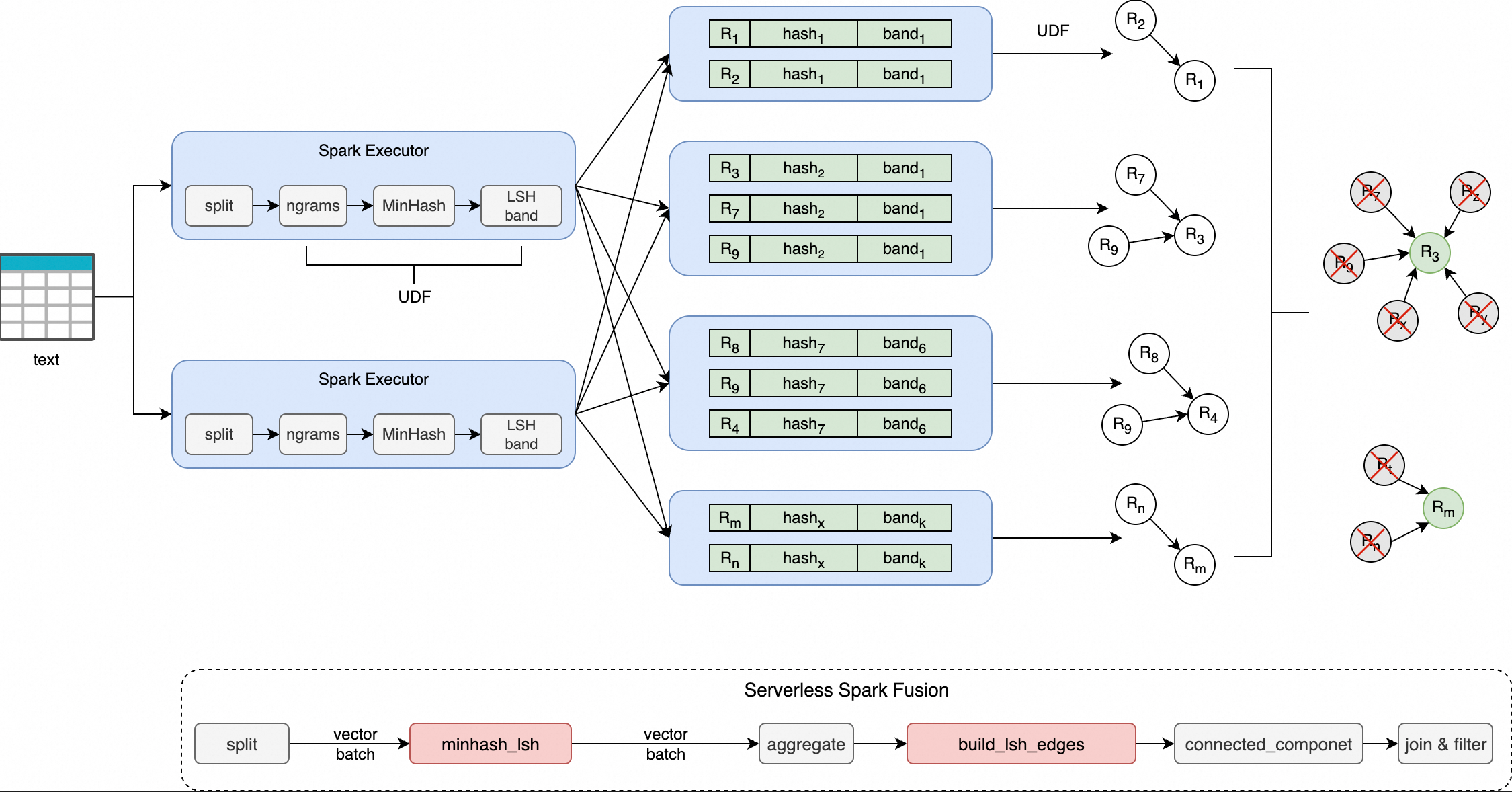
-
minhash_lsh: This function splits each line of input text into a set of n-gram tokens and generates a fixed-length signature vector by using the MinHash algorithm. It then divides the signature into multiple bands based on the specifiedhash_ranges, calculates a hexadecimal-encoded hash value for each band, and finally returns an array of the hash values for all bands. -
build_lsh_edges: This function receives a set of document IDs that fall into the same LSH bucket and generates an edge list for subsequent graph connected components analysis to cluster duplicate documents. The list is generated based on the "minimum node connection" strategy—the minimum ID in the bucket is used as a center node and is connected to all other nodes.
Supported versions
Only the following engine versions support the operations described in this topic:
-
esr-4.x: esr-4.1.1 and later.
-
esr-3.x: esr-3.1.1 and later.
-
esr-2.x: esr-2.5.1 and later.
Step 1: Prepare the data
-
Download the dataset.
The full sample/10BT open-source dataset is 28.5 GB.
-
Upload the dataset to OSS.
Use the console or CLI to upload the Parquet files to the specified path. For more information, see Simple upload.
-
Verify the uploaded data.
-
Create a temporary view in your Spark environment to verify that the data is readable.
CREATE OR REPLACE TEMPORARY VIEW temp_source USING parquet OPTIONS (path 'oss://<bucket>/fineweb-edu/sample/10BT/') ; -
Query the data. The dataset contains 727,000 records.
-
Step 2: Write the script
Save the following code as MinHash.py. The table below describes the key parameters.
import re
from typing import List
from typing import Tuple
import pyspark
import numpy as np
import numpy.typing as npt
from graphframes import GraphFrame
from pyspark.sql import SparkSession
from pyspark.sql import functions as sf
from scipy.integrate import quad as integrate
RNG = np.random.RandomState(42)
SPLIT_PATTERN = re.compile(r"[\s\xA0]+")  # Set the text delimiter.
DTYPE = np.uint32
MAX_HASH = 4_294_967_295  # Maximum 32-bit unsigned integer.
MOD_PRIME = 4_294_967_291  # Maximum 32-bit prime number.
input_files = "oss://<bucket>/fineweb-edu/sample/10BT/*.parquet"  # Set the input files to deduplicate.
output_path = "oss://<bucket>/fineweb-edu/output/10BT"  # Set the output path.
checkpoint_dir = "oss://<bucket>/fineweb-edu/checkpoints"  # Set the checkpoint for storing intermediate results during connected components computation.
threshold = 0.8  # Set the similarity threshold.
num_perm = 256  # Set the number of permutations.
ngram_size = 5  # Set the n-gram size.
min_length = ngram_size  # Set the minimum n-gram length, usually same as ngram_size.
text_column = "text"  # Set the name of the text column to deduplicate.
index_column = "__id__"
# Set a fixed default parallelism to ensure stable connected components results.
conf = (
    pyspark.SparkConf()
    .set("spark.default.parallelism", "200")
)
spark = SparkSession.Builder() \
    .appName("MinHashLSH") \
    .config(conf=conf) \
    .enableHiveSupport() \
    .getOrCreate()
spark.sparkContext.setCheckpointDir(checkpoint_dir)
# Automatically compute optimal band parameters (B, R).
def optimal_param(
        threshold: float,
        num_perm: int,
        false_positive_weight: float = 0.5,
        false_negative_weight: float = 0.5
):
    def false_positive_area(threshold: float, b: int, r: int):
        a, _ = integrate(lambda s: 1 - (1 - s**r)**b, 0.0, threshold)
        return a
    def false_negative_area(threshold: float, b: int, r: int):
        a, _ = integrate(lambda s: 1 - (1 - (1 - s**r)**b), threshold, 1.0)
        return a
    min_error = float("inf")
    opt = (0, 0)
    for b in range(1, num_perm + 1):
        max_r = int(num_perm / b)
        for r in range(1, max_r + 1):
            fp = false_positive_area(threshold, b, r)
            fn = false_negative_area(threshold, b, r)
            error = fp * false_positive_weight + fn * false_negative_weight
            if error < min_error:
                min_error = error
                opt = (b, r)
    return opt
# B (bands) and R (rows per band) split the MinHash signature matrix into B bands,
# each containing R rows, where B * R = num_perm.
# You can set these values manually or compute them from the threshold and num_perm.
B, R = optimal_param(threshold, num_perm)
HASH_RANGES_SLICE: List[int] = [i * R for i in range(B + 1)]
PERMUTATIONS: Tuple[npt.NDArray[DTYPE], npt.NDArray[DTYPE]] = (
    RNG.randint(1, MOD_PRIME, size=(num_perm,), dtype=DTYPE),
    RNG.randint(0, MOD_PRIME, size=(num_perm,), dtype=DTYPE),
)
# If your data has a primary key ID column, use it directly as the index_column.
# You do not need to generate an index with monotonically_increasing_id().
# .withColumn(index_column, "your_primary_key_col")
df = spark.read.parquet(input_files) \
    .withColumn(index_column, sf.monotonically_increasing_id())
a, b = PERMUTATIONS
# Use minhash_lsh to generate the band hash list, then use posexplode
# to expand the list into band_idx and band_hash columns.
hash_df = df \
    .select(index_column,
            sf.split(
                sf.lower(text_column),
                pattern=SPLIT_PATTERN.pattern).alias("tokens")) \
    .select(index_column,
            sf.minhash_lsh(
                "tokens",
                a.tolist(),
                b.tolist(),
                HASH_RANGES_SLICE,
                ngram_size,
                min_length).alias("hashes")) \
    .select(index_column, sf.posexplode("hashes").alias("band_idx", "band_hash"))
# Use build_lsh_edges to generate edges for documents that fall into the same LSH bucket
# based on the "minimum node connection" policy.
edges_df = hash_df.groupBy("band_idx", "band_hash") \
    .agg(sf.count(index_column).alias("cnt"), sf.collect_list(index_column).alias("doc_ids")) \
    .filter(sf.col("cnt") > 1) \
    .select(sf.build_lsh_edges("doc_ids").alias("edges")) \
    .select(sf.explode("edges").alias("edge")) \
    .selectExpr("edge.src as src", "edge.dst as dst") \
    .persist(pyspark.StorageLevel.DISK_ONLY)
# Compute all vertices from the edge list.
vertices_df = edges_df.select(sf.col("src").alias("id")) \
    .union(edges_df.select(sf.col("dst").alias("id"))) \
    .distinct() \
    .repartition(4096) \
    .persist(pyspark.StorageLevel.MEMORY_AND_DISK_DESER)
assignment = GraphFrame(vertices_df, edges_df).connectedComponents()
# Keep the representative document (the one with the smallest ID) in each connected component.
df = df.join(assignment.select(sf.col("id").alias(index_column), sf.col("component").alias("__component__")),
             on=index_column, how="left") \
    .filter(sf.col("__component__").isNull() | (sf.col("__component__") == sf.col(index_column))) \
    .drop("__component__")
# Write the deduplicated output.
df.write.parquet(output_path, mode="overwrite", compression="snappy")
# Release cached data.
edges_df.unpersist()
vertices_df.unpersist()
Script parameters
|
Parameter |
Example value |
Description |
|
|
|
Path to the input data in Parquet format. |
|
|
|
Output path for the deduplicated results. |
|
|
|
Storage path for intermediate states during graph computation. |
|
|
|
Jaccard similarity threshold. Recommended: 0.7–0.9. |
|
|
|
The length of the MinHash signature, which affects precision and performance. |
|
|
|
The size of n-grams. Recommended: 5–9 for long texts. |
|
|
|
The minimum token length of the text. Documents with fewer tokens are skipped. |
|
|
|
The name of the text column to be deduplicated. |
Step 3: Upload the file
-
Navigate to the artifact upload page.
-
Log on to the E-MapReduce console.
-
In the left navigation pane, choose EMR Serverless > Spark.
-
On the Spark page, click the name of your target workspace.
-
On the workspace page, click Artifacts in the left navigation pane.
-
-
On the Artifacts page, click Upload File.
-
In the Upload File dialog box, click the upload area to select MinHash.py, or drag and drop MinHash.py into the upload area.
Step 4: Create and run a batch job
After uploading the script, create and run a batch job to perform the deduplication.
-
On the workspace page, click Development in the left navigation pane.
-
On the Development tab, click the
 icon.
icon. -
In the dialog box, enter a name, select for the PySpark type, and click OK.
-
In the upper-right corner, select a resource queue.
For details on adding a queue, see Manage resource queues.
-
In the new development tab, configure the following settings, leave other parameters at their default values, and then click Run.
Parameter
Description
Main Python Resources
Select the Python file you uploaded to Artifacts in the previous step. In this example, select
MinHash.py.Engine Version
Select an appropriate version, such as
esr-4.4.0or later.Resource Configuration
A resource ratio of 4 vCPUs to 16 GB of memory per executor is recommended. For example:
spark.executor.cores=4, spark.executor.memory=14GB, spark.executor.memoryOverhead=2GB.Spark Configuration
spark.rdd.ensureConfigConsistency true: Required. Must be set totrue.Execution performance parameters:
-
spark.sql.shuffle.partitions 1000: For datasets under 1 TB, a value of 1000 is recommended. Increase this by 1000 for each additional 1 TB of data. -
spark.sql.files.maxPartitionBytes 256MB: Controls the partition size during the read phase to avoid an excessive number of small files. A value of 128 MB or 256 MB is typically sufficient.
-
-
After the job starts, find the job in the Execution Records area at the bottom of the page and click Details in the Actions column to monitor its progress.
Step 5: Verify the results
After the job completes successfully, verify the deduplication results.
-
Create a temporary view in the Spark SQL environment to load the deduplicated data.
CREATE OR REPLACE TEMPORARY VIEW temp_target USING parquet OPTIONS (path 'oss://<bucket>/fineweb-edu/output/10BT') ; -
Query the data. The total record count is 724,809, down from the original 727,000, indicating that 2,191 duplicate items were removed. Run the query
SELECT * FROM temp_target LIMIT 10;to validate the loaded data. The returned data includes fields such as__id__,text,id,dump,url,file_path, andlanguage, confirming that the Common Crawl web data has been successfully deduplicated and written to the target path.
Performance tuning
To balance precision, recall, and execution efficiency across data scales and business goals, consider tuning the solution in the following three areas.
Algorithm parameters
|
Parameter |
Recommended value |
Description |
|
|
128 or 256 |
Higher values improve precision but increase computational cost. A value of 256 is usually sufficient. |
|
|
5–9 (long text), 2–3 (short sentences) |
Controls semantic granularity. A value that is too large may reduce sensitivity to local changes. |
|
|
0.7–0.9 |
Values above 0.9 may result in insufficient recall (missed duplicates). |
LSH band configuration: B and R
The MinHash signature is split into
Ideally, the LSH probability curve,
Recommended configurations (for num_perm=256)
|
Goal |
B (bands) |
R (rows) |
|
High recall (minimize missed duplicates) |
32 |
8 |
|
High precision (minimize false positives) |
8 |
32 |
|
Balanced (recommended starting point) |
16 |
16 |
Spark execution optimization
|
Parameter |
Recommended setting |
Description |
|
|
For datasets under 1 TB, set to 1000. Increase by 1000 for each additional 1 TB of data. |
Prevents data skew or out-of-memory (OOM) errors in individual tasks. |
|
|
|
Controls the partition size during the read phase to prevent performance degradation from processing too many small files. |