When multiple teams share a Hadoop cluster, resource contention leads to unpredictable job performance and difficult cost allocation. YARN schedulers solve this by enforcing per-tenant resource guarantees, applying multi-tenant fairness policies, and optimizing node utilization to prevent hotspots.
Capacity Scheduler is recommended for E-MapReduce (EMR) YARN. This document covers how Capacity Scheduler works and how to configure it. For other scheduler types, see the Apache Hadoop YARN documentation.
Choose a scheduler
| Scheduler | Default in | Multi-tenant support | Node labels / attributes / placement constraints | When to use |
|---|---|---|---|---|
| FIFO Scheduler | — | No | No | Simple, single-tenant scenarios. Rarely used in production. |
| Fair Scheduler | CDH (Cloudera Distributed Hadoop) | Yes | No | Legacy CDH clusters. Not recommended for new deployments. |
| Capacity Scheduler | Apache Hadoop, HDP, CDP | Yes | Yes | Multi-tenant production clusters with performance and resource isolation requirements. Recommended for EMR YARN. |
Capacity Scheduler provides the full set of multi-tenant management and resource scheduling capabilities, including global scheduling, node labels, node attributes, and placement constraints. The rest of this document covers Capacity Scheduler in detail.
How Capacity Scheduler works
Scheduling modes
Capacity Scheduler's MainScheduler supports three triggering modes:
| Mode | How it works | Best for |
|---|---|---|
| Node heartbeat-driven | MainScheduler is triggered when a node sends a heartbeat. Scheduling is local to the node and is subject to heartbeat intervals, which can lead to low scheduling efficiency when many nodes have insufficient resources. | Clusters with low requirements on scheduling performance and features. |
| Asynchronous scheduling | An asynchronous thread randomly selects a node from the node list for scheduling. This improves throughput without requiring global state. | Clusters with high performance requirements but low feature requirements. |
| Global scheduling | A global thread selects applications based on multi-tenant fairness and priority, then selects nodes based on resource size, placement constraints, and resource distribution across the cluster. This produces optimal scheduling decisions. | Clusters with high requirements on both scheduling performance and features. |
Global scheduling requires all asynchronous scheduling configurations in addition to its own settings. See Global scheduling for details.
Architecture (global scheduling)
The following figure shows the architecture of global scheduling based on YARN 3.2 or later.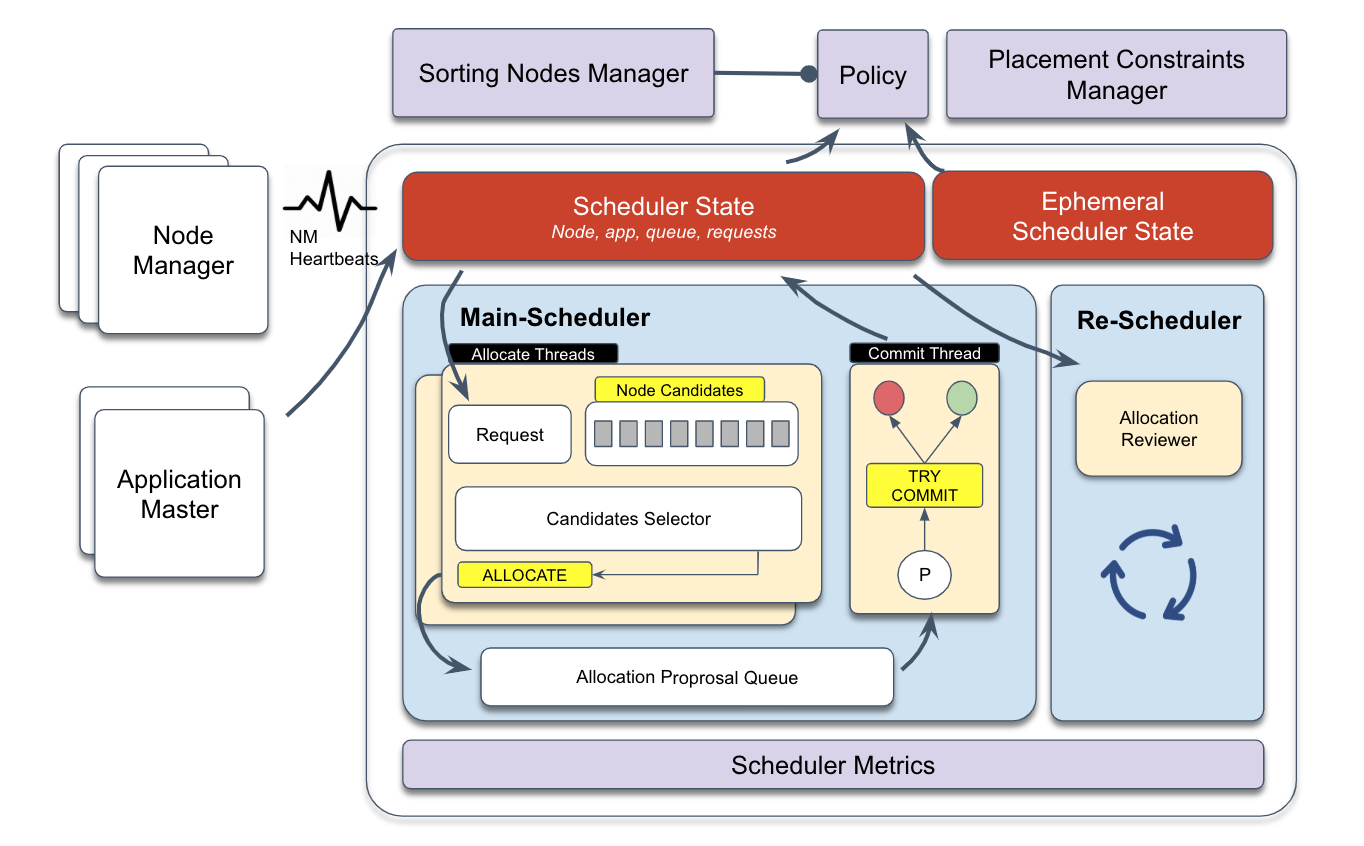
MainScheduler runs as an asynchronous multi-threaded framework:
Allocation threads identify the highest-priority resource request, select candidate nodes based on resource size and placement constraints, generate allocation proposals, and place them in an intermediate queue.
Submission thread consumes allocation proposals, rechecks placement constraints and application/node requirements, then either commits or discards each proposal and updates scheduler state.
ReScheduler runs periodically as a dynamic resource monitoring framework. It implements policies for inter-queue preemption, intra-queue preemption, and reserved resource preemption.
Node Sorting Manager and Placement Constraint Manager are global scheduling plug-ins for MainScheduler. They handle load balancing and complex placement constraint management.
Container allocation process
The following figure shows the global scheduling process of Capacity Scheduler.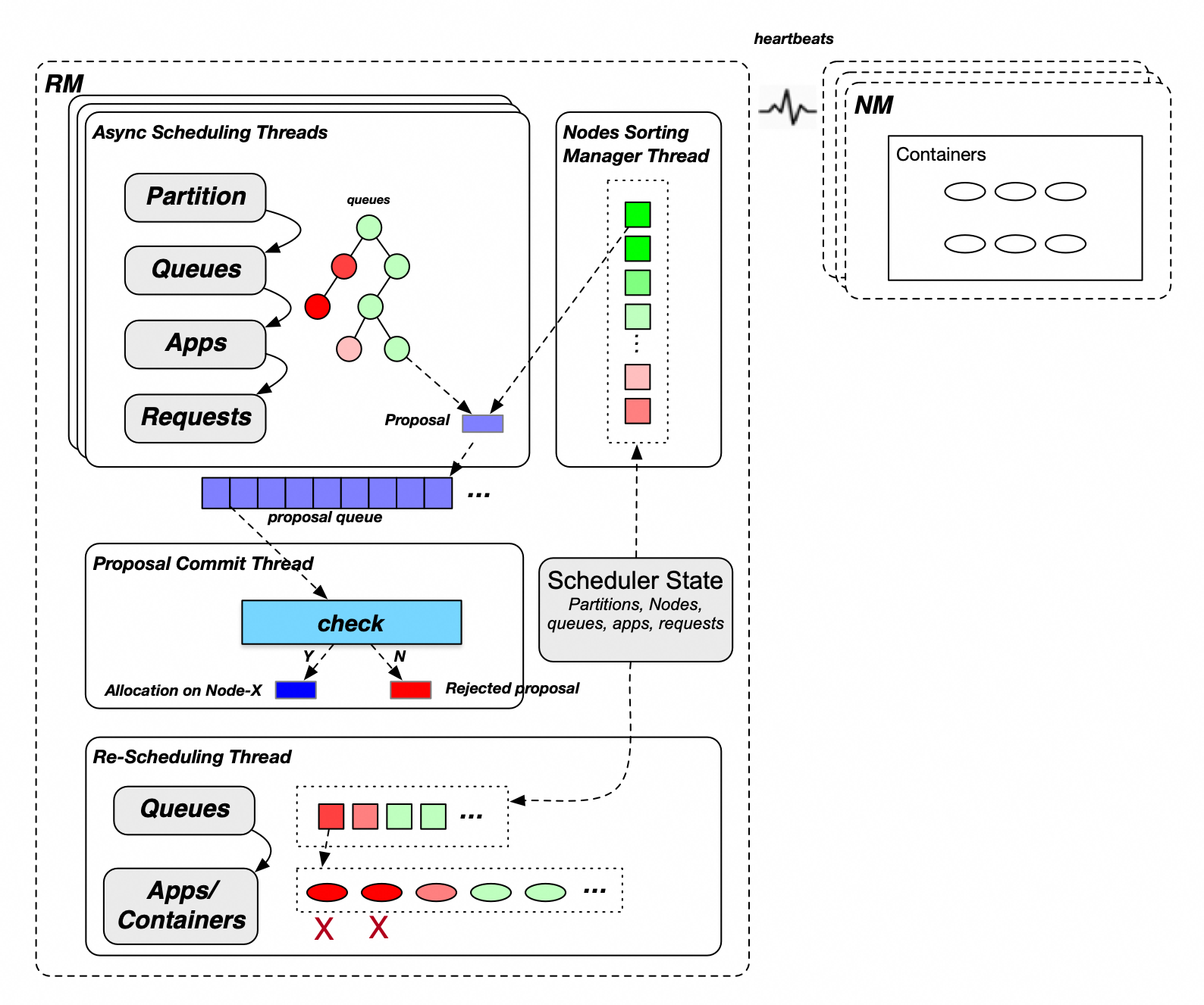
MainScheduler allocates containers in six steps:
Select partitions (node labels). A cluster may have one or more partitions. MainScheduler allocates containers to partitions in turn.
Select leaf queues. Traversing from the root queue downward, child queues at each level are visited in ascending order of their guaranteed resource percentage. Queues with lower utilization (shown in green in the figure above) receive resources before those with higher utilization (shown in red).
Select applications. Within a queue, MainScheduler selects applications based on the queue's ordering policy:
Fair policy: ascending order of allocated memory resources
FIFO policy: descending order of priority, then ascending order of application ID
Select requests. MainScheduler selects requests within the chosen application based on priority.
Select sorted candidate nodes. MainScheduler searches all sorted nodes for candidates that satisfy the request's resource requirements and placement constraints.
Allocate a container. For each candidate node, MainScheduler checks the queue's and node's allocated, in-use, and unconfirmed resources. If the check passes, it generates an allocation proposal and places it in the proposal queue.
After allocation, the submission thread verifies each proposal against application, node, and placement constraint requirements. Proposals that fail verification are discarded; approved proposals take effect and update resource accounting for the application and node.
Preemption
ReScheduler monitors cluster resources and triggers preemption when total available resources fall below a threshold and specific applications are under-resourced.
| Preemption type | Trigger condition |
|---|---|
| Inter-queue preemption | A queue's guaranteed resources are fully used, but another queue that is entitled to those resources cannot get them because the cluster has no idle capacity. Resources within queue capacity are guaranteed; resources above capacity but below maximum capacity are shared. |
| Intra-queue preemption | A high-priority application in a queue needs resources, but the queue's total allocation is exhausted. ReScheduler rebalances based on the FIFO or fair policy. |
| Reserved resource preemption | A task that reserved resources meets a release condition, such as a timeout. The task and its reserved resources are released. |
Key features
Multi-level queue management: A parent queue's resource quota limits the total usage of all its child queues. No single child queue can exceed the parent's quota. This gives you controllable multi-tenant isolation for complex organizational structures.
Resource quota: Set guaranteed capacity and maximum capacity per queue, cap the number of concurrent applications, limit the ApplicationMaster (AM) resource share, and control per-user resource ratios.
Elastic resource sharing: When the cluster and the parent queue have idle resources, child queues can borrow unused guaranteed resources from sibling queues. Elastic capacity = maximum queue capacity − queue capacity.
Access control list (ACL)-based access control: Assign per-queue submit and manage permissions to specific users or groups. A single user can manage multiple queues, or multiple users can share submit access to the same queue.
Inter-tenant queue scheduling: At the same queue level, queues are scheduled in ascending order of their guaranteed resource percentage, so queues with smaller allocations are served first. When priorities are configured, queues are split into two groups — those at or below capacity and those above it — and queues at or below capacity are served first within each group.
Intra-tenant application scheduling: Within a queue, applications are scheduled based on the queue's ordering policy. Under the FIFO policy: descending priority, then ascending submission time. Under the fair policy: ascending percentage of used resources, then ascending submission time.
Preemption: Keeps queue and application resource usage balanced as cluster resources change. See Preemption for the three preemption types.
Configure Capacity Scheduler
Global configurations
Configure the following settings in yarn-site.xml and capacity-scheduler.xml.
| Configuration file | Configuration item | Recommended value | Description |
|---|---|---|---|
yarn-site.xml | yarn.resourcemanager.scheduler.class | Leave blank | Scheduler class. Default: org.apache.hadoop.yarn.server.resourcemanager.scheduler.capacity.CapacityScheduler. |
capacity-scheduler.xml | yarn.scheduler.capacity.maximum-applications | Leave blank | Maximum concurrent applications on the cluster. Default: 10000. |
yarn.scheduler.capacity.global-queue-max-application | Leave blank | Maximum concurrent applications per queue. If not set, the per-queue limit is calculated as: Queue capacity / Cluster resource × maximum-applications. Configure this only for queues with special requirements, such as a low-capacity queue that needs to run a large number of applications. | |
yarn.scheduler.capacity.maximum-am-resource-percent | 0.25 | Maximum percentage of queue resources that ApplicationMaster (AM) containers can use, capped at: this value × maximum queue capacity. Default: 0.1. Increase this value if a queue runs many small applications with a high AM container ratio. | |
yarn.scheduler.capacity.resource-calculator | org.apache.hadoop.yarn.util.resource.DominantResourceCalculator | Resource calculator for queues, nodes, and applications. The default (DefaultResourceCalculator) considers only memory. DominantResourceCalculator considers all configured resource types (memory, CPU, and others) and uses the most-consumed resource as the primary resource. Note Changes to this item require a ResourceManager restart (or a primary/secondary switchover if high availability (HA) is enabled). A refresh operation is not sufficient. | |
yarn.scheduler.capacity.node-locality-delay | -1 | Number of scheduling cycles to skip before relaxing node locality. Default: 40. Set to -1 to disable locality delay and improve scheduling performance. With modern networks and storage, local scheduling is rarely the bottleneck. |
Node heartbeat configurations
| Configuration file | Configuration item | Recommended value | Description |
|---|---|---|---|
capacity-scheduler.xml | yarn.scheduler.capacity.per-node-heartbeat.multiple-assignments-enabled | false | Whether to allocate multiple containers per heartbeat. Default: true. Enabling this can affect load balancing and cause hotspots. |
yarn.scheduler.capacity.per-node-heartbeat.maximum-container-assignments | Leave blank | Maximum containers assignable per heartbeat. Default: 100. Effective only when multiple-assignments-enabled is true. | |
yarn.scheduler.capacity.per-node-heartbeat.maximum-offswitch-assignments | Leave blank | Maximum off-switch containers assignable per heartbeat. Effective only when multiple-assignments-enabled is true. |
Asynchronous scheduling
| Configuration file | Configuration item | Recommended value | Description |
|---|---|---|---|
capacity-scheduler.xml | yarn.scheduler.capacity.schedule-asynchronously.enable | true | Whether to enable asynchronous scheduling. Default: false. Enable this to improve scheduling performance. |
yarn.scheduler.capacity.schedule-asynchronously.maximum-threads | 1 or leave blank | Maximum threads for asynchronous scheduling. Default: 1. Multiple threads can generate duplicate proposals; a single thread is sufficient in most cases. | |
yarn.scheduler.capacity.schedule-asynchronously.maximum-pending-backlogs | Leave blank | Maximum pending allocation proposals in the queue. Default: 100. Increase this for large clusters. |
Global scheduling
Global scheduling requires all asynchronous scheduling configurations listed in the previous table.
| Configuration file | Configuration item | Recommended value | Description |
|---|---|---|---|
capacity-scheduler.xml | yarn.scheduler.capacity.multi-node-placement-enabled | true | Whether to enable global scheduling. Default: false. Enable for clusters with high requirements on both scheduling performance and features. |
yarn.scheduler.capacity.multi-node-sorting.policy | default | Name of the active global scheduling policy. | |
yarn.scheduler.capacity.multi-node-sorting.policy.names | default | Comma-separated list of global scheduling policy names. | |
yarn.scheduler.capacity.multi-node-sorting.policy.default.class | org.apache.hadoop.yarn.server.resourcemanager.scheduler.placement.ResourceUsageMultiNodeLookupPolicy | Implementation class for the default policy. Sorts nodes in ascending order of absolute allocated resources. | |
yarn.scheduler.capacity.multi-node-sorting.policy.default.sorting-interval.ms | 0 (small clusters) / 1000 (clusters with more than 1,000 nodes) | Cache refresh interval for node sorting. Default: 1000 ms. Set to 0 for synchronous sorting (no cache). For large clusters, set to 1000 to enable node caching and improve performance. Note With node caching enabled, containers may concentrate on the top-ranked nodes. Test the impact before enabling this in production. |
Node partition configurations
For node partition (node label) configurations, see Node labels.
Queue configurations
Basic queue configurations
Basic queue configurations define the queue hierarchy, guaranteed capacity, and maximum capacity. The following example shows a root queue with four child queues shared across an organization's departments.

Example queue structure:
| Queue | Guaranteed resources | Maximum resources | Child queues |
|---|---|---|---|
root | 100% | 100% | dev, test, support, default |
root.dev | 50% | 100% | training, services |
root.dev.training | 40% of dev | 100% of dev | — |
root.dev.services | 60% of dev | 100% of dev | — |
root.test | 30% | 50% | — |
root.support | 10% | 30% | — |
root.default | 10% | 100% | — |
The following capacity-scheduler.xml example configures this structure. Copy and adjust it to match your organization's queue layout.
<configuration>
  <!-- Root-level child queues -->
  <property>
    <name>yarn.scheduler.capacity.root.queues</name>
    <value>dev,test,support,default</value>
  </property>

  <!-- dev queue: 50% guaranteed, 100% max -->
  <property>
    <name>yarn.scheduler.capacity.root.dev.capacity</name>
    <value>50</value>
  </property>
  <property>
    <name>yarn.scheduler.capacity.root.dev.maximum-capacity</name>
    <value>100</value>
  </property>
  <property>
    <name>yarn.scheduler.capacity.root.dev.queues</name>
    <value>training,services</value>
  </property>

  <!-- dev.training: 40% of dev guaranteed, 100% of dev max -->
  <property>
    <name>yarn.scheduler.capacity.root.dev.training.capacity</name>
    <value>40</value>
  </property>
  <property>
    <name>yarn.scheduler.capacity.root.dev.training.maximum-capacity</name>
    <value>100</value>
  </property>

  <!-- dev.services: 60% of dev guaranteed, 100% of dev max -->
  <property>
    <name>yarn.scheduler.capacity.root.dev.services.capacity</name>
    <value>60</value>
  </property>
  <property>
    <name>yarn.scheduler.capacity.root.dev.services.maximum-capacity</name>
    <value>100</value>
  </property>

  <!-- test queue: 30% guaranteed, 50% max -->
  <property>
    <name>yarn.scheduler.capacity.root.test.capacity</name>
    <value>30</value>
  </property>
  <property>
    <name>yarn.scheduler.capacity.root.test.maximum-capacity</name>
    <value>50</value>
  </property>

  <!-- support queue: 10% guaranteed, 30% max -->
  <property>
    <name>yarn.scheduler.capacity.root.support.capacity</name>
    <value>10</value>
  </property>
  <property>
    <name>yarn.scheduler.capacity.root.support.maximum-capacity</name>
    <value>30</value>
  </property>

  <!-- default queue: 10% guaranteed, 100% max -->
  <property>
    <name>yarn.scheduler.capacity.root.default.capacity</name>
    <value>10</value>
  </property>
  <property>
    <name>yarn.scheduler.capacity.root.default.maximum-capacity</name>
    <value>100</value>
  </property>
</configuration>
On the Application Queues page of YARN ResourceManager, you can verify that the queue configuration has taken effect. The queue hierarchy tree shows the following queues under root: default, test, support, dev, and under dev the training and services sub-queues. Expand the dev.services queue to view its running status details:
Queue State: RUNNING
Effective Capacity:
memory:7864, vCores:4(60.0%)Effective Max Capacity:
memory:26214, vCores:16(100.0%)Absolute Configured Capacity: 30.0%
Max Applications: 3000
Ordering Policy: FifoOrderingPolicy
Preemption: disabled
The following table describes the capacity-scheduler.xml parameters for this structure.
| Configuration file | Configuration item | Sample value | Description |
|---|---|---|---|
capacity-scheduler.xml | yarn.scheduler.capacity.root.queues | dev,test,support,default | Child queues of the root queue. Separate multiple queues with commas. |
yarn.scheduler.capacity.root.dev.capacity | 50 | Guaranteed resource percentage for the dev queue relative to total cluster resources. | |
yarn.scheduler.capacity.root.dev.maximum-capacity | 100 | Maximum resource percentage for the dev queue relative to total cluster resources. | |
yarn.scheduler.capacity.root.dev.queues | training,services | Child queues of the dev queue. | |
yarn.scheduler.capacity.root.dev.training.capacity | 40 | Guaranteed resource percentage for training relative to dev's guaranteed resources. | |
yarn.scheduler.capacity.root.dev.training.maximum-capacity | 100 | Maximum resource percentage for training relative to dev's maximum resources. | |
yarn.scheduler.capacity.root.dev.services.capacity | 60 | Guaranteed resource percentage for services relative to dev's guaranteed resources. | |
yarn.scheduler.capacity.root.dev.services.maximum-capacity | 100 | Maximum resource percentage for services relative to dev's maximum resources. | |
yarn.scheduler.capacity.root.test.capacity | 30 | Guaranteed resource percentage for test relative to total cluster resources. | |
yarn.scheduler.capacity.root.test.maximum-capacity | 50 | Maximum resource percentage for test relative to total cluster resources. | |
yarn.scheduler.capacity.root.support.capacity | 10 | Guaranteed resource percentage for support relative to total cluster resources. | |
yarn.scheduler.capacity.root.support.maximum-capacity | 30 | Maximum resource percentage for support relative to total cluster resources. | |
yarn.scheduler.capacity.root.default.capacity | 10 | Guaranteed resource percentage for default relative to total cluster resources. | |
yarn.scheduler.capacity.root.default.maximum-capacity | 100 | Maximum resource percentage for default relative to total cluster resources. |
Advanced queue configurations
| Configuration file | Configuration item | Recommended value | Description |
|---|---|---|---|
capacity-scheduler.xml | yarn.scheduler.capacity.<queue_path>.ordering-policy | fair | Application ordering policy within a queue. fifo (default): descending priority, then ascending submission time. fair: ascending percentage of used resources, then ascending submission time. Set to fair for most production queues. |
yarn.scheduler.capacity.<queue_path>.ordering-policy.fair.enable-size-based-weight | Leave blank | Whether to use weight-based fair scheduling. Default: false (schedule by used resources). When true, scheduling is based on Used resources / Required resources, which helps prevent large applications from being starved during resource contention. | |
yarn.scheduler.capacity.<queue_path>.state | Leave blank | Queue state. Default: RUNNING. Set to STOPPED only when deleting a queue. The queue is deleted after all its applications complete. | |
yarn.scheduler.capacity.<queue_path>.maximum-am-resource-percent | Leave blank | Per-queue AM resource limit. Default: inherits from yarn.scheduler.capacity.maximum-am-resource-percent. | |
yarn.scheduler.capacity.<queue_path>.user-limit-factor | Leave blank | Upper limit factor for a single user. The maximum resources a user can use: min(maximum queue resources, guaranteed queue resources × userLimitFactor). Default: 1.0. | |
yarn.scheduler.capacity.<queue_path>.minimum-user-limit-percent | Leave blank | Minimum percentage of guaranteed resources a single user can use. Calculated as: max(guaranteed resources / number of users, guaranteed resources × min(userLimitFactor) / 100). Default: 100. | |
yarn.scheduler.capacity.<queue_path>.maximum-applications | Leave blank | Maximum concurrent applications on this queue. Default: guaranteed resource percentage × yarn.scheduler.capacity.maximum-applications. | |
yarn.scheduler.capacity.<queue_path>.acl_submit_applications | Leave blank | Submit ACL for this queue. Inherits from the parent queue if not set. | |
yarn.scheduler.capacity.<queue_path>.acl_administer_queue | Leave blank | Management ACL for this queue. Inherits from the parent queue if not set. |
ACL configurations
ACL is disabled by default. Enable it only when your organization requires access control on queue submission and management.
| Configuration file | Configuration item | Recommended value | Description |
|---|---|---|---|
yarn-site.xml | yarn.acl.enabled | Leave blank | Whether to enable ACL. Default: false. |
capacity-scheduler.xml | yarn.scheduler.capacity.<queue_path>.acl_submit_applications | Leave blank | Submit ACL. Inherits from the parent queue if not set. By default, the root queue allows all users to submit applications. |
yarn.scheduler.capacity.<queue_path>.acl_administer_queue | Leave blank | Management ACL. Inherits from the parent queue if not set. By default, the root queue allows all users to manage queues. |
ACL of a parent queue applies to all its child queues. If the root queue allows all users (default), child-queue ACL restrictions are ineffective. To enforce child-queue ACL, first restrict the root queue by setting:
yarn.scheduler.capacity.root.acl_submit_applications=<space>yarn.scheduler.capacity.root.acl_administer_queue=<space>
To grant a user or group both submit and manage permissions on a queue, configure both acl_submit_applications and acl_administer_queue for that queue.
Preemption configurations
Preemption ensures fair resource distribution across tenants and respects application priorities. Enable it for clusters with strict scheduling requirements. Preemption requires YARN V2.8.0 or later.
| Configuration file | Configuration item | Recommended value | Description |
|---|---|---|---|
yarn-site.xml | yarn.resourcemanager.scheduler.monitor.enable | true | Enable preemption. |
capacity-scheduler.xml | yarn.resourcemanager.monitor.capacity.preemption.intra-queue-preemption.enabled | true | Enable intra-queue preemption. Inter-queue preemption is enabled by default and cannot be disabled. |
yarn.resourcemanager.monitor.capacity.preemption.intra-queue-preemption.preemption-order-policy | priority_first | Intra-queue preemption order policy. Default: userlimit_first. | |
yarn.scheduler.capacity.<queue-path>.disable_preemption | true | Whether to protect this queue from being preempted. Inherits from the parent if not set. Setting this to true on the root queue protects all queues. Default at root level: false (queues can be preempted). | |
yarn.scheduler.capacity.<queue-path>.intra-queue-preemption.disable_preemption | true | Whether to disable intra-queue preemption for this queue. Inherits from the parent if not set. |
Manage queue configurations with the RESTful API
Starting from YARN V3.2.0, you can use the RESTful API to apply incremental configuration updates and view all currently active settings in capacity-scheduler.xml. Earlier versions only support full updates via the RefreshQueues operation, with no way to inspect active configurations.
To enable RESTful API queue management, add the following settings to yarn-site.xml:
| Configuration item | Recommended value | Description |
|---|---|---|
yarn.scheduler.configuration.store.class | fs | Storage type for scheduler configurations. |
yarn.scheduler.configuration.max.version | 100 | Maximum number of configuration versions stored in the file system. Older versions are deleted automatically. |
yarn.scheduler.configuration.fs.path | /yarn/<cluster-name>/scheduler/conf | Path where capacity-scheduler.xml is stored. The path is created automatically if it does not exist. Replace <cluster-name> with your actual cluster name. Multiple clusters for which the YARN service is deployed can use the same distributed storage. |
View active configurations:
RESTful API:
http://<rm-address>/ws/v1/cluster/scheduler-confHDFS:
${yarn.scheduler.configuration.fs.path}/capacity-scheduler.xml.<timestamp>— the file with the largest timestamp is the latest version.
Update configurations incrementally:
The following example changes yarn.scheduler.capacity.maximum-am-resource-percent to 0.2 and deletes the yarn.scheduler.capacity.xxx parameter. To delete a parameter, omit the value field.
curl -X PUT -H "Content-type: application/json" 'http://<rm-address>/ws/v1/cluster/scheduler-conf' -d '
{
  "global-updates": [
    {
      "entry": [{
        "key": "yarn.scheduler.capacity.maximum-am-resource-percent",
        "value": "0.2"
      },{
        "key": "yarn.scheduler.capacity.xxx"
      }]
    }
  ]
}'
Resource limits per container
The maximum resources for a single container are determined by the following settings. If a container request exceeds the limit, the scheduler logs an InvalidResourceRequestException: Invalid resource request... error.
| Configuration file | Configuration item | Description | Default |
|---|---|---|---|
yarn-site.xml | yarn.scheduler.maximum-allocation-mb | Cluster-level maximum memory per container. Unit: MiB. | The yarn.nodemanager.resource.memory-mb value of the node group with the largest memory. Set when the cluster is created. |
yarn.scheduler.maximum-allocation-vcores | Cluster-level maximum CPU per container. Unit: vCore. | 32 | |
capacity-scheduler.xml | yarn.scheduler.capacity.<queue-path>.maximum-allocation-mb | Queue-level maximum memory per container. Overrides the cluster-level setting for this queue only. | Leave blank (inherits cluster-level setting) |
yarn.scheduler.capacity.<queue-path>.maximum-allocation-vcores | Queue-level maximum CPU per container. Overrides the cluster-level setting for this queue only. | Leave blank (inherits cluster-level setting) |