The JindoFS Namespace Service supports various metadata backends and uses RocksDB by default. This topic describes how to configure RocksDB as the metadata backend.
Background
When used as a metadata backend, RocksDB does not support high availability. For a high availability setup, we recommend configuring Tablestore or Raft as the metadata backend. For more information, see Use Tablestore as the metadata backend and Use Raft-RocksDB-Tablestore as the metadata backend.The following figure shows the architecture of a single-instance RocksDB deployment for the JindoFS Namespace Service.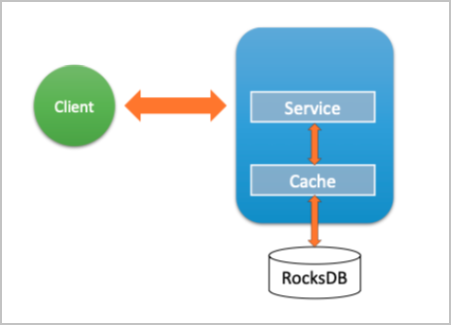
Configure RocksDB
- Go to the SmartData service.
- Log on to the EMR console.
- In the top navigation bar, select a region and a resource group as needed.
- Click the Clusters tab.
- On the Clusters page, find your cluster and click Details in the Actions column.
- In the navigation pane on the left, choose .
- Log on to the EMR console.
- Go to the bigboot service configuration page.
- Click the Configure tab.
- Click bigboot .
- Set the namespace.backend.type parameter to rocksdb.
- Save the configuration.
- In the upper-right corner, click Save.
- In the Confirm dialog box, provide a reason and enable Auto-update Configuration.
- Click OK.
- In the upper-right corner, select .