E-MapReduce (EMR) 3.27.0 and later allows you to use Raft-RocksDB-Tablestore as the storage backend for the JindoFS Namespace Service. Three master nodes form a Raft instance, and each peer node stores metadata in a local RocksDB.
Prerequisites
-
Create a Tablestore instance. A high-performance instance is recommended. For more information, see Activate Tablestore and create an instance.
NoteYou must enable the transaction feature.
-
Create an E-MapReduce cluster with three master nodes. For more information, see Create a cluster. When you create the cluster, enable High Availability and select 3 Master for the Deployment Mode.
Background information
RocksDB uses the Raft protocol to replicate data across three master nodes. You can bind a cluster to a Tablestore instance as an additional storage backend, and local metadata is asynchronously synchronized to that instance.
The following figure shows the high-availability architecture of the Namespace Service with Raft, RocksDB, and Tablestore.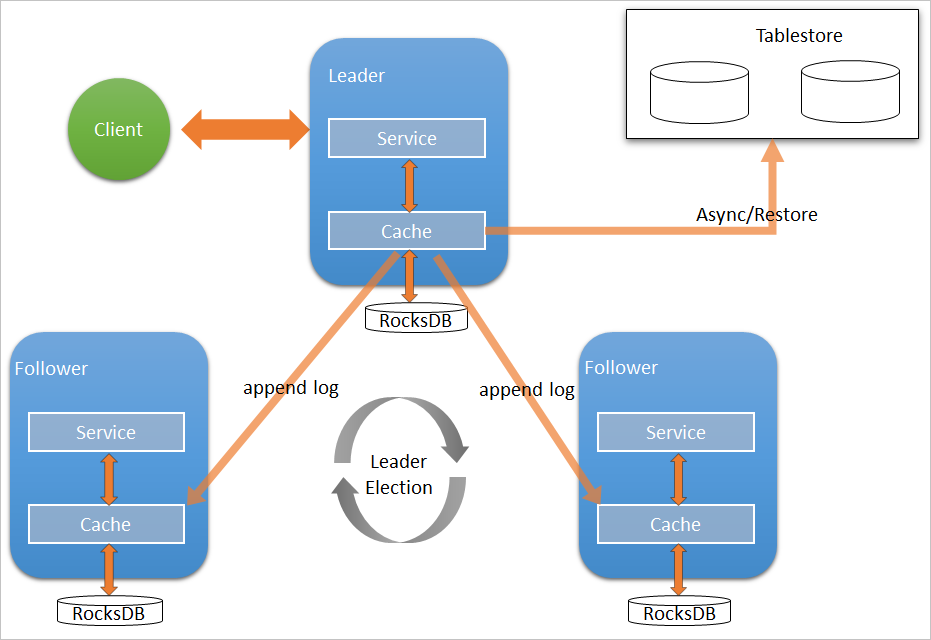
Configure the local Raft backend
-
After you create the EMR cluster, stop all SmartData services.
-
Log on to the Alibaba Cloud EMR console.
-
In the top navigation bar, select a region and resource group as required.
-
Click the Clusters tab.
-
On the Clusters page, find the target cluster and click Details in the Actions column.
-
In the navigation pane on the left, choose .
-
In the upper-right corner, choose .
-
-
Add namespaces as required.
Go to the namespace tab of the SmartData service.
-
In the navigation pane on the left, choose .
-
Click the Configure tab.
In the Service Configuration section, click the namespace tab.
-
On the namespace tab of the SmartData service, set the following parameters.
Parameter
Description
Example value
namespace.backend.type
The storage backend type for the namespace. Valid values:
rocksdbotsraft
Default value:
rocksdb.raftnamespace.backend.raft.initial-conf
The addresses of the three master nodes where the Raft instance is deployed. This is a fixed value.
emr-header-1:8103:0,emr-header-2:8103:0,emr-header-3:8103:0jfs.namespace.server.rpc-address
The addresses of the three master nodes that clients use to access the Raft instance. This is a fixed value.
emr-header-1:8101,emr-header-2:8101,emr-header-3:8101Optional: Configure a remote Tablestore for asynchronous storage.
On the namespace tab of the SmartData service, set the following parameters.
Parameter
Description
Example value
namespace.ots.instance
The name of the Tablestore instance.
emr-jfsnamespace.ots.accessKey
The AccessKey ID of the Tablestore instance.
Your AccessKey ID
namespace.ots.accessSecret
The AccessKey secret of the Tablestore instance.
Your AccessKey secret
namespace.ots.endpoint
The endpoint of the Tablestore instance. For an EMR cluster, we recommend using a VPC endpoint.
http://emr-jfs.cn-hangzhou.vpc.tablestore.aliyuncs.comnamespace.backend.raft.async.ots.enabled
Specifies whether to enable asynchronous uploads to Tablestore. Valid values:
truefalse
If you set this parameter to
true, you must enable this feature before the SmartData service is initialized.NoteYou cannot enable this feature after the SmartData service has been initialized. This is because data in Tablestore would be inconsistent with the local RocksDB data.
true-
Save the configuration.
-
In the upper-right corner, click Save.
-
In the Confirm dialog box, enter a reason for the change and turn on Auto-update Configuration.
-
Click OK.
-
-
In the upper-right corner, choose .
Restore metadata from Tablestore
If you enabled remote asynchronous storage with Tablestore on the original cluster, the Tablestore instance contains a complete copy of JindoFS metadata. After you stop or release the original cluster, you can restore the metadata to a new cluster to resume file access.
-
Optional: Perform preparatory work.
-
Optional: Collect metadata statistics (file and folder counts) from the original cluster.
[hadoop@emr-header-1 ~]$ hadoop fs -count jfs://test/ 1596 1482809 25 jfs://test/ (Number of folders) (Number of files) -
Stop all jobs on the original cluster and wait for 30 to 120 seconds for the metadata to fully synchronize to Tablestore. Run the following command to check the status. If the LEADER node shows
_synced=1, the data in Tablestore is fully synchronized.jindo jfs -metaStatus -detailThe following is a sample output.
state: LEADERindicates that the current Raft node is a leader. The log index has been updated to 624625, and all replicas are synchronized.[RaftPeerImpl] peer_id: xxx state: LEADER readonly: 0 term: 2 conf_index: 1 peers: xxx changing_conf: NO stage: STAGE_NONE election_timer: timeout(5000ms) STOPPED vote_timer: timeout(5000ms) STOPPED stepdown_timer: timeout(5000ms) SCHEDULING(in 2335ms) snapshot_timer: timeout(3600000ms) SCHEDULING(in 150305ms) storage: [1, 624625] disk_index: 624625 known_applied_index: 624625 last_log_id: (index=624625,term=2) first_index_pinned: 624625 state_machine: Idle last_committed_index: 624625 last_snapshot_index: 0 last_snapshot_term: 0 snapshot_status: IDLE replicator_25769803789@xxx next_index=624626 flying_append_entries_size=0 idle hc=2301 ac=624261 ic=0 replicator_32985348833259@xxx next_index=624626 flying_append_entries_size=0 idle hc=2301 ac=623564 ic=0 OtsUploader: _lastStopIndex=624624, _synced=1 -
Stop or release the original cluster to ensure that no other clusters are accessing the Tablestore instance.
-
Create a new cluster.
Create a new EMR cluster in the same region as the Tablestore instance, and then stop all SmartData services. For more information, see Configure the local Raft backend.
Configure the new cluster for recovery.
On the namespace tab of the SmartData service, set the following parameters.
Parameter
Description
Example value
namespace.backend.raft.async.ots.enabled
Specifies whether to enable asynchronous uploads to Tablestore. Valid values:
truefalse
falsenamespace.backend.raft.recovery.mode
Specifies whether to enable metadata recovery from Tablestore. Valid values:
truefalse
true-
Save the configuration.
-
In the upper-right corner, click Save.
-
In the Confirm dialog box, enter a reason for the change and turn on Auto-update Configuration.
-
Click OK.
-
-
In the upper-right corner, choose .
-
After the SmartData service on the new cluster starts, metadata is automatically restored from Tablestore to the local Raft-RocksDB. You can run the following command to monitor the recovery progress.
jindo jfs -metaStatus -detailAfter you run the command, confirm that the
statein the output is LEADER and thestatein the[Recovery From OTS Status]section is FINISH. This indicates that recovery is complete. The following is a sample output:[RaftPeerImpl] peer_id: xxx:8103:0 state: LEADER readonly: 0 term: 2 conf_index: 1 peers: xxx changing_conf: NO stage: STAGE_NONE election_timer: timeout(5000ms) STOPPED vote_timer: timeout(5000ms) STOPPED stepdown_timer: timeout(5000ms) SCHEDULING(in 3382ms) snapshot_timer: timeout(600000ms) SCHEDULING(in 474855ms) storage: [1, 153] disk_index: 153 known_applied_index: 153 last_log_id: (index=153,term=2) first_index_pinned: 1 state_machine: Idle last_committed_index: 153 last_snapshot_index: 1 last_snapshot_term: 2 snapshot_status: IDLE replicator_1116691496965@xxx: next_index=154 flying_append_entries_size=0 idle hc=262 ac=154 ic=0 replicator_3311419785217@xxx: next_index=154 flying_append_entries_size=0 idle hc=262 ac=154 ic=0 [Recovery From OTS Status] state: FINISH [Recovery From OTS Status] state: FINISH total rows: 1484409 table `jfs_block_test` 2 rows. table `jfs_namespace_cache_ns` 1 rows. table `jfs_namespace_test` 1484406 rows. -
Optional: Verify that the number of files on the new cluster is consistent with that on the original cluster.
The cluster is now in read-only recovery mode.
# Compare the file count to verify that it is consistent with that of the original cluster.
[hadoop@emr-header-1 ~]$ hadoop fs -count jfs://test/
        1596      1482809                 25 jfs://test/
# Files can be read normally by using the cat or get command.
[hadoop@emr-header-1 ~]$ hadoop fs -cat jfs://test/testfile
this is a test file
# View the directory contents.
[hadoop@emr-header-1 ~]$ hadoop fs -ls jfs://test/
Found 3 items
drwxrwxr-x   - root   root            0 2020-03-25 14:54 jfs://test/emr-header-1.cluster-50087
-rw-r-----   1 hadoop hadoop          5 2020-03-25 14:50 jfs://test/haha-12096RANDOM.txt
-rw-r-----   1 hadoop hadoop         20 2020-03-25 15:07 jfs://test/testfile
# Files cannot be modified because the cluster is in read-only mode.
[hadoop@emr-header-1 ~]$ hadoop fs -rm jfs://test/testfile
java.io.IOException: ErrorCode : 25021 , ErrorMsg: Namespace is under recovery mode, and is read-only.
Modify the configuration to exit recovery mode and enable asynchronous uploads to Tablestore.
On the namespace tab of the SmartData service, set the following parameters.
Parameter
Description
Example value
namespace.backend.raft.async.ots.enabled
Specifies whether to enable asynchronous uploads to Tablestore. Valid values:
truefalse
truenamespace.backend.raft.recovery.mode
Specifies whether to enable metadata recovery from Tablestore. Valid values:
truefalse
false-
Restart the cluster.
-
Click the Clusters tab.
-
On the Clusters page, find the target cluster and choose in the Actions column.
-