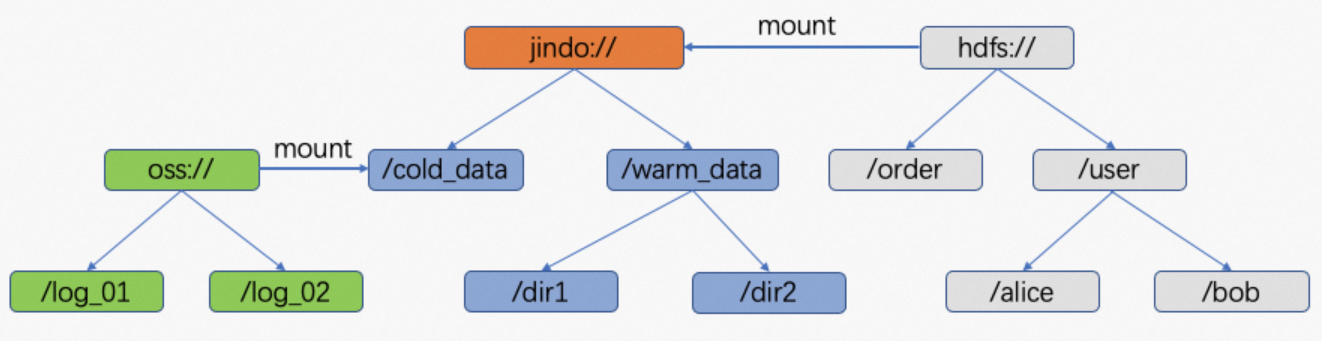
JindoFSx lets you unify multiple independent storage systems — Object Storage Service (OSS), OSS-HDFS, Apache Hadoop Distributed File System (HDFS), and File Storage NAS — under a single jindo:// namespace. Applications connect to JindoFSx once and access all storage systems through that unified path, without knowing the underlying storage locations.
Prerequisites
Before you begin, make sure that you have:
-
An E-MapReduce (EMR) cluster running EMR V3.42.0 or a later minor version, or EMR V5.6.0 or a later minor version (see Create a cluster)
-
Completed the transparent caching setup for your data source:
-
For OSS or OSS-HDFS: Accelerate access to OSS or OSS-HDFS by using the transparent caching feature of JindoFSx
-
For Apache HDFS: Accelerate access to Apache HDFS by using the transparent caching feature of JindoFSx
-
For File Storage NAS: the NAS share must be mounted at the same local path on every node where the JindoFSx namespace and storage services run
-
The examples in this topic use EMR V3.42.0.
How it works
The jindo admin -mount command maps a virtual path in the jindo:// namespace to a real path in an underlying storage system:
jindo admin -mount <path> <realpath>After mounting, any access to jindo://master-1-1:8101/<path> is transparently forwarded to the corresponding underlying path. The following table shows the mappings created in this topic:
| jindo:// path | Underlying path |
|---|---|
jindo://master-1-1:8101/jindooss |
oss://<yourBucketName>/<dir> |
jindo://master-1-1:8101/hdfs |
hdfs://<ip>:<port>/dir |
jindo://master-1-1:8101/nas |
/mnt/nas (local mount point on each node) |
Mount a data source
Mount OSS or OSS-HDFS
Run the following command to mount an OSS or OSS-HDFS path:
jindo admin -mount /jindooss oss://<yourBucketName>/<dir>Verify the mount by listing the unified path:
hdfs dfs -ls jindo://master-1-1:8101/jindoossThis is equivalent to listing oss://<yourBucketName>/<dir>.
Mount Apache HDFS
Run the following command to mount an HDFS path:
jindo admin -mount /hdfs hdfs://<ip>:<port>/dirVerify the mount:
hdfs dfs -ls jindo://master-1-1:8101/hdfsThis is equivalent to listing hdfs://<ip>:<port>/dir.
Mount File Storage NAS
File Storage NAS is mounted using the local:// scheme, which tells JindoFSx to read from the local filesystem path on each node.
The NAS share must be mounted at the same local path (/mnt/nas in this example) on every node where JindoFSx runs. If the paths differ across nodes, access through the unified namespace will be inconsistent.
Run the following command, where /mnt/nas is the NAS mount point on the physical machine:
jindo admin -mount /nas local:///mnt/nasVerify the mount:
hdfs dfs -ls jindo://master-1-1:8101/nasThis is equivalent to listing files in the /mnt/nas directory.